
AI Integration with Zapier and n8n: Guide
AI integration with workflow tools like Zapier and n8n is transforming how businesses handle repetitive tasks. Here's what you need to know:
- Zapier: A user-friendly, no-code tool ideal for quick AI integrations like email categorization, sentiment analysis, and data extraction. It's cloud-based with over 7,000 app integrations and built-in AI tools like GPT-4o mini. Pricing starts at $19.99/month for 750 tasks.
- n8n: A developer-focused, open-source platform for advanced AI workflows. It supports self-hosting, custom coding, and complex tasks like multi-agent orchestration and retrieval-augmented generation (RAG). Pricing is execution-based, starting at ~$20/month for 2,500 executions.
Key Benefits:
- Automate tasks like customer support, lead management, and content creation.
- Save time and reduce manual effort with AI-driven workflows.
- Choose between simplicity (Zapier) or flexibility (n8n) based on your needs.
Quick Comparison:
| Feature | Zapier | n8n |
|---|---|---|
| Ease of Use | No-code, drag-and-drop | Low-code, developer-friendly |
| Hosting | Cloud-only | Self-hosting or cloud |
| AI Features | Basic AI actions | Advanced workflows, memory, RAG |
| Pricing | Task-based ($19.99/month for 750) | Execution-based (~$20/month for 2,500) |
For simple setups, Zapier is great. For more control and privacy, n8n is the better choice.
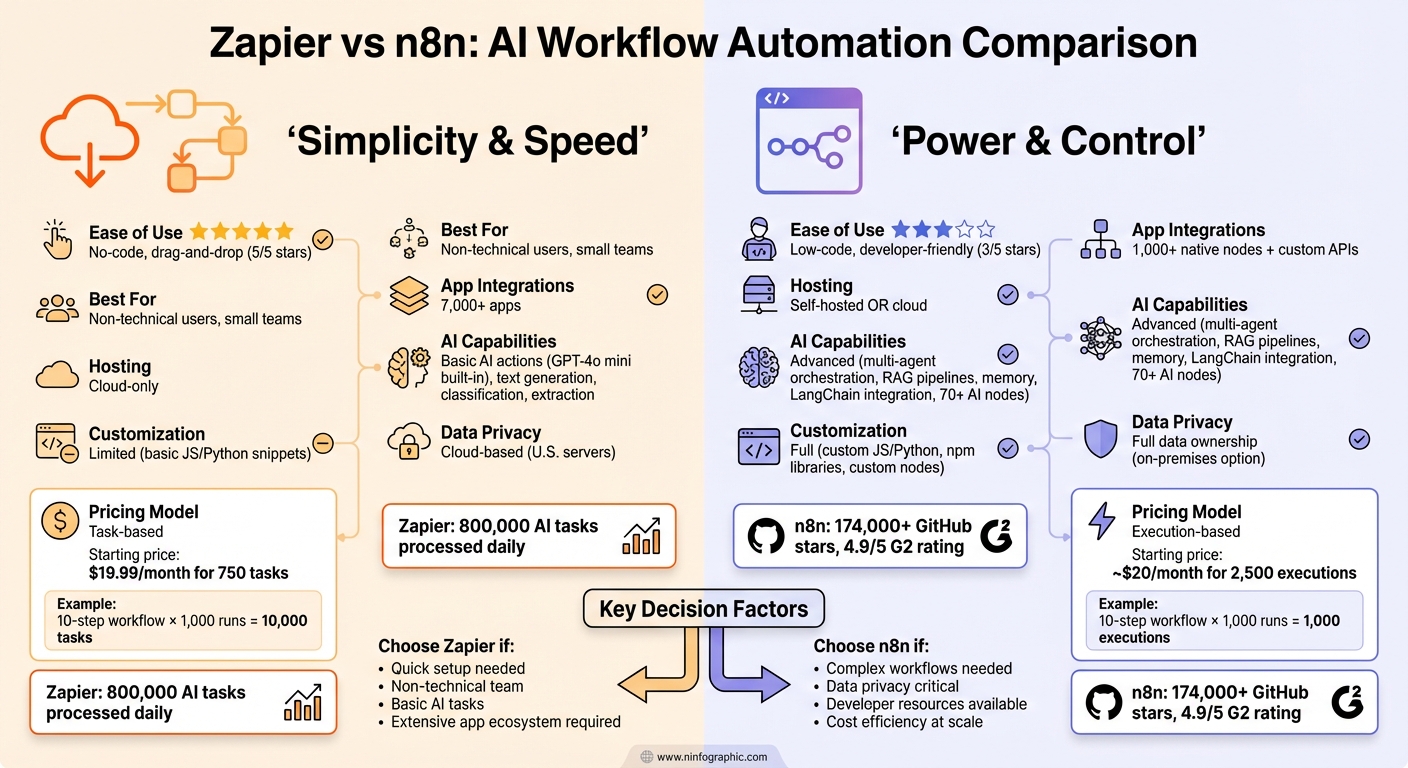
Zapier vs n8n: AI Workflow Automation Platform Comparison
n8n vs Zapier | We Compared Everything
sbb-itb-903b5f2
Getting Started with Zapier for AI Integration
Zapier makes it easy for anyone, regardless of technical expertise, to integrate AI into their workflows. With its built-in AI tool, AI by Zapier, you don’t need separate AI accounts or API keys. The platform includes GPT-4o mini directly, so you can start building AI-powered workflows right away, skipping the hassle of complex setups or external subscriptions.
Here’s how it works: Start by picking a trigger, like a new email in Gmail or a form submission in Typeform. Then, add an AI action by selecting "AI by Zapier" from the list of available actions. From there, you can build a custom prompt, use a pre-made template, or load a saved one.
"AI by Zapier is a built-in tool that lets you add powerful AI action steps to your Zaps. You don't even need a separate AI account to use it - GPT-4o mini from OpenAI is included right in the tool."
- Steph Spector, Editor, Zapier
The Prompt Builder includes a strength indicator to show how well your instructions are written. If needed, the "Improve prompt" button can refine your text automatically. Before activating your workflow, use the "Generate preview" feature to see what the AI will produce. This ensures the output meets your expectations.
You can also connect data sources like Google Drive, Notion, or Confluence to provide the AI with additional context. This lets the tool generate responses based on your organization’s specific data. Once you’ve got the basics down, you can move on to configuring and testing your workflows step by step.
Setting Up AI Workflows in Zapier
Creating your first AI workflow is quick and straightforward. Start by making a new Zap and selecting your trigger app. For example, if you’re processing customer feedback, you might choose "New Row in Google Sheets" as the trigger. After setting the trigger, add an action step and search for "AI by Zapier." For beginners, pre-made templates are great for tasks like data extraction, summarization, or classification.
On the configuration screen, choose your AI model. The default is GPT-4o mini, but you can also select options like OpenAI, Anthropic, Google, or Azure OpenAI. Next, define the output fields you need - for instance, "sentiment", "main_issue", or "suggested_action" if you’re analyzing customer feedback.
Write your instructions in plain language. Instead of technical jargon, you might say: "Analyze this customer feedback and determine whether the sentiment is positive, negative, or neutral. Identify the main issue mentioned and suggest an appropriate follow-up action." Use the "Generate preview" feature to test the output with your trigger data. Once satisfied, map the AI’s output to the next action, like sending alerts to Slack, creating tasks in Asana, or updating a CRM record. Once activated, your workflow will automatically process new feedback as it comes in.
For example, SisterLove, a nonprofit, used this setup to automate content creation. By converting internal notes into AI-generated blog posts and social media updates, the team saved over 190 hours in just nine months.
With your workflow in place, you can explore various applications to see how AI can transform your processes.
Common AI Use Cases in Zapier
Zapier users often rely on AI for tasks like analyzing, classifying, extracting, generating, and summarizing data. These applications highlight how automation can simplify workflows and improve efficiency.
- Extraction: Extract structured data from unstructured sources. For example, accounting teams can pull vendor names, dates, and amounts from emailed receipts, cutting down on manual entry and reducing errors.
- Classification: Categorize information for better organization. Customer support teams can analyze incoming emails and label them as sales inquiries, support requests, or billing questions.
- Generation: Create new content based on existing data. Sales teams can draft personalized email responses using CRM information, while marketing teams can generate social media posts or product descriptions. For instance, Popl implemented a system that categorizes inbound emails and creates follow-up tasks, streamlining their lead management process.
- Summarization: Turn lengthy content into concise insights. Product teams can summarize customer reviews to identify key themes, or transform meeting transcripts into actionable summaries.
- Analysis: Detect patterns and sentiment in text data. For example, ActiveCampaign used AI workflows to analyze user behavior, triggering personalized onboarding sequences that boosted webinar attendance by 440% and reduced 90-day churn by 15%.
Zapier’s pricing structure makes these tools accessible to businesses of all sizes. The free plan includes 100 tasks per month, perfect for testing workflows. Paid plans start at $19.99 per month (750 tasks), with options like the Professional plan at $49 per month (2,000 tasks) and the Team plan at $299 per month (up to 50,000 tasks). Since AI by Zapier includes GPT-4o mini at no additional cost, you only pay for the tasks you use.
For teams looking for even more customization and control, platforms like n8n offer advanced features that go beyond Zapier’s no-code approach.
Using n8n for Advanced AI Workflows
While Zapier is known for its simplicity, n8n stands out for its flexibility and control, making it a favorite among technical teams. Built on LangChain, n8n uses a modular node system where a root node connects to various sub-nodes. This setup allows for precise construction of complex AI workflows and agents. With over 174,000 GitHub stars and a 4.9/5 rating on G2, n8n has cemented itself as one of the most popular workflow automation tools available.
One key feature that sets n8n apart is its fair-code licensing, which supports self-hosting. This is especially critical for organizations managing sensitive data that must remain within their infrastructure. By leveraging n8n’s custom API integrations and stateful memory capabilities, companies have achieved impressive results. For example, Delivery Hero saved 200 hours per month on a single ITOps workflow, while StepStone reduced two weeks of work to just two hours - an incredible boost in efficiency.
"We have seen drastic efficiency improvements since we started using n8n for user management. It's powerful yet simple to use."
- Dennis Zahrt, Director of Global IT Service Delivery, Delivery Hero
With over 400 integrations and 1,700+ templates, n8n offers a strong starting point for building workflows. Unlike simpler automation tools, n8n’s AI capabilities go beyond basic tasks, enabling goal-oriented processes, decision-making, and multi-step workflows that interact with APIs and external systems. This makes it ideal for advanced applications like multi-agent orchestration, retrieval-augmented generation (RAG) pipelines, and AI models capable of retaining context over extended interactions.
Configuring AI Models in n8n
At the core of n8n's AI capabilities is the AI Agent node, which does more than just generate text. It can use tools, make decisions, and complete complex, multi-step tasks. To set up your AI model, you’ll connect sub-nodes tailored to your chosen platform - whether it’s OpenAI, Google Gemini, DeepSeek, or Groq. API credentials for these models can be securely stored using n8n’s built-in credential manager, eliminating the need to hardcode sensitive information.
For organizations using private or self-hosted models, n8n provides additional flexibility. You can either create a custom node or use the HTTP Request node to integrate REST APIs that work with n8n’s JSON-based input and output structure. This is especially useful for proprietary models or environments requiring strict data isolation.
To enable stateful interactions, attach a Memory sub-node, such as "Simple Memory" or "Conversation Memory." This ensures the AI retains context across interactions, avoiding the limitation of starting each conversation from scratch.
The real magic lies in tool orchestration. By linking Tool nodes to your AI Agent, you empower it to take actions beyond text generation. For example, the "Call n8n Workflow Tool" allows the AI agent to trigger entire workflows, effectively granting it access to APIs, databases, and other resources.
n8n also supports advanced data retrieval through RAG pipelines. Using Vector Database nodes like Pinecone or Qdrant, combined with Embeddings and Retriever sub-nodes, you can provide your AI with proprietary context from your organization’s knowledge base. To ensure outputs are machine-readable, Output Parser nodes like the Structured Output Parser or Auto-fixing Output Parser can format responses into clean JSON.
For those just getting started, n8n offers templates like "AI Agent Chat" and the "Self-hosted AI Starter Kit." These templates demonstrate how to connect Chat Triggers, Agent nodes, Models, and Memory nodes, giving you a functional base to build upon. You can even define your AI agent’s personality and constraints using the "System message" option in the AI Agent node. For sensitive tasks, consider implementing a human-in-the-loop system, where the AI pauses and requests human input when it’s unsure how to proceed.
Once your AI Agent is set up and memory is enabled, you can dive into more advanced orchestration features.
Advanced Features in n8n for AI Workflows
After configuring your AI models, you can take advantage of n8n’s advanced features to optimize workflows. Its LangChain integration offers modular AI orchestration patterns while maintaining a low-code interface, making it accessible even for those without deep machine learning expertise.
One standout capability is multi-agent orchestration. Using the Call n8n Workflow Tool, you can coordinate specialized agents for different tasks - such as data extraction, analysis, and report generation - under the management of a master agent. This setup mirrors how microservices operate in software development, but it’s applied to AI workflows.
The Chat Trigger node provides a built-in interface for testing AI workflows directly within n8n. You can also use the @n8n/chat npm package to embed this functionality into external websites, creating a chatbot widget without the need for additional frontend development.
For debugging and fine-tuning, the Logs tab in the AI Agent node lets you review inputs, outputs, and decision-making steps during testing. This transparency is invaluable for identifying and fixing issues, such as unexpected responses or incorrect tool usage.
n8n also supports custom code through JavaScript or Python nodes. This allows you to extend AI capabilities with specialized libraries and logic, ensuring you’re not limited by predefined functions. If a specific use case requires custom processing, you can implement it directly within your workflow.
With its self-hosting options, custom code support, and advanced AI features, n8n is an excellent choice for organizations with strict data privacy requirements or those developing proprietary AI systems. Unlike cloud-only platforms, n8n gives you full control over your data and how your AI models interact with it.
Zapier vs. n8n: Key Differences for AI Integration
Both Zapier and n8n are workflow automation tools, but they take very different approaches to AI integration. Zapier leans heavily on simplicity, offering over 7,000 pre-built app connections and a "plug-and-play" setup that allows even non-technical users to get started in minutes. On the other hand, n8n prioritizes developer flexibility, providing around 1,000 native nodes and the ability to connect to any API using HTTP nodes or custom code.
When it comes to AI capabilities, the technical distinctions are clear. Zapier processes about 800,000 AI tasks daily through its "AI Actions" and Model Context Protocol (MCP), enabling AI agents to trigger workflows across its ecosystem. In comparison, n8n integrates deeply with LangChain, offering nearly 70 dedicated nodes to support advanced features like vector databases (e.g., Pinecone, Qdrant) for Retrieval-Augmented Generation (RAG) pipelines. Another key difference lies in infrastructure: Zapier operates exclusively in the cloud with data processed on U.S.-based servers, while n8n allows for local hosting via Ollama, a critical feature for organizations with strict data privacy requirements.
Pricing Models: Task-Based vs. Execution-Based
Zapier and n8n also differ significantly in how they charge for usage. Zapier employs a task-based billing system, where each step in a workflow counts as a task. For example, a 10-step workflow running 1,000 times a month would consume 10,000 tasks. In contrast, n8n uses an execution-based model, where an entire workflow - regardless of its complexity - counts as a single execution.
This pricing difference can lead to substantial cost implications. As LogicWorkflow put it:
"Zapier's pricing model is designed to increase costs with more automation. The more you automate, the more you pay." – LogicWorkflow
Real-World Examples
These distinctions play out in real-world applications. In 2025, fintech consultancy Kunai used a self-hosted n8n instance to rebuild a recruiting workflow in just two days, saving over 300 hours of engineering time. Similarly, Delivery Hero reported saving 200 hours per month on a single ITOps workflow thanks to n8n's robust orchestration capabilities.
Comparison Table: Zapier vs. n8n
| Feature | Zapier | n8n |
|---|---|---|
| Ease of Use | High (no-code, drag-and-drop) | Moderate (low-code, developer-focused) |
| LLM Integration | OpenAI, Anthropic, Claude | OpenAI, Anthropic, LangChain, Ollama (local hosting) |
| Customization | Limited (basic JS/Python snippets) | Full (custom JS/Python, custom nodes, npm libraries) |
| Data Privacy | Cloud-only (U.S.-based servers) | Self-hosted or cloud (full data ownership) |
| AI Complexity | Prompt-in/prompt-out | Multi-agent orchestration, RAG pipelines, memory functionality |
| Workflow Logic | Linear, basic branching | Complex branching, loops, sub-workflows |
| Pricing | Task-based (~$20/month for 750 tasks) | Execution-based (~$20/month for 2,500 executions) |
| Code Support | Limited by execution time | Full support with external libraries |
Which Platform Should You Choose?
The choice between Zapier and n8n depends on your specific needs. Zapier is ideal for non-technical users or small teams looking to quickly integrate basic AI features - like text summarization or classification - into existing SaaS tools without worrying about infrastructure. Its ease of use and extensive app ecosystem make it a go-to for straightforward automation.
n8n, however, is better suited for developers or technical teams. If you're building complex AI workflows, need RAG pipelines, or require strict data control through self-hosting, n8n is the clear choice. It's particularly valuable in regulated industries like healthcare and finance, where sensitive data must stay behind a firewall. Additionally, for organizations handling large volumes of AI tasks, n8n's execution-based pricing can help avoid the escalating costs often associated with Zapier's task-based model.
As Techpoint aptly summarized:
"n8n vs Zapier: power and control vs simplicity and ease of use." – Techpoint
Best Practices for AI-Powered Workflow Automation
When using tools like Zapier and n8n to create AI-driven workflows, following best practices is essential to ensure both efficiency and security. Key areas of focus include safeguarding data privacy, thorough testing, and ongoing monitoring.
Protecting Data Privacy in AI Workflows
Data privacy is non-negotiable, especially in industries like healthcare and finance where regulations such as GDPR, HIPAA, or SOC 2 come into play. Sending sensitive data to cloud-based AI services introduces risks since third-party servers handle this information.
One way to mitigate these risks is through self-hosting. For example, n8n allows workflows to run on-premises or in a private cloud, ensuring sensitive data stays within your control. On the other hand, Zapier operates solely in the cloud, processing data on servers based in the U.S..
To further enhance security, implement strict access controls and maintain detailed audit trails. By logging every AI decision - who triggered it, what data was processed, and the resulting actions - you create accountability and can quickly identify any unauthorized access or issues. Assigning risk levels to workflows (e.g., Level 1 for low risk, Level 4 for high risk) ensures that processes with significant consequences include human oversight before execution.
For organizations prioritizing data sovereignty, consider tools like NanoGPT, which stores data locally on your device. This approach integrates privacy-first AI into workflows without relying on external servers.
Once privacy safeguards are in place, it's critical to test them rigorously to ensure they hold up under real-world conditions.
Testing and Optimizing AI Workflows
After setting up your AI workflows, validation through systematic testing is key. Even the most carefully designed workflows can have blind spots. Start by running them alongside manual processes to uncover edge cases before full deployment.
In scenarios where stakes are high, incorporate human-in-the-loop checkpoints. Direct uncertain outputs to human reviewers to ensure critical decisions are properly vetted. For instance, ActiveCampaign addressed a 25% churn rate in 2025 by implementing an AI-powered workflow that automatically registered new users for webinars and sent personalized follow-ups. Human reviewers handled uncertain cases, ensuring accuracy.
Another vital practice is monitoring for model drift. AI models can lose effectiveness as real-world conditions evolve. Keep an eye on task accuracy, completion rates, and the frequency of manual overrides. Set time limits for execution to avoid runaway processes and escalating costs. Adjust prompts, refine logic, or switch models as needed. For example, Popl, a sales automation company, saved $20,000 annually by replacing an expensive integration with a custom Zapier AI solution. They continuously optimized it by tracking lead categorization accuracy.
"It's not just about doing more. It's about doing it better, faster, and with fewer resources." – Jason Alvarez-Cohen, CEO, Popl
As with earlier steps, setting execution timeouts is crucial. This prevents runaway processes that could lead to inflated costs or operational disruptions.
Conclusion
Using AI models with workflow automation tools like Zapier and n8n is changing how businesses tackle repetitive yet nuanced tasks. These platforms make it possible to automate processes like summarizing documents, sorting unstructured data, and crafting personalized responses - all without needing to expand your team.
Zapier connects you to around 7,000 apps, while n8n offers over 1,000 built-in nodes and custom API support. This means you can create workflows that fit your specific needs.
Real-world examples highlight how these tools can save money and boost efficiency.
If you're just getting started, focus on automating one high-impact task to see a quick return on investment. From there, you can build more complex workflows. To manage costs, use lightweight models like GPT-4o mini for simpler tasks and reserve advanced models for more intricate needs. Zapier is ideal for straightforward, no-code setups, while n8n works better for complex, scalable workflows that might require custom coding or higher data privacy. This approach offers a cost-effective way to scale automation while maintaining control over your data.
For those prioritizing secure, pay-as-you-go AI solutions, NanoGPT provides access to major AI models like ChatGPT, Deepseek, Gemini, Flux Pro, Dall-E, and Stable Diffusion. It keeps your data local, avoiding external servers, with pricing starting at just $0.10 and no hidden fees.
As The AI Bible aptly puts it:
"AI-powered automation is the most powerful productivity lever of 2026".
Whether you're handling customer inquiries, analyzing sales data, or creating content, these platforms help you achieve faster and more efficient results.
FAQs
Do I need API keys to use AI in Zapier?
To use AI models with Zapier, you’ll need to generate your own API key. Simply create the key through your account and connect it to Zapier for smooth integration. This process works for models such as OpenAI and Anthropic.
When should I choose n8n instead of Zapier?
n8n is a solid choice if you’re looking for more flexibility, control, and scalability in your automation platform. Being open-source, it allows for self-hosting, offers advanced error handling, supports custom coding, and provides unlimited executions - making it perfect for handling complex workflows or managing high-volume tasks. Plus, if you need to process over 10,000 tasks a month, n8n can save you money by sidestepping Zapier’s task-based pricing model. That said, if you’re after simple, no-code automation, Zapier is still a great option.
How do I keep sensitive data private in AI workflows?
To keep sensitive data safe in AI workflows, it's important to use security features and stick to best practices. For instance, n8n includes tools like encrypted credentials, secure OAuth connections, and user access controls to enhance security. If you opt for a self-hosted setup, you maintain full control over your data. On the other hand, n8n Cloud ensures data processing aligns with GDPR requirements and includes encryption for added protection.
When designing workflows, take extra precautions. Avoid placing sensitive information in logs, use TLS encryption to secure data transmission, and regularly audit configurations to guard against unauthorized access or potential data leaks. These steps help build a secure and reliable system for handling critical information.