
Common Issues with Go SDKs for Text Generation APIs

Go SDKs for text generation APIs simplify tasks like authentication, HTTP requests, and JSON handling. But they come with their own set of challenges. Here's a quick summary of the most common issues and how to address them:
Key Challenges
- Authentication Errors: Misconfigured API keys or environment variables often lead to 401/403 errors.
- Error Handling: Poor retry logic, ignoring context timeouts, and unwrapping errors improperly can cause silent failures or infinite loops.
- Performance Issues: Large, auto-generated SDKs can slow down CI pipelines, testing, and linting.
- Token Limits: Exceeding input/output token caps leads to truncated responses or errors.
- Streaming Problems: Blocking goroutines or mishandling stream closures can cause resource leaks.
- Dependency Bloat: Monolithic SDKs with thousands of types hurt performance and maintainability.
Solutions
- Validate API keys early and use environment variables securely.
- Use exponential backoff for retryable errors (e.g., 429/5xx) and fail fast on client-side errors (e.g., 400/422).
- Set timeouts with
context.WithTimeoutto avoid hanging requests. - Pre-calculate token usage before making API calls to prevent truncation.
- Implement proper goroutine management and buffered channels for streaming.
- Encapsulate SDK calls in smaller interfaces and avoid bloated imports.
By addressing these issues, you can minimize bottlenecks, improve reliability, and streamline your Go-based text generation workflows.
Authentication and Environment Setup Problems
Common Authentication Issues
Authentication errors in Go SDKs for text generation APIs often stem from invalid or missing API keys. These errors typically show up as HTTP 401 Unauthorized or 403 Forbidden responses with messages like "Invalid API key" or "authentication failed". Mistakes such as copying the wrong key, mismanaging keys, or using project-specific keys (e.g., those starting with sk-proj-) with incorrect scoping are common culprits.
Another frequent issue arises from mixing test and production credentials. Using sandbox keys with production endpoints, for instance, results in perplexing 403 errors. Additionally, missing environment variables like OPENAI_API_KEY or GOOGLE_API_KEY can lead to empty strings being passed to client initializers. In some cases, this oversight may even cause runtime panics if the missing values aren't properly validated. These challenges are often reflected in the SDK's error reporting mechanisms, as outlined below.
How Go SDKs Report Authentication Errors
Go SDKs handle authentication failures by providing detailed, typed error values that include HTTP status codes, error codes, and descriptive messages. For example, OpenAI's Go SDK might return an error message like "Invalid Authentication" with a 401 status code, while AWS SDKs use specific error types such as awserr.InvalidClientTokenId. Similarly, Google Gemini SDKs may terminate requests with context timeouts if authentication fails early in the process.
To safeguard sensitive data, the AWS SDK for Go redacts sensitive API parameters in error messages, replacing them with placeholders like "sensitive" to reduce the risk of accidental exposure. However, developers sometimes misinterpret these error types, mistakenly attributing the issues to SDK bugs rather than configuration problems. Recognizing these error patterns can lead to more effective troubleshooting and configuration adjustments.
Tips for Reliable Configuration
To avoid authentication problems, start by validating environment variables during application initialization. For instance:
if key := os.Getenv("OPENAI_API_KEY"); key == "" {
    return errors.New("missing OPENAI_API_KEY")
}
Centralizing client construction within a configuration package ensures consistent use of credentials and base URLs across your application. Tools like spf13/viper or caarlos0/env can simplify this process by parsing structured configurations from environment variables, YAML files, or command-line arguments. For credential management, consider using context.Context to pass values securely. Here's an example:
ctx := context.WithValue(context.Background(), openai.AccessTokenKey, key)This approach not only supports credential management but also propagates timeouts, reducing the likelihood of hangs during authentication failures.
For a streamlined setup, NanoGPT offers a unified, pay-as-you-go API key that works across multiple models, including ChatGPT, DeepSeek, Gemini, DALL·E, and Stable Diffusion. This simplifies configuration while maintaining local data privacy. As a best practice, always keep secrets out of source control. Use environment variables or secret managers in production, and avoid logging sensitive API keys.
A Beautiful Way To Deal With ERRORS in Golang HTTP Handlers
Error Handling, Timeouts, and Retries
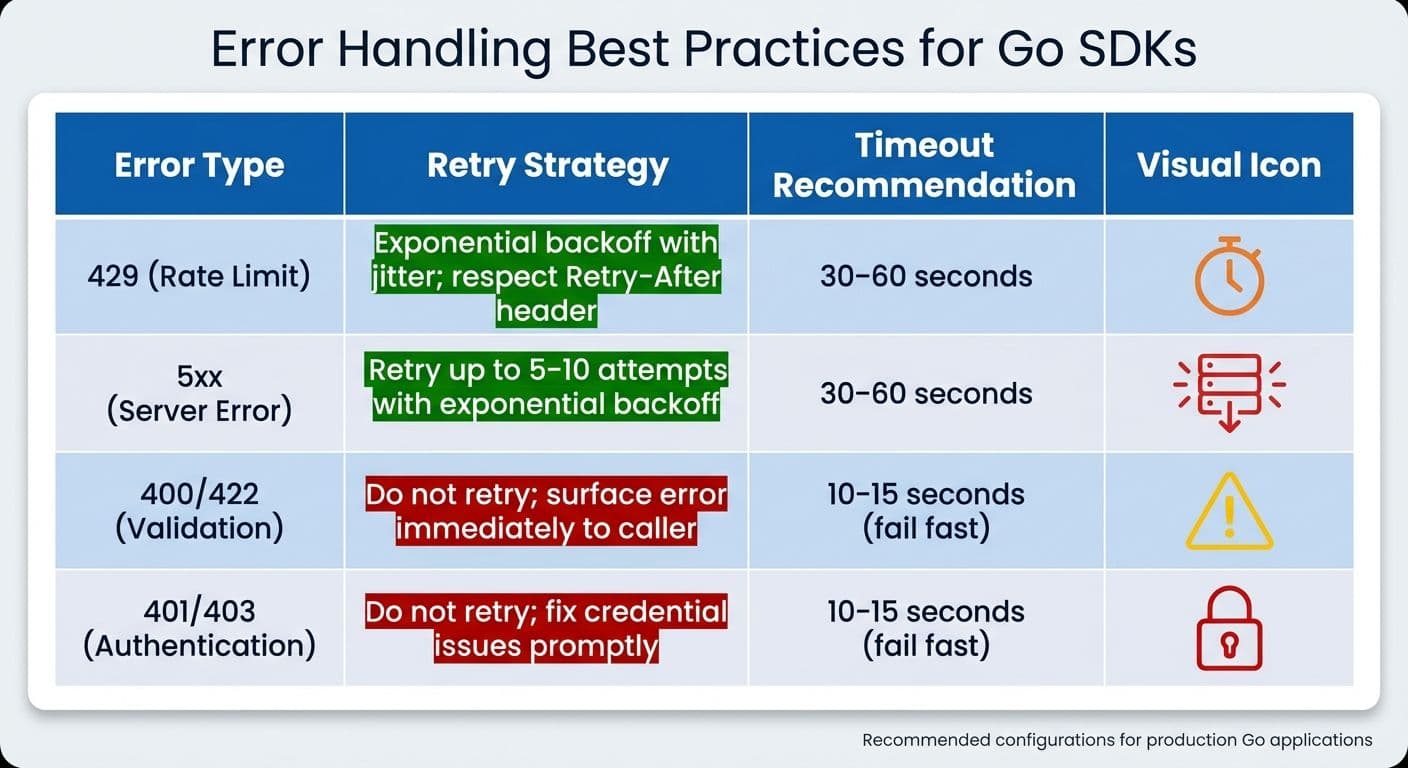
Go SDK Error Types: Retry Strategies and Timeout Recommendations
Common API Errors
Text generation APIs can be tricky to work with if errors aren't addressed properly. One of the most frequent issues is rate limiting errors (HTTP 429). These can disrupt high-volume pipelines, causing delays or even halting operations. Then there are server errors (HTTP 500 or 503), which often occur during peak loads or due to infrastructure hiccups, leading to incomplete responses. Validation errors (like HTTP 400 or 422) are another common challenge, where malformed prompts are rejected outright. This wastes valuable compute resources and demands immediate correction.
A particularly frustrating issue is when token limits are exceeded. If your prompt or response goes beyond the model's maximum token count, the API might cut off the response mid-generation. This forces developers to either split requests or reduce context size. Each of these errors calls for a different approach - retrying a rate limit error makes sense, but retrying a validation error is usually pointless and inefficient. Understanding these patterns is key to avoiding common pitfalls, especially in Go.
Go-Specific Error Handling Mistakes
Go developers face their own unique challenges when handling API errors. One frequent mistake is misusing context management. For example, relying on context.Background() instead of a timeout context can leave API calls hanging indefinitely during network issues, potentially causing goroutine leaks and stalling execution. A better practice is to use a timeout context, such as context.WithTimeout(parent, 30*time.Second), to enforce deadlines and cleanly cancel streaming responses.
Another common misstep is implementing overly simple retry logic. Using fixed delays - like retrying every second for five attempts - without adding jitter can cause retries to synchronize across multiple instances, worsening rate-limiting issues. Additionally, retrying non-idempotent errors, such as validation failures, can lead to infinite loops. Failing to unwrap errors with functions like errors.Is() or errors.As() can also hide critical details, such as HTTP status codes, making debugging harder. Lastly, neglecting to properly handle errors in goroutines can result in silent failures when managing concurrent text generation tasks.
Best Practices for Error Management
Managing errors effectively in Go SDKs not only makes applications more reliable but also ensures smoother integration with text generation APIs. Start by categorizing errors into transient (retryable) and non-retryable types. For instance:
- Treat rate limit errors (429) and server errors (5xx) as retryable, using exponential backoff strategies.
- Consider client-side errors like 400, 401, 403, 404, and 422 as non-retryable and surface them to the user immediately.
Using a library like github.com/cenkalti/backoff/v4 can simplify implementing exponential backoff. A good configuration might include an initial delay of 100ms, a multiplier of 2.0, and a maximum delay of 30 seconds, with jitter added to avoid synchronized retries.
Timeouts are another critical aspect. For non-streaming calls, set request timeouts between 30 and 60 seconds. Use shorter timeouts for connection setup, such as 5 seconds for dialing and 10 seconds for TLS handshakes via http.Transport. For streaming responses, allow longer read deadlines but ensure proper cancellation when the context ends.
When logging errors, include essential details like status codes, error codes, and retry attempts. Use structured logging to make debugging easier, but redact any sensitive data to protect user privacy.
| Error Type | Retry Strategy | Timeout Recommendation |
|---|---|---|
| 429 (Rate Limit) | Exponential backoff with jitter; respect Retry-After | 30–60 seconds |
| 5xx (Server Error) | Retry up to 5–10 attempts with exponential backoff | 30–60 seconds |
| 400/422 (Validation) | Do not retry; surface the error immediately to the caller | 10–15 seconds (fail fast) |
| 401/403 (Auth) | Do not retry; fix credential issues promptly | 10–15 seconds (fail fast) |
For platforms like NanoGPT, which prioritize local data storage, make sure error logs and traces are either kept on-device or thoroughly scrubbed of sensitive information. Centralizing error management by wrapping SDK clients in a custom package can further streamline retry rules, normalize error types, and integrate metrics for better observability. These practices, combined with earlier optimization strategies, ensure robust error handling for any Go-based text generation application.
Token Limits and Streaming Response Handling
Problems with Token Limits and Truncated Responses
When working with Go SDKs for text generation APIs, managing token limits and streaming responses is a crucial part of ensuring smooth integration. Token limits can create significant hurdles, as most models enforce strict caps on both input and output tokens. For instance, OpenAI's GPT-4o allows up to 128,000 input tokens, but the output is typically capped at 4,096 tokens. Exceeding these limits can result in the API rejecting the request with errors like "max_tokens exceeded" or, worse, silently truncating the response mid-sentence, leaving developers with incomplete results.
A common issue arises from unintentional token consumption. Elements like system messages, chat history, and formatting all count toward the token limit but are often overlooked. For example, you might assume a 3,000-token prompt is within limits, only to find that the API calculates it as 4,500 tokens after adding context, leading to abrupt truncation. This wastes compute resources and forces developers to adjust prompts repeatedly. In Go SDKs, such violations typically manifest as errors like openai.ErrMaxTokensExceeded or HTTP 400 responses with detailed JSON payloads explaining the overage.
Streaming Challenges in Go
While token limits affect the completeness of requests, streaming responses bring their own set of challenges. One frequent issue is blocking the main goroutine during synchronous stream reads. For example, when using code like response, err := client.Stream(ctx, req).Bytes(), the program can hang indefinitely while waiting for chunks to arrive, especially with large responses or network delays. This defeats the purpose of streaming and can stall the entire application.
Another common problem involves improper synchronization when multiple goroutines access shared stream channels. This can lead to race conditions or memory leaks, particularly if developers forget to close io.ReadCloser streams properly. Failing to call defer stream.Close() leaves resources dangling, which can quickly become a problem in long-running services. Additionally, many auto-generated SDKs provide non-idiomatic streaming APIs, making it harder to implement safe goroutine usage without writing custom wrappers.
Strategies for Proper Response Handling
To avoid token limit issues, start with preemptive token counting. Use tools like github.com/openai/gpt-tokenizer for precise calculations or approximate with len(strings.Fields(prompt))/0.75 for quick estimates. Before sending a request, ensure the total token count (prompt plus desired output) stays within the model's cap. For example:
if tokenizer.Count(prompt) + maxOutput > modelLimit {
    truncatePrompt()
}
This approach minimizes the risk of truncation.
For streaming, make proper use of Go's concurrency features. Process responses through buffered channels with dedicated goroutines. For instance:
go func() {
    defer close(ch)
    for {
        chunk, err := stream.Read()
        if err != nil {
            return
        }
        ch <- chunk
    }
}()
Then consume the data with:
for chunk := range ch {
    process(chunk)
}
Wrap streams in bufio.Reader for efficient chunked reading:
r := bufio.NewReader(stream)
for {
    line, err := r.ReadString('\n')
    if err == io.EOF {
        break
    }
}
To prevent indefinite hangs, pair this with context.WithTimeout. If truncation occurs, consider recursive prompts (e.g., "Continue from: [last chunk]") or allocate tokens strategically by reserving 80% for input and 20% for output. These practices help ensure complete and efficient response handling.
sbb-itb-903b5f2
Go SDK Design and Dependency Management
Structural Problems in Go SDKs
When it comes to Go SDKs, issues often extend beyond authentication and error handling, affecting their internal structure in ways that undermine performance and maintainability. A recurring problem in Go SDKs for text generation APIs is the tendency to cram thousands of types into a single package - commonly named something like models or client. This practice forces Go’s tooling to process an enormous amount of code, even if only a small portion is actually needed. It’s a direct contradiction to Go’s philosophy of structuring projects into small, focused packages.
This design choice doesn’t just clutter the codebase - it creates a cascade of inefficiencies. Tests run slower, linting takes longer, and build times increase significantly. The root cause? These SDKs expose hundreds or even thousands of models in one go, making linters and compilers analyze a vast amount of unnecessary code. Auto-generated SDKs often exacerbate the issue by producing unstable interfaces that break during upgrades, making it harder to integrate with existing Go codebases.
Impact on Performance and CI Pipelines
These structural flaws don’t just stay in the code - they ripple through the entire development workflow. Continuous Integration (CI) pipelines slow down considerably, driving up costs and delaying feedback cycles. Build times increase as Go’s tooling struggles with large dependency graphs, and memory usage spikes as the compiler deals with thousands of unused types. In production, oversized binaries can slow down application startup times and reduce scalability - problems that are especially pronounced in memory-constrained environments like serverless functions.
Documentation can also take a hit. The pkg.go.dev site enforces a 10 MB limit on rendered documentation, and bloated SDK packages can easily exceed this cap, making it harder for developers to access clear and concise information. Even Integrated Development Environments (IDEs) can struggle - autocomplete slows down, and indexing becomes sluggish as development tools grapple with overly large package surfaces. Fixing these structural issues isn’t just about cleaner code - it’s about creating a smoother, more efficient development experience.
Better SDK Integration Approaches
One effective way to address these challenges is to encapsulate SDK calls within minimal, well-defined interfaces. For instance, you could define a TextGenerator interface with a simple method like Generate(ctx context.Context, prompt string) (string, error) and implement it using the external SDK. This design allows you to swap providers, update SDK versions, or mock responses for testing without touching the core application logic.
Keep all direct SDK interactions confined to a dedicated adapter package, such as internal/ai/provider, to prevent SDK types from spreading throughout your codebase. When choosing an SDK, prioritize those that break functionality into smaller, domain-specific packages instead of relying on a single, monolithic client. Also, keep an eye on your CI performance after adding new dependencies to catch slowdowns early.
For SDK upgrades, it’s essential to follow a structured process. Use tools like go mod why to understand dependency chains, maintain compatibility matrices, and run CI benchmarks before and after upgrades to measure their impact. Pin specific versions in your go.mod file, and always test upgrades on a staging branch before rolling them out to production. By taking a disciplined approach to dependency management, you can ensure your build pipelines remain efficient and your application stays stable as text generation APIs continue to evolve.
Observability, Testing, and Local Development
Common Observability and Testing Gaps
When developers work with Go SDKs for text generation APIs, they often encounter challenges related to observability. A lack of structured logging and missing metrics - like payload size, model details, and error context - makes debugging difficult. Issues such as quota exhaustion frequently go unnoticed until they escalate into outages.
Testing coverage also suffers. Edge cases, like 429 RESOURCE_EXHAUSTED errors caused by quota limits or 504 DEADLINE_EXCEEDED timeouts, are often ignored during development and only surface in production. To make matters worse, bloated SDK packages can significantly slow down test execution. For example, a Microsoft Graph Go SDK issue revealed that importing a large models package caused go test runtimes to jump from 7 seconds to nearly 9 minutes, while golangci-lint runtime increased from 36 seconds to over 7 minutes in GitHub Actions. These prolonged runtimes discourage developers from writing comprehensive tests, perpetuating poor coverage and making bugs harder to catch. Addressing these gaps requires better logging and metrics strategies, as outlined below.
Improving Observability in Go Applications
One effective way to boost observability is by integrating a custom http.RoundTripper into the SDK's client. This allows developers to log critical details - such as HTTP method, URL, status code, and duration - in structured JSON format using tools like zap or logrus. At the same time, metrics can be recorded using Prometheus or OpenTelemetry. This setup captures every request and response, enabling the tracking of metrics like request duration, status codes, and token counts. Including headers and sanitized body snippets can further assist in diagnosing common issues, such as 429 RESOURCE_EXHAUSTED errors.
For deeper insights, Prometheus or OpenTelemetry can be used to track histograms of API call durations and counters for total requests and errors, categorized by provider and model. This makes it easier to pinpoint slower or more error-prone models. Google's Vertex AI documentation suggests retrying failed requests no more than twice, using exponential backoff with a minimum 1-second delay, to avoid overwhelming servers.
Simplifying Local Development
While enhanced observability is crucial for production, local development plays an equally important role in enabling faster iteration and testing. Unfortunately, working with text generation APIs during development often brings its own set of frustrations - external service dependencies introduce latency, quota limitations, and connectivity issues. Each test run may also consume paid tokens, adding to the challenge.
Tools like NanoGPT offer a practical solution by enabling offline testing. By storing data locally, NanoGPT eliminates the need for constant API calls, allowing developers to avoid quota and connectivity constraints. This approach supports local testing for models like ChatGPT and Gemini, which is particularly useful in CI/CD pipelines where large SDKs can slow down workflows. Additionally, keeping data on your device while instructing providers not to train on it ensures a reproducible environment for debugging and reduces the risk of regressions. For teams in the U.S. navigating privacy regulations, this local-first strategy simplifies compliance while maintaining a smooth development process.
Conclusion
Key Takeaways
Using Go SDKs effectively requires careful attention to authentication, error handling, and token management. Authentication issues often arise - so it's a good practice to validate API keys early, ideally through environment variables, and test them with a simple API call. This can help avoid frustrating 401 errors, which are common in integrations like OpenAI and Google Gemini. For error handling, a structured approach works best. Implement exponential backoff retries for temporary failures, but avoid retrying client-side 4xx errors. On the token management front, proactive monitoring is key. Explicitly setting max_output_tokens can prevent truncated responses and ensure smoother API interactions.
SDK design can also have a major impact on performance. For instance, Microsoft Graph SDK users reported a massive jump in testing times - from 7 seconds to nearly 9 minutes. Similarly, golangci-lint durations in GitHub Actions ballooned from 36 seconds to over 7 minutes. To avoid such slowdowns, stick to minimal, task-specific imports and modular SDK designs, which can streamline CI/CD workflows.
Finally, incorporating structured logging, metrics, and abstracted SDK calls can greatly improve observability and make testing more efficient.
Why Privacy-Focused Platforms Like NanoGPT Work Well
When tackling Go SDK challenges, platforms like NanoGPT offer a compelling solution for U.S.-based developers handling text generation tasks. Its pay-as-you-go model (starting at just $0.10) eliminates the need for long-term subscriptions, making budgeting in U.S. dollars straightforward - especially for side projects or teams with fluctuating workloads.
NanoGPT also stands out with its local data storage, ensuring that data stays on the user’s device. This feature aligns with regulations like CCPA and removes concerns about cloud-side logging. By consolidating access to over 400 AI models - such as ChatGPT, Deepseek, and Gemini - through a single API, NanoGPT simplifies the complexities of managing multiple vendor-specific SDKs. This includes challenges like authentication, error handling, and dependency management.
For Go developers who value cost control and data sovereignty, NanoGPT’s local-first, flexible approach offers a practical alternative to traditional cloud-based API platforms. It’s a solution designed to meet both technical and regulatory needs without unnecessary overhead.
FAQs
What’s the best way to handle token limits when using Go SDKs for text generation APIs?
To handle token limits effectively in Go SDKs, it's important to streamline your requests and responses. Start by keeping a close eye on token usage for every API call. Make sure your prompts and expected outputs are as brief as they can be without losing clarity. Incorporate token counting and truncation mechanisms before sending requests to prevent exceeding the limits.
For more complex tasks, try dividing them into smaller, more manageable requests to stay within token boundaries. You can also take advantage of features like auto-model selection, which can help control response lengths while preserving quality. These approaches not only enhance efficiency but also help cut down on costs and processing time.
How can I effectively manage authentication errors when using Go SDKs?
To handle authentication errors effectively when working with Go SDKs, consider these practical tips:
- Double-check your API keys or tokens before making any requests to confirm they’re valid and active.
- Use retry logic with exponential backoff for temporary issues, preventing unnecessary repeated requests.
- Keep a record of authentication errors in your logs to quickly diagnose and resolve problems.
- Set up automatic processes to refresh expired tokens or re-authenticate as needed, especially in long-running applications.
- Store credentials securely - use environment variables or encrypted storage to keep them safe from unauthorized access.
- Address specific error codes, like
401 Unauthorized, by triggering actions such as re-authentication.
By following these steps, you can maintain secure and efficient access to APIs while ensuring a smooth development process with NanoGPT.
What are the best practices for handling errors and retries when using text generation APIs in Go?
To make error handling and retries more effective in Go, consider using exponential backoff. This approach gradually increases the delay between retry attempts, helping to manage transient issues more gracefully. Be sure to set a maximum retry limit to avoid endless retry loops.
Focus on handling specific HTTP status codes like 429 (Too Many Requests) and 500 (Internal Server Error). These codes often indicate temporary problems, so tailoring your response to them can improve reliability. Additionally, use a context with a timeout for each request to prevent the application from waiting indefinitely.
Incorporate jitter into your backoff intervals. This adds slight randomness to the delays, reducing the risk of overwhelming the server if multiple retries occur simultaneously. Finally, make sure to log errors. Detailed error logs are crucial for monitoring, debugging, and maintaining a stable connection with text generation APIs.