
ARM vs x86 for AI: Key Differences
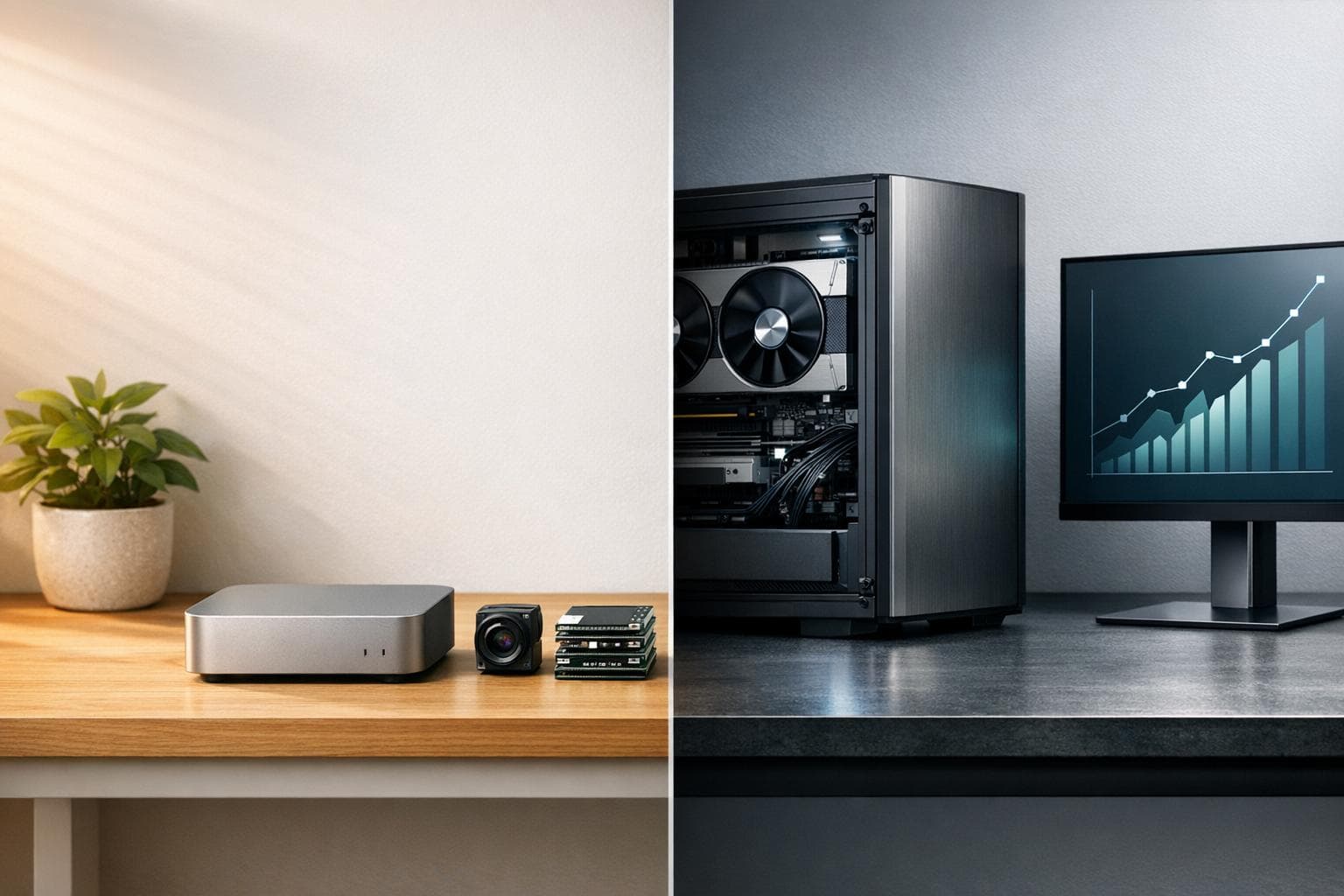
When choosing between ARM and x86 for AI workloads, it boils down to efficiency vs. performance:
- ARM is ideal for low-power, on-device AI tasks like edge inference, portable devices, and cloud-native services. Its RISC architecture ensures lower power consumption (4-15W for edge devices) and better thermal management, making it a cost-effective option for inference-heavy workloads.
- x86, with its CISC design, excels in high-performance tasks like training large AI models and handling complex simulations. It pairs well with GPUs (via PCIe) and supports a mature software ecosystem, making it the go-to for data centers and GPU-reliant AI workflows.
Quick Overview:
- ARM: Best for energy-efficient, portable, and cloud inference workloads.
- x86: Best for high-throughput model training and legacy software compatibility.
Key Takeaways:
- Power: ARM consumes significantly less energy than x86.
- Performance: x86 offers higher computational throughput for heavy AI tasks.
- Cost: ARM often provides better price-performance for inference; x86 shines in training-intensive scenarios.
- Compatibility: x86 has broader support for AI frameworks like TensorFlow and PyTorch, while ARM is catching up with tools like TensorFlow Lite and Arm NN.
| Feature | ARM | x86 |
|---|---|---|
| Power Efficiency | Low (4-15W for edge devices) | Higher (10-35W+ for edge devices) |
| Thermal Management | Fanless-friendly | Requires active cooling |
| AI Strength | Inference, edge AI | Training, high-intensity workloads |
| Framework Support | Growing (TensorFlow Lite, Arm NN) | Robust (TensorFlow, PyTorch, CUDA) |
| Cost-Effectiveness | Better for inference-heavy tasks | Better for training-intensive tasks |
Your choice should align with your workload needs - ARM for energy-efficient, cloud-native, or edge tasks, and x86 for training large models or GPU-heavy applications.
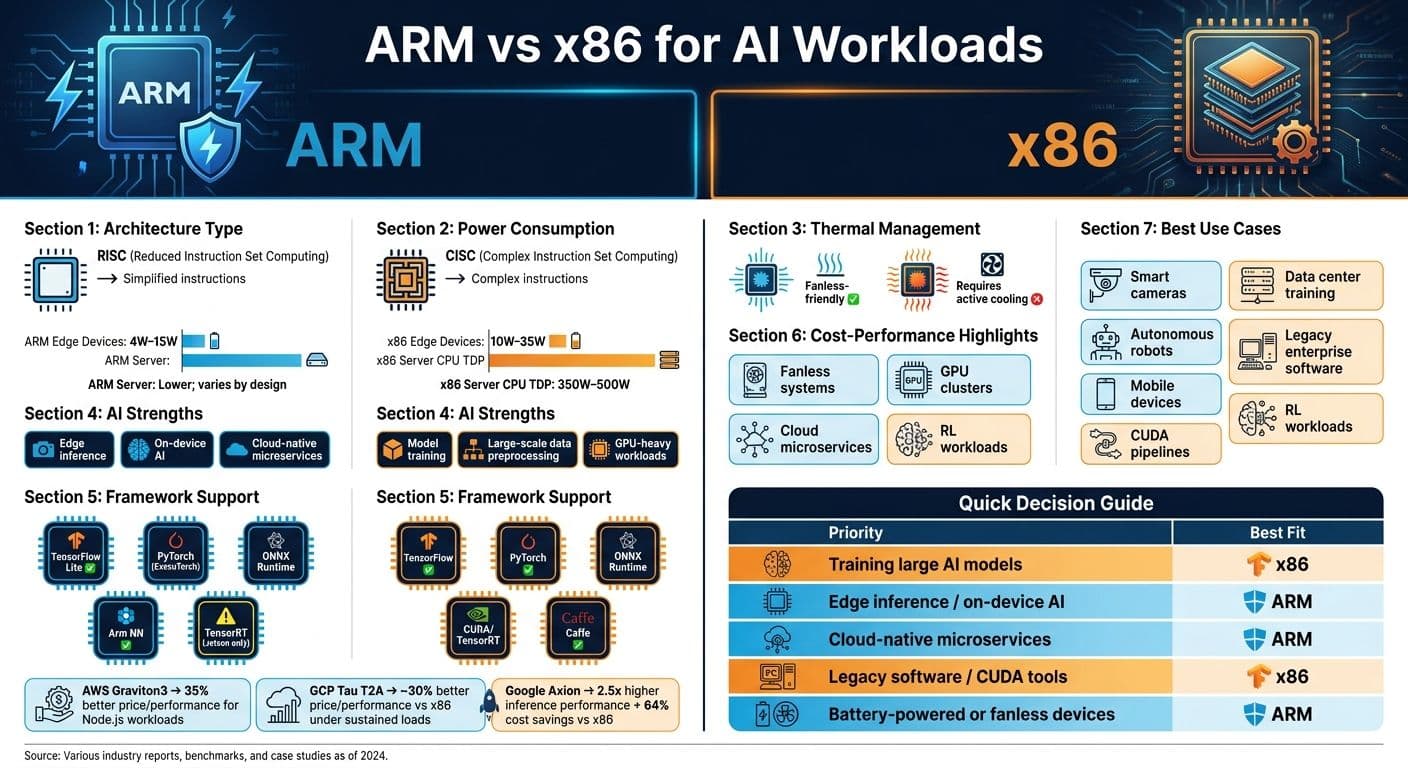
ARM vs x86 for AI: Architecture Comparison & Key Metrics
ARM vs x86: A Comprehensive Comparison of CPU Architectures
sbb-itb-903b5f2
ARM Architecture for AI
ARM's RISC (Reduced Instruction Set Computing) design is built around simplicity and efficiency. By using fewer transistors and streamlined instructions, ARM processors generate less heat, making them ideal for fanless, battery-powered AI devices. This thermal efficiency is crucial for always-on AI applications, especially in portable and embedded systems. Let's dive into how ARM stands out in power efficiency, diverse AI applications, and compatibility with AI frameworks.
Power Efficiency and Scalability
One of ARM's greatest strengths is its ability to operate efficiently in environments where energy is limited. From industrial sensors to autonomous machines and wearable devices, ARM processors thrive in settings with tight energy constraints. On the other end of the spectrum, ARM has proven its scalability. For example, AWS Graviton5 processors now feature up to 192 cores - double the previous generation - to support the orchestration demands of large-scale AI systems.
"AI growth is no longer gated solely by accelerators. It is gated by how efficiently systems can be orchestrated, continuously, at scale." - Arm Editorial Team
This ability to scale from tiny microcontrollers to massive cloud CPUs makes ARM an adaptable choice for building AI infrastructure at any level.
AI Use Cases on ARM
ARM's role in AI extends further than many realize. At the edge, combinations like ARM Cortex-M and Ethos-U NPUs enable transformer-based small language models (SLMs) to run with impressive energy efficiency. For mobile devices and cloud applications, ARM's integrated vector extensions, such as SVE2 (part of the Armv9 architecture), accelerate tasks like real-time voice translation and on-device virtual assistants. ARM-based cloud instances also excel in handling large language models (LLMs). For instance, Google Axion achieves up to 2.5x higher inference performance and 64% cost savings compared to x86 systems.
ARM has also streamlined AI hardware integration. Cortex-A processors can now directly control Neural Processing Units (NPUs) like the Ethos-U85 without needing separate driver microcontrollers. This reduces latency and simplifies system design.
AI Framework Compatibility on ARM
ARM processors are compatible with all major AI frameworks, making them a versatile option for developers. For example:
- PyTorch supports ARM edge devices via ExecuTorch.
- TensorFlow Lite is optimized for mobile and IoT inference.
- ONNX Runtime enables seamless cross-platform model execution.
- MediaPipe provides up to a 30% performance boost on models like Gemma 2B.
A standout tool in this space is Arm KleidiAI, an open-source optimization layer that activates ARM-specific microkernels within frameworks like PyTorch and TensorFlow. This requires no code changes and delivers significant performance improvements. On Graviton4 processors, KleidiAI reduces the time-to-first-token for Llama 3 by up to 2.5x. However, it's worth noting that some older libraries and closed-source binaries may lack native ARM (aarch64) support, so compatibility checks are recommended before fully transitioning.
| AI Framework/Tool | ARM Support Level | Key Optimization Feature |
|---|---|---|
| PyTorch | High | ExecuTorch for edge deployment |
| TensorFlow Lite | High | Mobile/IoT inference |
| MediaPipe | High | Up to 30% boost on Gemma 2B |
| KleidiAI | Native | Microkernel activation for Llama 3 |
| ONNX Runtime | High | Cross-platform model execution |
x86 Architecture for AI
x86 architecture focuses on maximizing throughput, making it ideal for heavy AI processing tasks. Its Complex Instruction Set Computing (CISC) design allows it to execute instructions like data loading, calculations, and result storage in a single step. This approach delivers the computational density required for demanding AI workloads.
Performance for Heavy AI Tasks
When it comes to model training, large-scale data preprocessing, and complex simulations, x86 is a top choice. Server-grade x86 CPUs, with power ratings ranging from 350W to 500W, are built to handle high-intensity workloads. They also support PCIe expansion, enabling integration with discrete GPUs like the NVIDIA H100 to scale performance as needed. These CPUs excel at tasks such as data tokenization, model sharding, I/O management, and implementing security layers.
The modular nature of x86 supports scalable performance through PCIe expansion, making the CPU-plus-accelerator model the standard for production AI workloads.
Another key advantage of x86 lies in its mature software ecosystem, which further enhances its capabilities for AI applications.
"x86 became the de facto standard for servers thanks to its deep ecosystem of hardware, compilers, libraries, and vendor support." - Christopher Tozzi, Technology Analyst
Software Ecosystem for x86
x86's hardware strengths are complemented by its robust software ecosystem. Many foundational tools, including libraries like NumPy and SciPy, as well as major AI frameworks, were initially designed for x86. As a result, these tools run efficiently on x86 without requiring additional configuration. Additionally, the seamless integration between x86 CPUs and NVIDIA's CUDA platform ensures better stability and fewer compatibility issues during AI development.
This architecture also excels in handling Reinforcement Learning (RL) workloads. The "branchy", latency-sensitive code often involved in tasks like code compilation, verification, and physics simulation is not well-suited for GPU parallelism but performs effectively on x86 CPUs. As AI models become more complex, this capability is becoming increasingly important.
AI Framework Support on x86
x86 provides native support for leading AI frameworks like TensorFlow, PyTorch, and Caffe, avoiding the compatibility challenges sometimes encountered with ARM. Both Intel and AMD have been working to enhance x86's AI performance at the hardware level. For example, their AI Compute Extensions (ACE) standard introduces 2D Tile Registers and outer-product algorithms, allowing CPUs to handle matrix multiplication directly. This results in a 16x boost in compute density compared to standard AVX10 instructions. With ACE, modern x86 CPUs can perform 1,024 multiplications per clock cycle, far surpassing the 64 multiplications achievable with traditional AVX.
In addition, newer x86 processors are incorporating integrated NPUs. Intel Core Ultra and AMD Ryzen mobile chips now include dedicated neural processing units for tasks like live captions and prompt pre-processing. These features allow for local inference without relying entirely on GPUs, signaling x86's push into areas traditionally dominated by ARM.
ARM vs x86 for AI: A Direct Comparison
Let's break down the differences between ARM and x86 architectures when it comes to AI workloads. ARM shines in edge inference applications, while x86 is the go-to for heavy-duty model training. Here's how they stack up across key metrics and costs.
Performance and Efficiency Metrics
The table below highlights the main differences between ARM and x86 in terms of power consumption, thermal behavior, and AI capabilities. ARM-based single-board computers (SBCs) typically consume between 4W and 15W, whereas x86 SBCs require more power, ranging from 10W to 35W. At the server level, x86 CPUs can have TDP ratings as high as 500W, while ARM's lower thermal demands allow for fanless designs.
| Metric | ARM | x86 |
|---|---|---|
| Edge device power draw | 4W–15W | 10W–35W |
| Server CPU TDP | Lower; varies by design | 350W–500W |
| AI acceleration | Integrated NPUs (common) | High clock speeds + PCIe GPU |
| Thermal profile | Low heat; fanless-friendly | Requires active cooling |
| Primary AI strength | Inference and edge AI | Training and development |
ARM provides better efficiency, particularly in edge and cloud inference scenarios. On the other hand, x86 excels in raw performance, making it ideal for tasks like training large-scale AI models.
Cost Considerations
ARM systems tend to be more affordable upfront and offer long-term savings on electricity. For cloud-based workloads, these savings can be dramatic. For example, AWS Graviton3 (ARM) demonstrated 35% better price/performance for Node.js API workloads in 2025 benchmarks, while GCP Tau T2A (ARM) achieved about 30% better price/performance compared to x86 under sustained loads.
A practical example: A fintech company adopted a hybrid cloud approach - using ARM-based Azure Dpsv5 for stateless microservices and x86 for legacy payment processing. This strategy reduced their overall cloud costs by 22%. While x86 remains the standard for large-scale training due to its robust GPU ecosystem and mature software support, ARM is proving to be a cost-effective choice for inference-heavy or cloud-native tasks.
"ARM is no longer just 'the cheap option' - it's a serious contender for most cloud workloads in 2025." - Sanj.dev
These cost dynamics underline the importance of choosing the right architecture based on workload requirements.
Best Deployment Scenarios for Each Architecture
ARM dominates in edge inference applications, while x86 is best suited for training-intensive environments. ARM is ideal for devices like smart cameras, autonomous robots, mobile devices, and fanless systems handling real-time AI inference. Its integrated NPUs efficiently manage tasks like object detection and speech recognition without needing external GPUs.
On the flip side, x86 is better for industrial applications requiring high-resolution image analysis, multi-stream video inference, or workloads reliant on CUDA tooling and legacy enterprise software. High-end x86 systems paired with discrete GPUs remain the gold standard for training new AI models.
"Alternative CPU architectures can improve energy efficiency and thermal behavior in AI data centers without sacrificing capability, but the magnitude depends on how your workloads actually use the CPU." - Christopher Tozzi, Technology Analyst
AI Framework and Software Compatibility
Cross-Platform AI Development
When it comes to AI development, the compatibility hurdles between ARM and x86 architectures are significant. These platforms operate on fundamentally different instruction sets - ARM uses RISC (Reduced Instruction Set Computing), while x86 relies on CISC (Complex Instruction Set Computing). This difference means code written for one architecture won’t run natively on the other without extra steps like recompilation or emulation. Developers often face the challenge of refactoring code, recompiling binaries, and maintaining separate codebases to ensure functionality across platforms.
"Running software on ARM vs. x86 is like driving a car on a road versus water. The software is the car, and the water or road is the underlying architecture." - Teresa Reidt, emteria
Cloud environments complicate things further. Platforms like AWS Graviton, Google Axion, and Azure Cobalt are ARM-based, but each has its own custom implementation. This means that workloads optimized for one cloud provider may not seamlessly transfer to another. While major AI frameworks such as TensorFlow and PyTorch offer support for both ARM and x86, the level of support varies. x86 platforms typically benefit from full framework versions with extensive community testing and fewer bugs. ARM, especially in edge computing scenarios, often relies on lighter options like TensorFlow Lite and Arm NN, which prioritize efficiency over feature set completeness.
These compatibility issues inevitably shape optimization strategies for both platforms.
Optimization and Binary Support
The way ARM and x86 handle optimization is where their differences become most apparent. x86 processors feature a microcode layer that optimizes instructions at the hardware level, giving compilers a head start. On the other hand, ARM compilers must rely more heavily on software-level optimization to match the performance of x86's hardware microcode.
For AI workloads, this divergence influences which toolchains are most effective. ARM-based systems, especially those targeting edge inference, excel with frameworks like TensorFlow Lite, Arm NN, and OpenCL, which are designed to leverage integrated NPUs. Meanwhile, x86 platforms dominate in training workloads, often utilizing the full versions of PyTorch or TensorFlow in combination with NVIDIA's CUDA platform and TensorRT for GPU acceleration.
| Framework | ARM Support | x86 Support |
|---|---|---|
| TensorFlow | Partial / TF Lite | Full |
| PyTorch | Growing / Mobile | Full |
| ONNX Runtime | Strong | Full |
| Arm NN | Native | N/A |
| TensorRT | Limited (Jetson only) | Full (NVIDIA GPUs) |
| Caffe | Limited | Full |
These distinctions make it clear that choosing the right toolchain is critical for maximizing the strengths of each architecture. Before committing to hardware, it’s essential to confirm that your AI libraries are compatible with your target architecture. Tools tied to NVIDIA's CUDA ecosystem, for instance, are still heavily optimized for x86. Overlooking this during the planning phase can lead to costly issues post-deployment.
"Arm is incompatible with x86. Adding Arm to your cloud means refactoring, recompiling, and managing multiple codebases in exchange for uncertain gains." - AMD
Still, the gap between ARM and x86 is narrowing. Major software vendors like Microsoft and Adobe have begun releasing ARM-native versions of flagship applications, including Word, Excel, and Photoshop. This shift signals growing recognition of ARM as a competitive platform. For teams building new AI pipelines, prioritizing cross-platform compatibility from the outset is far easier - and far less expensive - than trying to retrofit it later.
Conclusion: Choosing the Right Architecture for AI
When deciding between x86 and ARM for AI workloads, the choice often comes down to your specific needs. x86 dominates in raw computational power, making it the preferred option for training large models, running CUDA-reliant pipelines, and ensuring compatibility with legacy enterprise software. On the other hand, ARM prioritizes efficiency, excelling in edge inference, cloud-native microservices, and applications requiring low power consumption.
Cost comparisons reveal that ARM instances in the cloud often provide better price-performance for many tasks, though x86 still shines in high-throughput scenarios that benefit from specialized optimizations. Expert opinions reflect this divide:
"For the vast majority of users... x86 remains the superior choice for AI right now [for training]... while ARM is the future for on-the-go AI and power-efficient devices." - ChipChaser, AI Edge Analyst
Key Takeaways
Here's a quick breakdown of the best architecture based on your priorities:
| Your Priority | Best Fit |
|---|---|
| Training large AI models | x86 (GPU + CUDA ecosystem) |
| Edge inference / on-device AI | ARM (integrated NPUs, low TDP) |
| Cloud-native microservices | ARM (up to 40% better price-performance) |
| Legacy software / CUDA tools | x86 (mature, plug-and-play support) |
| Battery-powered or fanless devices | ARM (4W–15W typical draw) |
Before making a final decision, ensure your AI libraries and tools are compatible with the architecture you're considering. Overlooking this step can lead to unnecessary expenses. If your stack is cloud-native and portable, ARM is becoming an increasingly attractive option. However, if your workflows are deeply tied to x86, the transition may not be worth the effort just yet.
FAQs
Can I run the same AI code on ARM and x86 without changes?
AI code generally cannot run seamlessly on both ARM and x86 architectures without some modifications. These two platforms rely on different instruction sets and hardware optimizations. To make AI code compatible and efficient, developers often need to adapt or recompile it. This is especially important when taking advantage of features like ARM's Neural Processing Units (NPUs) or x86's GPUs. While tools and frameworks are making cross-platform support better, some adjustments are still necessary to achieve the best performance.
When does ARM beat x86 on total cost for AI workloads?
When it comes to AI workloads, ARM processors often come out ahead in terms of total cost, especially when power efficiency and operational expenses matter. Take the Apple Silicon M2, for example - it operates at just around 15 watts, compared to the 65+ watts typically required by x86 chips. This difference translates into noticeable savings, with annual electricity costs dropping to roughly $15–$20.
Another cost-saving feature of ARM is its unified memory architecture. This design eliminates the need for expensive discrete GPUs, making ARM a more budget-friendly option for tasks like always-on, local AI inference.
Do I need a GPU for training or inference on each architecture?
A GPU isn't always necessary for training or inference on ARM or x86 architectures. It really comes down to the specific workload and performance requirements. For instance, training more complex models, such as NanoGPT, generally benefits from a GPU because it significantly speeds up the process. On the other hand, when it comes to inference, lightweight models can perform well on high-performance ARM or x86 CPUs. However, for tasks that are real-time or large-scale and demand higher performance, GPUs can make a big difference.