
Best Practices for Azure OpenAI API Error Handling

Azure OpenAI APIs are powerful tools for language model access, but errors like timeouts, rate limits, and server issues can disrupt your application. Effective error handling ensures reliability, reduces costs, and maintains user trust. Here’s what you need to know:
- Common Errors: Authentication issues (401, 403), rate limits (429), server errors (500), and timeouts (408).
- Retry Logic: Retry transient errors (408, 429, 5xx) with exponential backoff and jitter. Avoid retrying permanent errors (400, 401, 403).
- Monitoring: Use Azure Monitor to track metrics like token usage, error rates, and latency. Log key details for troubleshooting.
- Security: Replace API keys with Microsoft Entra ID or Managed Identities. Use private endpoints and Azure API Management for secure traffic.
- Testing: Simulate errors using tools like Microsoft Dev Proxy and validate error-handling strategies under stress.
Smart error handling combines retries, monitoring, and secure practices to build resilient systems. The article dives into detailed strategies for handling these errors effectively.
Learn Live: Monitoring Azure OpenAI

sbb-itb-903b5f2
Common Azure OpenAI API Errors and Their Causes
Understanding common Azure OpenAI API errors - like authentication problems, rate limiting, and server/network issues - can make debugging faster and more efficient. Let’s break down these errors and how to handle them.
Authentication and Authorization Errors
Two of the most frequent errors tied to credentials are 401 Unauthorized and 403 Forbidden, each with distinct causes. A 401 occurs when the service outright rejects your credentials. This typically happens due to an invalid or expired API key, using the wrong endpoint URL, or mistakenly using the model name instead of your deployment name.
Header formatting mistakes are another common pitfall. Make sure API keys are sent using the api-key header. If you're using Microsoft Entra ID tokens, the correct format is Authorization: Bearer <token>. Mixing these formats will result in a 401 error every time.
"Most Azure OpenAI 401 failures come from the credential path, not from the .NET SDK call itself." - DotNetStudioAI
A 403 Forbidden error, on the other hand, means Azure received your request but blocked it due to permission issues. This could happen because the Cognitive Services OpenAI User RBAC role is missing, network restrictions are in place, or your subscription hasn’t been approved. Keep in mind that RBAC role assignments can take up to five minutes to propagate, so don’t assume something is broken if you’ve just made changes.
"A 403 Forbidden in this case is almost always due to one of these: API key ↔ endpoint mismatch, wrong deployment name, missing IAM role, model not deployed / not allowed, network restrictions, subscription not approved." - Manas Mohanty, Microsoft External Staff
Now, let’s explore rate-limiting errors, which are common in high-throughput scenarios.
Rate Limit and Quota Errors
The 429 Too Many Requests error is a frequent challenge when operating at scale. Azure OpenAI enforces two types of limits: Tokens-Per-Minute (TPM) and Requests-Per-Minute (RPM). These limits are specific to your region, model, and subscription.
A tricky aspect of throttling is that it’s based on an estimated token count at the time the request arrives. This estimate includes prompt tokens, max_tokens, and best_of, not just the tokens actually generated. Setting max_tokens unnecessarily high can quickly drain your quota.
Burst traffic can also cause throttling since rate limits are evaluated over short intervals (as brief as 1 to 10 seconds). For example, even with a 600 RPM limit, sending too many requests within a single second can trigger throttling. Pay attention to the API’s response headers, which provide key details about your limits:
| Header | What It Tells You |
|---|---|
x-ratelimit-remaining-requests | Requests left before the next reset window |
x-ratelimit-remaining-tokens | Tokens left before the next reset window |
retry-after-ms | How long to wait (in milliseconds) before retrying |
x-ratelimit-limit-tokens | Your effective TPM limit (may be lower than configured) |
"Unsuccessful requests still count toward your per-minute rate limit. Continuously resending a request without backing off makes throttling worse." - Microsoft Learn
Server and Network Errors
5xx errors and timeouts are more complex since they can stem from either transient or persistent issues, and the error messages often lack specifics. An HTTP 500 error usually indicates the model encountered an unexpected issue, such as a prompt exceeding the context window, malformed JSON output when using response_format="json_object", or triggering a hidden content policy violation. Meanwhile, HTTP 408 timeouts often occur due to regional capacity constraints during peak usage, particularly with preview models on Global Standard deployments.
To troubleshoot, determine whether the issue is consistent (likely a payload problem) or intermittent (possibly transient capacity issues). For example, if a specific prompt always returns a 500, the problem is likely with the prompt itself - check for size issues, content filter triggers, or JSON formatting errors.
"A 500 from the Azure OpenAI endpoint is always frustrating because the error message doesn't tell you why. Think of it as the service saying, 'Something in this request (or the model's response) broke my internals, so I bailed.'" - Jerald Felix, Volunteer Moderator
Network-level failures, like connection resets, DNS errors, or TLS handshake issues, are often caused by corporate proxies or firewall timeouts rather than Azure itself. To troubleshoot connectivity, check DNS resolution, TCP port 443, and HTTPS functionality. Avoid relying on ICMP ping, as it’s often blocked even when the API endpoint is reachable. Always log the apim-request-id from response headers, as Azure support will need this to investigate server-side issues.
Best Practices for Handling Azure OpenAI API Errors
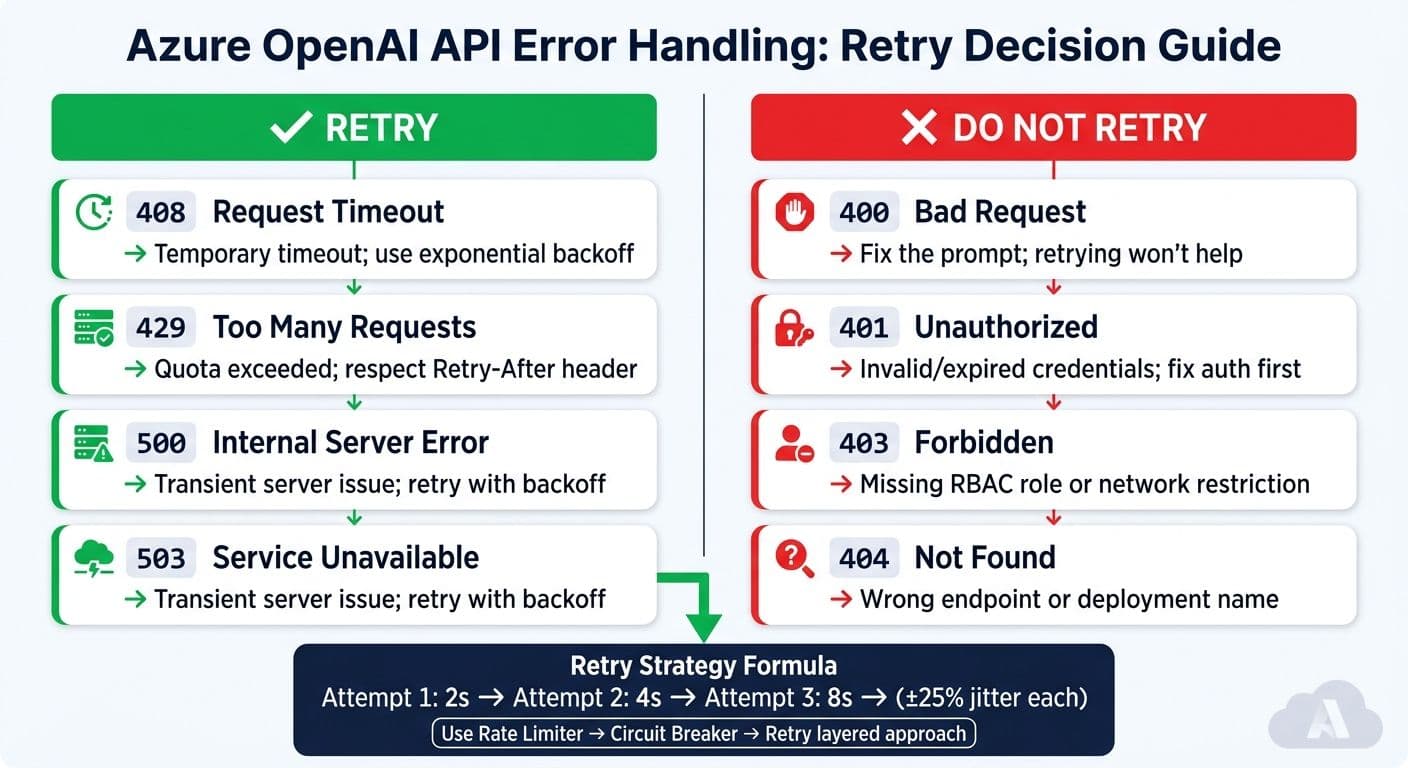
Azure OpenAI API Error Codes: Retry vs. No-Retry Cheat Sheet
Understanding the types of errors you might encounter is just the first step. The real challenge is crafting systems that handle these errors smartly - avoiding wasted quota or unnecessary strain on the API.
Classify Errors and Apply Retry Logic
Not all errors warrant a retry. The golden rule for Azure OpenAI error handling is simple: retry only transient errors. Temporary errors like 408, 429, and 5xx codes can benefit from retries, while others like 400, 401, 403, and 404 indicate deeper issues that retries won't resolve.
| Status Code | Retry? | Reason |
|---|---|---|
| 408 | ✅ Yes | Temporary timeout; retry with backoff |
| 429 | ✅ Yes | Quota exceeded; respect Retry-After header |
| 500 / 503 | ✅ Yes | Server issue; retry with backoff |
| 400 | ❌ No | Bad request; fix the prompt |
| 401 / 403 | ❌ No | Authentication or permissions problem |
When implementing retries, adopt exponential backoff with jitter. This approach increases wait times progressively (e.g., 2 seconds, 4 seconds, 8 seconds) and adds a random variation (±25%) to avoid synchronized retries that could worsen API throttling.
"Retrying during quota exhaustion worsens the situation. If your 60-second TPM window is exhausted, five aggressive retries over 30 seconds consume quota from the next window before it resets." - DotNetStudioAI
For production systems, use a layered approach to resilience: Rate Limiter → Circuit Breaker → Retry. A circuit breaker that activates when the failure rate exceeds 70% over 30 seconds (with at least 10 requests) can prevent your app from draining quota during extended outages. This setup ensures your system stays stable even during temporary disruptions.
Design Idempotent and Resilient Requests
Effective retry logic requires that every request be safe to repeat. Each request should be stateless and self-contained, ensuring retries don't cause duplicated processing or errors.
To achieve this, include a unique identifier (like x-ms-client-request-id) in every request. This helps you trace retries in logs, monitor failures in Azure Monitor, and escalate issues with Azure support if needed. For high-traffic applications, consider using a queue-based trigger pattern (e.g., Azure Queue Storage) to separate processing from real-time events. This way, if a specific task fails, you can retry just that task instead of reprocessing the entire workflow.
Another useful technique is client-side token estimation. Tools like tiktoken (Python) or Microsoft.ML.Tokenizers (.NET) can help you count tokens before sending a request. This prevents silent 400 errors caused by exceeding context length limits and keeps your token usage predictable.
Use SDK Features for Error Resilience
Beyond building resilient requests, take advantage of the error-handling features built into Azure SDKs. SDKs for .NET, Python, Java, and JavaScript come with retry policies that automatically handle 429 and 5xx errors. These SDKs also respect headers like retry-after-ms and x-ms-retry-after-ms, so you don’t have to manage them manually.
For example, the Python SDK defaults to three retry attempts, with a base delay of 0.8 seconds and a maximum delay of 60 seconds. While this works for smaller applications, it has limitations in larger systems: retries are managed per-client instance, meaning multiple clients won’t share state or coordinate circuit-breaking behavior.
"A circuit breaker that stops all calls for 15 seconds during sustained failures is worth more than five more retries." - DotNetStudioAI
For .NET, libraries like Polly v8 (or Microsoft.Extensions.Resilience) offer advanced features like shared circuit breaker states, customizable backoff strategies, and pipeline-based error handling. Python developers can use the tenacity library for similar flexibility, offering cleaner syntax than manually coding retry loops. If you're working with the Realtime API over WebSocket, the approach differs: for a server_error, close the connection and start a new session rather than trying to reuse a potentially compromised one.
Operational and Architectural Considerations
Monitor, Log, and Alert on Errors
Effective error handling goes beyond retry mechanisms - it requires clear visibility into what's happening in production. The key is centralized telemetry. For every request, log details like tokens_used, model, flowRunId, and HTTP status codes to Azure Monitor and Log Analytics. For larger payloads, store complete prompts and responses in a database while logging only a reference ID to keep log sizes manageable. This setup lays the groundwork for secure and efficient API operations.
To improve tracking, implement distributed tracing with correlation IDs. This approach lets you trace a single request across API calls, model inference, and downstream services, making it easier to identify where failures occur. Using the opentelemetry-instrumentation-openai Python package can simplify this process for OpenAI SDK requests.
For real-time alerting, configure Azure Monitor to notify your team when errors like 429 or 5xx spike. Also, keep an eye on RateLimit-Global-Remaining and RateLimit-Global-Reset headers to anticipate quota limits before they are reached. Azure Monitor Workbooks offer pre-built dashboards that display HTTP requests, token usage, and PTU consumption in one place, which can help teams get started quickly.
"Latency isn't always about capacity: Investigate workload patterns before scaling hardware." - psundars, Microsoft
One crucial privacy step: make sure to anonymize prompts and responses before logging them. This isn't just a best practice - it often aligns with compliance requirements.
Secure Access to Azure OpenAI APIs
Avoid using API keys in production environments. Instead, rely on Microsoft Entra ID and Managed Identities to handle communication between your application and Azure OpenAI. This eliminates the risk of credential leaks entirely.
For network security, route all traffic through Private Endpoints and Azure Virtual Network (VNet). This ensures that requests stay off the public internet, reducing the risk of attacks. Pair this setup with Azure API Management (APIM) as a centralized gateway for your OpenAI backends. APIM allows you to enforce authentication policies, rate limits, and access controls in one place, simplifying management across services.
Once access is secured, it's equally important to manage quotas effectively to balance performance and costs.
Manage Quotas and Costs
Azure OpenAI applies rate limits based on two factors: Tokens Per Minute (TPM) and Requests Per Minute (RPM). The RPM-to-TPM ratio depends on the model. For instance, older chat models operate at 6 RPM per 1,000 TPM, while newer models like o3-mini offer 1 RPM per 10,000 TPM. Keep in mind that rate limits are evaluated in short windows of 1–10 seconds, so even a brief spike in requests can trigger a 429 error, even if your minute-level quota isn’t fully used.
Quota consumption is determined by the estimated maximum token count, which includes the prompt, max_tokens, and best_of. Adjust max_tokens carefully to match your needs.
For high-demand workloads, consider using Provisioned Throughput Units (PTU) for consistent traffic and Standard deployments with APIM priority routing. A real-world case study from Microsoft's Apps on Azure Blog highlights the benefits of this approach. By setting a 2,000-token limit for synchronous requests, enabling streaming for longer outputs, and using multi-region spillover via APIM, one production environment reduced 408/429 errors from over 1% to nearly zero. Additionally, token generation costs dropped by around 60%.
Validating and Testing Error Handling
Effective error handling isn't just about implementation - it's about ensuring those strategies hold up under pressure. This requires rigorous validation and standardized practices.
Simulate and Test Failure Scenarios
Once monitoring and quota management are in place, it's time to test how your error handling performs under stress. One of the most effective ways to do this is through fault injection - deliberately introducing faults in a controlled environment.
For example, Microsoft's Dev Proxy tool simplifies this process. With the GenericRandomErrorPlugin, you can simulate common issues like 429, 5xx, and timeout responses. To test OpenAI throttling scenarios, you can download a pre-built configuration preset by running devproxy config get openai-throttling. Additionally, setting addDynamicRetryAfter: true in your simulation file ensures your application correctly interprets the Retry-After header, rather than defaulting to a fixed wait time.
Another approach is to adjust TPM or RPM limits in Azure OpenAI Studio to intentionally trigger errors. In January 2024, Microsoft engineer Roman Mullier demonstrated this by reducing a deployment's TPM limit from 40,000 to 1,000. Using Postman, he sent rapid-fire requests to consistently provoke 429 errors. Mullier then used Azure API Management tracing to confirm that requests were seamlessly rerouted to a secondary deployment, avoiding any disruption for end users. As Mullier aptly noted:
"Things fail all the time: marriages, hard drives, power supplies, entire data centers... But failure is not the only thing to keep in mind when designing an application for high availability. Success is another." - Roman Mullier, Microsoft
It's also important to verify that PTU exhaustion triggers a smooth fallback to pay-as-you-go deployment, ensuring uninterrupted service.
Set Error Handling Standards Across Teams
Even the best error handling strategies can crumble if every team or microservice takes a different approach. Standardizing practices across teams is key to maintaining consistency and reliability.
Shared libraries and centralized policies can help. For Python projects, the tenacity library is a trusted option for implementing exponential backoff with jitter. In the .NET ecosystem, Microsoft.Extensions.AI provides a unified framework for handling model inputs and tool calls. By adopting shared libraries for retry mechanisms and circuit breaker logic, teams can work from a common foundation. Additionally, defining a standardized error classification model ensures everyone speaks the same "error-handling language".
"A poorly designed retry strategy can make things worse by flooding the API with retries during peak load." - Nawaz Dhandala, OneUptime
To measure the effectiveness of your error-handling strategies, focus on tracking these three key metrics across all teams:
- 429 response rate
- Average retry count per successful request
- P99 latency
Together, these metrics provide a clear picture of whether your retry logic is reducing load or inadvertently adding to it. Setting up Azure Monitor alerts for these metrics ensures you catch any issues early - before users experience them.
Conclusion
Handling errors in the Azure OpenAI API hinges on catching specific exceptions, implementing smart retry strategies, and planning for potential failures from the start. Leveraging the Azure SDK's hierarchical exception model - where you address specific errors like ClientAuthenticationError or RateLimitError before defaulting to the broader AzureError - allows your application to respond appropriately to different failure scenarios.
Building resilience into your design is equally important. This can include setting token limits, using streaming for longer outputs, and managing traffic securely with tools like Azure API Management and circuit breaker logic. For example, a GPT-4o-mini deployment successfully reduced error rates and token costs by combining token limits with multi-region spillover strategies. These approaches support both system reliability and cost efficiency.
Security and privacy must also remain a top priority. Protect diagnostic logs and replace static API keys with Azure Managed Identity (DefaultAzureCredential) to minimize security vulnerabilities.
For developers looking for an alternative that combines simplicity, cost savings, and security, NanoGPT is worth exploring. NanoGPT offers pay-as-you-go access to various text and image generation models, such as ChatGPT, Gemini, and Stable Diffusion. It prioritizes privacy by storing data locally on your device instead of relying on remote servers, eliminating the need for subscriptions while maintaining a secure, user-friendly experience.
FAQs
How do I choose retry limits that won’t waste tokens?
When working with rate limits, it's important to manage retry attempts wisely to avoid wasting tokens. Use the Retry-After header provided in rate limit responses to determine how long to wait before making another request. This helps you pause appropriately and avoid unnecessary retries.
You can also explore SDKs that come with built-in retry policies to simplify the process. If you prefer a custom approach, consider implementing strategies like exponential backoff, which gradually increases the wait time between retries.
Finally, keep an eye on your quota usage. This ensures retries remain effective without draining your token allocation unnecessarily. Proper monitoring and thoughtful retries can save both time and resources.
What should I log for Azure support to debug failures fast?
To troubleshoot Azure OpenAI issues efficiently, make sure to log detailed information about both requests and responses. This includes capturing request IDs, error messages, and response headers. Enable client-side logging in your application and configure diagnostic logs in the Azure portal to record errors and request details. These steps make it easier to pinpoint problems such as rate limits or server-side errors, allowing you to resolve them more quickly.
How can I prevent 429 throttling without slowing users down?
To keep things running smoothly without hitting 429 throttling errors, try using smart retry strategies that adjust based on response times and rate limit errors. Pair this with load balancing and circuit breaker patterns to spread out requests and manage throttling more efficiently. You can also tweak deployment modes, like PTU or Standard, to fine-tune performance and minimize bottlenecks.