
Top 5 Containerization Tools for AI Models
When deploying AI models, containerization ensures consistent environments, eliminates dependency conflicts, and simplifies scaling. This article covers the top 5 containerization tools tailored for AI/ML workloads:
- Docker: Ideal for local development with GPU support and pre-built images for frameworks like TensorFlow and PyTorch.
- Kubernetes: Excels in large-scale, distributed training and inference with advanced GPU scheduling and resource management.
- Amazon ECS: Simplifies GPU-intensive AI workloads on AWS with managed scaling and pre-configured NVIDIA integrations.
- HashiCorp Nomad: A lightweight orchestrator for mixed environments, supporting GPUs and non-containerized workloads.
- NVIDIA NGC: Provides optimized, secure containers preloaded with NVIDIA's AI software stack for seamless deployment.
Each tool serves specific needs, from local testing to large-scale production. Below is a quick comparison to help you choose the right fit.
Quick Comparison
| Tool | GPU Support | Scalability | Integration Options | Security Features | Best Use Case |
|---|---|---|---|---|---|
| Docker | Native GPU support | Single-node setups | Pre-built AI/ML images | Vulnerability scanning, privacy focus | Local development and testing |
| Kubernetes | Advanced GPU scheduling | Cluster-wide scaling | Extensive ecosystem integrations | Multi-layer security, isolation | Large-scale training and inference |
| Amazon ECS | AWS GPU instances | Managed cloud scaling | Deep AWS service integration | IAM task roles, encrypted storage | GPU-heavy workloads on AWS |
| HashiCorp Nomad | Multi-platform GPU support | Flexible scaling | Works with non-containerized apps | Vault for secrets, air-gapped setups | Mixed workloads, federated deployments |
| NVIDIA NGC | Optimized AI containers | Portable across platforms | Docker, Kubernetes, Singularity | CVE scans, secure private registry | GPU-optimized base image source |
Choosing the right tool depends on your project's scale, hardware needs, and complexity. Read on for detailed insights into each option.
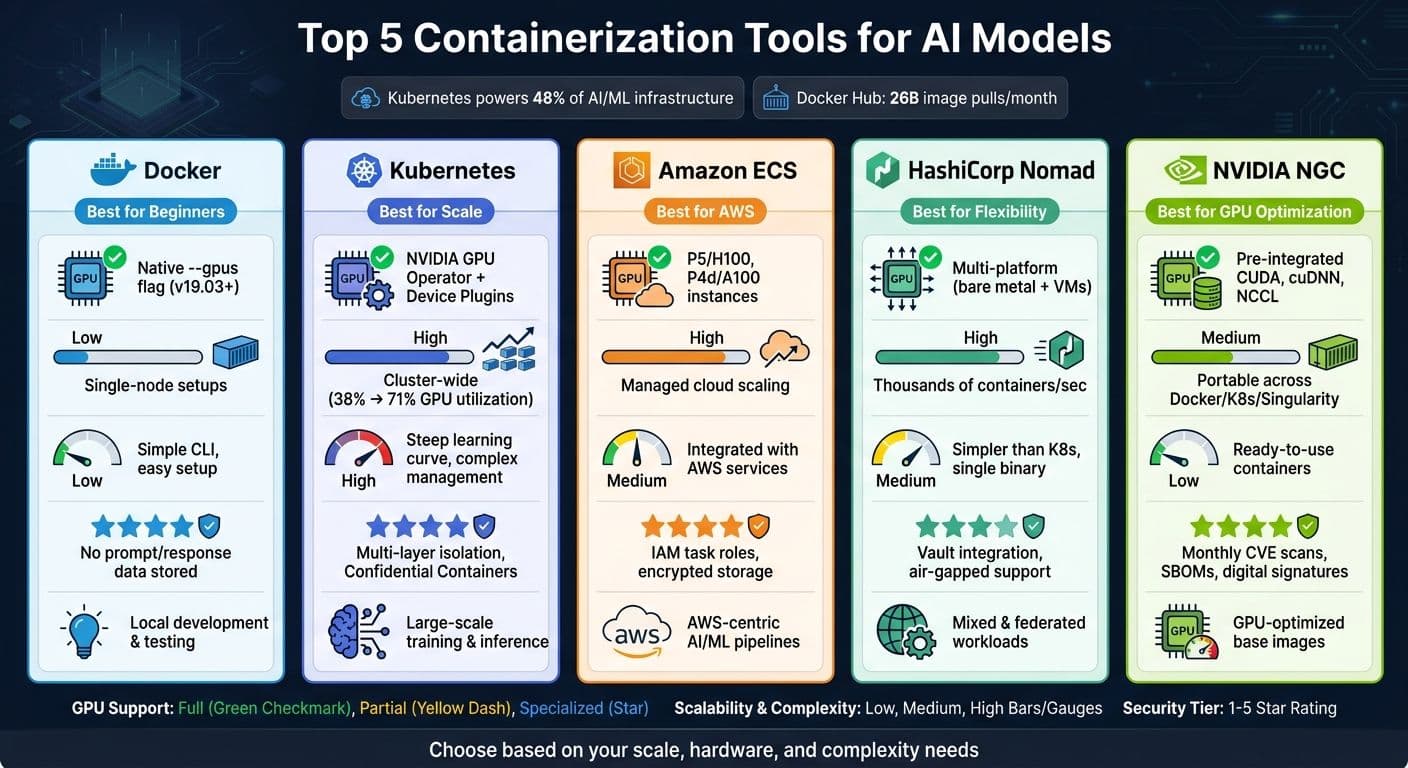
Top 5 Containerization Tools for AI Models: Side-by-Side Comparison
Running AI Workloads in Containers and Kubernetes - Kevin Klues
sbb-itb-903b5f2
How to Choose a Containerization Tool for AI/ML
AI workloads come with specific demands - like dependable GPU access, precise dependency management, efficient inference handling, and robust security. Choosing the wrong containerization tool can lead to slower training times, broken environments, or even security risks.
GPU support should be your top priority. Since Docker 19.03, NVIDIA GPUs have been supported natively, removing the need for the older nvidia-docker2 runtime. The right tool will manage GPU resource allocation seamlessly, ensuring containers can access GPUs without interference. But hardware isn’t the only concern - software dependencies are just as critical.
Framework compatibility is equally important. Frameworks like PyTorch and TensorFlow rely on CUDA/cuDNN, which require exact version matches. Tools that automate compatibility checks or offer pre-configured GPU-optimized images can save you hours of troubleshooting. For example, NVIDIA AI containers for TensorFlow and PyTorch are updated monthly with the latest optimizations.
When it comes to inference, selecting the right engine for your workload is crucial:
| Engine | Best For | Model Format |
|---|---|---|
| llama.cpp | Local development, resource efficiency | GGUF (quantized) |
| vLLM | Production, high throughput | Safetensors |
| Diffusers | Image generation (e.g., Stable Diffusion) | Safetensors |
Lastly, security and data handling should never be overlooked. Production-grade tools must offer features like automated vulnerability scanning (e.g., CVE reports) and version-locked environments to maintain dependency stability. For teams working with sensitive data, privacy controls - such as ensuring prompt content isn’t stored - are essential. These factors play a key role in evaluating the tools discussed later.
1. Docker
Docker has become the go-to platform for containerization in AI/ML development, thanks to its support for GPUs, streamlined dependency management, and strong security features. Since version 19.03, Docker has offered native support for NVIDIA GPUs. This is made possible through the NVIDIA Container Toolkit, which uses OCI hooks to simplify GPU configuration automatically .
A standout feature of Docker is its seamless integration with the NVIDIA NGC registry (nvcr.io). This allows developers to access pre-built containers, updated monthly, that are optimized for frameworks like TensorFlow, PyTorch, and MXNet. These containers are thoroughly scanned for vulnerabilities (CVEs), providing a secure starting point for production environments. By using these pre-built images, you can save time and avoid the headaches of dependency conflicts.
For GPU access, Docker provides flexible controls. The --gpus all flag gives access to all GPUs, while NVIDIA_VISIBLE_DEVICES and NVIDIA_DRIVER_CAPABILITIES allow for fine-tuned permissions. This approach ensures a "least-privilege" setup, which is especially useful in shared or multi-tenant environments, minimizing potential security risks.
Docker also supports generative AI workflows through its Model Runner. This tool works with various inference engines, such as llama.cpp for GGUF-formatted models (on both CPU and GPU) and vLLM for high-throughput Safetensors workloads. These models are served through an OpenAI-compatible API, with resources dynamically managed - loading into memory at runtime and unloading after 5 minutes of inactivity to optimize resource use.
Security is another area where Docker excels. Docker Scout continuously scans image layers for vulnerabilities, ensuring safer deployments. Additionally, Docker Model Runner prioritizes user privacy by not storing prompt data, model responses, or personal information.
As Docker CTO Justin Cormack explains:
"The ecosystem around Docker and NVIDIA has been building strong foundations for many years and this is enabling a new community of enterprise AI/ML developers to explore and build GPU accelerated applications."
The numbers speak for themselves: Docker Hub now processes 26 billion image pulls per month across 27 million active IPs, with over 100 million pulls specifically for AI/ML-related images. This highlights Docker's critical role in powering AI infrastructure at scale.
2. Kubernetes
Kubernetes has become the go-to platform for managing AI/ML workloads, thanks to its powerful GPU scheduling, tenant isolation, and support for distributed training. In fact, 48% of organizations now rely on Kubernetes for their AI/ML infrastructure. By leveraging containerization principles, Kubernetes takes scalability and deployment efficiency to a whole new level.
One standout feature of Kubernetes is its device plugin framework, which allows NVIDIA GPUs to be treated as schedulable resources (nvidia.com/gpu). The NVIDIA GPU Operator simplifies GPU management by automating the entire software stack, including drivers, container runtimes, device plugins, and monitoring tools - all through Helm. This eliminates the need for manual configurations on individual nodes. NVIDIA describes their approach as follows:
"NVIDIA cloud-native technologies enable developers to build and run GPU-accelerated containers with Docker, Podman, and Kubernetes."
This automation ensures seamless GPU provisioning and advanced resource management.
GPU Sharing and Efficiency
One of Kubernetes' major strengths is GPU sharing, which is crucial for multi-tenant production environments. With Multi-Instance GPU (MIG), a single A100 or H100 GPU can be partitioned into up to seven isolated instances, each with dedicated memory and compute resources. For lighter workloads, time-slicing enables multiple pods to share a GPU, while MIG provides true isolation with dedicated partitions.
Kubernetes also excels in improving resource utilization. Migrating to Kubernetes can increase GPU usage from 38% to 71%, while cutting infrastructure costs by up to 40%. Tools like Kueue help enforce fair-share scheduling and manage quotas across teams, raising cluster utilization from a baseline of 25–35% to 60–85%. When it comes to model serving, KServe supports features like scale-to-zero and canary deployments, while KubeRay facilitates distributed training across nodes for frameworks like PyTorch and JAX.
Security Features
Kubernetes also prioritizes security with multiple protective layers. Confidential Containers leverage hardware-based Trusted Execution Environments (TEEs), such as AMD SEV-SNP or Intel TDX, to encrypt model weights and sensitive data in memory - even shielding it from the host OS. To enhance security, you can:
- Apply taints to GPU nodes to prevent CPU-bound pods from accessing expensive hardware.
- Set
readOnlyRootFilesystem: truein your security context. - Mount model weights as read-only from encrypted storage to prevent tampering.
These features make Kubernetes an incredibly robust platform for AI/ML workloads, combining scalability, efficiency, and security in one package.
3. Amazon Elastic Container Service (ECS)
Amazon Elastic Container Service (ECS) provides an AWS-native alternative to Kubernetes with less operational complexity. As AWS's container orchestration service, ECS is a practical option for teams running GPU-intensive AI workloads without needing to manage a full Kubernetes setup. One of its advantages is the absence of control plane costs, and it typically requires only 2–5% of a team's time for management, compared to the 10–20% often associated with Kubernetes clusters.
GPU Support and NVIDIA Integration
ECS treats GPUs as core resources, similar to how it handles vCPUs or memory. The ECS container agent automatically assigns physical GPUs to specific containers for the duration of a task. ECS-optimized AMIs come preconfigured with NVIDIA drivers and the CUDA toolkit, allowing users to run tools like nvidia-smi directly within their containerized tasks for quick GPU monitoring.
"Now GPUs are first class resources that can be requested in your task definition, and scheduled on your cluster by ECS." - Brent Langston, Sr. Developer Advocate, Amazon Container Services
AWS offers a wide selection of NVIDIA-powered instances, ranging from g4dn instances (NVIDIA T4) for inference tasks to p5 instances (NVIDIA H100) for large-scale training. Performance improvements can be dramatic; for example, TensorFlow benchmarks on ECS showed a jump from 321.16 images per second on a single GPU to 1,707.23 images per second across eight GPUs. Additionally, AWS provides pre-built Deep Learning Containers optimized for TensorFlow, PyTorch, and Apache MXNet, all leveraging NVIDIA CUDA for high-performance training and inference.
Scalability and Orchestration
ECS enables scaling for AI workloads in two ways: horizontally by adding more GPU-enabled EC2 nodes, or vertically by upgrading to larger instance types like p3.16xlarge. Capacity Providers help manage GPU-backed instances based on pending tasks, while Service Auto-scaling adjusts fleet sizes using CloudWatch metrics such as inference queue depth. Spot Instances can also be integrated through Capacity Providers, offering cost savings for fault-tolerant training jobs. For CPU-focused AI tasks, AWS Fargate offers a serverless option with strong kernel-level isolation, making it suitable for sensitive operations.
Security for AI Workloads
ECS enhances security by assigning IAM roles directly to individual tasks, ensuring that each AI model only accesses necessary AWS resources, such as specific S3 buckets or ECR repositories. When running on Fargate, each task benefits from kernel-level isolation for added protection. ECS also supports encryption for both data at rest and in transit, along with encrypted ephemeral storage. Recent updates include GPU auto-repair and GPU application restart metrics for managed instances, boosting reliability for long-running AI tasks.
4. HashiCorp Nomad
Let's take a closer look at HashiCorp Nomad, a lightweight orchestrator designed to run containers, binaries, and scripts seamlessly across mixed infrastructures. For AI/ML teams juggling environments like bare metal, VMware, AWS, Azure, and GCP, Nomad's cloud-agnostic approach makes it an excellent option for federated deployments and handling cloud bursts during demanding training sessions.
GPU Support and NVIDIA Integration
Nomad simplifies GPU workloads with its built-in nomad-device-nvidia plugin (introduced in version 0.9). This plugin leverages the NVIDIA Management Library (NVML) to gather detailed hardware profiles for each GPU, including specs like memory, power consumption, clock speeds, and PCI bandwidth. These profiles help the scheduler make smarter placement decisions.
To request GPUs in your job spec, you include a device block within the resources stanza. You can specify a particular GPU model (e.g., nvidia/gpu/1080ti) or set parameters like a minimum VRAM threshold (e.g., >= 4 GiB) using an affinity block, giving you flexibility in optimizing scheduling. Nomad also supports Multi-Instance GPU (MIG), allowing a single physical GPU to be divided into isolated instances.
"Nomad's plugin-based integration strategy yields several advantages... New CUDA platform features (e.g. CUDA compatibility) are available without having to upgrade Nomad." - NVIDIA Technical Blog
This robust GPU integration, paired with Nomad's scalability, makes it a strong choice for managing large-scale AI workloads.
Scalability and Orchestration
Nomad organizes GPU-equipped nodes into pools and uses strategies like bin packing and self-healing to maximize hardware usage. Developers can simply reference the pool name in their job files instead of setting detailed constraints for each job. The scheduler is capable of deploying thousands of containers per second, which is critical for large-scale batch training or scaling inference operations quickly.
"Nomad's architecture enables easy scalability and an optimistically concurrent scheduling strategy that can yield thousands of container deployments per second." - HashiCorp
Security and Isolation
Nomad prioritizes security and resource isolation by using Linux cgroups and namespaces. It enforces memory limits based on total virtual memory, with swap disabled by default to prevent one job from negatively affecting others. GPU resources allocated to a task remain locked to that task until completion, ensuring exclusive hardware access.
For workloads requiring an extra layer of protection, Nomad supports the gVisor (runsc) runtime, creating a stronger boundary between processes and the host kernel. Additionally, sensitive data like model registry tokens or S3 keys can be securely passed at runtime using Nomad Variables, keeping them out of job specifications. Nomad even supports air-gapped deployments, making it a reliable choice for enterprises running private models in isolated environments where data security is paramount.
5. NVIDIA NGC (NVIDIA GPU Cloud)
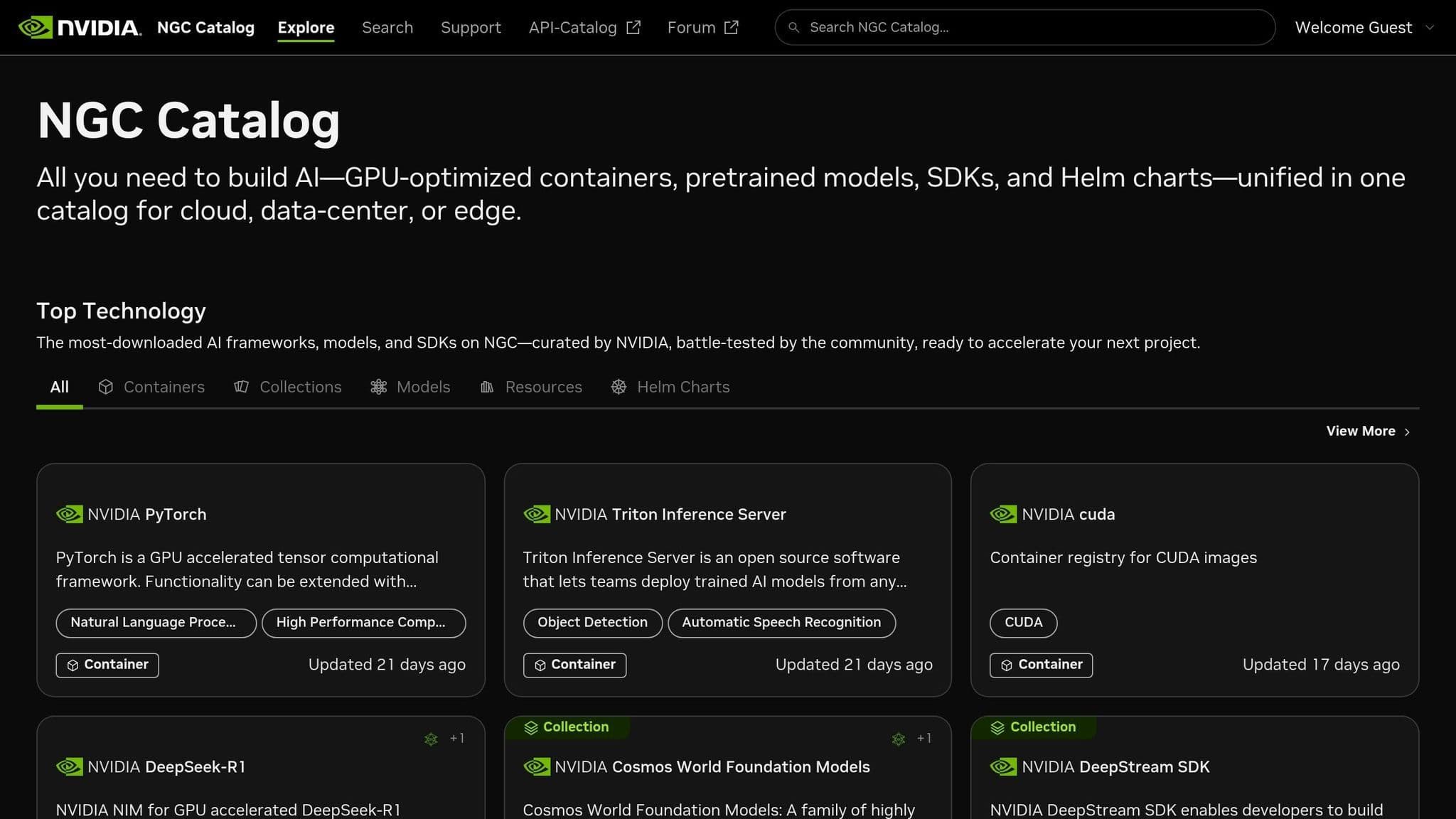
Geared specifically for NVIDIA-powered AI tasks, NGC offers a ready-made, containerized environment tailored for NVIDIA hardware. Instead of manually setting up a GPU-ready environment, NGC provides containers preloaded with everything you need: Linux OS, CUDA runtime, cuDNN, NCCL, DALI, and your preferred framework - all optimized to work seamlessly together.
"Each container has the NVIDIA GPU Cloud Software Stack... all tuned to work together immediately with no additional setup." - NVIDIA
GPU Support and NVIDIA Ecosystem Integration
NGC containers are fine-tuned for NVIDIA architectures, with updates released monthly by NVIDIA engineers. These updates ensure the software stack stays current with the latest performance enhancements and hardware optimizations. The extensive catalog includes over 1,000 resources - ranging from containers and pre-trained models to Helm charts - covering more than 80 containerized applications and SDKs.
Enabling GPU access is as simple as adding the --gpus all flag to the docker run command, eliminating the need for additional runtime installations. For Kubernetes users, the NVIDIA GPU Operator simplifies cluster management by automating tasks like driver installation, container runtime setup, and device plugin configuration.
This level of integration guarantees top-tier performance and supports flexible deployment scenarios.
Scalability and Compatibility
NGC’s portability is a standout feature. Its containers work across platforms like Docker, Singularity, cri-o, and containerd, and can be deployed on bare metal, virtual machines, or Kubernetes clusters. Supported architectures include x86, ARM, and IBM Power. Whether you’re working on a local DGX workstation or scaling across cloud providers like AWS, Google Cloud, Azure, or Oracle Cloud, the same container image can be used without modification. For production-level inference, NVIDIA NIM (Inference Microservices) delivers OpenAI-compatible APIs to accelerate foundation model deployment across any environment.
Security Features
NGC takes security seriously, employing a multi-layered approach. Each container image undergoes regular vulnerability scans, and NVIDIA offers detailed security documentation, including Software Bill of Materials (SBOMs) and Vulnerability Exploitability eXchange (VEX) reports. Digital signatures on container images and models allow teams to verify their authenticity using tools like Cosign or Kubernetes admission controllers with NVIDIA’s public key.
For enterprises, the NGC Private Registry provides a secure space to store proprietary containers, models, and Helm charts. Access is controlled via scoped API keys, with Service API Keys recommended for CI/CD pipelines over personal keys. For sensitive data, organizations can use Customer Managed Keys (CMK) to control encryption within the private registry. Additional security measures include MFA for owner accounts and support for External SSO integration with existing identity providers.
| Feature | Description | Target User |
|---|---|---|
| Automatic Mixed Precision (AMP) | Speeds up training using Tensor Cores | Data Scientists / Researchers |
| Multi-Node Scaling | Expands from single-GPU setups to DGX SuperPOD clusters | ML Engineers |
| CVE Scanning | Regular vulnerability scans with detailed reports | IT / Security Teams |
| Quick Deploy | One-click deployment to platforms like Google Cloud Vertex AI | DevOps / Developers |
Side-by-Side Comparison of Containerization Tools
Choosing the right containerization tool can make a huge difference in how efficiently you deploy AI models. Below, you'll find a detailed comparison of popular tools, focusing on GPU support, scalability, integration options, and security features.
| Tool | GPU Support | Scalability | Integration | Security Highlights | Best For |
|---|---|---|---|---|---|
| Docker | Native --gpus flag (CE 19.03+) | Single-node; manual scaling | OpenAI/Ollama APIs, Docker Compose, Testcontainers | No prompt or response data stored locally | Local development, testing, single-server deployment |
| Kubernetes | NVIDIA GPU Operator + Device Plugins | High; cluster-wide orchestration | Service discovery, load balancing, massive ecosystem | Container isolation, runtime management | Large-scale production training and inference |
| Amazon ECS | Cloud-ready GPU instances (P5/H100, P4d/A100) | High; managed cloud scaling | Native AWS services - S3, IAM, CloudWatch | Managed infrastructure security | AWS-centric AI/ML pipelines |
| HashiCorp Nomad | Bare-metal and virtualized GPU workloads | High; flexible multi-workload orchestration | Works alongside Consul and Vault; supports non-containerized apps | Vault integration for secrets management | Mixed workloads, non-Kubernetes environments |
| NVIDIA NGC | Pre-integrated CUDA, cuDNN, NCCL stack | Optimized image source; not a runtime | Works with Docker, Kubernetes, Singularity, cri-o | Monthly security scans | Source for optimized, secure AI/ML base images |
This table highlights the specific strengths of each tool, helping you choose based on your deployment needs.
For example, Docker is a go-to for local development and testing, but it lacks the scalability required for multi-node setups. Kubernetes, on the other hand, excels in distributed training and high-availability environments but comes with added complexity. If you're already using AWS, Amazon ECS provides seamless integration with AWS services and managed scaling. For teams juggling containerized and non-containerized workloads, HashiCorp Nomad offers flexibility with its unified scheduler. Lastly, NVIDIA NGC serves as a reliable source for GPU-optimized base images, perfect for building AI/ML pipelines using Docker or Kubernetes.
Conclusion
Every tool mentioned plays a specific role in deploying AI and machine learning projects. Docker is perfect for local testing environments, Kubernetes shines in orchestrating large-scale deployments, Amazon ECS simplifies operations on AWS, HashiCorp Nomad provides flexibility for mixed workloads, and NVIDIA NGC delivers a GPU-optimized starting point.
Choosing the right containerization tool depends on your project's scale, hardware requirements, and operational complexity. For instance, a solo researcher tweaking a model locally has vastly different needs compared to a team managing distributed training across multiple nodes.
Containerization ensures AI models are portable, reproducible, and ready for production. By packaging specific versions of Python, CUDA, and deep learning libraries into a single container image, it eliminates common compatibility issues in AI model deployments.
For NanoGPT, using containers guarantees a stable and reliable environment for inference while preserving local data privacy.
"Docker containers offer significant advantages for machine learning by ensuring consistent, portable, and reproducible environments across different systems... eliminating the 'it works on my machine' problem." - Youssef Hosni
FAQs
Do I need Kubernetes, or is Docker enough?
When deciding between Kubernetes and Docker, it all comes down to how complex your AI deployment is.
For simpler setups or development needs, Docker does the job. It lets you package and run containers either locally or on a single host. It's straightforward and works well for smaller applications.
However, if you're dealing with large-scale or production-grade workflows, Kubernetes is the way to go. It handles container clusters, scales workloads automatically, balances loads, and ensures high availability. These features are crucial for running complex AI models and distributed systems efficiently.
How can I ensure my container has the correct CUDA and cuDNN versions?
To make sure your container has the correct CUDA and cuDNN versions, consider using NVIDIA's GPU-optimized containers. These containers are pre-configured specifically for deep learning tasks. Look for options that clearly specify the CUDA and cuDNN versions, such as those available through NVIDIA NGC or Google Cloud Deep Learning Containers. Before deploying, double-check the container's specifications to ensure they align with the versions you need for compatibility and performance.
What’s the simplest way to run GPU containers securely in production?
The easiest way to safely run GPU containers in production is by using container runtimes that support GPU acceleration, such as NVIDIA Container Runtime. This tool ensures smooth compatibility with widely-used container platforms and streamlines deployment by bundling GPU-accelerated applications along with their required dependencies.
Essentially, this runtime serves as a link between the container engine and GPU drivers. It allows secure and efficient access to GPUs, supports setups with multiple GPUs, and integrates with orchestration tools like Kubernetes for better management.