
Best Practices for Hybrid AI Workflow Maintenance

Hybrid AI workflows combine AI automation with human expertise to streamline tasks, improve efficiency, and handle complex operations. But maintaining these systems can be tricky without the right strategies. Here's what you need to know:
- Challenges: Keeping AI models updated, managing errors, balancing resources, and ensuring data privacy.
- Solutions: Use tools like NanoGPT for cost-effective, privacy-focused AI. Implement monitoring checkpoints, automate error handling, and establish clear recovery protocols.
- Key Practices: Regularly update models, track performance metrics, and secure sensitive data. Use feedback loops to refine workflows and avoid disruptions.
Hybrid Cloud AI Workflows in a GitHub Pipeline
sbb-itb-903b5f2
Setting Up Multi-Stage Monitoring Checkpoints
Monitoring checkpoints help catch problems early, stopping small glitches from turning into bigger issues that could disrupt the user experience. The idea is to keep an eye on performance at every step, from when data enters the system to when results reach the user.
Defining Key Performance Indicators (KPIs)
Start by identifying the key metrics that matter most. These could include the quality of input data, processing latency to catch bottlenecks, and output precision and recall to ensure relevance.
"Effective AI observability goes beyond checking code logs; it requires monitoring performance metrics (such as accuracy and latency), data quality (completeness and validity), and user feedback to capture the system's end-to-end health." - Or Jacobi, Coralogix
Set clear thresholds for these KPIs so you can act quickly when something goes off track. For instance, if the error rate of your evaluators - reflecting issues like hallucinations or bias - goes beyond acceptable levels, you’ll know it’s time to take action before users encounter the problem. Keeping an eye on costs is just as important. Track resource usage, like GPU consumption or API token costs, and compare them to performance. If costs rise without clear benefits, it might signal inefficiencies.
Using Real-Time Monitoring Tools
Real-time monitoring tools are your first line of defense against errors that could snowball. Advanced systems can automatically check every data request, including user prompts and context retrieval from vector databases, to weed out anything suspicious or irrelevant before it causes trouble.
A unified observability setup - combining metrics, logs, traces, and events into a single dashboard - makes it easier to pinpoint the root of errors and data quality problems. Automating as much as possible minimizes human mistakes and speeds up the process of detecting and fixing issues. Pay attention to signs like high negative user feedback or frequent query rewrites; these often indicate that your model might need retraining or adjustments to its prompts.
This kind of proactive monitoring creates a solid foundation for effective error handling and fast recovery when things go wrong.
Error Handling and Recovery Strategies
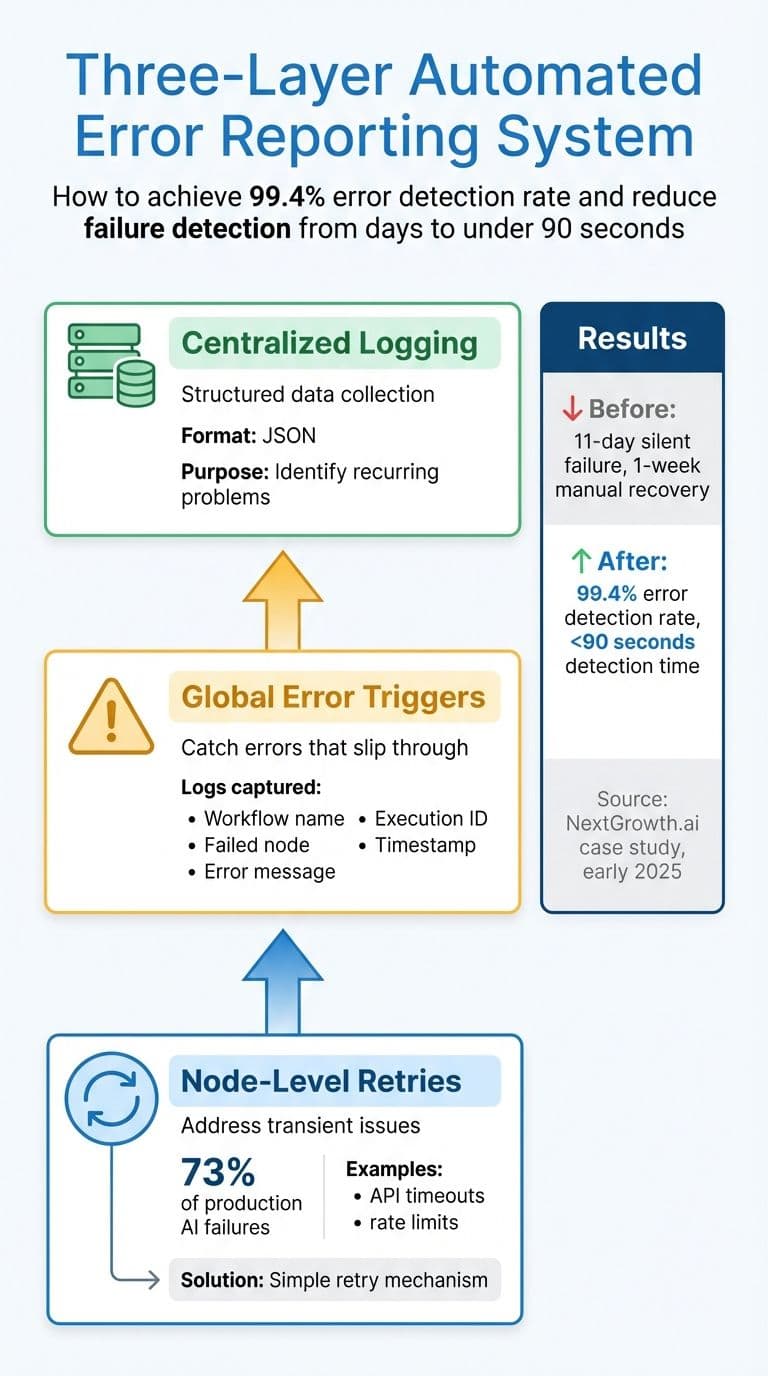
Three-Layer Automated Error Reporting System for Hybrid AI Workflows
Once monitoring checkpoints are in place, the next step is ensuring quick recovery from errors. In hybrid AI systems, errors can sometimes appear valid in format but may still be incorrect or subtly biased.
Building Automated Error Reporting Systems
A strong error reporting system typically involves three layers:
- Node-level retries: These address transient issues like API timeouts or rate limits, which account for about 73% of production AI failures. Most of these issues can be resolved with a simple retry.
- Global error triggers: These catch any errors that slip through by creating a dedicated workflow. This workflow logs critical details such as the workflow name, failed node, error message, execution ID, and timestamp.
- Centralized logging: This collects error data in structured formats (like JSON), making it easier to spot recurring problems.
For example, in early 2025, NextGrowth.ai faced a silent failure in a DataForSEO API workflow that went unnoticed for 11 days. The recovery process took a week of manual effort. DevOps engineer The Nguyen revamped their system using this three-layer approach across over 200 production workflows. This upgrade achieved a 99.4% error detection rate and reduced failure detection time from several days to under 90 seconds.
Different types of errors require specific responses:
- Transient errors (e.g., HTTP 429 rate limits or 5xx server errors): Use exponential backoff with jitter (random delays) to avoid simultaneous retries.
- Permanent errors (e.g., 401 authentication failures): Trigger immediate alerts for manual intervention.
- Circuit breakers: Temporarily disable failing services when a threshold is reached, preventing cascading failures and excessive API usage.
Creating Recovery Protocols
Once errors are detected, tiered recovery protocols are essential for resolving them effectively:
- In-place recovery: Correct minor issues like semantic loops or slight drift using corrective prompts.
- Warm restarts: Resume from the last checkpoint while maintaining context. Tools like LangGraph or Temporal are particularly useful for resuming processes at the exact failure point.
- Cold restarts: For corrupted context or persistent failures, restart the process from scratch with a task briefing.
- Session migration: In cases of infrastructure failure, transfer the session state to a new host.
"Resilience is what separates a demo from a product." - atal upadhyay
To prevent duplicate actions, design each tool call to be idempotent - this ensures that running a task multiple times either produces the same result or indicates that it has already been executed (avoiding issues like double-billing). Set hard timeouts (e.g., 30 seconds) on external API calls to prevent a single stalled request from halting the entire pipeline.
For managing context overflow, set automated thresholds:
- Start summarization at 70% capacity.
- Enforce rolling summarization at 85%.
- At 95%, checkpoint and restart with compacted context.
Ultimately, the difference between a prototype and a production system lies not in the AI model itself but in how errors are managed.
Automating Model Updates and Version Control
To ensure stability in AI workflows, automating model updates and version control is essential. AI models and their runtimes evolve rapidly, and without proper automation, silent failures can creep in, degrading performance. Data indicates that tool versioning issues account for 60% of AI agent failures, while model drift is responsible for another 40%.
Security concerns make automation even more critical. In early 2026, Anthropic's Claude Code tool resolved major vulnerabilities (CVE-2025-59536, CVSS 8.7; CVE-2026-21852, CVSS 5.3). Companies with automated update systems quickly deployed fixes, while those relying on manual processes were left vulnerable.
Model providers also enforce strict retirement schedules. For Model as a Service (MaaS) setups, Microsoft warns that retired models return HTTP errors, potentially breaking applications if updates aren't made. When a foundation model reaches its end-of-life, workflows can stop functioning immediately, with no gradual performance decline.
Scheduling Regular Model Updates
To avoid disruptions, it's important to follow a structured approach to updates:
- Lock specific model versions in your configuration files. Use identifiers like
gpt-4o-2024-08-06instead of generic "latest" tags. Silent updates can degrade performance, and as Grizzly Peak Software advises, "The only safe assumption is that every model version change is a breaking change until proven otherwise". - Use a canary rollout strategy for updates. Start by directing 5% of traffic to the new model. If metrics hold steady, gradually increase usage. Roll back immediately if error rates double, latency increases by more than 50%, or token usage rises by 30%.
- Shadow deployments provide a risk-free way to test major updates. Run both the old and new versions simultaneously but serve only the stable one. Log outputs from both for comparison, which helps identify behavioral changes.
Plan updates during low-traffic times and ensure your team is available for at least 48 hours post-upgrade for monitoring. Avoid simultaneous updates to AI runtimes and agent code to make troubleshooting easier. Also, disable auto-updates in production by setting environment variables like DISABLE_AUTOUPDATER=1 to prevent unplanned runtime changes.
Implementing Version Control for Hybrid AI Workflows
While regular updates reduce risks from model drift, version control ensures traceability and simplifies recovery when issues arise.
- Maintain a centralized model registry that links friendly names (e.g., "Summarizer") to specific model IDs, prompt versions, and provider settings. This avoids hardcoding identifiers in your codebase, making updates easier.
- Store prompts as code in Git-controlled files (e.g., YAML or Jinja2) instead of editing them through dashboards.
- Use lineage tracking to connect model versions to their training data, Git commits, and environments (including Python versions and dependencies). This allows you to quickly recreate the exact conditions if performance issues arise or audits are required. Adding SHA256 hashes to model files can also help detect corruption or unauthorized changes.
Adopt a lifecycle management system that transitions models through Development, Staging, Production, and Archives. Before promoting a model, run automated quality checks to validate JSON structure, ensure key overlap in structured outputs, and compare output lengths with previous versions.
For Retrieval-Augmented Generation (RAG) systems, version vector indexes separately (e.g., index_v1 vs. index_v2) when changing chunking strategies or embedding models. Use provider adapters - abstraction layers that handle different API shapes - so that provider changes only require updating the adapter file rather than the entire application.
Finally, implement deprecation checks during application startup. These scripts should query model metadata for retirement dates and alert your team when a pinned model is within 30–90 days of its end-of-life.
Resource Management and Performance Tracking
Managing resources effectively is key to avoiding budget overruns and ensuring hybrid AI workflows remain steady. With 80% of AI workflows operating in hybrid cloud environments, many businesses face challenges in maintaining smooth data connectivity. A good starting point is to focus on high-impact workflows - automating repetitive tasks like data processing or ticket sorting, which often consume the most time, before moving on to more complex edge cases.
From a budget perspective, it's smart to handle lightweight tasks locally while reserving cloud resources for more complex operations. For example, tasks like lead sorting can run on local infrastructure, while predictive scoring, which requires more computational power, is better suited for the cloud. This approach ensures one team doesn't exhaust resources while another can scale efficiently. Tools like Kubernetes and Terraform simplify deployment across both on-premises and cloud systems, reducing the chances of manual errors.
Real-time monitoring is essential for spotting bottlenecks in on-premises and cloud systems before they disrupt operations. Performance management tools offer comprehensive visibility into workload distribution, resource usage, and system health. Metrics such as response times, resolution efficiency, AI-to-human handoff rates, and resource utilization trends should be tracked consistently. For instance, a mid-sized operations team used AI to centralize supply chain data and detect anomalies in real-time, cutting decision-making times from days to hours while freeing up staff for more strategic tasks.
Continuous tracking builds on these insights, helping to identify patterns that may signal potential issues. For example, a drop in lead conversion rates might point to model drift, while recurring support requests could highlight flaws in handoff protocols. Data virtualization is another effective tool, enabling unified access to distributed data without physically moving it, which reduces latency in hybrid workflows. Regular reviews - monthly or quarterly - can help refine resource allocation strategies, while A/B testing can be used to experiment with different prompts, models, or process steps.
Automated alerts are another critical layer of monitoring. They can flag deviations from established thresholds, ensuring timely interventions. Notably, 70% of executives believe that improving KPIs and making performance adjustments are crucial for business success in AI-driven workflows. Monitoring invocation frequency helps prevent unnecessary resource consumption, and using developer workflows as a control plane supports sustainable scaling. This transforms workflows into adaptable systems that respond dynamically to changing demands.
Security and Compliance in Maintenance
Prioritizing User Privacy and Data Security
Keeping user data safe starts with reducing potential vulnerabilities. By storing data locally on user devices instead of relying on centralized servers, platforms can significantly lower the risk of network breaches. NanoGPT, for example, takes this approach by ensuring local data storage and isolating each session to prevent providers from linking user requests.
"A key aspect of our privacy approach is that every conversation (or chat session) is treated as separate and isolated. There is no mechanism for a model provider to link different chat sessions as originating from the same user through us." - NanoGPT
Minimizing data exposure is equally important. Personally identifiable information (PII) and IP addresses should be stripped from requests before they are sent to external model providers, leaving only the raw prompt. For workflows that require cloud synchronization, end-to-end encryption secured with user-defined passphrases ensures that off-device data remains protected. Hardware-level safeguards, such as Trusted Execution Environments (TEEs), further enhance security by isolating code and memory during execution. Alarmingly, 35% of businesses using AI lack solid protocols for handling sensitive data.
In addition to safeguarding data, adhering to regulatory standards is key to maintaining operational integrity over time.
Meeting Regulatory Requirements
Failing to meet regulations like GDPR or HIPAA can lead to heavy fines and legal challenges. For hybrid AI workflows, compliance should be part of the maintenance routine from the start. This includes regular audits, pseudonymizing data during model updates, and maintaining comprehensive documentation of data flows. For workflows involving protected health information (PHI), additional measures like encryption (both at rest and in transit), strict access controls, and automated audit logs are essential to ensure every interaction with data is tracked and secure.
Automating compliance monitoring can make ongoing maintenance more manageable. This includes enforcing input validation, using behavioral analytics to spot anomalies, and setting up alerts for deviations in metrics. Establish clear escalation protocols for scenarios such as low-confidence outputs or sensitive data requests, ensuring that critical decisions are reviewed by humans when necessary. Regular reviews - monthly or quarterly - can help evaluate the effectiveness of compliance measures, while testing backup systems ensures continuity in case of failures.
Building Feedback and Iteration Loops
Refining workflows doesn’t stop at monitoring - it’s about creating feedback loops that allow for continuous improvement.
Gathering Feedback from End Users
Getting meaningful feedback starts with recognizing a key challenge: most users only provide input when their experience is either outstanding or frustrating. This often skews manual ratings toward negativity. To counter this, hybrid AI workflows need multiple feedback channels working together.
Feedback typically comes in two forms: explicit signals (like thumbs up/down or star ratings) and implicit signals (such as copying text, rephrasing queries, or abandoning sessions). A particularly insightful metric is the "edit distance" - the difference between an AI-generated draft and the user’s final version. This measures how much users had to correct the output. Notably, 60% of enterprise AI applications rely on RAG (retrieval-augmented generation) architectures, highlighting the importance of tracking user behavior to identify retrieval issues.
"Feedback loops are the immune system of production AI. Without them, your application is frozen at launch quality, slowly drifting as the world changes and edge cases accumulate." - Sheikh Mohammad Nazmul H., Software Developer
To make feedback actionable, pair user signals with contextual metadata. This includes logging the entire interaction context - such as the prompt template, retrieved content, and model version - to help pinpoint where breakdowns occur. For teams using NanoGPT or hybrid workflows involving multiple models, tracking which model handled each step can reveal where quality falters. Simple tools like thumbs up/down buttons combined with interaction logging can provide 80% of the insights teams need to improve workflows.
These user signals lay the foundation for targeted, ongoing improvements.
Iterating on Workflow Improvements
Once feedback is gathered, the challenge is to turn it into measurable workflow upgrades. This process follows a structured four-stage cycle: observation (logging user behavior), evaluation (assessing quality), decision (determining fixes), and action (implementing changes). Automating consistency checks in the background ensures smoother operations without slowing down performance. Teams can review aggregated feedback during bi-weekly sessions to prioritize high-impact changes.
When testing updates, focus on 5–10 challenging, real-world cases rather than ideal examples. This approach reveals how well the workflow handles variability. Another key metric is tracking how often AI-driven decisions are later reversed - this helps gauge whether the system is earning user trust. Shadow deployments, where updates are tested on real traffic without affecting users, allow for performance comparisons before full rollout. Maintaining a library of prompt versions and logging which version generated each response helps measure the impact of iterative changes.
For RAG-based workflows, irrelevant answers often point to issues in the retrieval layer, such as embedding models or search parameters, rather than the language model itself.
One important caution: be selective with the data used for retraining. Relying too heavily on synthetic outputs can lead to model collapse, where performance degrades over time. Including subject matter experts in the process ensures data quality and keeps the model aligned with real-world demands.
Conclusion: Maintaining Hybrid AI Workflows Long-Term
Key Takeaways for Workflow Maintenance
Keeping hybrid AI workflows running smoothly hinges on five essential practices: continuous monitoring, automated error handling, scheduled updates, resource optimization, and privacy protection. While automation can streamline processes, it still demands consistent oversight to ensure accuracy and reliability. Teams should routinely review workflows to spot errors, eliminate bottlenecks, and update outdated rules before they disrupt operations. Tracking key performance metrics is also critical for staying ahead.
At the heart of successful AI workflows lies data quality. Poorly organized or inconsistent data can cause errors, slow down operations, and undermine AI-generated insights. By standardizing data formats, removing duplicates, and validating inputs before feeding them into workflows, teams can reduce exceptions, enhance automation, and achieve more dependable results. Additionally, treating developer workflows as a central hub for managing costs and performance is crucial. Hybrid AI systems falter when reasoning processes are treated as default actions instead of deliberate decisions. A solid data foundation also supports effective redundancy measures.
Redundancy plays a key role in preventing cascading failures. By integrating manual overrides and enabling human intervention when necessary, teams can maintain operational stability. Prioritizing privacy and compliance from the start further simplifies scaling. Early attention to audit trails and adherence to industry regulations ensures smoother automation and reduces long-term risks.
Why NanoGPT Works Well for Hybrid AI Workflows

NanoGPT aligns seamlessly with these maintenance strategies, providing a practical solution to common challenges. Its pay-as-you-go pricing model, starting at just $0.10, avoids subscription fees and ensures predictable cost management as workflows grow.
The platform’s ability to access multiple AI models in one place simplifies version control and updates. This feature lets teams test different models for specific workflow stages without juggling multiple vendor relationships or integration headaches. Additionally, NanoGPT’s local data storage addresses a major concern: privacy. By keeping data on your device rather than transmitting it to external servers, NanoGPT reduces compliance headaches and eliminates a common failure point in distributed systems. For teams prioritizing data governance, this architecture significantly lightens the maintenance load while adhering to privacy-first principles.
FAQs
Which KPIs should I monitor first in a hybrid AI workflow?
When evaluating the success of your AI models, it's crucial to keep an eye on a few key performance indicators (KPIs). These include:
- Performance metrics: Metrics like accuracy, latency, and error rates help measure how well your model is functioning. They give you insight into how effectively your AI is meeting its intended goals.
- Data quality indicators: Monitoring things like data drift and anomalies ensures that the data feeding your model remains consistent and reliable. Changes in data quality can significantly impact your model's performance over time.
By tracking these KPIs, you can maintain the reliability and efficiency of your AI systems long-term.
How do I prevent model updates from breaking production?
To minimize disruptions caused by model updates, it's smart to use version control and implement safe upgrade strategies. Techniques like version pinning, canary deployments, shadow testing, and rollback plans can make a big difference.
- Version pinning ensures you're working with a specific model version, allowing for controlled testing before rolling it out fully.
- Canary deployments introduce the new version to a small subset of users, making it easier to spot potential issues early.
- Shadow testing runs the new version alongside the current one without impacting users, helping to identify problems in a real-world environment.
Additionally, automated testing, validation processes, and rollback mechanisms provide extra layers of protection, ensuring your production environment stays stable even if updates introduce unexpected challenges.
What’s the safest way to handle PII in hybrid AI workflows?
Storing data locally on a user's device is one of the most secure methods to protect sensitive information. Tools like NanoGPT's local data storage offer privacy-focused solutions, ensuring that data remains on the device instead of being exposed to external servers. To further safeguard user privacy, it's essential to follow practices like data validation, anonymization, and real-time monitoring. These measures not only reduce the risk of data leaks but also help maintain a smooth and efficient workflow.