
How to Report AI-Generated Content Misuse
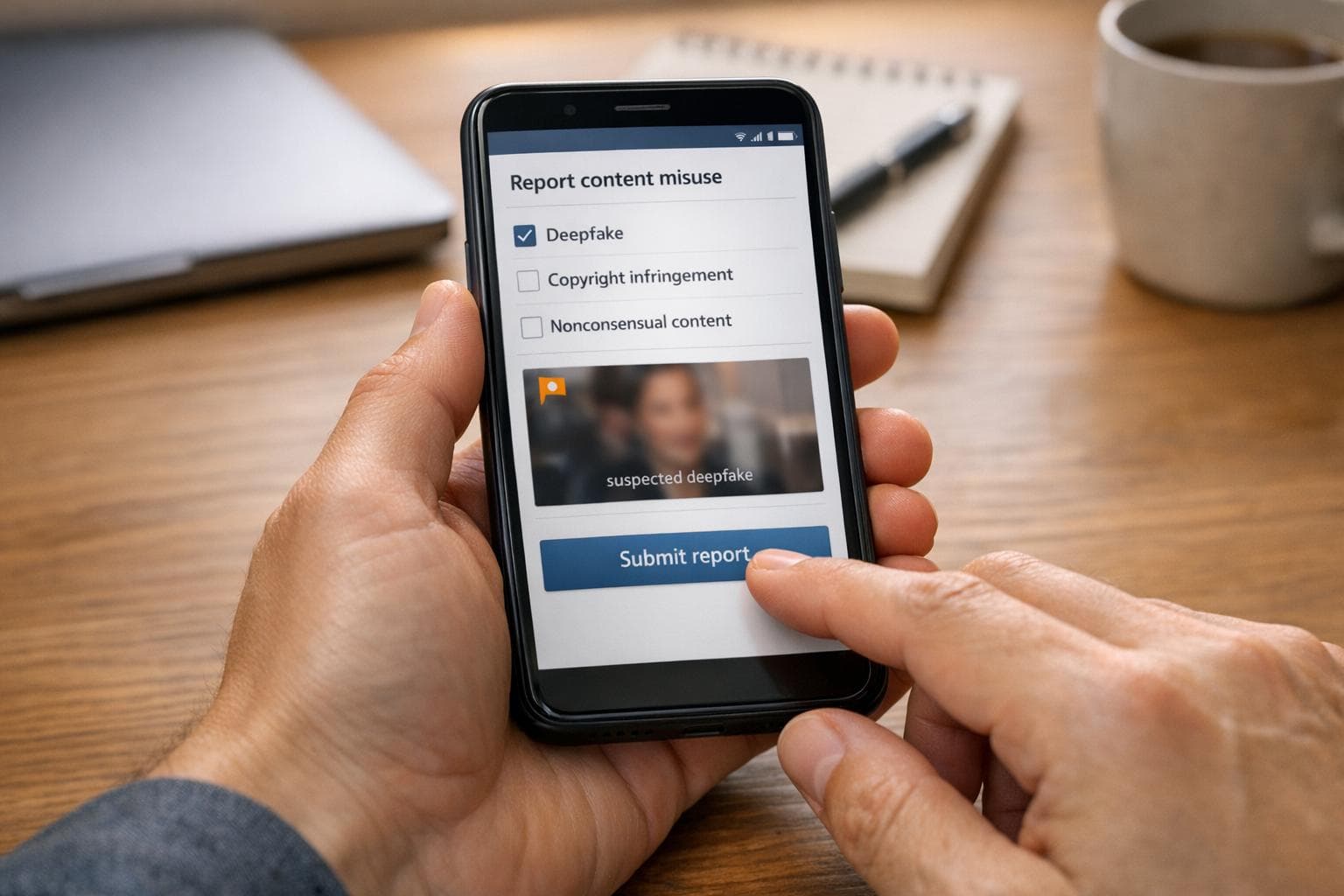
Misuse of AI-generated content is a growing problem, from deepfakes and scams to misinformation and copyright violations. Reporting these issues quickly is essential to limit harm. Here’s how you can take action:
- Identify misuse: Look for signs like physics errors in images, repetitive text patterns, or unnatural audio pacing. Use tools like reverse image searches, GPTZero, or deepfake detectors to confirm suspicions.
- Report to platforms: Use the content host's reporting tools or contact their abuse team directly. For independent sites, conduct a WHOIS lookup to find the hosting provider.
- File legal notices: For copyright issues, submit DMCA takedown notices with evidence of originality. For likeness misuse, rely on privacy laws or escalate to authorities.
- Notify AI providers: Report misuse directly to the AI tool's support channels. Some providers, like NanoGPT, have strict policies and safety features to address abuse.
- Preserve evidence: Take screenshots, save files, and use tools like the Wayback Machine to document content before it’s removed.
Understanding AI Misuse: Risks, Real-World Examples, and How to Stay Vigilant
sbb-itb-903b5f2
How to Identify AI-Generated Content Misuse
To report AI-generated content misuse, you first need to spot it. The tricky part? AI tools are getting better fast, making traditional giveaways - like awkwardly drawn hands - less dependable. Instead, focus on context, physics anomalies, and behavioral cues where AI still tends to fall short. These clues can help you recognize misuse before taking further action.
Warning Signs of Misuse
Start with your instincts. If a photo from a chaotic scene - like a protest, natural disaster, or emergency - features people looking oddly polished or flawless, it’s worth questioning. Real-life chaos doesn’t create picture-perfect moments. In text, look for repetitive phrasing or "AI-isms" like terms such as "ever-evolving landscape" or "tapestry." A recent study found that 74.2% of 900,000 newly created web pages in April 2025 contained AI-generated content.
Physics errors are another major clue. AI often struggles with 3D space: shadows might point in conflicting directions, reflections in water or glass may not match the object, and parallel lines - like those on a roof - might not meet at a single vanishing point. For audio, listen for odd pacing, a lack of natural breathing sounds, or mechanical-sounding tones. Even small linguistic mistakes, like placing currency symbols after numbers (e.g., "pounds 35,000" instead of "£35,000"), can be giveaways.
Real-World Examples of Misuse
When these warning signs are confirmed, real cases show how damaging AI misuse can be. In January 2024, a finance worker at a multinational company in Hong Kong transferred $25 million to scammers after attending a video call where every participant was a deepfake of his colleagues, including the UK-based Chief Financial Officer. The fraudsters used publicly available footage to create convincing avatars that delivered fake instructions for the transfer. Around the same time, political consultant Steven Kramer created a deepfake robocall mimicking President Joe Biden. In less than 20 minutes, he produced audio urging New Hampshire voters to skip the primary election, which was then sent to thousands of recipients.
Detection Tools for AI-Generated Content
Spotting misuse often requires a mix of observation and tech tools. For starters, check for Content Credentials using the C2PA standard at websites like contentcredentials.org/verify. This cryptographic signature can confirm if content came from a trusted source. Reverse image searches with tools like Google Lens or TinEye can help identify reused or misattributed visuals. For text, platforms like GPTZero and Copyleaks analyze patterns typical of AI writing, though they’re only accurate 75% to 85% of the time.
To catch audio deepfakes, free tools like TrueMedia.org and Hiya Deepfake Voice Detector (which offers 20 free uses per month with its Chrome plugin) can help identify synthetic voices. When scrutinizing images, zoom in to 100% - authentic photos have natural sensor noise and tiny irregularities, while AI-generated ones often show smooth, repetitive patterns. You can also use a line tool to trace vanishing points; if parallel lines don’t converge at a single point, the image might be AI-made.
How to Report AI-Generated Content Misuse
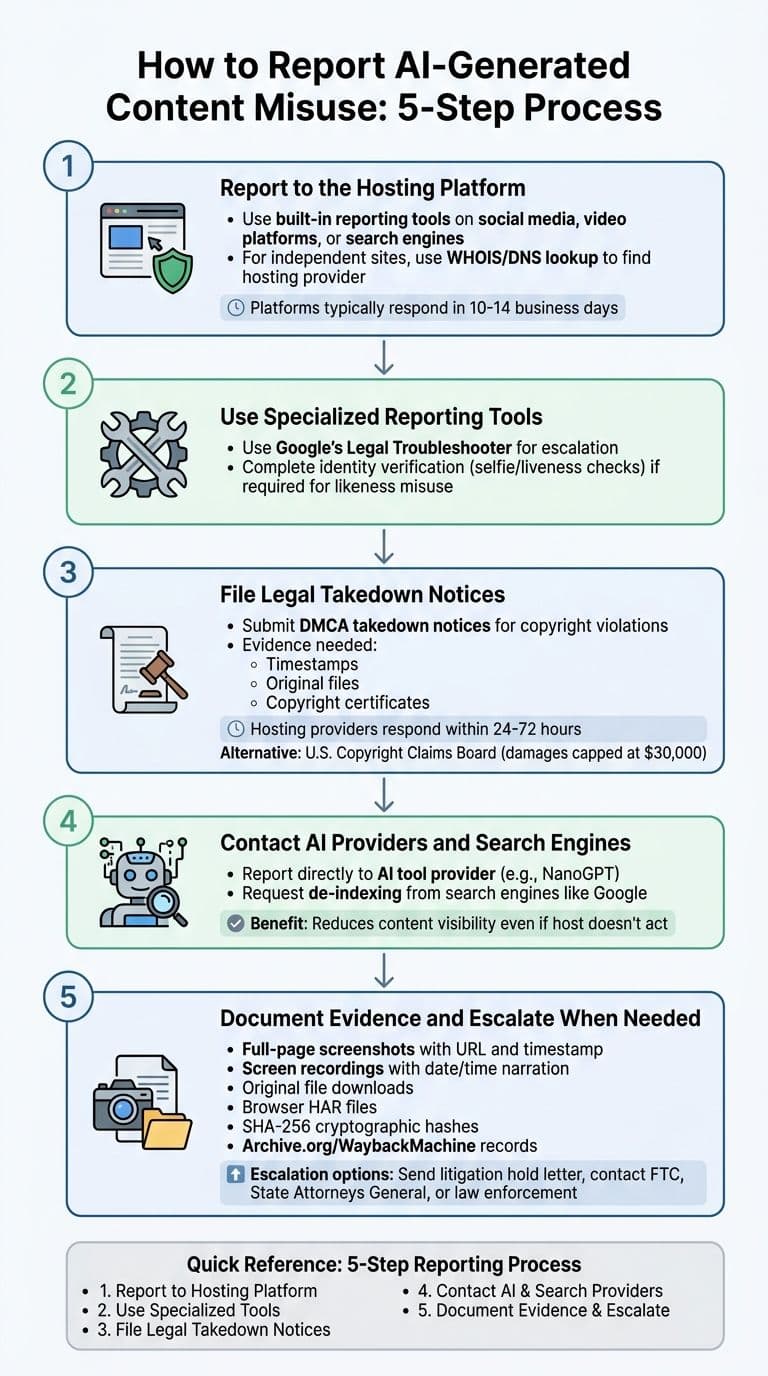
5-Step Process to Report AI-Generated Content Misuse
When dealing with misuse of AI-generated content, acting quickly is crucial. The longer harmful content stays online, the more damage it can cause, and the harder it becomes to address. Taking a structured approach ensures your report is thorough and credible, increasing the chances of a timely resolution. Here's how to handle it step by step.
Step 1: Report to the Hosting Platform
Start by reporting the issue directly to the platform where the content is hosted. Most major platforms - like social media sites, video platforms, and search engines - offer built-in tools for reporting abuse. Follow their on-screen instructions to file your report.
If the content is hosted on an independent blog or forum, you’ll need to identify the hosting provider. Tools like WHOIS or DNS lookups can help you find the provider’s contact information. Once identified, submit your report to their designated abuse contact.
Keep in mind, platforms often take 10 to 14 business days to respond, but their actions depend on whether the content violates their policies. As Google reminds users:
"Content that you disagree with or deem inappropriate is not always a violation of Google's Terms of Service or program policies."
Step 2: Use Specialized Reporting Tools
If the platform’s response is slow or unhelpful, escalate your complaint using specialized tools. For example, Google’s Legal Troubleshooter can guide you through filing complaints about content on its services.
In cases involving misuse of your likeness, some platforms may require you to verify your identity with selfie verification or liveness checks. These measures help prevent fraudulent claims while ensuring the rightful party is heard.
Step 3: File Legal Takedown Notices
When copyright or trademark violations are involved, informal reports might not be enough. Filing a formal legal notice is often necessary. The Digital Millennium Copyright Act (DMCA) provides a legal framework for removing infringing content. Most platforms and hosting providers have dedicated legal help centers to process these requests. Hosting providers usually respond within 24 to 72 hours to maintain their legal protections.
Before filing, gather evidence to prove originality, such as timestamps or original files. For example, in June 2025, Disney and NBCUniversal presented evidence of AI-generated artwork that resembled their protected characters, leading to a lawsuit seeking damages and a permanent injunction. Including a registered copyright certificate in your claim can strengthen your case. For smaller disputes, you might consider filing with the U.S. Copyright Claims Board, which caps damages at $30,000.
"The DMCA creates a working arrangement between rights holders and platforms... That structure still applies today, including when the content in question is AI generated." – Phillip Shoemaker, Identity.org
Step 4: Contact AI Providers and Search Engines
If the content was generated using a specific AI tool, such as NanoGPT, report the misuse directly to the provider. Many AI services have dedicated channels for handling such reports and are committed to addressing misuse responsibly.
Additionally, if the content appears in search results, you can request its removal from search engines like Google. Even if the original host doesn’t act immediately, de-indexing the content can significantly reduce its visibility. A notable example occurred in January 2026, when a sexually explicit AI-generated image of a public figure led to a California Attorney General investigation and widespread public attention.
Step 5: Document Evidence and Escalate When Needed
Preserving evidence is essential for building a strong case. Take full-page screenshots that include the URL and timestamp, record screen videos with narration of the date and time, and download the original files before they are removed. Tools like Archive.org or the Wayback Machine can provide permanent, timestamped records.
For more technical evidence, save your browser's HAR file and create SHA-256 cryptographic hashes of downloaded files. These steps ensure your evidence is admissible in legal proceedings.
If necessary, send a "litigation hold" letter to the hosting platform, requesting they preserve account details, IP logs, and other critical data. If the platform’s response remains inadequate, escalate your case to authorities like the Federal Trade Commission (FTC), State Attorneys General, or local law enforcement - especially in cases involving non-consensual explicit content or fraud.
| Reporting Step | Action Required | Tools/Methods |
|---|---|---|
| Hosting Platform | Report abuse | In-product reporting options |
| Evidence | Create forensic record | Screenshots, recordings, HAR files, hashes |
| Legal | File formal notices | DMCA takedown, litigation hold letters |
| AI Provider | Notify provider | Official reporting channels (e.g., NanoGPT) |
| Authorities | Escalate serious issues | Law enforcement, FTC, State Attorney General |
How to Prevent AI-Generated Content Misuse
To minimize the misuse of AI-generated content, it's essential to integrate safeguards into your workflow. This includes clear labeling of content and maintaining thorough records of your processes.
Promoting Ethical AI Usage
Respect copyright and intellectual property. Avoid prompts that include specific artist names or trademarked characters. Instead of asking for something like "Mickey Mouse in a forest", opt for descriptive styles such as "post-impressionist woodland scene" or "Bauhaus minimalism".
Address bias with intentional prompts. AI can unintentionally amplify societal biases. To counter this, use explicit and inclusive language in your prompts. For example, specify "diverse business team across ages and ethnicities" rather than just "business team". As Wanoza explains:
"AI won't fix society's biases - it amplifies them. Your responsibility isn't to make AI unbiased... but to actively correct its outputs through intentional prompting and human review."
Clearly label AI-generated content. Transparency builds trust. Use visible markers like "Generated with AI" or "Visualizing concept with AI" at the start or end of your content. Embed metadata, such as ai_generated: true and details about the model used, through formats like XMP or JSON-LD.
Avoid automating publishing. Always include human oversight. Manual review can catch inaccuracies, inappropriate outputs, or biases that automated systems might overlook.
Keep detailed records. Maintain logs of your prompts, source files, and model details. Tools like C2PA (Content Credentials) can help establish a verifiable chain of origin for your AI-generated assets.
By implementing these measures, you can proactively reduce errors and ensure responsible AI use. These strategies align with NanoGPT’s built-in safety features.
Using NanoGPT for Safe AI Usage
NanoGPT provides tools designed to support ethical AI usage and maintain safety.
AI detection API: This feature verifies the authenticity of text for just $0.01 per request. It’s particularly helpful for reviewing submitted content or auditing workflows.
Real-time safety filters: NanoGPT analyzes prompts and outputs before they are generated, automatically blocking anything that violates content policies - such as prompts involving violence, hate speech, or illegal activities. If a violation occurs, the system returns a 400 error with the code content_policy_violation instead of producing harmful content.
Strict policies against harmful content: NanoGPT enforces a zero-tolerance approach to deepfakes, non-consensual intimate imagery, and child sexual abuse material (CSAM). It uses technologies like PhotoDNA to detect and report illegal material. For image generation, NSFW classification endpoints help prevent the creation of sexually explicit or otherwise inappropriate visuals.
Local data storage: By storing data locally, NanoGPT ensures users maintain control over their information and reduces the risk of unauthorized access. With its pay-as-you-go pricing model starting at $0.10, NanoGPT makes integrating safety tools accessible without requiring subscriptions.
These features and practices make NanoGPT a strong ally for promoting safe and ethical AI usage.
Reporting AI Content Misuse in the United States
US Copyright and Privacy Laws
In the United States, copyright protection for AI-generated content hinges on the presence of substantial human creativity. The U.S. Copyright Office (USCO) has made it clear that works solely created by AI prompts don’t qualify for copyright. Shira Perlmutter, Register of Copyrights and Director of the U.S. Copyright Office, explained:
"Extending protection to material whose expressive elements are determined by a machine... would undermine rather than further the constitutional goals of copyright".
If you're seeking copyright protection for content that incorporates AI elements, it’s essential to document your specific human contributions. This evidence becomes particularly important when filing takedown notices or pursuing legal action.
The legal landscape around AI-generated content is evolving rapidly. In July 2024, the USCO proposed federal legislation to address unauthorized AI-generated digital replicas, following over 10,000 public comments. High-profile legal battles have also emerged. For example, in June 2025, Disney (including Lucasfilm and Marvel) and Universal Pictures filed a lawsuit against Midjourney in Los Angeles, accusing the platform of willful copyright infringement. The case included visual evidence of AI recreating well-known characters, such as Elsa from Frozen and Bart Simpson, and sought damages of $150,000 per infringed work - potentially exceeding $20 million in total.
For cases involving likeness misuse without copyright ownership - such as fake endorsements or AI-generated replicas - DMCA takedown notices are not applicable. Instead, individuals must rely on state privacy laws or pursue remedies related to the right of publicity. Celebrities have already spoken out on this issue. In April 2026, Reese Witherspoon addressed concerns over AI-generated endorsements, stating:
"No one is paying me".
This legal framework underscores the importance of understanding your rights and the available steps to address misuse of AI-generated content.
US-Based Reporting Resources
Victims of AI misuse in the U.S. have access to several resources designed to provide support and streamline the reporting process. One key option is the Copyright Claims Board (CCB), established by the CASE Act of 2020. The CCB offers a more accessible alternative to federal court for disputes involving damages of up to $30,000. Cases can be filed through eCCB without requiring a lawyer, with statutory damages capped at $15,000 per work infringed. Note that claims must be filed within three years of the infringing activity.
For DMCA takedown notices, you can search the U.S. Copyright Office’s DMCA Designated Agent Directory at dmca.copyright.gov/osp/ to locate the correct contact for the hosting platform. While copyright registration isn’t required to send a takedown notice, it is mandatory before pursuing a lawsuit in federal court.
In cases involving nonconsensual intimate images or deepfakes, the Cyber Civil Rights Initiative (CCRI) provides assistance through its Image Abuse Helpline, reachable at 1-844-878-CCRI. Additionally, incidents can be reported to the Federal Trade Commission (FTC) at ReportFraud.ftc.gov. For intellectual property theft, piracy, or counterfeiting, the National Intellectual Property Rights (IPR) Coordination Center, led by Homeland Security Investigations, offers resources such as the "IP Protect" program, which is particularly helpful for small businesses.
Conclusion
Summary of Reporting Steps
Addressing AI-generated content misuse requires swift and organized action. Start by recognizing key warning signs - such as unusual blinking patterns, odd skin textures, or mismatched lip-syncing in videos. Once identified, secure evidence immediately. This means taking screenshots, recording your screen, downloading files, or even creating cryptographic hashes to ensure you have a solid, tamper-proof record.
Next, report the issue through multiple channels. Use the platform's built-in reporting tools, reach out directly to AI providers (like NanoGPT's dedicated reporting portal), and submit DMCA takedown notices if copyright violations are involved. For severe cases, such as those involving non-consensual imagery or extortion, escalate the matter to agencies like the FTC, state Attorneys General, or local cybercrime units. As Complaint.page advises:
"Fast preservation + clear chain-of-custody = far more options later. If you wait and only have a re-saved screenshot, legal and enforcement paths narrow quickly".
Final Thoughts on Responsible AI Usage
While knowing how to report misuse is critical, it’s just as important to think about the bigger picture: responsible AI use. With AI-generated content becoming more prevalent - by March 2025, 25% of TikTok posts are projected to be synthetic - prevention is just as vital as addressing misuse. Reporting not only protects you but also helps AI providers refine their safety measures, reducing the spread of harmful content.
Being responsible with AI tools means choosing platforms that prioritize security and ethical practices. For example, NanoGPT (https://nano-gpt.com) offers advanced AI models for text and image generation while ensuring privacy through local data storage. Its pay-as-you-go model eliminates subscription commitments, making it easier to use AI tools without contributing to misuse.
Taking action against AI misuse is essential to maintaining the integrity of digital content and holding platforms accountable. Whether you’re a creator, business owner, or concerned individual, understanding your rights and available reporting mechanisms equips you to act effectively. By responding decisively and ethically, you contribute to a safer digital space and protect the value of creative content.
FAQs
What proof should I save before reporting?
Before taking steps to report the misuse of AI-generated content, it's important to gather clear and reliable evidence. This includes saving screenshots, metadata, relevant URLs, and, if possible, any witness statements. Make sure to preserve this evidence as quickly as possible - ideally within the first hour - to ensure its accuracy and usefulness. Avoid sharing the evidence widely, as this could unintentionally cause further harm or weaken its credibility. Keeping the evidence authentic and maintaining a proper chain of custody is essential, especially if you plan to file a complaint or pursue legal action.
When should I file a DMCA notice instead of a platform report?
When dealing with copyright infringement, filing a DMCA notice is the way to go if you want to directly address the issue and request the removal of specific content. This process involves contacting the hosting provider or platform through their designated channels, provided you have clear evidence of the infringement. It’s a legal route designed to protect your rights.
On the other hand, platform reports are more suitable for addressing content that violates a platform's policies or community standards but isn’t necessarily tied to copyright issues. These reports focus on breaches like inappropriate behavior or rule violations rather than legal copyright claims.
Who can help in the U.S. if the platform won’t act?
If a platform doesn’t take action on reports of AI-generated content misuse in the U.S., federal agencies can step in. The FBI's Internet Crime Complaint Center (IC3) deals with cybercrimes, including online abuse, while the Federal Trade Commission (FTC) focuses on issues like the nonconsensual sharing of intimate images. These agencies have the authority to investigate and act when platforms fall short in addressing such concerns.