
How to Calculate AI Image API Costs

AI image APIs can cost as little as $0.003 per image or as much as $0.25 per image, depending on the provider and settings. The pricing varies based on factors like resolution, quality, and billing models. Here's what you need to know:
- Per-Image Pricing: Flat fee per image, often dependent on resolution and quality.
- Token-Based Billing: Charges based on input/output tokens and sometimes "thinking tokens" for complex processing.
- Subscription vs. Pay-As-You-Go: Subscriptions are cheaper for high-volume users, while pay-as-you-go suits irregular workloads.
- Hidden Costs: Failed generations, extra features (e.g., web search), and storage can add to your bill.
For example, generating 10,000 high-quality images could cost $600 with Google's Imagen 4 Ultra or $1,670 with OpenAI's GPT Image 1 High. Understanding these factors helps you avoid surprises and control expenses.
Quick Tip: Start with lower resolutions and simpler prompts to reduce costs. Use batch APIs for bulk tasks to save up to 50%.
Read on for a step-by-step guide to estimating your AI image API expenses.
STOP Overpaying for AI Images (Real Price Breakdown)
sbb-itb-903b5f2
How AI Image API Pricing Works
AI image APIs typically follow two main billing methods: per-image pricing and token-based billing. Per-image pricing charges a flat fee for each image generated, often varying by resolution. For instance, Stable Diffusion 3 costs as little as $0.0020 per 1024×1024 image, while Flux 1.1 Pro is priced at $0.040 for the same resolution. Token-based billing, on the other hand, breaks down both your input (the text prompt) and the output (the image) into tokens - around three words equal four tokens - and calculates charges accordingly. For example, Google's Gemini 3 Pro Image charges $2.00 per million input tokens and $120.00 per million output tokens.
Some newer models add a third layer of costs: "thinking tokens." These account for the internal reasoning the AI performs before generating an image. For Gemini 3 Pro, thinking tokens are priced at $12.00 per million on standard APIs, adding roughly $0.01–$0.03 per image. This can contribute 7–18% of the total cost when using models with advanced reasoning, like Chain-of-Thought.
Per-Image Pricing and Token-Based Billing
Per-image pricing is simple - you pay a set fee for each image, regardless of how detailed your input is. For example, Google's Imagen 4 Ultra charges $0.06 per image, while OpenAI's GPT Image 1 High Quality is priced at $0.167. Token-based systems, however, offer more granularity. A 2K image generated by Gemini 3 Pro uses 1,120 output tokens, costing $0.134, while a 4K image requires 2,000 tokens, totaling $0.240. Input tokens are relatively inexpensive, with a typical prompt costing around $0.0002.
Batch APIs provide a cost-effective solution for non-urgent tasks. These APIs process requests within 24 hours instead of instantly, reducing costs by 50%. For instance, Google's Batch API charges $0.067 for 2K images and $0.12 for 4K images, compared to $0.134 and $0.240 on standard APIs. This option is ideal for bulk tasks like creating product catalogs or training datasets where immediate results aren't necessary.
These pricing structures form the foundation for understanding both pay-as-you-go and subscription-based models.
Pay-As-You-Go vs. Subscription Tiers
Beyond billing methods, the way you access these APIs significantly influences your expenses.
Pay-as-you-go models charge only for what you use, with no monthly commitments. NanoGPT, for example, operates on this model, letting users access various AI tools with a single credit balance. This approach works well for irregular workloads or testing, as you pay per token or per image.
Subscriptions, on the other hand, offer a fixed monthly fee for a set quota. For example, Google AI Pro costs $19.99/month and includes 100 Nano Banana Pro images daily, while ChatGPT Plus costs $20.00/month with unlimited GPT-5.1/DALL-E 3 generations. However, daily quotas reset at midnight, which means unused capacity - like on weekends - goes to waste, potentially up to 29% of your subscription. Subscriptions become more economical as usage increases. For instance, generating over 83 4K images per month makes the $19.99 Pro plan cheaper than standard API rates.
What Affects API Pricing
Several factors influence the final cost of using an AI image API, beyond just the pricing model itself.
Resolution is a major cost driver. Google charges $0.134 for both 1K and 2K images since they use the same number of tokens, but 4K images jump to $0.240 - a 79% increase. Quality settings also play a role; OpenAI offers square images ranging from $0.01 for low quality to $0.17 for high quality.
Failed generations can also impact costs, as they still consume tokens or quota - even if the output is rejected due to content policies or other issues. The complexity of your prompt matters too; clear, concise prompts reduce the use of thinking tokens, lowering overall costs. Additional features like web-search grounding may also add charges, often around $0.035 per request.
Some external services offer flat-rate pricing, which can cut costs compared to tiered official rates. However, these third-party services may lack official support or service guarantees, which could be a trade-off to consider.
How to Calculate AI Image API Costs
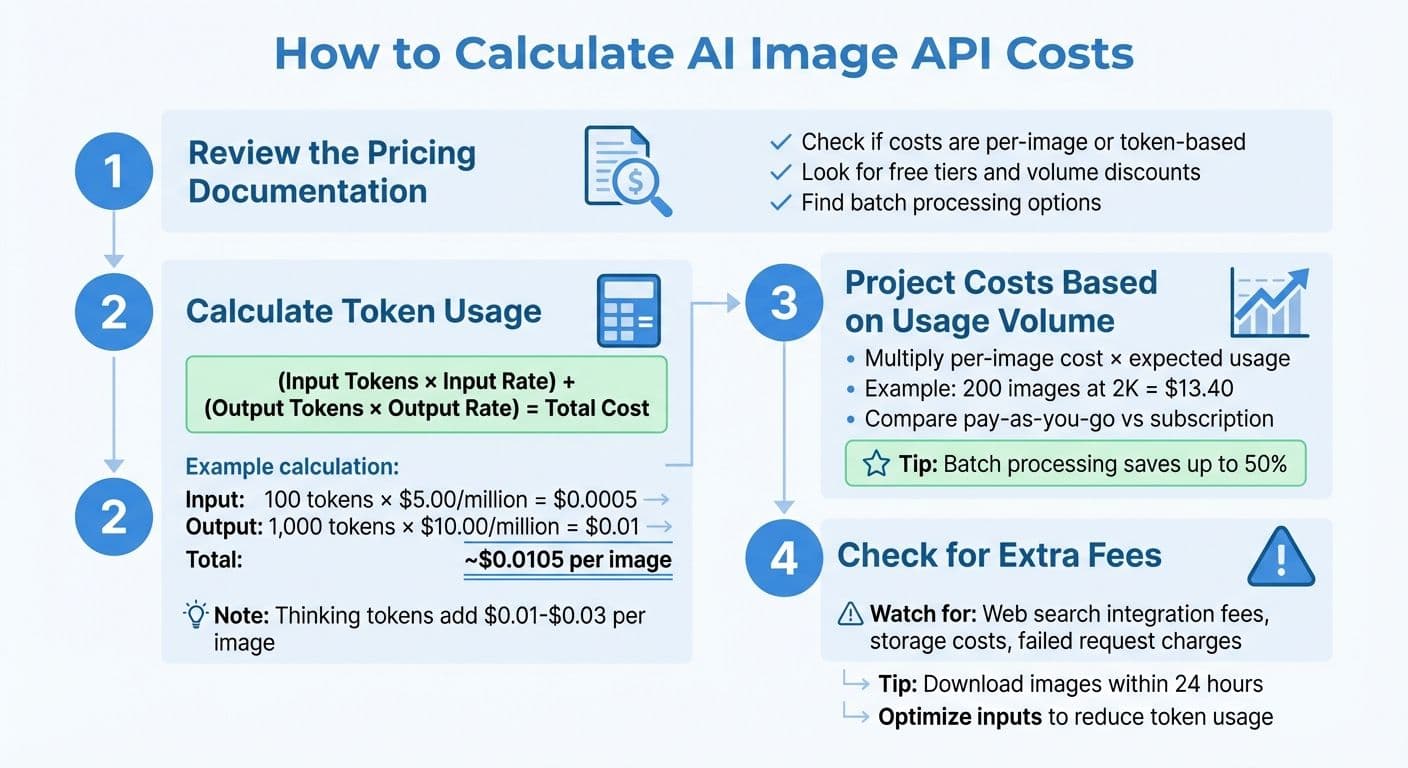
4-Step Guide to Calculating AI Image API Costs
Once you’ve got a handle on the basics of pricing, the next step is figuring out your actual expenses. This involves reviewing the pricing details, estimating token usage, projecting costs based on your needs, and checking for any additional fees. Here's how to break it all down.
Step 1: Review the Pricing Documentation
Start by visiting the official pricing page of your API provider. Check whether costs are calculated as fixed rates per image or based on token usage. Many APIs, like NanoGPT, offer tiered pricing that varies depending on image quality and resolution. Look for free tiers, volume discounts, or batch processing options that might help reduce your overall costs.
Step 2: Calculate Token Usage
If the API uses token-based billing, you’ll need to estimate how many tokens your text prompts and images will consume. For instance, a short text prompt might only cost a fraction of a cent. In tasks involving both text and images, you can standardize input token usage by setting "low detail" to 85 tokens.
Here’s a basic formula to estimate costs:
(Input Tokens × Input Rate) + (Output Tokens × Output Rate) = Total Cost
For example, if an API charges $5.00 per million tokens for input and $10.00 per million tokens for output, using 100 input tokens and 1,000 output tokens would cost:
(100 × $5.00/1,000,000) + (1,000 × $10.00/1,000,000) ≈ $0.0005 + $0.01 = ~$0.0105 per image.
Keep in mind that some advanced models include "thinking tokens" for internal processing, which can add $0.01 to $0.03 per image. For complex prompts, these tokens might make up 20% to 40% of the total cost. Using parameters like thinking_level="low" for simpler tasks can help reduce these additional expenses.
Step 3: Project Costs Based on Usage Volume
Once you’ve calculated your per-image or per-token cost, multiply it by your expected usage to estimate your total expenses. For instance, generating 200 images at 2K resolution might cost around $13.40. For high-quality production, creating 50 4K images per month using NanoGPT’s Standard API might cost about $12.00, excluding the cost of prompt text.
Decide whether a pay-as-you-go model or a subscription plan works better for you. NanoGPT, for example, uses a pay-as-you-go system with no minimum deposits or per-query fees, making it a good option for lower usage. For higher volumes, batch processing can significantly reduce costs - sometimes by nearly 50%. To avoid surprises, consider setting budget alerts and usage quotas.
Step 4: Check for Extra Fees
Look out for additional charges that might affect your overall bill. Some providers charge extra for integrations like web search, code interpretation, or file search features. Enabling features like search grounding might also come with a flat fee per request.
Storage fees can also add up. NanoGPT, for instance, stores images locally on your device for up to 24 hours, helping you avoid ongoing storage costs. To minimize these fees, download your images promptly and store them on your own infrastructure.
Lastly, be aware that failed or retried requests may still incur processing charges. To save on costs, optimize your inputs by compressing or resizing images (e.g., keeping them under 4 MB) to reduce token usage and processing time. Keeping an eye on these extra fees ensures your budget stays on track.
Example: Calculating Costs with NanoGPT
How NanoGPT's Pay-As-You-Go Model Works
NanoGPT operates on a straightforward pay-as-you-go system - no subscriptions, no hidden charges. You can deposit as little as $1.00 through standard payment methods or $0.10 if you're using cryptocurrency. Costs are deducted in real-time, and every API response includes a cost field showing what you were charged for that request, along with a remainingBalance field to keep tabs on your spending.
With access to 139 image models, including Flux Pro, DALL-E, and Stable Diffusion, all charges are conveniently billed from a single account balance. NanoGPT prioritizes privacy by keeping your data stored locally on your device, not on external servers. When you generate images, they're delivered via signed download URLs that expire after about an hour. These files are deleted from NanoGPT's servers within 24 hours, so it's important to download them promptly.
To help you manage your budget, NanoGPT allows you to set a daily spending cap ("USD per Day") for individual API keys through the dashboard. This feature ensures you won't accidentally drain your balance during high-usage periods, whether you're running tests or automating workflows.
Here's an example to show how costs break down in practice.
Sample Cost Calculation
Let’s say you’re generating 10 medium-quality images at 1024×1024 resolution using Flux Pro. Each image requires about 200 input tokens for the text prompt and generates roughly 1,290 output tokens. NanoGPT charges approximately $2.00 per million input tokens and $10.00 per million output tokens. The cost for one image is calculated as follows:
(200 × $2.00/1,000,000) + (1,290 × $10.00/1,000,000)
≈ $0.0004 + $0.0129
≈ $0.014 per image
For 10 images, the total cost comes to about $0.14.
Now, imagine a larger project for the month: generating 500 low-quality images using Stable Diffusion. At an estimated $0.003 per image, the base cost is $1.50. Adding the cost for around 500,000 tokens (approximately 1,000 tokens per image) at the same rates adds $0.70. This brings your monthly total to roughly $2.20.
Keep in mind, these calculations exclude optional extras like web searches, which cost $0.006 per request for standard searches or $0.06 for deep searches. And since NanoGPT stores your images locally, you won’t incur any ongoing storage fees.
Conclusion
Breaking down pricing components makes cost estimation much easier. Modern pricing models rely on tokens for inputs, outputs, and internal processing. For most cases, output tokens make up about 85–90% of the cost per image, while reasoning tokens - used in techniques like Chain-of-Thought reasoning - typically add an extra $0.01 to $0.03 per image.
Once you know how costs are calculated, keeping an eye on real-time usage becomes crucial. Accurate cost predictions depend on tracking key metrics like requests, tokens, and images. By extracting usage_metadata from API responses, you can monitor consumption in real time and identify what’s driving costs. Additionally, starting with lower image resolutions and reduced reasoning levels during development can save money - a 1K resolution image, for instance, uses about half the tokens of a 2K image.
Pay-as-you-go models are ideal for workloads that fluctuate. Unlike subscription plans where unused quotas reset daily, NanoGPT allows you to retain your balance and charges only for what you use. This approach eliminates wasted quotas and makes budgeting easier, no matter the project size.
For non-urgent tasks, batch APIs can cut token costs by up to 50%. Combining batch processing with concise prompt engineering helps reduce token usage while keeping expenses predictable.
Choosing a platform with transparent pricing is essential. Look for services that include detailed cost breakdowns in every API response, so you know exactly what you’re paying and how much balance remains. With local data storage and clear retention policies, you can stay in control of both your budget and your data privacy.
FAQs
How can I estimate image output tokens before I generate anything?
To estimate the number of tokens needed for image output, refer to tools or guidelines provided in the NanoGPT API documentation. For models such as GPT-4o and GPT-4.1, token usage varies based on the image's size and level of detail. For example, a 512×512 tile might use around 170 tokens. You can either calculate this manually or use token calculators, where you input image dimensions and model specifications. These tools can help you anticipate token usage and potential costs before creating an image.
When should I use batch image generation to cut costs?
Batch image generation is a smart choice for cutting costs when handling large numbers of images, especially if you're okay with some delays. By creating multiple images at once and taking advantage of times when demand is lower, you can save up to 63%. This method is particularly useful for bulk projects or enterprise-level tasks where instant results aren't necessary, helping you manage expenses more efficiently.
How do I avoid paying for failed or retried image requests?
When using NanoGPT, you can avoid unnecessary charges for failed or repeated image requests by keeping a close eye on request statuses and managing retries smartly. Always use status endpoints to confirm whether a request has been completed before attempting to retry.
To keep costs under control, make sure to:
- Implement error handling: Set up proper mechanisms to catch and address errors promptly.
- Set rate limits: Prevent excessive requests that could lead to failures or additional charges.
- Enable auto-recharge options: Ensure uninterrupted service without unexpected fees.
By verifying successful requests and following these practices, you’ll only be charged for completed tasks, helping to reduce unnecessary expenses.