
Compression Techniques for Scalable Text APIs
Compression is essential for scalable text APIs. It reduces data size, speeds up response times, and lowers costs. Here’s a quick breakdown of four popular methods:
- Gzip: Widely supported and reduces JSON payloads by ~85%. Best for general-purpose APIs due to its balance of speed and compatibility.
- Brotli: Compresses better than Gzip (70–90% reduction) but uses more CPU. Ideal for static files and modern web apps.
- MessagePack: A binary serialization format that’s faster than JSON and shrinks payloads by 30–50%. Best for high-throughput internal APIs.
- Avro: Combines compact binary encoding with schema support, reducing size by 50–70%. Useful for big data pipelines and streaming environments.
Key takeaway: Choose a method based on your API’s needs. Gzip works for most cases, Brotli excels with static content, MessagePack is great for speed, and Avro suits schema-heavy systems. Pairing compression with caching strategies can further improve performance and reduce costs.
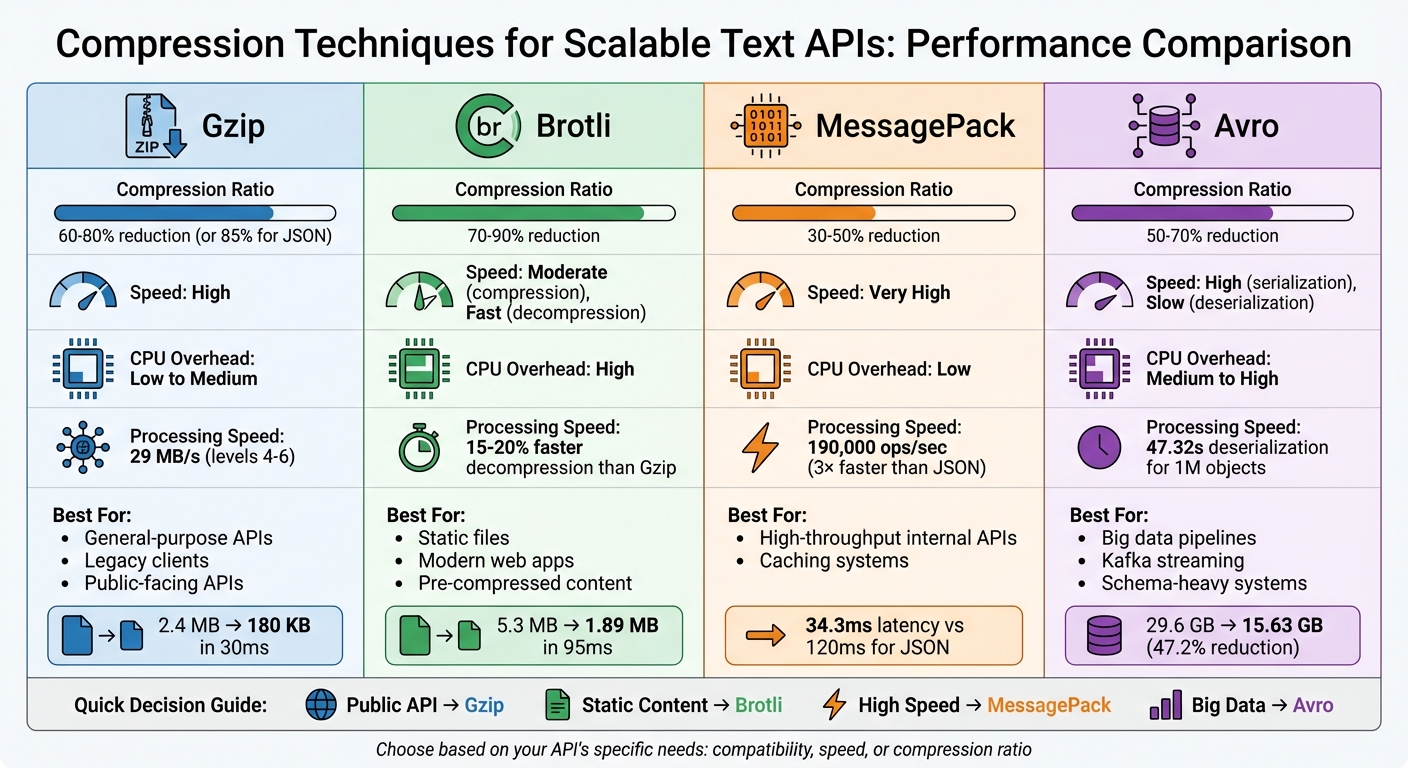
Compression Techniques for Text APIs: Performance Comparison Chart
I Made My API 4x FASTER With This ONE Trick! | Gzip vs Brotli Compression Explained
sbb-itb-903b5f2
1. Gzip
Gzip relies on the DEFLATE algorithm and provides nine compression levels, allowing users to balance speed with file size reduction. This flexibility is particularly useful for text generation APIs, where different situations call for varying trade-offs. For instance, Level 1 processes data at approximately 83 MB/s but achieves only 60–62% compression. In contrast, Level 9 slows down significantly to 8 MB/s but delivers a higher compression rate of 85–87%. That said, the jump from Level 1 to Level 9 increases processing time tenfold for just a 16% improvement in compression. These trade-offs highlight the need to weigh speed against compression efficiency depending on the use case.
Compression Ratio
When it comes to JSON payloads, Gzip typically reduces file sizes by 85%. For example, a 2.4 MB response can shrink to just 180 KB in about 30 milliseconds. The impact on network performance is dramatic: a 10 MB uncompressed response would take 30 seconds to load on a 3G network, but a compressed 1 MB version would load in only 3 seconds. For APIs managing thousands of requests daily, this reduction not only cuts bandwidth costs but also greatly enhances the experience for mobile users.
Speed
Gzip's speed varies depending on the compression level. Levels 4–6 hit a practical middle ground for many API scenarios, achieving 75–80% compression at a throughput of roughly 29 MB/s. These levels are often the default for web servers, as they balance performance and CPU usage during traffic spikes. Lower levels (1–3) prioritize speed, making them ideal for real-time streaming where latency must be minimized. Meanwhile, higher levels (7–9) are better suited for static assets that can be compressed ahead of time.
CPU Overhead
CPU usage becomes a critical factor, especially under heavy traffic. High compression levels can lead to a tail-latency issue where requests pile up, causing significant delays at the p95 and p99 latency levels, even if the average response time appears acceptable. For smaller responses (under 1–2 KB), the CPU cost of compression and the 18-byte Gzip header can outweigh the bandwidth savings. On the bright side, decompression is much faster than compression, which benefits mobile clients with limited processing power. However, server-side compression still limits the overall throughput of each instance.
Best Use Case
Gzip is the most widely supported compression method for public APIs. It works seamlessly with browsers, HTTP clients, older proxies, and legacy SDKs, unlike newer options like Brotli, which may lack compatibility in some cases. For APIs serving large volumes of traffic, it's important to optimize performance and resource use.
- Use Levels 4–6 for dynamic API responses to balance speed and compression.
- Skip compression entirely for payloads smaller than 1 KB, as the CPU cost outweighs the benefits.
- Pre-compress static files like documentation or JavaScript bundles at Level 9 during deployment.
Lastly, avoid compressing already-compressed formats like JPEGs or MP4s. Doing so wastes CPU resources and, in some cases, can even increase file size.
2. Brotli
Building on Gzip's versatility, Brotli provides a modern compression option with better file size reduction. This algorithm combines LZ77, Huffman coding, and a static dictionary tailored for web formats like JSON, HTML, and JavaScript. Brotli's custom dictionary feature shines when dealing with large, structured JSON data. Typically, it reduces file sizes by 70–80%, compared to Gzip's 60–70%, and in direct comparisons, Brotli often saves an extra 5–20% over Gzip.
Compression Ratio
Brotli's compression capabilities are impressive. For instance, compressing a 565 KB Form Model JSON with Brotli at level 11 resulted in a mere 61 KB file, while Gzip at level 9 produced 78 KB. Ayrshare, a social API provider, tested Brotli on Shakespeare's complete works (5.3 MB) in March 2025. Brotli compressed the file to 1.89 MB in 95.31 ms, while Gzip reduced it to 2.03 MB in 252.01 ms - a clear win for Brotli in both size and speed. Facebook (Meta) also switched to Brotli for compressing JavaScript bundles and API responses, reporting an 18% drop in bandwidth usage compared to Gzip. Although Brotli achieves better compression, it does require more processing time than Gzip.
Speed
While Brotli is slower during compression, it makes up for it with faster decompression. Achieving high compression ratios demands more CPU power, adding 15–30 ms of processing time per response. However, its decompression speed is 15–20% faster than Gzip, which is especially useful for mobile devices and low-power hardware. Under heavy server loads, Brotli's higher CPU usage can lead to request delays and increased latency for high-percentile (p95/p99) response times.
CPU Overhead
"Brotli is designed to squeeze text extremely well. On JSON, HTML, and other 'wordy' payloads, it surpasses Gzip in compression ratio at higher levels." - Koder.ai
The trade-off for Brotli's excellent compression is its demand for more CPU cycles. This can lead to higher compute costs, particularly for dynamic API responses. Servers may hit CPU limits faster, triggering autoscaling and increasing infrastructure expenses, even as bandwidth costs drop. Choosing the right compression settings is critical to balancing these trade-offs, especially when handling both dynamic and static content.
Best Use Case
For APIs generating dynamic text, Brotli levels 4–6 provide a good balance between CPU usage and compression efficiency. Save the highest compression level (level 11) for static files or pre-generated data, where the extra processing time is spread across multiple requests. Like Gzip, avoid compressing responses smaller than 1–2 KB to conserve CPU resources. Additionally, always set up Gzip as a fallback for older clients that don't support Brotli (br encoding). Be sure to include the Vary: Accept-Encoding header to prevent CDNs from serving Brotli-compressed files to incompatible clients.
Next, we’ll take a closer look at MessagePack and how it compares as a compression strategy.
3. MessagePack
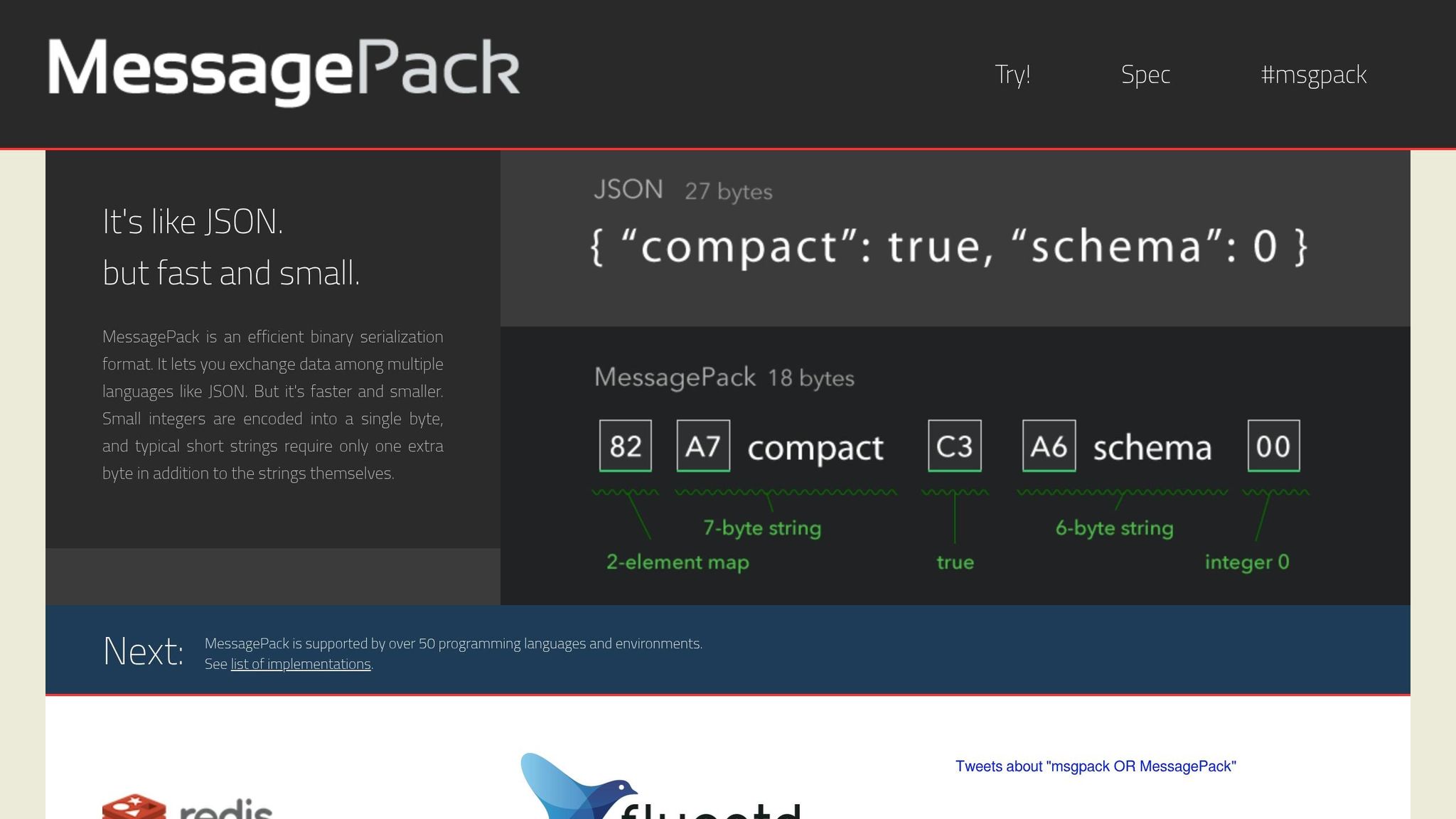
MessagePack takes a different approach from traditional compression methods by using binary serialization instead of compressing text.
Unlike Gzip and Brotli, MessagePack isn't a compression algorithm. It's a binary serialization format that replaces JSON with a more compact encoding structure. This means it reduces payload size by converting data into a binary form, avoiding JSON's verbose field names and quotation marks. Think of it as a streamlined, efficient alternative to JSON.
Compression Ratio
When it comes to size reduction, MessagePack delivers modest results compared to Gzip and Brotli. It typically reduces payloads by 15–17.5% compared to standard JSON [17, 18]. For instance, a simple 56-byte JSON object can shrink to 38 bytes, which is about a 32% reduction. In comparison, Gzip and Brotli can achieve reductions of 60–80% and 70–90%, respectively.
One key advantage of MessagePack is its native support for binary data, removing the need for Base64 encoding. Base64 can inflate JSON payloads by around 33%. Interestingly, when MessagePack or JSON is further compressed with Gzip or Brotli, the final size is almost the same.
Speed
MessagePack shines when it comes to speed. It processes approximately 190,000 operations per second, significantly outpacing JSON's 58,000 operations per second. In benchmarks involving 1 million operations, MessagePack encoding took just 420 ms, while JSON encoding took 850 ms.
Latency tests also highlight MessagePack's speed advantage, with a median round-trip latency (p50) of 34.3 ms compared to JSON's 120 ms - a 3.5× improvement.
"Actually we just wanted a fast replacement of JSON, and MessagePack is simply useful." - Kazuki Ohta, CTO of Treasure Data.
CPU Overhead
One of MessagePack's strengths is its lower CPU overhead during serialization, making it ideal for high-throughput scenarios. By reducing string allocations and simplifying text parsing, it addresses bottlenecks commonly associated with JSON processing.
However, deserialization performance can vary depending on the runtime. For example, in environments like Node.js, the highly optimized native JSON.parse (written in C++ or Zig) may sometimes outperform MessagePack's unpacking process. It’s a good idea to test in your specific setup before fully committing. Even so, MessagePack's efficiency makes it a strong choice for high-throughput APIs that generate text.
Best Use Case
MessagePack is particularly well-suited for internal microservices and caching systems where both the producer and consumer are under your control. It's especially valuable for high-frequency endpoints where low latency takes precedence over maximum bandwidth savings.
For public-facing APIs, however, JSON combined with Gzip or Brotli is still the better option due to its widespread compatibility. In internal pipelines, pairing MessagePack with external compressors like LZ4 or Zstandard can strike a good balance between speed and compactness.
"Redis scripting has support for MessagePack because it is a fast and compact serialization format with a simple to implement specification." - Salvatore Sanfilippo, creator of Redis.
Next, we'll dive into Avro to wrap up our look at schema-based compression techniques.
4. Avro
When it comes to scalable AI text generation APIs, finding the right balance between payload size, latency, and resource usage is a constant challenge. Avro brings a unique approach to the table, making it a strong contender for big data pipelines, though it does come with higher CPU demands.
Apache Avro is a binary serialization format that encodes data into a compact binary form, embedding the schema directly into the data. This feature makes schema evolution seamless, which is a big plus for dynamic environments.
Compression Ratio
Avro is known for its ability to significantly reduce payload size. For example, Cristian Toader, an Engineering Manager at UiPath, tested Avro in 2020 on a 29.6 GB Reddit comments dataset. The result? The data was compressed to just 15.63 GB, achieving a 47.2% reduction. Another test involving 1,000,000 objects showed Avro compressing data to 4.2 MB, compared to JSON's 9.0 MB - a 53% reduction.
To push efficiency even further, Avro's binary format can be paired with compression algorithms like Snappy or Deflate.
Speed
While Avro offers moderate serialization speed, its deserialization process can be a bottleneck, especially for latency-sensitive APIs. In a 2024 benchmark with 1,000,000 objects, Avro took 47.32 seconds to deserialize, whereas Protobuf completed the same task in just 0.01 seconds.
"Avro showed significantly lower performance in deserialization time, which can be problematic for latency-sensitive applications." - Marc Milbled
One workaround is streaming deserialization using generators, which processes records one by one instead of loading the entire dataset into memory.
CPU Overhead
Another challenge with Avro is its high CPU and memory usage during deserialization. For instance, Avro consumed 116.79 MB of memory compared to Protobuf's 4.49 MB in one test. This can strain your system during high API traffic, leading to increased latency.
That said, Avro's compact binary format helps reduce network bandwidth usage, which can offset some of the CPU overhead by cutting down I/O wait times. To optimize performance in high-traffic scenarios, you can:
- Use the Snappy codec with a compression level of 6 for a balance between compression and CPU usage.
- Implement a schema registry to reference schema IDs instead of transmitting the full schema with each API call, reducing per-message overhead.
Best Use Case
Avro is particularly well-suited for big data pipelines and streaming environments that handle frequent, write-heavy operations. Its schema evolution capabilities allow APIs to adapt without breaking compatibility, which is critical in dynamic systems. The row-based format also makes Avro ideal for continuous streaming in text generation workflows.
"Avro's greatest strength is its sophisticated handling of schema evolution. It provides clear and powerful rules for evolving schemas in a way that maintains compatibility between producers and consumers." - AutoMQ Team
For internal microservices where you control both the producer and consumer, Avro's benefits shine. However, for public-facing APIs, JSON paired with Gzip or Brotli may be a more practical choice due to its native browser support and faster deserialization.
Advantages and Disadvantages
When evaluating compression methods for text generation APIs, it’s essential to weigh their pros and cons. The right choice depends on your performance goals - whether you’re prioritizing bandwidth, latency, or throughput.
Gzip is the go-to standard for many because it’s widely compatible and has relatively low CPU demands. This makes it a solid choice for public APIs, especially those supporting older clients. However, its efficiency diminishes at higher compression levels. For instance, Level 9 takes 10 times longer to process than Level 1, yet it only improves compression by about 16%.
Brotli offers higher compression ratios than Gzip, reducing payload sizes by 70–90%. However, this comes at the cost of higher CPU and memory usage during compression, which can increase latency under heavy workloads. As Sanjeev Sharma, a Full Stack Engineer, explains:
"Brotli compresses better than gzip but costs more CPU. The choice depends on your constraints".
This makes Brotli an excellent choice for static payloads - compress once, serve repeatedly.
MessagePack emphasizes speed over maximum compression. It’s three times faster than JSON, handling 190,000 operations per second compared to JSON’s 58,000, while reducing payload sizes by 30–50%. Shekhar Manna, a Solution Architect, highlights its efficiency:
"MessagePack serializes 3× faster than JSON... and produces 17.5% smaller payloads with zero schema overhead".
However, without additional compression (like LZ4), its size savings fall short of Gzip or Brotli.
Avro uses schemas to achieve 50–70% size reductions (0.3–0.5× of JSON’s size). Its efficient binary encoding makes it ideal for streaming environments like Kafka pipelines. That said, managing schemas introduces complexity, making it less suitable for simpler APIs.
Here’s a quick comparison of these methods:
| Technique | Compression Ratio | Speed | CPU Overhead | Best Use Case |
|---|---|---|---|---|
| Gzip | 60–80% | High | Low to Medium | General-purpose text, legacy clients |
| Brotli | 70–90% | Moderate | High | Static payloads, modern web apps |
| MessagePack | 30–50% | Very High | Low | High-throughput internal APIs, caching |
| Avro | 50–70% | High | Medium | Kafka streaming, data pipelines |
Conclusion
Choosing the right compression method depends on the specific requirements and constraints of your API. Gzip is a reliable choice for public-facing APIs due to its broad compatibility and low CPU usage. For static content, Brotli offers better compression ratios, making it ideal for scenarios where content is compressed once during build time and served repeatedly. On the other hand, MessagePack is perfect for high-throughput use cases where speed is a priority, while Avro works best for schema-driven streaming pipelines.
To truly enhance performance, it's not just about selecting the right compression method - it's about pairing it with smart caching strategies. For APIs handling large text payloads, like AI model responses, combining compression with prompt caching can drastically reduce both bandwidth usage and latency. For example, NanoGPT employs this approach with its Context Memory endpoint, compressing entire conversation histories into a single message. The pricing structure is $5.00 per 1M non-cached tokens and $2.50 per 1M cached tokens, all while staying within the default 128,000-token limit and performing compression before model inference. By marking static prefixes with cache_control and setting stickyProvider: true in critical scenarios, you can avoid resending redundant system prompts or policy rubrics and prevent cached tokens from being invalidated during automatic failovers.
Experts generally recommend applying compression only when payloads exceed 1 KB. As Lori MacVittie, Distinguished Engineer at F5, succinctly explains:
"Fewer packets = less time = happier users"
FAQs
How do I choose the right compression level for my API?
To find the right compression level, you’ll need to weigh speed against data reduction. Lower levels (1-3) prioritize speed, making them ideal for quick compression tasks, though they reduce data less. On the other hand, higher levels (7-9) deliver greater data reduction but require more processing time. For a middle ground, levels 4-6 typically provide a good mix of efficiency and speed. Opt for lower levels if you're working with real-time APIs, and go for higher levels when data reduction is the top priority over processing speed.
When should I skip compression to reduce latency?
When compressing data takes more time than it saves, it's better to skip it - especially in situations where speed is critical. This is common in real-time scenarios where quick responses matter more than reducing bandwidth usage.
Can I combine binary formats with HTTP compression?
Yes, it's possible to use HTTP compression methods like Gzip or Brotli alongside binary formats to shrink payload sizes in APIs. These compression techniques are commonly applied to optimize data transfer over HTTP, even for binary data, helping to boost scalability and throughput.