
Ultimate Guide to AI Model Storage Needs

AI storage plays a critical role in ensuring high-performance workflows. Without the right setup, even expensive GPUs can sit idle, wasting valuable resources. Here’s a quick breakdown of storage essentials for AI:
- Key Storage Components:
- Disk Storage: Long-term data and model weight storage.
- System RAM: Handles preprocessing tasks.
- VRAM: Ultra-fast memory for tensor operations; bottlenecks here can reduce performance by 90%.
- Model Size and Storage:
- A 7B parameter model (16-bit precision) needs 14 GB VRAM; a 70B model requires 140 GB.
- Quantization (e.g., 4-bit) can cut VRAM needs by 72% with minimal quality loss.
- Storage Across AI Stages:
- Raw Data: Requires high capacity and cost-effective solutions like object storage.
- Training Checkpoints: Demands fast, write-intensive storage (e.g., NVMe SSDs).
- Inference: Needs fast read performance and availability, often supported by SSD-backed object storage.
- Local vs. Cloud Storage:
- Local: Better for privacy, low latency, and predictable costs.
- Cloud: Flexible for dynamic workloads but can become expensive over time.
- Hardware Choices:
- HDDs: Best for massive raw data storage.
- SSDs (NVMe): Ideal for training and inference due to faster read/write speeds.
Optimizing storage ensures GPUs stay productive, reducing costs and avoiding delays. Whether you’re managing raw data, checkpoints, or trained models, aligning your storage strategy with your workload is key to maximizing performance.
Storage Requirements for AI
sbb-itb-903b5f2
Storage Types Across the AI Model Lifecycle
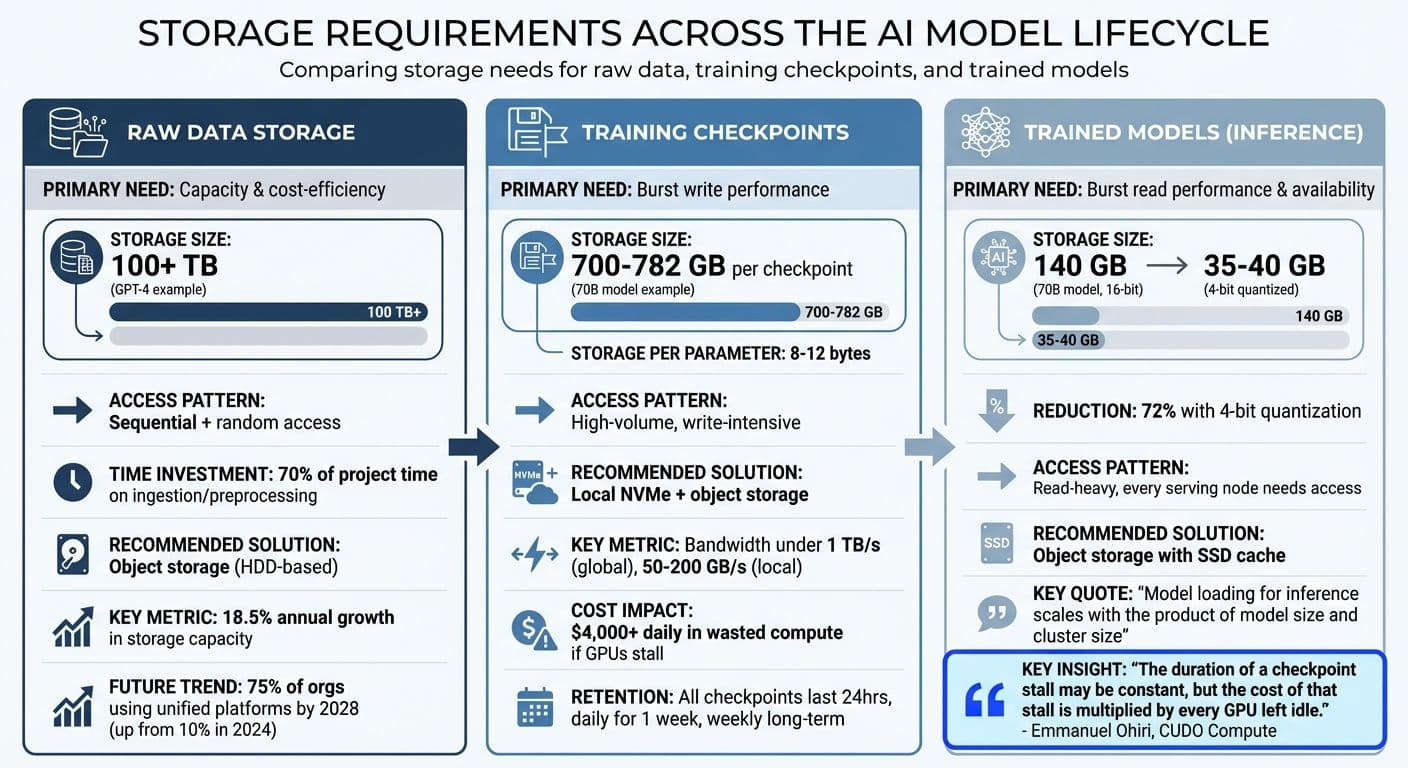
AI Storage Requirements Across Model Lifecycle Stages
AI workflows require tailored storage solutions at each stage, from raw data collection to deploying trained models. Understanding these needs helps avoid unnecessary costs from over-provisioning or inefficiencies caused by under-provisioning.
Raw Data Storage
Raw datasets are often enormous and varied. For example, training a foundation model like GPT-4 involves over 100 terabytes of compressed text and metadata. Similarly, an image recognition model might need 1,000 images per subject, and at 2 MB per image, storage demands grow quickly as more subjects are added. With AI data center storage capacity projected to more than double between 2023 and 2027, storage solutions must keep pace with this growth, which reflects an annual increase of over 18.5%.
Efficient raw data storage must handle both sequential access for ingestion and random access for retrieving specific data during training. Since about 70% of an AI project’s time is spent on data ingestion and preprocessing, having storage that delivers high throughput is critical to prevent costly GPU downtime. Object storage is a popular choice for this stage because it scales to exabytes and is cost-effective compared to high-performance alternatives. By 2028, 75% of organizations handling generative AI data are expected to adopt unified storage platforms, a significant rise from 10% in 2024. To further streamline operations, reorganizing raw data into larger chunks can reduce the performance penalties tied to random reads.
Once data ingestion is complete, the focus shifts to storage for training checkpoints.
Training Checkpoints Storage
During training, checkpoint storage becomes essential to ensure smooth progress and recovery. Checkpoints store not only model weights but also optimizer states like momentum vectors, making them much larger than the final model. For instance, while a 70B-parameter model in 16-bit precision needs about 140 GB, a single checkpoint for the same model can range from 700 to 782 GB, requiring 8 to 12 bytes of storage per parameter.
The main challenge here is write performance. Checkpointing involves high-volume, write-intensive operations where thousands of GPUs may simultaneously save data. Delays in this process can lead to GPU stalls, which, for large-scale training, could cost over $4,000 daily in wasted compute.
"The duration of a checkpoint stall may be constant, but the cost of that stall is multiplied by every GPU left idle."
– Emmanuel Ohiri, CUDO Compute
Modern frameworks mitigate this issue with asynchronous checkpointing, where data is offloaded from VRAM to host RAM, allowing GPUs to resume training while CPUs handle the background saving. In 2025, Glenn K. Lockwood analyzed 85,000 checkpoints from 40 training runs (spanning 45B to over 1 trillion parameters) and found that asynchronous methods kept global checkpoint bandwidth requirements under 1 TB/s, with local checkpoints offloading at 50–200 GB/s.
Retention policies are also crucial. A common approach is to keep all checkpoints from the last 24 hours, then one per day for a week, and one per week for long-term storage. Writing checkpoints first to local NVMe SSDs minimizes GPU stalls, with data later moved to persistent storage like object storage or Lustre.
Once training is complete, the focus shifts to storing and accessing the final models for inference.
Trained Model Storage
After training, the priority becomes ensuring fast and reliable access to the optimized models for inference. Loading a trained model for inference is a read-heavy process, with every serving node requiring access to the model weights.
Trained models are smaller than checkpoints, as they only contain the final weights. Using quantization techniques, such as 8-bit or 4-bit formats, can further reduce storage needs and speed up loading without significantly affecting accuracy. High availability is also critical to protect against zonal or regional failures, ensuring reliable production performance.
Object storage is ideal for serving trained models, offering durability and scalability while enabling quick retrieval of weights for inference.
"Checkpointing (writes and restores) scales linearly with the model size, model loading for inference scales with the product of model size and cluster size."
– Marco Abela, Google Cloud
| Stage | Primary Need | Recommended Storage |
|---|---|---|
| Raw Data | Capacity & cost-efficiency | Object storage (HDD-based) |
| Training Checkpoints | Burst write performance | Local NVMe + object storage |
| Trained Models | Burst read performance & availability | Object storage with SSD cache |
Hardware Considerations for AI Storage
Picking the right storage hardware can make a world of difference in AI workflows. It speeds up model loading, cuts costs, and ensures GPUs aren't sitting idle, which impacts performance at every stage.
HDD vs. SSD for AI Workloads
The difference between hard disk drives (HDDs) and solid-state drives (SSDs) is massive when it comes to AI tasks. For example, loading a 70-billion-parameter model takes 3 to 5 minutes on an HDD, about 60 seconds on a SATA SSD, and just 30 seconds on an NVMe SSD. The latest NVMe Gen5 drives push those times down to 5–8 seconds, making them 6 to 12 times faster than other options.
This speed difference comes down to how each drive handles data. AI inference depends on small, scattered reads, which SSDs handle much better than HDDs due to their low latency. NVMe Gen5 drives, in particular, can achieve over 1 million IOPS for random reads, compared to 100,000–500,000 IOPS for SATA SSDs. Sequential read speeds tell a similar story: NVMe drives hit 14+ GB/s, dwarfing SATA's 600 MB/s limit.
"Storage arrays built using solid-state disks offer better performance than conventional hard drives, but they're more expensive. They make sense for AI workloads where I/O is a top priority."
– Christopher Tozzi, Technology Analyst, Fixate.IO
HDDs still have their place, though. They're the most cost-effective option for storing massive datasets - think 100+ terabytes of raw, unprocessed data - where access speed isn't critical. For active tasks like training checkpoints or model weights, NVMe SSDs are the way to go, while HDDs work best for archival storage.
| Feature | HDD | SATA SSD | NVMe (Gen 5) |
|---|---|---|---|
| 70B-parameter Model Load Time | 3–5 minutes | ~60 seconds | 5–8 seconds |
| Random Read IOPS | Very Low | 100K–500K | 1M+ |
| Sequential Read | ~100–200 MB/s | Up to 600 MB/s | 14+ GB/s |
| Best Use Case | Massive raw data storage | General-purpose AI | High-performance inference/training |
These performance differences directly affect how GPUs and CPUs interact with memory, as explained below.
GPU Memory and CPU RAM Requirements
When it comes to AI, GPU memory (VRAM) is often the biggest constraint. If your workload exceeds VRAM capacity, the system has to rely on slower system RAM, which can drag performance down by over 90%. High Bandwidth Memory (HBM3) in GPUs can deliver 3 TB/s bandwidth, while DDR5 system RAM tops out at around 76 GB/s - a stark 40-fold difference.
"VRAM (Video Random Access Memory) has become the single most critical constraint in AI development."
– Orbit2x
System RAM plays a supporting role, acting as a staging area for data preparation before it moves to the GPU. To avoid bottlenecks, your storage hardware must keep these memory buffers filled efficiently. For inference, aim for twice your VRAM in system RAM; for training, you'll need 4 to 8 times your VRAM to handle tasks like data loading and checkpointing.
Here’s a rule of thumb: In 16-bit precision, every 1 billion parameters requires 2 GB of VRAM. Training models, however, demands 16 to 20 bytes per parameter, accounting for gradients and optimizer states.
One way to ease these demands is quantization, which reduces memory and storage needs. Using 4-bit formats (INT4) can cut requirements by about 75% compared to FP32. For instance, a 70-billion-parameter model that needs 140 GB in FP16 can shrink to 35–40 GB in 4-bit format. This makes it possible to run on a high-end consumer GPU like the RTX 4090 (24GB VRAM, around $1,600) with some offloading or on a dual-GPU setup.
Balancing memory capacity and bandwidth is key to ensuring storage and system performance work seamlessly together.
Local vs. Cloud Storage
Beyond speed and capacity, where you deploy - locally or in the cloud - can significantly impact performance.
Local storage gives you full control over your data, making it ideal for air-gapped environments where sensitive information, like PII or proprietary code, must stay within your organization. It also delivers sub-20ms latency thanks to local bus speeds, compared to 200ms to 800ms roundtrip delays typical of cloud APIs.
The cost structures differ, too. Local setups require significant upfront investment in hardware but offer predictable, low-cost operation once running. In contrast, cloud storage uses a pay-per-token model, which is flexible for spiky traffic but can become expensive for always-on applications. Self-hosting AI can lead to 70–80% savings over three years compared to cloud APIs, with hardware typically paying for itself in 3 to 5 months for high-volume use.
Cloud solutions still shine for tasks requiring complex reasoning or long-context capabilities - up to 2 million tokens. On the other hand, local models excel in specialized tasks like coding or structured data extraction. Many organizations now adopt a "Complexity-Based Routing" approach: simpler tasks are handled locally, while more demanding ones are sent to the cloud.
"It's not 'local or cloud?' but rather: Which tasks benefit from local inference? Which tasks require cloud capabilities?"
– Zen van Riel, Senior AI Engineer, GitHub
Choose cloud-first if your workload is unpredictable, you need cutting-edge reasoning, or your team is small and time-constrained. Go local-first if privacy is critical, you handle sustained high-volume traffic (5,000+ complex queries daily), or you need ultra-low latency (under 50ms). For local setups, prioritize VRAM capacity - 24GB (like the RTX 4090 or 5090) is a good baseline for long-term use.
Ultimately, your choice between local and cloud storage should align with your performance needs and budget.
Storage Optimization for AI Model Performance
Keeping GPUs active and productive relies heavily on optimizing storage performance. By fine-tuning file systems, caching strategies, and capacity planning, you can ensure your AI infrastructure operates efficiently. The right storage setup minimizes idle GPUs waiting for data and maximizes their computational potential.
High-Performance File Systems
Not all file systems are built to handle the demands of AI workloads. Parallel file systems, like Managed Lustre, are specifically designed for tasks like AI training. They provide sub-millisecond latency, massive IOPS, and throughput scaling up to 1 TB/s, making them perfect for scenarios requiring full POSIX compliance or frequent small random reads, such as loading thousands of checkpoint files.
For teams looking to save on costs, Cloud Storage FUSE offers an attractive alternative. It mounts object storage as a local file system, delivering nearly unlimited capacity at a lower price point. This option supports popular AI frameworks like PyTorch and TensorFlow. A noteworthy example comes from April 2025, when Anthropic used Google Cloud's Anywhere Cache to co-locate data with TPUs in a single zone. This setup enabled dynamically scalable read throughput of up to 6 TB/s, while also improving workload resilience.
"AI training consumes terabytes per hour and needs something different: high throughput, low latency, and dozens of processes accessing the same files simultaneously."
– DigitalOcean
For distributed training across multiple GPU nodes, Network File Storage (NFS) eliminates the need to copy datasets to each machine. Services like DigitalOcean Network File Storage offer up to 1 GB/s read throughput and 650 MB/s write throughput, starting at $15/month for 50 GiB ($0.30/GiB-month). On the other hand, GCP Filestore scales up to 25 GB/s throughput and supports 920,000 IOPS.
Next, let’s dive into how local caching strategies can further supercharge your setup.
Local Data Caching Strategies
Effective caching can significantly enhance performance. Take local NVMe caching, for example - it can load a 512 MB model file in just 0.2 seconds, compared to about 1 second from remote storage, achieving throughput of around 2.5 GB/s. A three-tier caching architecture often works best:
- Hot tier: Local NVMe SSDs for ultra-fast access.
- Warm tier: Peer-to-peer intra-cluster sharing, delivering roughly 1.5 GB/s.
- Cold tier: Durable cloud object storage for less frequently accessed data.
Parallel downloads are another way to speed things up. By splitting files into segments and downloading them concurrently into a local cache, you can achieve model load times up to 9× faster. In such setups, the first instance populates a high-performance cache (e.g., S3 Express One Zone), allowing subsequent instances to bypass cold start delays and access data up to 7× faster than standard object storage.
Asynchronous loading is another game-changer. By fetching entire files on the first random read, you ensure subsequent partial reads are served from the local cache. Features like LRU (Least Recently Used) eviction can help manage cache space efficiently, ensuring critical data remains readily available. If you're using cloud GPUs with bundled Local SSDs, consider utilizing that storage for cache directories to eliminate extra costs.
"When your storage keeps GPUs fed with data instead of waiting on I/O, you're getting actual work out of hardware that costs anywhere from $2-8 per hour."
– Fadeke Adegbuyi, Manager, Content Marketing, DigitalOcean
Keep an eye on your cache hit rates. If nodes frequently access cold storage for the same files, it’s a sign that your warm cache might need resizing or reconfiguration. To boost first-time read performance, pre-fill metadata caches by running directory listing commands (like ls -R) before starting your workloads.
Now, let’s look at how to balance capacity and performance across storage tiers.
Balancing Capacity and Performance
Matching storage tiers to workload requirements is essential for achieving optimal performance. Here’s how to allocate resources effectively:
- Use local NVMe storage for active model weights and scratch space, achieving throughput of around 2.5 GB/s.
- Leverage intra-cluster sharing for model caches across GPU nodes, which typically provides about 1.5 GB/s.
- Reserve cloud object storage for archives, checkpoints, and as your primary data source. With parallel connections, you can achieve approximately 1.0 GB/s throughput.
Optimizing data formats can also make a big difference. Columnar formats like Parquet and ORC speed up analytical queries, while framework-specific formats such as TFRecord (for TensorFlow) and LMDB (for PyTorch) enhance data loading efficiency. Packaging smaller files into larger bundles (e.g., TAR or TFRecord) enables sequential I/O, improving throughput on local drives.
Before starting training, calculate the time and cost of replicating data near GPUs to avoid wasting compute resources. Use multiple threads or parallel connections when pulling data from object storage to maximize bandwidth. For large-scale inference, consider read-only-many volumes like Hyperdisk ML, which can attach to thousands of nodes simultaneously and provide a single, high-performance copy of model weights.
In 2024, Spotify demonstrated the benefits of an integrated approach to storage. By using Google Cloud's Autoclass and Storage Intelligence features, they analyzed billions of object metadata entries and reduced their total storage costs by 37%. This example highlights the efficiency gains that come from treating storage as a dynamic system rather than just a static repository for files.
NanoGPT: Privacy and Flexibility in AI Storage
NanoGPT takes a different path when it comes to AI storage, offering a balance of privacy and affordability tailored for individuals and small teams.
Unlike enterprise AI systems that demand massive storage capacities, smaller-scale users often need powerful AI tools without compromising privacy or committing to costly subscriptions. NanoGPT addresses these needs with a unique approach to managing AI storage and access.
Local Data Storage: Keeping Your Information Private
With NanoGPT, all user data is stored locally in your browser, using tools like localStorage and IndexedDB. This ensures that your prompts, chat history, and AI-generated responses never leave your device. You don’t even need an account to use the platform - anonymity is maintained through a random UUID, with an astronomical number of possible identifiers, making it virtually impossible to guess someone’s ID.
"By default we do not store anything except a cookie containing your account number with your associated balance. Chats you have via this website are stored locally in your browser." – NanoGPT
For developers, there’s an option to set the store parameter to false, ensuring that no data is retained on NanoGPT’s infrastructure. If you choose to sync data across devices, server-side storage is encrypted using AES-256-GCM, and you can even bring your own encryption key (BYOK) for added security. This local-first design means clearing your browser data permanently erases your conversations, as NanoGPT doesn’t keep server-side backups.
This focus on privacy is paired with a cost-efficient pricing model, making NanoGPT accessible to a wide range of users.
Flexible, Pay-as-You-Go Pricing
NanoGPT uses a pay-per-token system, allowing you to start with as little as $0.10 via cryptocurrency or $1.00 via credit card. Costs scale directly with token usage: $0.06 per million input tokens and $0.24 per million output tokens for Amazon Nova Lite 1.0. If you spend $500 or more in a day on text models, you get a 10% discount the following day.
"Nice to be able to use GPT4 for just a few questions, instead of paying the $20 monthly subscription to OpenAI" – John D. (NanoGPT Store)
Additional savings are possible through features like prompt caching for Claude models, which can cut costs by up to 90% on repeat requests, and a 5% discount for payments made with Nano cryptocurrency.
This pricing flexibility complements NanoGPT’s extensive range of AI tools.
Access to a Wide Array of AI Models
NanoGPT provides access to over 852 models spanning text, image, video, and audio generation. These include well-known text models like ChatGPT and Gemini, image tools like Dall-E and Stable Diffusion, and specialized models for embeddings and speech. Instead of juggling multiple subscriptions or managing hefty storage needs for each provider, you can access everything through one OpenAI-compatible API.
Model weights are processed remotely, so local storage requirements are minimal - limited to conversation history and settings. For developers, the Models API offers detailed metadata like context_length, capabilities, and cost_estimate, while the Personalized Models API allows you to manage and filter models you’ve marked as visible. This setup combines the performance of cloud-hosted models with the privacy of local data storage.
NanoGPT showcases how thoughtful storage solutions can meet the demands of modern AI users, balancing performance with strong privacy protections.
Conclusion
The performance of AI systems heavily depends on storage infrastructure. Without proper storage optimization, GPUs can end up sitting idle for as much as 70% of the time. To avoid this, it’s crucial to align your storage strategy with your workload requirements. For instance, active training might call for high-throughput NVMe storage, massive datasets benefit from object storage, and privacy-focused applications may require local storage.
Balancing cost and performance is equally important. Many organizations overspend, with about 21% of cloud resources going underutilized. On the other hand, on-premises solutions can reduce costs by 40–60% over three to five years. The breakeven point for these setups generally occurs at 60–70% sustained utilization. This makes it vital to track your usage patterns before locking into a specific solution. Performance and cost challenges are closely connected, so a thoughtful approach can prevent unnecessary expenses.
"In the race to accelerate artificial intelligence (AI) innovation, storage infrastructure performance is just as critical as computational power." – Hammerspace
Each stage of the AI lifecycle - data ingestion, training, checkpointing, and inference - has unique storage demands. Data ingestion benefits from high write throughput for mixed operations, training requires sustained parallel reads to keep GPUs busy, checkpointing relies on fast sequential writes, and inference thrives on ultra-low latency and high IOPS. These stages highlight why a tailored storage approach is essential. A generic, one-size-fits-all strategy often leads to performance bottlenecks.
Even smaller teams and individual users can apply these principles. For example, NanoGPT demonstrates how local data storage can offer both flexibility and privacy without the complexity of enterprise-level systems. Whether you’re using on-premises setups or a pay-as-you-go cloud model, the key is to align your storage choices with your workload needs. Chasing trends won’t guarantee success - but choosing the right solution for your specific requirements will deliver the performance you need without overspending.
FAQs
How do I estimate storage needs for my dataset, checkpoints, and final model?
To figure out how much storage you'll need, keep these important factors in mind:
- Dataset Storage: Massive datasets, such as raw text, can easily take up over 100 TB, even when compressed.
- Checkpoints: Training checkpoints, saved periodically, can each consume hundreds of GB.
- Final Model Weights: For example, a 70-billion parameter model using 16-bit precision typically requires around 140 GB.
Combine these elements and leave room for future expansion to get a clear picture of your total storage needs.
What’s the best storage setup to prevent GPU stalls during training and checkpointing?
To avoid GPU stalls during training and checkpointing, it's crucial to use storage solutions that offer high throughput and low latency, such as NVMe SSDs or all-flash arrays. These allow for faster data transfers, keeping your workflows running smoothly.
Implementing smart tiering strategies - shifting data between SSDs and HDDs - can help you strike a balance between performance and cost. High-capacity SSDs are particularly effective for storing large model checkpoints, ensuring efficient saves as model sizes continue to increase.
Keep an eye on throughput and latency metrics regularly. This helps you identify and resolve any bottlenecks before they disrupt your processes.
When should I choose local storage vs. cloud storage for AI workloads?
Local storage works best when data privacy, security, or low latency (like under 20ms) are top priorities. Keeping sensitive data on-site eliminates the need for external transfers, reducing risks. Plus, for high-volume workloads, it can be a cost-saving option over time.
On the other hand, cloud storage shines with its flexibility, easy accessibility, and ability to scale quickly. It's perfect for burst workloads, prototyping, or situations where avoiding upfront hardware investments and ongoing maintenance is a priority.