
Edge AI vs. Cloud AI: Cost and Latency Comparison
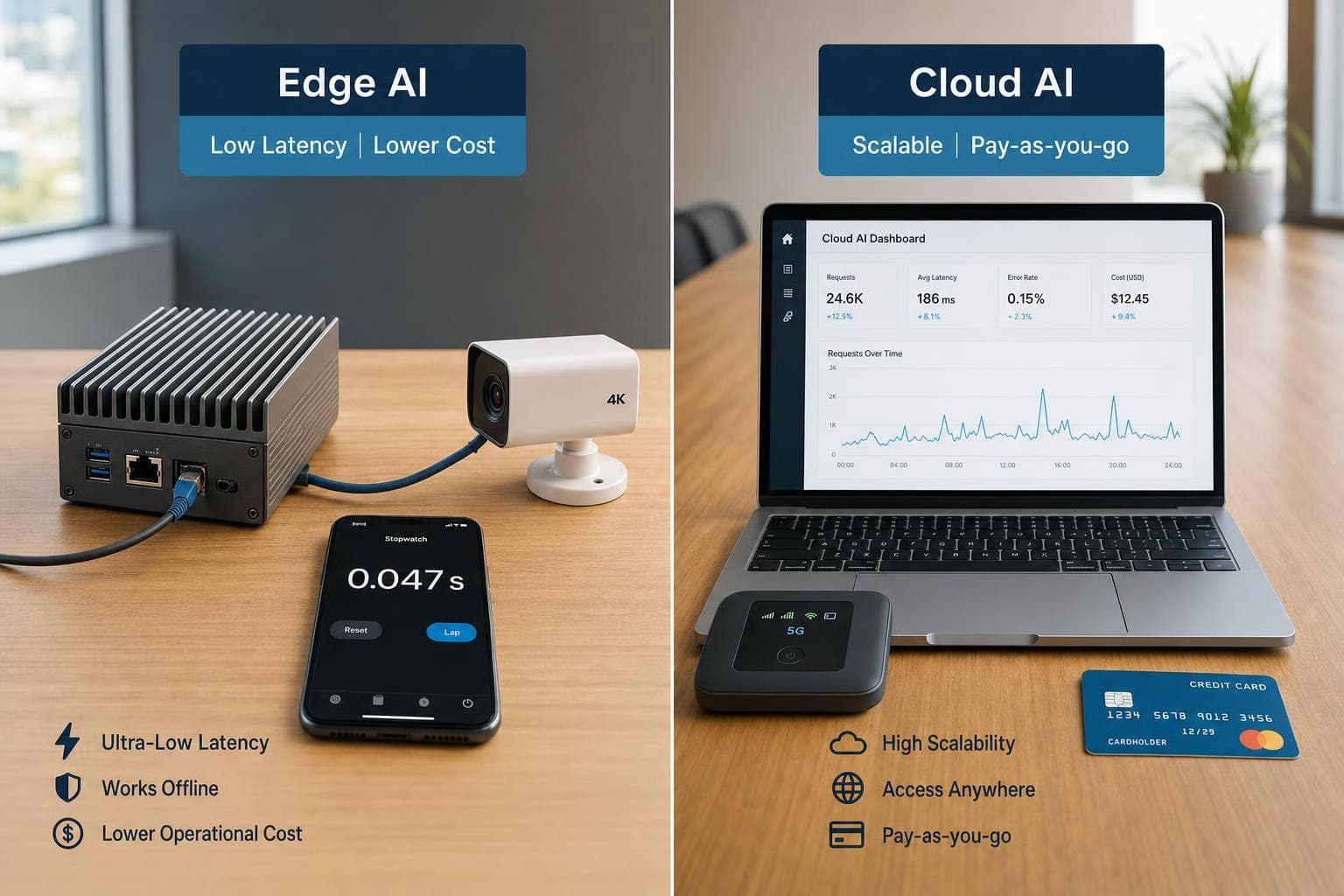
If you need AI responses in under 50 ms, edge is usually the better pick. If your workload is light, bursty, or can wait 100+ ms, cloud is often the lower-cost place to start.
I’d sum the article up like this: edge AI trades higher upfront spend for lower delay and lower bandwidth use, while cloud AI trades added network delay for pay-as-you-go pricing and easier scaling. In the numbers shown, edge inference often lands around 1–50 ms, while cloud inference often lands around 50–500+ ms once network travel is included.
Here’s the short version:
- Pick edge for control systems, local vision, video streams, and sites that can’t rely on the internet
- Pick cloud for pilots, low request volume, batch work, and large models that don’t fit on-device
- Pick hybrid when you need both: a fast local answer first, then cloud for heavier tasks
- Watch three inputs first: latency target, request volume, and data transfer
- Cost flips with scale: cloud is often cheaper early on, but edge can cost less over 18–24 months in high-use setups
- Bandwidth matters: the article puts edge/cloud break-even for some devices around 30–50 GB/day
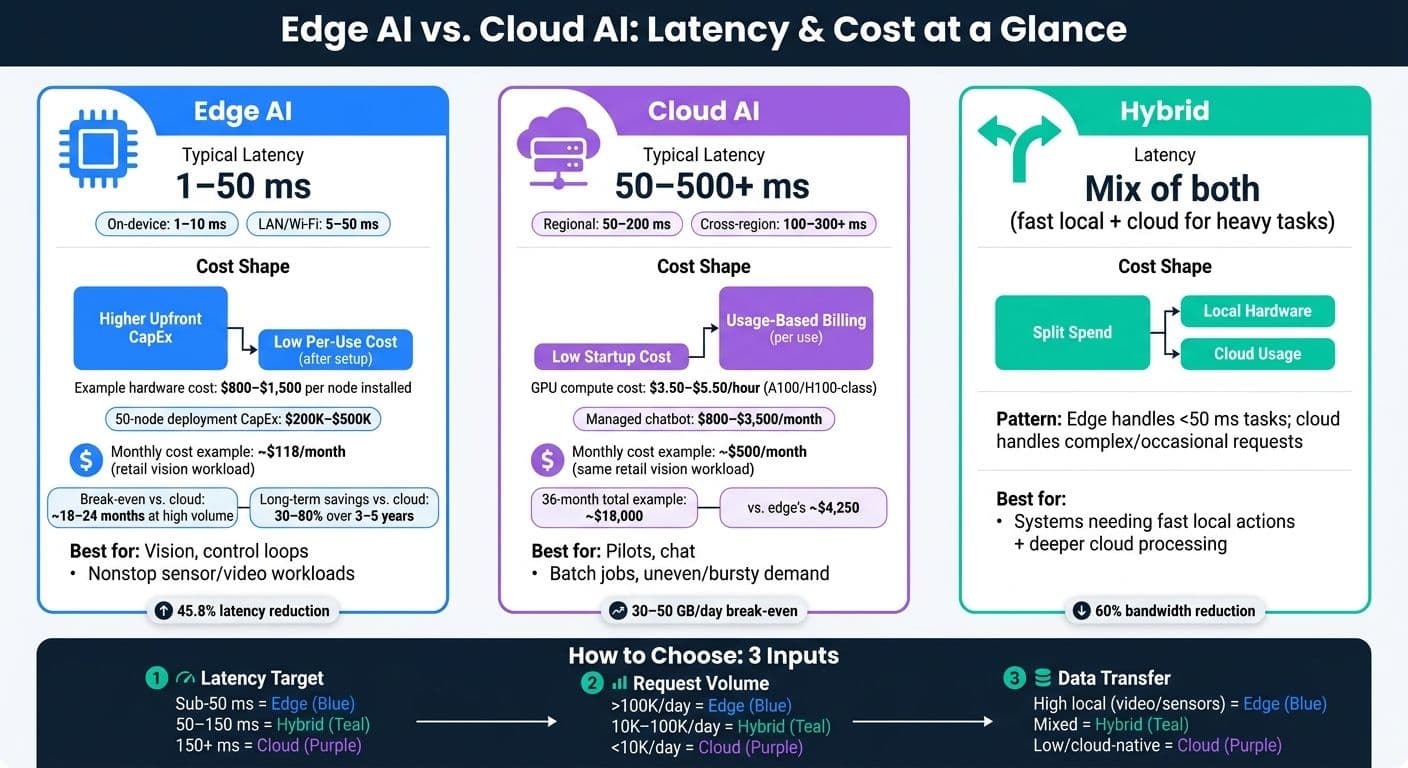
Edge AI vs. Cloud AI: Latency & Cost Comparison at a Glance
Edge AI vs. Cloud AI
sbb-itb-903b5f2
Quick Comparison
| Option | Typical Latency | Cost Shape | Best Use |
|---|---|---|---|
| Edge AI | 1–50 ms | Higher upfront cost, low per-use cost after setup | Vision, control loops, nonstop sensor/video workloads |
| Cloud AI | 50–500+ ms | Low startup cost, usage-based billing | Pilots, chat, batch jobs, uneven demand |
| Hybrid | Mix of both | Split spend across local hardware and cloud usage | Systems that need fast local actions plus deeper cloud processing |
If I were making the call, I’d use a simple rule: start with latency, then check daily volume, then check how much data has to move. That gives you the answer fast without overthinking it.
Latency Comparison: Where Edge AI Wins and Where It Does Not
Latency comes down to three things: distance, load, and network quality. In plain English, the closer the compute is to the user or device, the faster the response tends to be. That’s why local edge systems usually come out on top. Regional cloud can still work well for interactive tasks. Distant cloud is almost always the slowest option.
| Deployment Type | Typical Latency (ms) | Best Fit When |
|---|---|---|
| Edge AI (local or on-device) | 1–10 | Control loops, on-device vision, safety-critical tasks |
| Edge AI over a short LAN/Wi‑Fi hop | 5–50 | Factory and campus workloads that need fast local responses |
| Edge AI under load | 50–200 | Only when capacity is isolated and overprovisioned |
| Private 5G or carrier edge (MEC) | 10–30 | Mobile robotics, campus AR/VR, warehouse AGVs |
| Regional Cloud (same U.S. region) | 50–200 | Chatbots, recommendations, and similar interactive workloads |
| Long-Distance Cloud (cross-region or overseas) | 100–300+ | Batch jobs and other non-time-sensitive workloads |
The biggest gains show up in workloads that can’t wait for a network round trip. One catch, though: edge hardware only holds low latency under heavy demand if you overprovision it. And that pushes cost up fast.
Edge AI Latency for Sub-50 ms Workloads
Some jobs just don’t have time to send data to a cloud region and wait for a reply. Industrial robot control loops, collision avoidance in autonomous vehicles, and AR overlays on smart glasses all need responses in under 50 ms. In many cases, they need 10–20 ms or less.
That’s where local inference has a clear edge. An INT8-quantized YOLOv8n model running on edge hardware hits sub-3 ms inference latency, which supports perception rates above 300 Hz and total closed-loop latency under 20 ms. Push that same pipeline to the cloud, and you add 100 ms or more.
A factory example makes this pretty concrete. If image transfer takes 30 ms, edge inference takes 15 ms, and the result comes back in under 1 ms, the full path lands at about 45 ms end to end. That stays inside a 50 ms target.
AR shows the same pattern. A factory worker using smart glasses connected to an on-premise server over Wi‑Fi can get overlays in 10–30 ms. Route that setup through a regional cloud instead, and latency usually lands around 80–150 ms. That delay is noticeable when the user turns their head.
Cloud can still work when the user is close to the region and the task can handle a few dozen milliseconds.
Cloud AI Latency for Regional and Distant Users
Cloud platforms trim latency with regional placement, connection reuse, and caching. That helps. But distance still puts a hard floor under performance.
For a U.S. user on the East Coast connecting to an East Coast region, interactive latency can fall in the 50–120 ms range. That’s usually fine for chatbots, content recommendations, and similar tasks. A video analytics study found that moving processing to edge nodes cut average latency from 480 ms in a pure cloud setup to 260 ms - a 45.8% reduction - and also reduced bandwidth use by 60%.
The reason is simple: miles matter. Distance adds tens of milliseconds before processing even begins, and actual network routes add more on top of that. So even with regional placement and tuned protocols, cloud systems can’t reliably promise sub-10 ms latency for users who are far from the region.
Then there’s jitter. Last-mile links like LTE, cable, and DSL add variability that can make response times jump around. For scattered users, that makes steady low-latency performance tough to guarantee.
Latency defines the speed target; the next section looks at when edge hardware ends up costing more or less than cloud usage.
Cost Comparison: Upfront Hardware vs. Pay-As-You-Go Usage
The cost story for edge AI and cloud AI pulls in opposite directions. Edge AI is upfront-heavy. You pay for hardware, installation, and setup before the first inference ever runs. Cloud AI spreads cost over time through request fees, storage, bandwidth, and egress. That same local compute that cuts latency is also what makes edge cost more at the start. The clean way to compare them is to amortize edge hardware over 3–5 years, then add power and maintenance. That math starts to matter once your workload volume and latency needs are clear.
On the edge side, the main budget items are hardware, installation labor, electricity, and upkeep. A Jetson Orin NX 16 GB node usually lands around $800–$1,500 installed. At larger scale, the numbers climb fast: a 50–100-node deployment can reach $200,000–$500,000 in total CapEx after integration and commissioning. Power isn't just background noise in the budget either. A 5–10 kW deployment can cost $4,000–$8,000 per year in electricity, which works out to about 10%–25% of total cost of ownership. Maintenance is often planned at 5%–20% of hardware value per year.
Cloud AI flips that model. Instead of buying gear, you pay for usage: tokens, storage, bandwidth, and egress. That keeps startup cost low, but the network hop is still part of the deal. A managed-cloud chatbot can cost $800–$3,500 per month, based on traffic and token volume. If you're renting GPU-class compute directly, A100/H100-class capacity runs about $3.50–$5.50 per hour. And one line item gets missed all the time: bandwidth and egress. For vision systems or sensor-heavy workloads, moving large amounts of data can add up fast.
| Cost Component | Edge AI (per month, hypothetical) | Cloud AI (per month, hypothetical) |
|---|---|---|
| Hardware amortization | $83 ($3,000 over 36 months) | $0 |
| Energy | $10 (100 W device at U.S. rates) | Bundled into service pricing |
| Maintenance | $25 (~10% of $3,000/year) | Managed by provider |
| Per-inference charges | ~$0 after deployment | Scales with volume |
| Bandwidth & egress | Minimal (data stays local) | Variable; can be large for vision workloads |
| Estimated monthly total | ~$118 | Varies widely with usage |
When Edge AI Becomes Cheaper at Scale
Once edge hardware is in place and amortized, each extra inference costs very little beyond added electricity and wear. That's why edge starts to look good for always-on, high-volume workloads. A single Jetson Orin-class device can hit cost parity with cloud at roughly 30–50 GB/day of processed data, and high-frequency systems may reach break-even within 18–24 months. Over a 3–5 year period, amortized hardware plus lower data transfer can lead to estimated savings of 30%–80% versus cloud-only processing.
When Cloud AI Stays Cheaper for Small or Unpredictable Workloads
Cloud stays cheaper when usage is light, uneven, or short-lived. If demand comes in bursts, the logic is simple: pay for the spike, then stop paying when the spike is over. That beats owning hardware that sits mostly idle the rest of the year.
For teams that want usage-based access without owning infrastructure, NanoGPT fits that model with pay-as-you-go access and local data storage. This makes sense when you want flexible model access without long-term infrastructure commitments.
Hypothetical Cost Examples in USD
Example 1 - Sustained retail vision workload (hypothetical): A single U.S. retail store uses one edge gateway ($3,000 hardware) to run shelf-monitoring inference 24/7. Monthly cost comes to about $83 in amortization, $10 in electricity, and $25 in maintenance, for a total of ~$118/month. A similar cloud setup priced at $0.001 per inference with 500,000 monthly inferences would cost ~$500/month in API fees. Edge total over 36 months: ~$4,250. Cloud total: ~$18,000.
Example 2 - Low-volume pilot app (hypothetical): A freelance developer runs about 10,000 API calls per month during testing. At common pay-as-you-go rates, that might cost $10–$30/month. Buying even a modest edge server for $1,500 to handle that same load would take years to pay off at that volume, so cloud is the more practical option.
The next section turns these cost patterns into workload-specific placement rules.
Best Fit by Workload: Edge, Cloud, or Hybrid
Use the table below as a quick placement guide, not a hard rulebook. The idea is simple: match latency needs and traffic shape to the deployment model that usually costs the least.
| Workload | Latency Target | Data Volume | Cost Pattern | Recommended Deployment |
|---|---|---|---|---|
| Continuous streaming (video/sensors) | <50 ms | High, continuous - often multiple Mbps to tens of Mbps per stream | Edge reduces egress and bandwidth costs; cloud can get expensive with sustained streaming | Edge or Edge-heavy Hybrid |
| Interactive user sessions | 50–150 ms; longer responses can stream in chunks. | Moderate, bursty | Pay-per-request cloud pricing works well at variable user counts | Cloud or Hybrid |
| Industrial control | 1–10 ms (control loops); 10–50 ms (supervisory AI) | High-frequency, small messages | Dedicated edge hardware is justified by safety and downtime risk | Edge (Hybrid for analytics) |
| Periodic batch jobs | Seconds to minutes | Large but infrequent datasets | Cloud storage and compute on demand are cheaper; reserved or spot instances can lower cost | Cloud |
| Large-model occasional tasks | 1–5 seconds | Small input, compute-heavy | Pay-as-you-go is cheaper than keeping idle GPU hardware | Cloud or Hybrid |
Workloads That Favor Edge AI
Edge makes the most sense when latency is tight, bandwidth is expensive, or the system needs to keep working even when the network doesn't. A U.S. factory running pick-and-place robotics, for example, may need supervisory decisions in the 10–50 ms range. That kind of timing leaves little room for a round trip to a distant data center.
The same logic shows up in retail video, hospital monitoring, and remote sites. In those settings, local processing can cut egress costs, keep response times short, and help the system stay up during connection issues.
Workloads That Favor Cloud AI
Cloud is often the better pick when models are too large for local hardware or when response times above 100 ms are still fine. This is especially clear with large models. Models with tens or hundreds of billions of parameters, along with high-resolution diffusion models, often just don't fit on edge devices.
Cloud also works well for analysis across many locations. If you need to pull data from dozens of sites and run company-wide forecasting or fraud detection, it's usually cheaper to do that in the cloud than to copy heavy compute into every site.
Hybrid Model Placement and NanoGPT
Most production systems land in the hybrid camp. Why? Because one workflow can contain two very different jobs: one that needs a fast local answer, and another that needs more compute.
A common pattern looks like this:
- Run small, fast models at the edge for frequent tasks
- Send complex or occasional requests to the cloud
So an edge device might handle local anomaly detection or intent classification in under 50 ms. If that first pass flags something that needs deeper reasoning - like a detailed explanation, a generated report, or a high-quality image - the system can route that request to the cloud.
For the cloud tier, NanoGPT is a good fit for occasional text or image generation: you pay only when you use it, while data stays stored locally on the user's device.
These workload rules set up the decision framework below.
Decision Framework and Conclusion
Simple Rules for Choosing a Deployment Model
You can narrow the choice down with three inputs: latency SLO, request volume, and data-transfer profile. Once you look at those together, the comparison becomes much easier to use.
| Latency SLO | Volume Band (requests/day) | Data-Transfer Profile | Cost Signal | Best Fit |
|---|---|---|---|---|
| < 50 ms | > 100,000 | High local data (video/sensors) | Edge CapEx, lower per-request cost, reduced bandwidth spend | Edge-first |
| 50–150 ms | 10,000–100,000 | Mixed local and cloud | Balanced hardware and cloud spend | Hybrid |
| > 150 ms | < 10,000 | Cloud-native, low data volume | Low monthly cloud bill, no hardware investment | Cloud-first |
A simple rule of thumb works well here: start with latency, then check volume, then look at data movement. If your workload needs sub-50 ms response times, edge usually makes the most sense. In the 50–150 ms range, hybrid or regional cloud setups are often a better match. If 150 ms or more is fine, cloud-first is usually the easiest and lowest-cost place to begin.
Big, nonstop inputs should stay close to where they’re produced. For video-heavy workloads, the point where edge hardware tends to pay for itself often lands around 30–50 GB/day per device.
For hybrid workflows that need local data storage and pay-as-you-go model access, NanoGPT fits that pattern.
Key Takeaways
In day-to-day use, the choice comes down to four simple rules.
- Latency bands are the fastest filter. Sub-50 ms points to edge, 50–150 ms opens the door to hybrid or regional cloud, and above 150 ms is usually cloud territory.
- Sustained volume drives cost. Low or uneven traffic fits pay-as-you-go cloud. High, steady traffic starts to favor edge hardware once the monthly cloud bill gets close to the amortized hardware cost.
- Data gravity matters. Large, continuous streams belong near the source. Small, occasional requests fit the cloud better.
- Hybrid is the default for complex systems - not a fallback, but a planned split between latency-sensitive local inference and heavier centralized tasks.
- Edge latency is steadier; cloud latency varies more under load.
The choice between edge, cloud, and hybrid is about fit, not preference. Start with your latency target, estimate your steady volume, and map where your data lives. Those three inputs usually point to the right deployment model.
FAQs
How do I choose between edge, cloud, and hybrid AI?
Choose based on latency, privacy, and budget.
Use edge AI for real-time tasks that need 1–10 ms response times or strict privacy rules, because it handles data locally. That makes a big difference when every millisecond counts.
Cloud AI makes more sense for high-volume, changing workloads when you want to avoid high upfront hardware costs. The tradeoff is latency, which can land around 50–200+ ms.
Hybrid AI sits in the middle. Keep sensitive or time-sensitive tasks local, and send more complex work to the cloud.
When does edge AI become cheaper than cloud AI?
Edge AI tends to make more financial sense when demand stays high and steady. Cloud AI is often the better fit for testing, pilots, or workloads that swing up and down, since the upfront spend is lower.
But the math shifts once usage climbs. When GPU utilization gets above 33% to 70%, edge infrastructure can deliver 30% to 50% savings over three years.
There’s another cost angle too: moving data. By processing data locally, edge AI can reduce bandwidth use and data egress fees instead of sending large amounts of data back and forth to the cloud.
What workloads benefit most from edge AI?
Edge AI works best when a system needs to make real-time decisions, protect private data, and keep working even when cloud access is weak or unavailable.
That’s why it shows up in areas like autonomous vehicles, augmented reality, industrial IoT, healthcare, finance, and battery-powered devices in remote locations. In these cases, low latency, local processing, and steady operation aren’t nice extras - they’re the whole point.