
Fault Tolerance in AI Pipelines: Step-by-Step Guide

One bad batch, one schema change, or one timeout can break an AI pipeline fast. My takeaway is simple: if you want fewer outages, I’d lock down four areas first - data ingestion, feature processing, orchestration, and inference.
Here’s the short version:
- Stop bad data early. Wrong field types drive 33% of data pipeline failures, so I’d validate schemas, null rates, ranges, and duplicates before data reaches models.
- Make jobs safe to rerun. I’d use checkpoints, replay, and idempotent writes so retries don’t create duplicate records or stale features.
- Retry only the right failures. Timeouts,
429,500, and503may be safe to retry.400,401,404, and policy errors usually are not. - Plan fallback paths for inference. If one model endpoint times out or hits quota, I’d switch based on pre-set rules instead of guessing during an incident.
- Watch cost and uptime at the same time. Track latency, success rate, request IDs, and daily spend in USD ($) so retry loops don’t turn into outages and surprise bills.
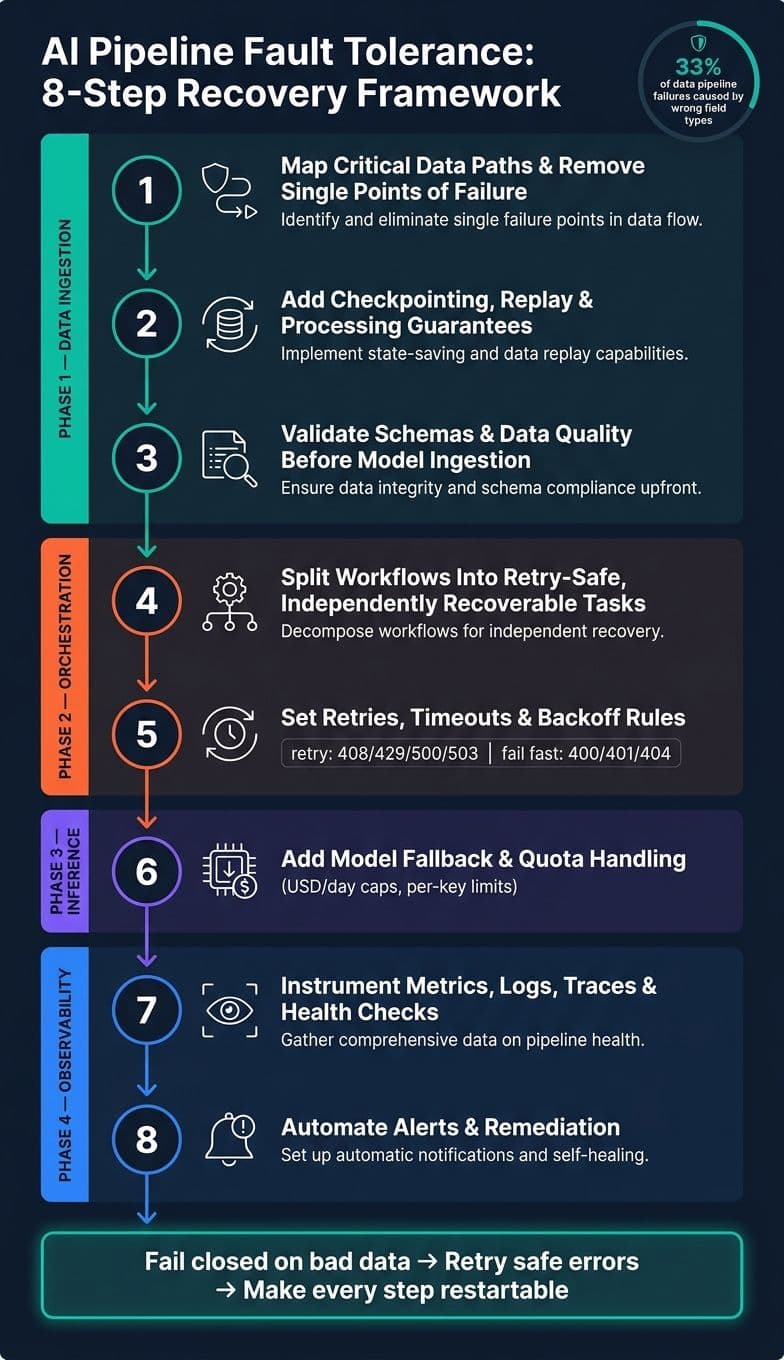
If I had to reduce this guide to one line, it would be this: fail closed on bad data, retry safe errors, and make every step restartable.
A few points stand out:
- Fault tolerance is about keeping outputs correct, or at least safely degraded, when parts fail.
- Availability is about staying up.
- Resilience is about recovery after a break.
That difference matters. A system can stay online and still send bad predictions.
I also like the order here. Instead of starting at the model, the guide starts upstream, where many failures begin. That means:
- Map critical data paths and remove single points of failure
- Add checkpointing and replay
- Validate schemas and data quality
- Split workflows into retry-safe tasks
- Set retries, timeouts, and backoff rules
- Add model fallback and quota handling
- Instrument metrics, logs, traces, and health checks
- Automate alerts and remediation
My short read: this is a clear checklist for making AI pipelines harder to break without adding wasteful cloud spend everywhere.
The rest of the article walks through each step in order.
AI Pipeline Fault Tolerance: 8-Step Recovery Framework
Idempotent Data Pipelines | Building Reliable & Fault-Tolerant Data Workflows | Uplatz
sbb-itb-903b5f2
Step 1: Harden Data Ingestion and Feature Pipelines
Bad data usually gets in upstream. That’s why ingestion and feature pipelines should be the first place you tighten things up, before serving or orchestration. Start with the data path that feeds production features and online inference.
Map Critical Data Paths and Remove Single Points of Failure
Map the pipeline from end to end, from source systems all the way to model inputs. Mark every read, transform, and write step. Then sort each path into one of three groups:
- Business-critical: A failure directly hits revenue, compliance, or core product behavior.
- Delay-tolerant: Short outages are okay if the data still shows up later.
- Best-effort: Occasional loss or delay doesn’t materially change model performance.
This classification helps you decide where redundancy is worth the cost. For business-critical paths, use primary-replica database setups with automatic failover across availability zones, versioned object storage to stop accidental overwrites, and event streams with enough replication to survive node failures. Replicate pipeline objects too, not just the data. That includes ingestion configs, stream definitions, and scheduled tasks, so you can restore the full path fast during a regional failure.
Once you’ve mapped the critical paths, make them restartable with checkpoints and replay.
Add Checkpointing, Replay, and Processing Guarantees
Checkpointing lets a failed job restart from the last known-good state instead of from scratch. In batch pipelines, checkpoint at logical milestones, like after extraction, after cleaning, and after feature engineering, by writing immutable, versioned snapshots to durable storage. In streaming pipelines, use built-in checkpointing to save offsets, window buffers, and operator state to durable storage on a schedule.
Replay matters too. If the source can replay data, the sink needs to handle that safely. Pair replayable sources with idempotent sinks, such as upserts keyed by a stable identifier like user_id plus a timestamp, so replaying the same events doesn’t double-count features or corrupt the feature store.
Pick the processing guarantee based on the cost of being wrong:
| Processing guarantee | Pros | Cons | Best AI pipeline use case |
|---|---|---|---|
| At-most-once | Simple, low overhead | Can silently drop events | Non-critical telemetry or secondary monitoring signals |
| At-least-once | No data loss; widely supported | May produce duplicates without idempotent sinks | Real-time feature generation with deduplication by entity ID |
| Exactly-once | Correct and complete; no loss or duplication | Complex; higher latency and cost | Fraud detection, billing features, compliance-critical pipelines |
For most streaming features, at-least-once is the practical choice when writes are idempotent. Save exactly-once for fraud, billing, and compliance paths, where duplicates or loss can cause real damage.
After recovery is in place, push validation to the edge of the pipeline so bad data gets stopped before it spreads.
Validate Schemas and Data Quality Before Model Ingestion
Schema and data quality checks belong at ingestion boundaries, at feature engineering outputs, and right before training or online inference as a final gate. The goal is simple: reject corrupted, missing, or duplicated data before it touches training or inference.
A few checks do most of the heavy lifting:
- Required columns must exist. If a required feature column disappears, block inference or training.
- Data types must match. If an
agefield arrives as a string instead of an integer, it should fail loudly instead of being silently coerced. - Null-rate limits. Alert or block when nulls in critical features climb 5–10% above baseline.
- Range checks. Reject records with values outside realistic bounds, like negative monetary amounts, ages above 120, or any impossible value.
- Duplicate detection. Check for repeated records using natural keys before writing to feature stores.
Fail closed. Keep invalid batches out of the model.
Step 2: Make Orchestration and Execution Safe to Retry
Once data quality is under control, the next place things break is orchestration: the workflow layer that moves work from ingestion to transformation, model calls, and delivery. If one step fails and your recovery rules are fuzzy, you can end up with duplicate writes, wasted retries, and a bigger bill than expected.
Split Pipelines Into Modular, Independently Recoverable Tasks
The main idea is straightforward: don't run your pipeline like one giant job. Split it into separate tasks - ingestion, transformation, model invocation, post-processing, and delivery - with clear inputs and outputs for each one.
That way, one bad model call or one failed transform doesn't take down the whole run. If a task fails, the orchestrator should restart only that task, not everything that came before it.
A few guardrails matter here:
- Persist task state and output pointers before marking success.
- Declare dependencies directly in the DAG.
- Set a bounded timeout for every task so hangs show up as failures fast.
Configure Retries, Timeouts, and Backoff With Idempotency
Not every error deserves a retry. Some failures are temporary, like 408, 429, 500, and 503. Others point to a bad request or an account issue, such as 400, 401, 402, 404, and 413. Mixing those together is where retry logic starts to go off the rails.
Use exponential backoff with jitter so retries don't pile up all at once. If a 429 response includes a Retry-After header, follow it. Also account for rate limits, reset windows, and budget caps.
| Retry Policy | Best Use Case | Main Risk | Recommended Checkpoint |
|---|---|---|---|
| Exponential backoff with jitter | 408, 504, 500, 503, and other transient failures | Retrying too aggressively while a service is recovering | Add randomness and cap the retry window |
Respect Retry-After | 429 rate-limited responses | Ignoring the reset time can trigger more rate limiting | Pause until Retry-After or the reset window clears |
| Halt and resolve | 402 insufficient balance | Wasting orchestration cycles on a request that cannot succeed | Add funds before retrying |
| Fail fast | Non-recoverable request errors such as 400, 401, 404, 413 | Repeating a bad request | Fix the request and stop the task |
| Treat as already completed | 409 Conflict | Duplicate processing | Check whether the request was already completed |
Any task that writes data or calls an external model endpoint should use a stable idempotency key. That's what keeps reruns from creating duplicate records. And if you get a 409 Conflict, treat it as already done, not something to retry.
Define Failure Escalation and Compensation Paths
You also need to decide what happens when retries run out. In some cases, the right move is to skip non-critical work. In others, you should stop dependent runs or page the on-call team. The goal is simple: take the smallest action that protects downstream data and inference quality.
Send exhausted tasks to a dead-letter queue, and log the X-Request-ID from failed responses so debugging takes less time. If a stream fails midway through, treat it as a failed request. Then retry only the safe classes, such as 503.
Once retries are under control, the next failure boundary is model access and inference.
Step 3: Build Fault Tolerance Into Model Access and Inference
Once your orchestration layer is safe to retry, the next place to harden is inference itself. This is the part users feel right away. If a model call fails, stalls, or returns bad output, the problem shows up on screen.
Inventory Model Endpoints, Limits, and Fallback Rules
Before you add guards around inference, write down what each endpoint can and can’t do.
For each one, document:
- throughput limits
- daily requests-per-day caps
- daily USD/day caps
- expected latency budget
- timeout settings
- the failure responses you should expect
Then put every endpoint behind one API layer with a single error-handling contract. That way, the app doesn’t need custom logic for every provider or model.
It also helps to mark which requests must stay local and which ones are okay to send to external endpoints. That line matters for privacy, but it also affects how you build fallbacks.
Once you’ve mapped the limits, define fallback rules for each failure type. Be explicit. What error triggers a fallback? Which model does the request move to next? If you skip this step, failover tends to become messy fast.
Handle Inference Failures Without Hurting Output Quality
Not every inference failure should get the same treatment. A timeout isn’t the same as a policy block, and a quota issue isn’t the same as invalid output.
The table below maps fault modes to handling strategies by category.
| Category | Fault Mode | Detection | Handling |
|---|---|---|---|
| Transient | Timeout | HTTP 408 / 504 | Retry with exponential backoff + jitter |
| Transient | Server error | HTTP 500 / 503 | Retry with backoff; switch models if persistent |
| Rate-limited | Rate limit | HTTP 429 | Wait for Retry-After; respect daily request and spend limits |
| Non-retryable | Invalid output | empty_response | Treat as request-configuration error; check stop sequences and max_tokens first |
| Non-retryable | Policy violation | content_policy_violation | Do not retry; fix the request |
| Blocked by quota | Insufficient funds | HTTP 402 | Prompt for top-up before retrying |
| Stream interruption | Partial stream error | finish_reason: "error" in chunk | Log the request ID and retry only transient stream errors |
Streaming calls need extra care. With stream: true, errors can show up in the middle of the response, not just at the start. If the connection drops, or if a chunk includes a terminal error, log the X-Request-ID from the response header. Then retry only if the error class is safe to retry, such as 503.
That small detail can save a lot of debugging time later.
Balance Reliability, Privacy, and Cost
The same policy should cover uptime, spend, and data exposure. If those rules live in three different places, things drift.
Set per-key daily limits for both total requests and USD spend so retry loops and traffic spikes don’t run wild. NanoGPT supports optional daily USD caps per API key, which gives you a hard spending ceiling.
You can also cache static prefixes to cut input cost and trim latency. Put static content at the start of each request, including system prompts, reference documents, and few-shot examples. Keep that content byte-identical so cache hits stay consistent.
On the privacy side, keep sensitive content local when you can. If a request is allowed to hit an external endpoint, apply the same fallback and timeout rules from your endpoint inventory. That keeps behavior predictable instead of making outside calls feel like a separate system.
Step 4: Add Observability, Self-Healing, and a Final Checklist
Once you’ve set up fallbacks, the next job is simple: make sure you can tell whether they’re doing their job. Retries, checkpoints, and backup models sound good on paper. But if you can’t spot failures fast, those safeguards won’t help much.
Instrument Metrics, Logs, Traces, and Health Checks
Each observability layer catches a different kind of issue. Metrics show performance patterns over time. Logs tell you why something broke. Traces follow a request from one hop to the next. Health checks can kick off automated action before anyone on the team sees a problem.
| Observability Component | What It Captures | How It Helps Detect AI Pipeline Faults |
|---|---|---|
| Metrics | Success rate, p95/p99 latency, throughput, and cost per run in USD | Spots slowdowns, cost spikes, or sudden drops in model reliability |
| Logs | Error messages (e.g., content_policy_violation), status codes, payload sizes | Shows the exact reason for failure, such as schema mismatches or safety filter triggers |
| Traces | X-Request-ID flow and partial stream errors | Finds "hidden" failures where a stream ends too early without a standard error code |
| Health Checks | Readiness probes and endpoint availability (503/504 status) | Starts automated scaling or model failover when an inference provider is down |
Don’t treat these signals as dashboard wallpaper. Use them to trigger action.
Automate Remediation and On-Call Response
Alerts without automation can turn into background noise fast. The aim is to fix the common failures on their own and send the rest to a human only when judgment is needed.
Alert on sustained throughput spikes or when daily USD spend hits 80% of the cap. When an alert fires, route traffic to a fallback model or pause the task. Permanent failures - 400, 401, 403, 404 - should skip retries and trigger an immediate alert.
Conclusion: Core Steps to Make AI Pipelines Recoverable
Use this checklist to spot any layer that’s missing alerts, fallback paths, or automated remediation.
FAQs
How do I prioritize which pipeline failures to fix first?
Start with the failures that do the most damage to system stability and the user experience. Fix the high-severity problems first, especially poison pills that kick off endless retry loops and freeze your data watermark. A Dead Letter Queue (DLQ) lets you pull bad records out of the stream without bringing the whole pipeline to a halt.
After that, move to failures that lead to silent data loss or drag down performance, like IAM permission denials, schema mismatches, 429s, and 503s. If time or staff is tight, put the focus on the issues hurting p99 latency and your error-rate targets.
When should I use exactly-once processing instead of at-least-once?
Use exactly-once processing when duplicate or repeated entries could break your AI pipeline or business logic. At-least-once is often enough when retries don't cause trouble.
Choose exactly-once for sensitive tasks where duplicate side effects - like financial transactions or repeat record processing - must be avoided. Make sure idempotency and state management are strong enough to stop double-processing during retries or failures.
What should happen if a model retry keeps failing?
If a model retry keeps failing, stop processing that record. Otherwise, you can end up in an infinite retry loop that freezes the pipeline and blocks downstream systems.
Send the record to a Dead Letter Queue (DLQ) or another secondary storage location for review later. That way, one malformed event doesn't bring the whole pipeline to a halt, and you still keep the record around for debugging.