
GPU Partitioning for AI: Save Costs with Kubernetes
Want to cut GPU costs while boosting efficiency? Kubernetes now supports GPU partitioning, solving the problem of idle GPUs and wasted resources. With GPUs like NVIDIA A100 costing up to $30,000, using only a fraction of their capacity is a costly mistake. GPU partitioning methods like Time-Slicing, MIG (Multi-Instance GPU), and MPS (Multi-Process Service) let you allocate GPU resources more precisely, saving money and improving utilization.
Here’s a quick breakdown of these methods:
- Time-Slicing: Share GPU time among multiple tasks. Ideal for development and testing, but lacks memory isolation.
- MIG: Divide GPUs into isolated slices for production workloads. Offers fault isolation but requires newer GPUs.
- MPS: Run concurrent CUDA processes for high-throughput inference. Great for batch jobs but lacks memory isolation.
These techniques can boost utilization from 35% to over 80% and save up to 85% on costs. For example, Walmart saved $120,000 in six months by using dynamic MIG partitioning.
Key Takeaway: Choose the right GPU partitioning method based on your workload. Use Time-Slicing for dev environments, MIG for production, and MPS for batch inference. Tools like NVIDIA GPU Operator and Karpenter make implementation seamless, while monitoring tools like DCGM Exporter help optimize performance and prevent resource waste.
GPU Sharing Mechanisms in Kubernetes
sbb-itb-903b5f2
GPU Partitioning Methods in Kubernetes
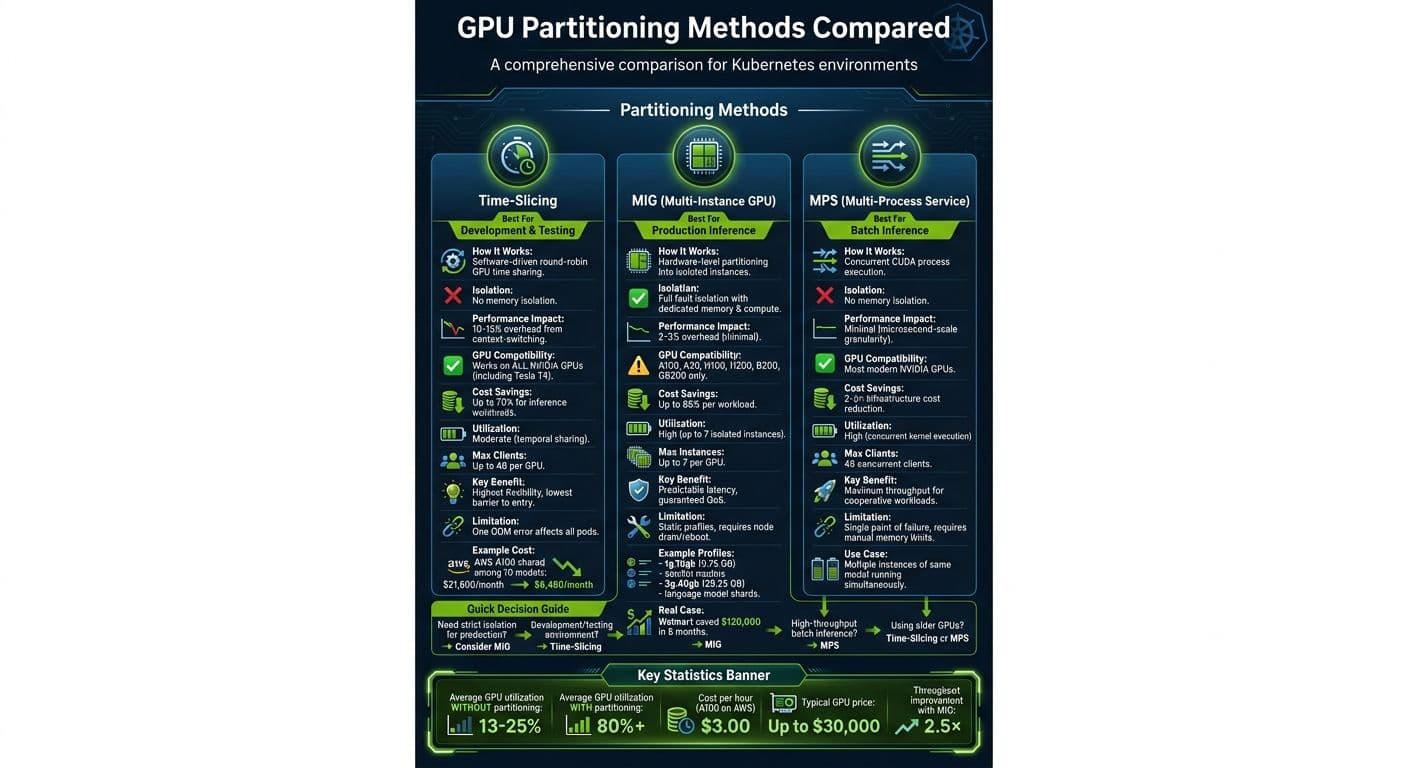
GPU Partitioning Methods Comparison: Time-Slicing vs MIG vs MPS
Kubernetes continues to expand its capabilities, offering three main methods to optimize GPU allocation: time-slicing, Multi-Instance GPU (MIG), and Multi-Process Service (MPS). Each approach offers a different balance of cost, isolation, and performance, making it essential to choose based on your specific environment and workload needs.
Time-Slicing for Development Environments
Time-slicing is a software-driven method that allows multiple workloads to share a single GPU by allocating GPU time in a round-robin manner. This creates virtual GPUs, enabling resource oversubscription and is particularly useful for development and testing environments.
This method works on most NVIDIA GPUs, including the Tesla T4, and can be configured dynamically using the NVIDIA GPU Operator - no need to reboot nodes. However, there are trade-offs. Time-slicing does not provide memory isolation, meaning one pod can cause an Out-of-Memory error that impacts other pods sharing the same GPU. Additionally, context-switching introduces a throughput reduction of about 10–15%.
As NVIDIA notes:
Time-slicing trades the memory and fault-isolation that is provided by MIG for the ability to share a GPU by a larger number of users.
This makes time-slicing a great fit for cost-sensitive scenarios like development, interactive Jupyter Notebooks, and some inference workloads. For instance, it can reduce GPU costs for inference by up to 70%. On AWS, where an A100 costs approximately $3.00 per hour, sharing one GPU among 10 models can cut monthly expenses from $21,600 to $6,480.
For production workloads that demand strict isolation, MIG is a better option.
NVIDIA Multi-Instance GPU (MIG) for Production
MIG offers a hardware-level solution to GPU partitioning. It divides GPUs like the A100 or H100 into up to seven isolated instances, each with dedicated compute cores, memory, and cache. Unlike time-slicing, MIG ensures fault isolation, so an error in one instance won't affect others.
The overhead with MIG is minimal, typically around 2–3%, and it delivers predictable latency. As Kalyan Reddy Daida, a GPU optimization expert, advises:
Production inference? Use MIG. The isolation is worth the slightly higher configuration overhead.
MIG is only available on newer NVIDIA datacenter GPUs, such as the A100, A30, H100, H200, B200, and GB200. You can configure MIG profiles based on memory requirements. For example, a 1g.10gb profile with 9.75 GB of memory is ideal for smaller models, while a 3g.40gb profile with 39.25 GB is better suited for larger workloads like language model shards.
The main limitation is that MIG profiles are static. Adjusting the partition layout often requires draining the node and rebooting the GPU. Despite this, MIG is an excellent choice for production environments where SLAs and multi-tenant isolation are critical, potentially cutting infrastructure costs by 50% while maintaining hardware separation.
For batch inference scenarios that prioritize throughput and shared resources, MPS is another viable option.
Multi-Process Service (MPS) for Inference
MPS is designed to maximize GPU utilization by allowing concurrent CUDA process execution. It's particularly suited for high-throughput batch inference, where multiple instances of the same model are running simultaneously.
Unlike time-slicing, MPS enables concurrent kernel execution with minimal overhead, ensuring efficient use of Streaming Multiprocessors. However, it doesn't provide memory isolation, so you'll need to enforce memory limits using Kubernetes LimitRange to prevent resource contention.
MPS works best for cooperative workloads where processes don't compete heavily for GPU resources. It supports most modern NVIDIA GPUs but is limited to 48 concurrent clients. For batch scoring pipelines or serving multiple copies of the same model, MPS offers a middle ground between the flexibility of time-slicing and the isolation of MIG.
Cost Savings with GPU Partitioning
This section dives into how GPU partitioning translates into real-world cost reductions and improved efficiency, building on previously discussed partitioning methods.
Case Study: Cast AI's Cost Reductions
In November 2025, Cast AI demonstrated the power of combining time-slicing with Spot Instance automation. By enabling four developers to share a single H100 GPU, they slashed development costs by 75%, achieving an impressive 93% savings per developer. Phil Andrews from Cast AI summed up the benefits:
"MIG lets you take a $5k/month H100 and let eight developers share it – all working in parallel, all at full speed, without stepping on each other's toes."
Similarly, in September 2025, Walmart adopted dynamic MIG partitioning on a Kubernetes cluster equipped with eight NVIDIA A100 GPUs. By reconfiguring profiles every five minutes based on pending pod requests, they deferred additional GPU purchases, saving over $120,000 in capital expenditures within six months. Additionally, cloud GPU burst costs dropped by 60%.
Utilization and Cost Benchmarks
These examples highlight the potential for significant cost savings, but they also bring attention to broader utilization trends. In active clusters, GPU usage typically ranges from 13% to 25%, with memory utilization often falling below 20%. This underutilization inflates compute costs, driving them to $15–$25 per hour for low-utilization tasks on unpartitioned A100 GPUs. Sagar Parmar, an SRE, refers to this as the "GPU atomicity Problem", pointing out that organizations often pay for 100% of a $30,000 GPU while leaving most of its power unused.
Partitioning methods address this inefficiency. For example, MIG can cut per-workload infrastructure costs by up to 85%, and strategic GPU sharing can reduce overall infrastructure costs by 2–3×. In one instance, deploying NVIDIA A100 MIG on Amazon EKS P4d instances in September 2023 boosted throughput by 2.5× compared to non-partitioned setups.
GPU Partitioning Techniques Compared
The table below compares the main GPU partitioning methods, highlighting their strengths, limitations, and use cases:
| Method | Utilization Gain | Cost Savings | Use Cases | Pros | Cons |
|---|---|---|---|---|---|
| MIG | High (up to 7 isolated instances) | Up to 85% per workload | Production inference, multi-tenant clusters | Hardware isolation; guaranteed QoS | Limited to Ampere/Hopper+; fixed partition sizes |
| Time-Slicing | Moderate (temporal sharing) | High (cheapest sharing for dev) | Development, notebooks, light workloads | Works on all NVIDIA GPUs; highly flexible | No memory isolation; 10–15% context-switching overhead |
| MPS | High (concurrent execution) | 2–3× reduction in infrastructure costs | Mixed workloads, high-throughput inference | Microsecond-scale granularity; very low latency | No memory isolation; single point of failure |
The right method depends on specific workload needs. As Sagar Parmar explains:
"MIG provides the 'hard walls' necessary to transform a single $30,000 asset into a flexible fleet of seven reliable micro-accelerators".
For development environments where cost efficiency is critical, time-slicing offers the highest density - supporting up to 48 clients per GPU - though it lacks memory isolation. Choosing the right partitioning strategy can lead to significant cost savings and better resource utilization.
How to Implement GPU Partitioning
Tools for Automation
Automation tools can simplify GPU partitioning significantly. For instance, the NVIDIA GPU Operator handles drivers, device plugins, and MIG managers across clusters seamlessly. Karpenter takes it a step further by dynamically provisioning nodes based on the GPU type and memory needs of a pod, then terminating them as soon as they're no longer needed. Melanie Dalle from Qovery highlights its efficiency:
"Karpenter can terminate nodes the millisecond the last GPU task completes, ensuring you only pay for the seconds used."
Cast AI adds another layer of automation by managing time-slicing and MIG configurations, while working with autoscalers to minimize the gap between requested and actual resource usage. For tracking costs, OpenCost is a useful tool, attributing expenses directly to specific models, teams, or even individual inference requests.
Matching Workloads to Partitioning Methods
Once you have automation in place, the next step is to match your partitioning method to the needs of your workloads.
- Time-slicing works well for environments like development, testing, or interactive notebooks, where strict isolation isn't a priority. You can set this up using a
ConfigMapin thegpu-operatornamespace, which defines how many virtual GPUs (or "replicas") a physical GPU supports. - For production inference tasks that require strict service-level agreements, MIG (Multi-Instance GPU) is the way to go. Compatible hardware like A100 or H100 GPUs can be configured in MIG mode, with profiles such as
1g.5gbfor smaller inference models or3g.20gbfor larger workloads like language model shards.
Kalyan Reddy Daida, an instructor at StackSimplify, emphasizes the importance of MIG for production:
"Production inference? Use MIG. The isolation is worth the slightly higher configuration overhead."
To streamline workload routing, label nodes with their sharing strategy (e.g., nvidia.com/gpu-sharing=mig) and use node selectors. Additionally, create GPU-specific node pools with taints like nvidia.com/gpu: true to ensure non-GPU workloads don’t consume costly GPU resources.
Monitoring and Optimization
After setting up GPU partitioning, monitoring becomes key to optimizing allocation and managing costs. Tools like the DCGM Exporter can stream GPU metrics into Prometheus, allowing real-time tracking of metrics such as DCGM_FI_DEV_GPU_UTIL and DCGM_FI_DEV_FB_USED to prevent out-of-memory errors.
Set alerts for specific conditions, like GPU memory usage exceeding 90% or utilization dropping below 20% for more than 30 minutes, to identify underused resources.
To prevent over-consumption in time-slicing environments, implement ResourceQuota and LimitRange at the namespace level. It’s crucial to cap per-container memory in these setups, as one out-of-memory error can crash all pods sharing the same GPU. For scaling based on metrics, KEDA is a powerful option, enabling autoscaling tied to business-relevant metrics like SQS or RabbitMQ queue depth, rather than traditional CPU or RAM metrics.
Conclusion
GPU Partitioning Methods Recap
GPU partitioning is all about making the most out of expensive hardware. Time-slicing allows multiple workloads to share the same GPU by running in sequential time slots. It's a good fit for development environments or interactive notebooks where strict isolation isn't a priority. On the other hand, NVIDIA Multi-Instance GPU (MIG) divides a single A100 or H100 GPU into up to seven independent instances, each with its own memory and compute resources. This makes it perfect for production inference scenarios where reliability and service-level agreements are essential. Finally, Multi-Process Service (MPS) focuses on throughput, letting different processes execute kernels simultaneously on the same GPU - ideal for batch inference tasks.
Each method serves different needs. As Luca Berton, Principal Solutions Architect, explains:
MIG provides hardware isolation with partitioned memory and compute - no noisy neighbor.
The right choice depends on your workload. Training often requires full GPU allocation, production inference benefits from MIG's isolation, and cost-conscious dev/test environments thrive with time-slicing.
Achieving Cost Savings in AI Workloads
GPU partitioning isn't just about efficiency - it can save a lot of money. For example, running a single NVIDIA A100 GPU on AWS costs around $3.00 per hour. If an inference pod uses only 12% of the GPU's capacity, up to 88% of the billed resources are wasted. By using GPU partitioning, costs can drop by as much as 70% compared to allocating an entire GPU.
Take dynamic MIG partitioning as an example: it significantly increased utilization while cutting both capital and burst costs. To make things even easier, some platforms now offer ready-to-use solutions that simplify deployment and maximize savings.
Use NanoGPT for Your AI Projects
For teams looking for a simple way to save on AI workloads, NanoGPT offers an affordable, pay-as-you-go option. Starting at just $0.10, NanoGPT provides access to essential AI models without requiring dedicated infrastructure. There are no subscriptions, no hidden charges, and your data stays local on your device for complete privacy.
This aligns perfectly with the cost-saving goals of GPU partitioning. Instead of paying for idle GPU capacity or navigating complex Kubernetes setups, you only pay for what you use. For smaller projects or teams experimenting with AI, NanoGPT delivers the flexibility and affordability needed to explore AI without the hassle of managing infrastructure.
FAQs
Which GPU partitioning method should I use for my workload?
The best GPU partitioning approach depends on what you're aiming to achieve.
If you need consistent performance and hardware isolation, NVIDIA's Multi-Instance GPU (MIG) feature on A100 or H100 GPUs is a solid choice. It's particularly well-suited for inference workloads where meeting strict latency requirements is crucial.
On the other hand, if you're looking for a cost-effective way to share resources for development or tasks that don't demand high precision, time-slicing can be a good option. However, keep in mind that it may introduce some latency and doesn't provide hardware isolation.
Ultimately, your decision should balance the need for predictable performance against the flexibility of resource sharing.
What GPUs support MIG, and what are the main limitations?
GPUs compatible with MIG include the NVIDIA A100, H100, and H200. However, there are some drawbacks to consider. For instance, MIG requires pre-configured profiles, works exclusively with certain GPU models, and involves more complex setup processes. These limitations can make it less ideal for tasks that demand flexible or unpredictable resource allocation.
How do I monitor GPU utilization and prevent out-of-memory issues in Kubernetes?
To keep an eye on GPU usage and prevent out-of-memory (OOM) problems in Kubernetes, tools like nvidia-smi are invaluable for tracking real-time GPU memory and compute activity. You can also use GPU partitioning techniques, such as NVIDIA MIG, to create isolated instances, or adopt GPU sharing strategies like time-slicing to maximize resource efficiency. Regularly fine-tune resource requests and limits based on GPU metrics to maintain optimal performance and system stability.