
AI Governance Frameworks: 9 Key Standards

AI governance is no longer optional. With over 1,000 AI policy initiatives tracked globally and rising regulatory pressure, organizations must navigate a sea of frameworks to ensure compliance, mitigate risks, and build responsible AI systems. Here's a quick breakdown of nine major frameworks shaping AI governance in 2026:
- OECD AI Principles: The first intergovernmental AI standard, focusing on transparency, accountability, and human rights.
- UNESCO Ethics of AI: A global recommendation emphasizing ethical AI lifecycle management and human accountability.
- NIST AI RMF: A U.S.-focused risk management framework guiding organizations on AI safety, fairness, and transparency.
- ISO/IEC 42001: The first certifiable AI management standard, aligning with global regulations like the EU AI Act.
- EU AI Act: A binding regulation with strict risk-based classifications and enforcement, including hefty penalties.
- UK AI Governance Principles: A flexible, principles-driven approach enforced by existing regulators.
- IEEE 7000 Series: A technical standard embedding ethics directly into AI system design.
- Singapore Model AI Governance Framework: A voluntary framework promoting transparency and human-centric AI.
- GPAI Framework: A global partnership fostering collaboration and responsible AI practices.
Each framework serves different needs - from compliance with strict laws to voluntary ethical guidelines. Together, they form a layered governance strategy for organizations to manage risks, meet legal obligations, and align with global standards.
Quick Comparison:
| Framework | Type | Enforcement | Certification | Best For |
|---|---|---|---|---|
| OECD AI Principles | Voluntary | Peer pressure | None | Policymakers, ethics teams |
| UNESCO Ethics of AI | Voluntary | Self-adoption | None | Governments, developing nations |
| NIST AI RMF | Voluntary | Indirect | None | U.S. organizations, federal contractors |
| ISO/IEC 42001 | Voluntary, Certifiable | None | Certifiable | AI developers, regulated industries |
| EU AI Act | Binding Regulation | Strict penalties | Required for high-risk AI | Organizations in EU markets |
| UK AI Governance Principles | Voluntary | Regulator-driven | None | UK-based entities, public sector |
| IEEE 7000 Series | Voluntary | Self-regulated | CertifAIEd™ (optional) | System architects, product teams |
| Singapore Model AI Governance Framework | Voluntary | Self-assessment | None | Asia-Pacific organizations |
| GPAI Framework | Voluntary | Peer collaboration | None | Governments, SMEs |
Organizations should combine these frameworks for a robust governance stack, starting with risk management (e.g., NIST AI RMF), adding certifiable processes (ISO/IEC 42001), and meeting jurisdiction-specific regulations (like the EU AI Act). This layered approach ensures compliance, reduces risks, and builds trust in AI systems.
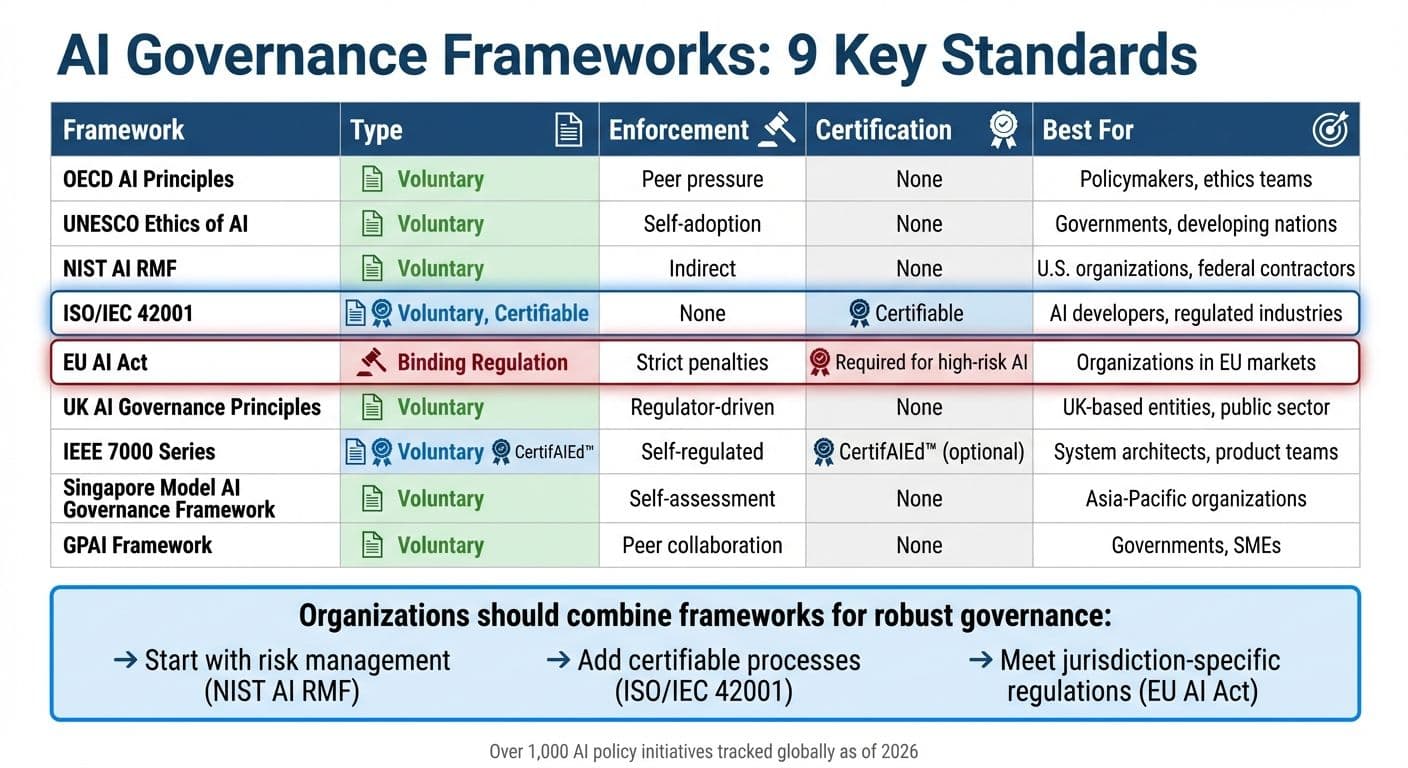
AI Governance Frameworks Comparison: 9 Key Standards for 2026
1. OECD AI Principles
Type
The OECD AI Principles serve as a formal "Recommendation" from the OECD Council, marking the first intergovernmental standard for trustworthy AI. Initially adopted on May 22, 2019, and updated in 2024, these principles now have the backing of 47 countries, including all 38 OECD members as well as Brazil, Argentina, and Singapore. While non-binding, this "soft law" carries substantial political influence.
Scope
These principles apply universally to all sectors and involve every AI stakeholder - whether they are researchers, developers, providers, or organizations deploying AI. Covering the entire AI system lifecycle, the framework addresses stages from design and data collection to deployment, operation, and eventual retirement. The 2024 update introduced measures to tackle risks from generative AI, such as misinformation and disinformation, and added a focus on environmental sustainability to highlight the ecological impact of large-scale AI systems.
Enforcement
There’s no global body enforcing these principles. Instead, compliance relies on peer pressure, national integration, and political commitment from participating countries. Notably, the G20 AI Principles align closely with the OECD framework, extending its influence to major emerging economies. The OECD.AI Policy Observatory supports implementation by maintaining a database of over 1,000 national AI policy initiatives from more than 70 jurisdictions.
Certification Requirements
The OECD AI Principles do not mandate specific certifications or technical checklists. Instead, they emphasize "Common Guideposts" for managing risks and encourage mutual recognition of conformity assessments between countries to ease regulatory challenges. Organizations can use internationally recognized technical standards, such as ISO/IEC, to align with the framework’s five core values:
- Inclusive growth and well-being
- Respect for human rights and democratic values
- Transparency and explainability
- Robustness and security
- Accountability
This flexible guidance provides a foundation for organizations to align with the principles while adapting to their unique needs.
Best For
These principles are particularly useful for national policymakers, Chief AI Officers, and ethics teams looking to establish internal review processes. Many organizations begin with transparency requirements since they are often the easiest to implement. The OECD.AI Policy Observatory features case studies that demonstrate how organizations in various sectors have approached these principles in practice. The emphasis on mutual recognition reflects an international push for collaborative AI governance.
sbb-itb-903b5f2
2. UNESCO Recommendation on the Ethics of AI
Type
The UNESCO Recommendation on the Ethics of AI is a global framework adopted unanimously by 193 Member States in November 2021. While not legally binding, it provides guidance for shaping national laws and policies. Its strength lies in the international consensus behind it, encouraging countries to align their domestic AI strategies with its principles. This approach allows for widespread application in AI development and governance.
Scope
This framework addresses the entire lifecycle of AI systems and applies to a wide range of stakeholders, including governments, private companies, academic institutions, and civil society organizations. It outlines 11 key policy areas such as data management, gender equality, education, health, and environmental concerns. A core principle of the Recommendation is the assertion that AI systems are tools under human control, with people accountable for their effects at every stage.
Enforcement
Implementation of the Recommendation is voluntary, with Member States responsible for adopting it domestically. UNESCO supports this process through a four-year reporting cycle. By 2025, over 50 countries had either completed or were in the process of conducting readiness assessments to evaluate gaps in their AI governance. For instance, in March 2026, Lao PDR and Thailand published their Artificial Intelligence Readiness Assessment Reports using UNESCO's framework. This voluntary adoption aligns with other non-binding international frameworks in AI governance.
Certification Requirements
Although the Recommendation does not require certifications, it provides two key tools for implementation. The Readiness Assessment Methodology (RAM) helps countries evaluate their legal, institutional, and technical preparedness across five dimensions. Meanwhile, the Ethical Impact Assessment (EIA) supports organizations in identifying and mitigating risks related to human rights, gender equality, and environmental concerns before deploying AI systems. For example, Trinidad and Tobago held a RAM Validation Workshop in April 2026 to strengthen its ethical AI governance. Additionally, Microsoft and Telefonica co-chair the Business Council for Ethics of AI, collaborating with UNESCO to implement the EIA tool in Latin America.
Best For
This framework is particularly helpful for governments and policymakers aiming to adopt a human-rights-focused and inclusive approach to AI governance. It is especially useful for developing nations working to close the "AI divide." Following readiness assessments, 83% of Member States now incorporate diversity, inclusion, and equality into their AI strategies, while 93% prioritize education as a foundational element of AI readiness.
3. NIST AI Risk Management Framework (AI RMF 1.0)
Type
Released on January 26, 2023, the NIST AI Risk Management Framework (AI RMF 1.0) is a voluntary, technology-neutral guide designed to address AI risks across various industries and applications. While it’s not a binding regulation, it has become a go-to standard in the U.S., especially among federal agencies like the FTC, FDA, and SEC, which often reference its principles in their enforcement guidelines. This framework takes a socio-technical approach to AI, acknowledging that risks stem not just from the technology itself but also from how people design, deploy, and use AI systems.
Scope
The framework covers the entire AI lifecycle - from initial design to eventual decommissioning. It’s applicable to any AI system, whether it’s a customer service chatbot or a complex medical diagnostic tool. It outlines seven key traits of trustworthy AI:
- Valid and reliable
- Safe
- Secure and resilient
- Accountable and transparent
- Explainable and interpretable
- Privacy-enhanced
- Fair, with harmful bias managed
To implement these traits, organizations are guided through four core functions:
- Govern: Set policies and accountability measures.
- Map: Identify the context and risks of AI use.
- Measure: Use metrics and testing to assess risks.
- Manage: Prioritize and address identified risks.
Enforcement
Although compliance with the framework is voluntary, it holds considerable sway in practice. U.S. federal contractors, for instance, are often expected to demonstrate alignment with NIST’s AI governance principles as part of procurement requirements. Additionally, regulators in industries like finance, healthcare, and employment frequently use NIST’s principles as benchmarks for acceptable risk management. The framework is designed to evolve, with updates driven by high-level directives. For example, in December 2025, NIST introduced a draft Cyber AI Profile (NIST IR 8596), which aims to integrate AI risk management with the Cybersecurity Framework 2.0. This evolving approach also supports certification pathways and practical tools for assessment.
Certification Requirements
The NIST AI RMF itself cannot be directly certified. However, organizations can use it as a foundation to work toward certifications like ISO/IEC 42001, which is certifiable. To assist with this, NIST provides a crosswalk for aligning the two frameworks. It also introduces four implementation tiers - Partial, Risk-Informed, Repeatable, and Adaptive - to help organizations measure their maturity in managing AI risks. A recommended starting point is creating an inventory of all AI systems, including third-party solutions, and using the NIST AI RMF Playbook for actionable guidance.
Best For
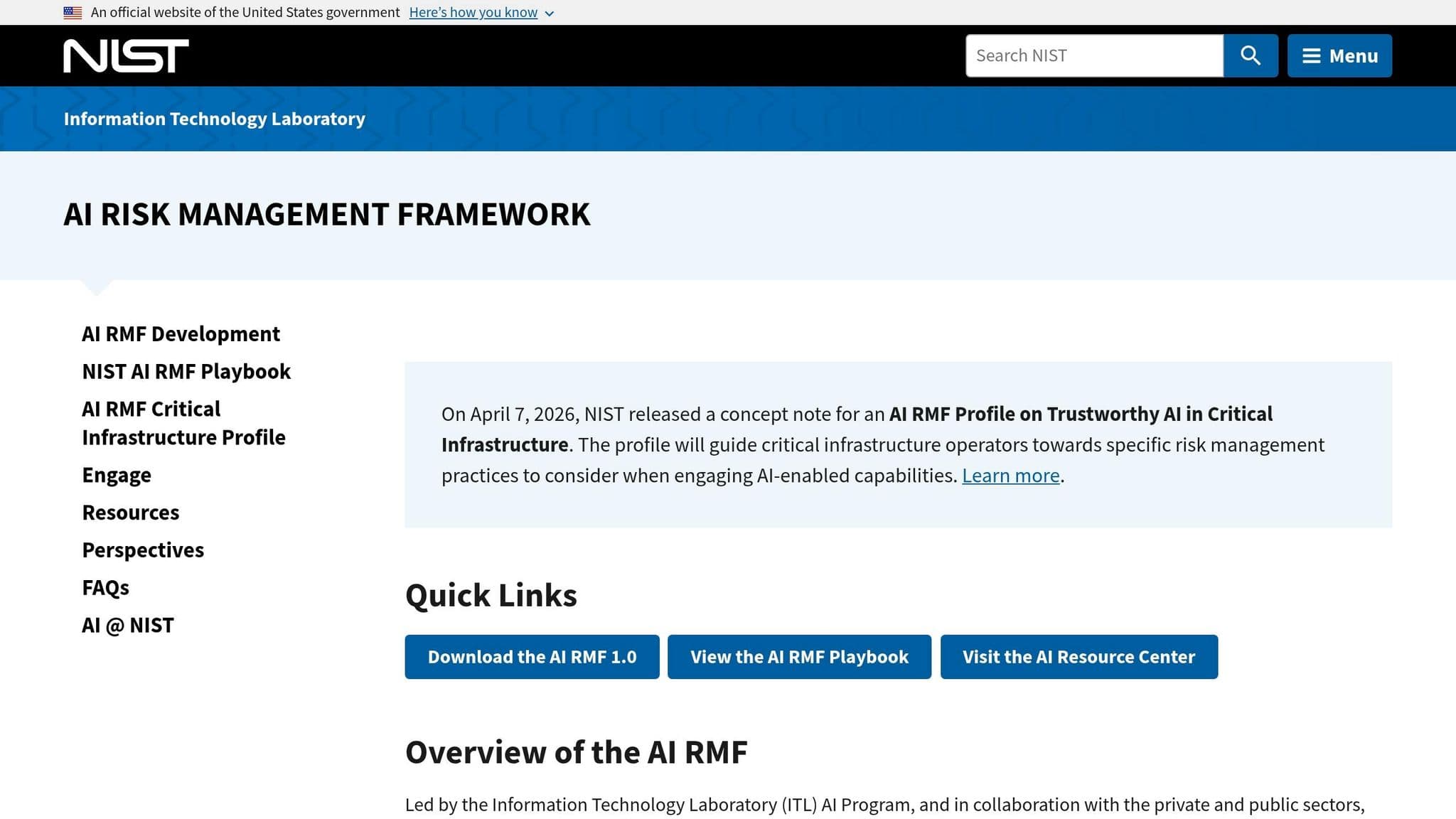
This framework is particularly suited for U.S.-based organizations, federal contractors, and enterprise risk management teams looking for a structured approach to AI governance. It’s especially useful in regulated sectors where agencies reference NIST principles in enforcement. Developers of generative AI systems can also benefit from the NIST AI 600-1 profile, which highlights 12 specific risk categories, such as hallucinations (confabulation) and risks related to CBRN (chemical, biological, radiological, and nuclear) information. Additionally, on April 7, 2026, NIST introduced a concept note for an AI RMF Profile focused on trustworthy AI in critical infrastructure, offering tailored guidance for operators of essential services.
4. ISO/IEC 42001:2023
Type
ISO/IEC 42001:2023 stands out as the first-ever certifiable international management system standard tailored specifically for artificial intelligence. Released on December 18, 2023, this standard goes beyond non-certifiable guidelines like the NIST AI RMF by offering organizations a structured path to certification. It incorporates the Plan-Do-Check-Act cycle, embedding AI governance into corporate frameworks to promote continuous improvement and ensure accountability at the executive level. Developed with input from over 50 countries, it provides a structured alternative to non-binding frameworks, offering a more formalized approach to AI management.
Scope
This standard is designed to be applicable across all industries and organizations, regardless of size or sector, as long as they develop, provide, or use AI systems. It covers the entire AI lifecycle, featuring 38 controls across nine categories, including areas like data quality, bias mitigation, transparency, and human oversight. For organizations already certified under ISO/IEC 27001 or ISO 9001, the Harmonized Structure (Annex SL) allows for seamless integration with ISO 42001. This alignment can cut implementation costs by 30% to 50%.
Enforcement
Although adopting ISO 42001 is voluntary, its relevance is growing in response to global regulatory trends. The standard aligns closely with the EU AI Act, offering a documented framework for meeting high-risk AI requirements. Companies selling AI-enabled products in the European Union can use this certification to demonstrate compliance. A survey found that 76% of compliance professionals plan to adopt ISO 42001 or similar frameworks to guide their AI governance. Since late 2024, major players like Microsoft, Anthropic, Workday, Synthesia, and Cognizant have obtained certification to meet global regulatory needs and enterprise procurement requirements.
Certification Requirements
To achieve certification, organizations must pass a two-stage audit conducted by an accredited third-party body.
- Stage 1: A readiness review of key documentation, such as AI policies and risk assessments.
- Stage 2: An evaluation of how effectively these policies are implemented, including interviews and evidence reviews.
Applicants need at least three months of live operations, supported by internal audits and management reviews, to qualify. A critical component is the AI Impact Assessment (AIA), which examines the ethical, social, and legal impacts of AI systems on individuals and society. Certification remains valid for three years, with annual surveillance audits costing between $3,000 and $12,000. The initial investment typically ranges from $45,000 to $135,000, and implementation can take anywhere from 3 to 9 months.
Best For
ISO/IEC 42001 is particularly suited for AI developers, SaaS companies, and enterprise vendors aiming to showcase "trust by design" and streamline B2B transactions. It’s especially beneficial for organizations in regulated or high-stakes industries like healthcare, finance, insurance, and legal services, where strong AI governance is essential. Companies already certified under ISO 27001 can efficiently integrate AI governance due to shared management structures.
In March 2026, Microsoft announced that its Microsoft 365 Copilot and Microsoft 365 Copilot Chat services had achieved ISO/IEC 42001:2023 certification. This milestone validated its Responsible AI Standard, demonstrating robust risk management throughout the AI lifecycle. Such certifications enhance competitive positioning in a rapidly evolving regulatory environment.
AI Security and Risk: Side-by-side Comparison of AI Compliance and Risk Frameworks
5. EU AI Act
This section delves into the EU AI Act, a regulation that introduces binding enforcement measures and a structured risk categorization, setting it apart from earlier voluntary frameworks.
Type
The EU AI Act (Regulation (EU) 2024/1689) is the first legally enforceable regulation for AI, imposing strict obligations with hefty financial penalties for violations. Effective August 1, 2024, it creates a unified legal framework across all 27 EU member states. Designed as a product safety regulation, it complements - rather than replaces - the GDPR.
Scope
The Act applies globally to any provider whose AI systems or outputs reach the EU market. It classifies AI systems into four categories: Unacceptable (banned), High-Risk (strictly regulated), Limited Risk (subject to transparency requirements), and Minimal Risk (unregulated). Roughly 8–10% of AI systems fall into the High-Risk tier, while about 70% are classified as Minimal Risk. Certain uses, like AI for military purposes, pre-market scientific research, or personal non-professional applications, are exempt.
Enforcement
Enforcement relies on collaboration between National Competent Authorities in member states and a centralized European AI Office, which oversees General-Purpose AI models. Authorities can request technical documentation, inspect source code, and order system withdrawals. Practices like social scoring and subliminal manipulation were banned starting February 2, 2025. High-risk AI systems must achieve full compliance by August 2, 2026. Non-compliance can lead to fines of up to $35 million or 7% of global annual revenue for banned practices, and up to $15 million or 3% of global turnover for failing to meet high-risk obligations.
Certification Requirements
High-risk AI systems must pass a conformity assessment, either through internal evaluations or by independent Notified Bodies for more sensitive cases. Certification involves proving compliance with standards for risk management, data governance, transparency, human oversight, and technical reliability. This is documented through an EU Declaration of Conformity and CE marking. Additionally, all high-risk systems must be listed in a public EU database, and non-EU providers are required to appoint an EU-based Authorized Representative. The certification process for complex systems typically takes 4 to 12 months. These rigorous requirements make the EU AI Act a pivotal step in shaping AI governance.
Best For
The regulation is particularly relevant for organizations deploying AI in regulated industries such as healthcare, finance, recruitment, education, and critical infrastructure, especially if they operate in or aim to enter the European market. Companies pursuing ISO/IEC 42001 certification may find alignment opportunities, and those viewing compliance as a governance strategy can gain a competitive advantage in this evolving regulatory environment.
6. UK AI Governance Principles
Type
The UK has opted for a principles-driven, innovation-friendly strategy for AI governance, steering clear of strict, standalone laws. Instead of introducing AI-specific legislation, the framework places responsibility on existing regulators - like the Information Commissioner's Office (ICO), the Financial Conduct Authority (FCA), and Ofcom - to enforce five core principles within their respective industries. This non-statutory framework is designed to be adaptable and not tied to specific technologies, enabling regulators to keep pace with rapid advancements without rigid procedural constraints.
The five guiding principles are: Safety, Security and Robustness; Appropriate Transparency and Explainability; Fairness; Accountability and Governance; and Contestability and Redress. For public sector organizations, these principles are further detailed in the "AI Playbook for the UK Government", which introduces 10 operational guidelines effective February 2025. These guidelines address critical areas such as understanding AI's limitations, ensuring ethical and lawful use, maintaining secure deployment, enabling human oversight, managing AI throughout its lifecycle, and fostering commercial partnerships. This adaptable framework ensures its relevance across various sectors.
Scope
This framework is designed to cover the entire UK economy. The AI Playbook is mandatory for central government entities and arm's-length organizations, ensuring its principles are applied throughout the AI lifecycle - from development and procurement to eventual decommissioning. Unlike the EU's centralized legislative approach, the UK relies on sector-specific regulators to interpret and apply these voluntary principles within their respective domains.
Enforcement
The UK's enforcement approach builds on its principles-based model, utilizing existing legal structures. Regulators apply these principles within the scope of established laws such as the UK GDPR, the Data Protection Act 2018, and the Equality Act. They have the discretion to implement these principles using a technology-neutral perspective. Non-compliance can lead to enforcement actions by regulators like the ICO, which may impose fines or issue corrective orders for breaches of underlying legal requirements.
"The principles are voluntary and how they are considered is ultimately at regulators' discretion." – Department for Science, Innovation & Technology
To support the implementation of these principles, the UK government has allocated £10 million (approximately $13 million) to enhance regulators' AI capabilities. Additionally, the AI and Digital Regulations Service has gained traction, with over 2,800 visits to its developer guidance and 3,800 visits to its adopter guidance since its launch.
Certification Requirements
Currently, there are no mandatory AI certification requirements in the UK. Compliance is demonstrated through documentation and adherence to international standards. Public-facing AI systems must comply with the Algorithmic Transparency Recording Standard (ATRS), while organizations are encouraged to adopt global benchmarks like ISO/IEC 42001 (AI Management System) and ISO/IEC 22989 (Terminology) to ensure compatibility and demonstrate compliance.
Certification is viewed as a long-term goal within a broader "AI assurance ecosystem" aimed at evaluating and communicating the reliability of AI systems. The United Kingdom Accreditation Service (UKAS) oversees third-party conformity assessment bodies that provide certification and testing services. Organizations are also encouraged to use tools like Model Cards and Data Cards for improved transparency and to adopt certifications like Cyber Essentials for baseline security.
Best For
This framework is particularly well-suited for UK-based organizations and public sector bodies seeking a flexible, risk-based governance model. It prioritizes innovation while ensuring alignment with existing data protection and human rights laws. It’s especially useful for entities already subject to sector-specific regulations and those looking to demonstrate compliance without navigating intricate certification processes. Unlike the EU AI Act, the UK's approach offers greater flexibility by leveraging existing legal frameworks rather than introducing new legislation.
7. IEEE 7000 Series
Type
The IEEE 7000 series provides a structured, technical approach to embedding ethics into system design. Using a five-phase cyclical model - Values Investigation, Translation, System Design, Verification, and Monitoring - this standard ensures that ethical considerations are integrated throughout the system development lifecycle. Rooted in Value-Based Engineering (VbE), it is designed to work across various technologies, including AI systems, IoT devices, autonomous vehicles, and traditional software projects.
After five years of collaboration among 154 experts, the standard was published as IEEE 7000-2021 and later recognized globally as IEEE/ISO/IEC 24748-7000:2022. Pilot testing showed that participants identified an average of 10 ethical issues each, outperforming traditional approaches in spotting potential concerns.
Scope
This framework spans the entire lifecycle of system development and can be tailored to organizations of any size. Rather than replacing existing processes, it integrates seamlessly with them. Available through the IEEE Xplore Digital Library - and occasionally for free via the IEEE GET Program - it emphasizes seven key quality attributes: Accountability, Auditability, Bias Mitigation, Explainability, Fairness, Traceability, and Transparency.
Enforcement
Adopting the IEEE 7000 series is voluntary, relying on internal processes and training rather than regulatory enforcement. However, its detailed ethical design methods align well with broader regulatory frameworks like the EU AI Act.
"Engineers, their managers, and other stakeholders benefit from well-defined processes for considering ethical issues along with the usual concerns of system performance and functionality early in the system life cycle." – Konstantinos Karachalios, Managing Director of IEEE SA
Certification Requirements
While IEEE 7000-2021 is a guidance standard and doesn’t offer direct certification, the IEEE CertifAIEd™ program provides formal validation for professionals and AI products. This program evaluates systems based on four pillars: Transparency, Accountability, Algorithmic Bias, and Privacy. In January 2026, Vienna became a pioneer in using IEEE CertifAIEd™ to certify its software ethically. Peter Weinelt, Deputy Director General for the City of Vienna, remarked:
"Data security and data protection must be at the forefront when using AI from the very beginning. That's why we relied on international expertise (from IEEE) during the development of the software and had our program ethically certified".
Organizations can use the "Values Traceability" process within the standard to establish an auditable link between high-level ethical goals and specific design decisions. However, implementing this framework may require upfront investments in training and could add weeks to project timelines, especially during the values investigation phase.
Best For
The IEEE 7000 series is ideal for system architects, design teams, and product managers working in critical industries like healthcare, finance, and transportation. It bridges the gap between abstract ethical principles and practical, measurable technical requirements. Unlike broader frameworks such as the OECD Principles, it delivers actionable engineering outputs, making it an excellent choice for organizations aiming to enhance their lifecycle models with systematic ethics.
8. Singapore Model AI Governance Framework
Type
Singapore has taken a voluntary, principles-based approach to AI governance, specifically designed for private sector organizations. This framework is built on two key principles: AI decision-making must be transparent, explainable, and fair, and AI solutions should focus on human needs. Instead of rigid regulations, the framework aims to build public trust while encouraging innovation, positioning itself as a global model for ethical AI development.
The Personal Data Protection Commission (PDPC) highlights this approach:
"Singapore believes that its balanced approach can facilitate innovation, safeguard consumer interests, and serve as a common global reference point".
Scope
The framework has evolved over time to address the challenges of different AI technologies. Starting with Traditional AI for predictive models, it expanded to include Generative AI for large language models and, most recently, Agentic AI in January 2026, which focuses on autonomous agents and the risks of cascading failures across interconnected systems.
While the framework applies broadly across industries, specific sectors have additional requirements. For example:
- Financial Sector: The Monetary Authority of Singapore (MAS) enforces specific AI guidelines.
- Healthcare: The Ministry of Health (MOH) provides tailored guidance for healthcare providers.
Additionally, the Personal Data Protection Act (PDPA) is mandatory for any AI systems handling personal data.
Enforcement
Unlike regions with binding regulations, Singapore relies on self-assessment and collaboration to encourage compliance. The framework does not impose penalties or mandatory requirements. Instead, governance is seen as a strategic advantage:
"This is a country that treats governance as competitive infrastructure, and US organisations operating in the region need to understand how that infrastructure works".
This approach has yielded results. In the first half of 2025, Singapore attracted over $1.31 billion in private AI funding, while the government pledged more than $786 million toward AI research and development for 2025–2030.
Certification Requirements
While formal certification is not required, Singapore provides tools to help organizations assess their AI governance practices. Key resources include:
- ISAGO: The Implementation and Self-Assessment Guide for Organizations helps companies evaluate their governance maturity and pinpoint areas for improvement.
- AI Verify Toolkit: This open-source tool allows technical testing for fairness and robustness, generating reports to demonstrate transparency to stakeholders.
The framework is also designed to work seamlessly with other global standards, such as the NIST AI Risk Management Framework and ISO/IEC 42001, making it easier for organizations to comply across jurisdictions. The AI Verify Foundation, which oversees these tools, includes over 180 member organizations, including major players like Google, Microsoft, and Salesforce.
Best For
This framework is particularly beneficial for multinationals operating in the Asia-Pacific region, especially in industries like financial services, healthcare, and autonomous systems. It also serves as the basis for the ASEAN AI Governance Guide, making it valuable for companies working across Southeast Asia.
For US firms, the framework's alignment with NIST standards offers an efficient way to meet compliance requirements across multiple regions without duplicating efforts. Additionally, the Agentic AI framework provides unique insights for organizations developing autonomous systems, addressing challenges like multi-agent coordination and independent decision-making.
Singapore's commitment to growing its AI workforce - aiming to expand from 4,500 practitioners to 15,000 - further strengthens its appeal as a hub for companies adopting these governance standards.
9. GPAI (Global Partnership on AI) Framework
The GPAI framework builds on a variety of national and regional standards to promote worldwide collaboration on AI policy.
Type
The Global Partnership on Artificial Intelligence (GPAI) is a global initiative involving multiple stakeholders, not a regulatory body. It was launched in June 2020 with 15 founding members and has since grown to include 46 countries, with the EU set to join by 2026. In 2024, GPAI merged its governance structure with the OECD. The partnership brings together over 500 AI experts from government, industry, academia, and civil society to work collaboratively.
Scope
GPAI’s framework covers the entire AI lifecycle, organized around four main themes: Responsible AI, Data Governance, Future of Work, and Innovation and Commercialization. Its operations are supported by three Expert Support Centers located in Montreal, Paris, and Tokyo. Key priorities include managing the governance of generative AI and foundational models, with a focus on safety testing and transparency to address risks like bias and deepfakes. The framework also highlights the importance of developing sovereign AI capabilities and ensuring equitable access to AI resources for developing nations to help close the digital divide.
Enforcement
Rather than relying on binding regulations, GPAI depends on voluntary participation and influence through soft law and peer collaboration. Members are expected to follow the OECD AI Principles and pay an annual fee of €20,000 (approximately $21,800). The GPAI Council holds the authority to review, suspend, or remove members that consistently violate its core values.
Certification Requirements
GPAI does not provide formal certification. Instead, it offers advisory tools like safety benchmarks, transparency templates, and non-binding guidance documents. These resources serve as blueprints for domestic AI regulations, helping organizations showcase responsible AI practices without requiring official certification.
Best For
GPAI is particularly helpful for aligning international AI policies, making it an asset for governments crafting national AI strategies that need to fit within global standards. Small and medium-sized enterprises can take advantage of its resources on innovation and commercialization, which focus on open-source tools and shared computing resources to reduce barriers to adoption. Developers working across different jurisdictions can use GPAI's toolkits to demonstrate responsible practices without needing formal certification. Its global approach provides valuable advisory support for both policymakers and developers.
Strengths and Weaknesses
This section examines the strengths and challenges of various frameworks to help guide effective AI governance strategies.
Each framework brings its own advantages and limitations, catering to different organizational needs. The EU AI Act is notable for being the only legally binding regulation in this space, with enforceable penalties that can reach up to $38.2 million or 7% of global annual turnover. However, its stringent requirements often lead to high compliance costs and limit flexibility, especially when managing high-risk systems.
The ISO/IEC 42001 framework gains credibility through third-party certification, which serves as external validation of an organization's AI governance maturity. On the downside, its voluntary nature means there is no regulatory enforcement, and achieving certification requires extensive documentation, which can be resource-intensive.
The NIST AI RMF emphasizes flexibility with its outcome-based approach, making it particularly appealing for U.S.-based organizations designing risk management programs. That said, it lacks formal certification and direct regulatory penalties, instead relying on indirect enforcement through federal procurement requirements. Dr. Faiz Rasool from the Global AI Certification Council highlights the complementary nature of these frameworks:
"The EU AI Act, NIST AI RMF, and ISO 42001 form a single governance stack: regulation providing legal requirements, a framework providing risk management methodology, and a standard providing certifiable evidence".
The UK AI Governance Principles focus on fostering innovation by allowing sector-specific flexibility. However, this approach can lead to fragmented oversight due to the absence of centralized regulatory control. Similarly, Singapore's Model AI Governance Framework is praised for its adaptability, with updates like the January 2026 release addressing Agentic AI. Despite these efforts, it remains non-binding and relies on soft enforcement measures. Meanwhile, frameworks like the OECD Principles and UNESCO's Recommendation provide useful global consensus but lack technical depth and enforcement mechanisms.
Conclusion
The nine frameworks share common principles like transparency, accountability, fairness, and human oversight but differ in how they enforce, structure, and apply these values. Instead of choosing just one, organizations should treat these frameworks as complementary layers of AI governance. For instance, the NIST AI RMF provides a solid foundation for risk management, ISO/IEC 42001 offers certifiable processes, and the EU AI Act sets binding legal standards. Together, these frameworks create a comprehensive strategy that simplifies compliance while leveraging their individual strengths.
A phased approach works best for implementation. Start by building a risk management framework using the NIST AI RMF (3–6 months). Then, pursue ISO/IEC 42001 certification (2–4 months). Finally, integrate legal requirements specific to your jurisdiction, such as those outlined in the EU AI Act. Documentation can often be reused across frameworks using official crosswalks, which map NIST subcategories to ISO/IEC 42001 clauses.
Dr. Faiz Rasool, Director at the Global AI Certification Council, emphasizes the benefits of combining these frameworks:
"Organizations that consolidate these frameworks will navigate AI governance most effectively in 2026 and beyond are those that stop treating these frameworks as separate compliance projects".
Adopting a unified governance approach has real-world advantages. Reports show it can lead to a 34% faster time-to-market and 67% fewer post-deployment issues.
With the EU AI Act’s full enforcement scheduled for August 2, 2026, and ISO/IEC 42001 certification becoming a standard in enterprise procurement, now is the time to act. Begin by conducting an inventory of your AI systems, assign clear ownership - such as through an AI ethics committee or a dedicated governance lead - and focus on frameworks that align with your operational, geographical, and risk needs. Maintain a cross-framework register to track each system’s risk classification, relevant controls, and compliance status.
FAQs
Which framework should we start with?
The NIST AI Risk Management Framework (AI RMF) is a smart starting point for organizations looking to manage AI risks effectively. It’s widely recognized across the U.S., offering a flexible, risk-based approach that helps establish a solid foundation for AI governance. While NIST guidelines are voluntary, their credibility makes them an excellent choice for organizations just beginning their AI governance efforts. They also serve as a stepping stone before navigating stricter regulations, such as the EU AI Act or ISO/IEC 42001.
Is ISO/IEC 42001 certification required for compliance?
No, ISO/IEC 42001 certification isn’t required to comply with AI governance standards. However, it does offer a certifiable management system that can assist organizations in aligning with emerging regulations, such as the EU AI Act and NIST AI RMF. This certification provides a structured framework to address these requirements in an organized way.
How do we know if our AI is “high-risk” under the EU AI Act?
Under the EU AI Act, an AI system is labeled as "high-risk" if it operates within the categories listed in Annex I or Annex III. These categories cover applications that could have serious effects on health, safety, or fundamental rights. The classification hinges on how the system is used, rather than how technically advanced it is. If a system is deemed high-risk, it must include proper documentation and notification to comply with the regulations.