
How AI Watermarking Ensures Content Traceability
AI watermarks help you trace where an image came from, but they do not guarantee proof after heavy editing. If you need traceability, the best setup is usually invisible pixel watermarks + C2PA metadata + internal file logs.
Here’s the short version:
- Visible watermarks are easy for people to spot, but easy to crop or cover.
- Invisible watermarks hide data in the image and can survive things like JPEG compression, resizing, and reposting better than plain metadata.
- A watermark can store small data points like model ID, version, time of creation, and sometimes user or policy signals.
- Detection usually returns a confidence score, not a yes/no fact.
- Metadata can disappear fast after screenshots, file conversion, or some CMS processing.
- Even strong watermark systems can weaken after cropping, rotation, noise, or attack methods.
- Google says SynthID has been used on more than 20 billion images.
If I were putting this into a work process, I’d treat watermarking as one layer of evidence, not the whole system. It helps with source tracing, but only if the mark survives every step after export.
| Method | What it does well | Main weakness | Best fit |
|---|---|---|---|
| Visible watermark | People can see it at once | Easy to remove or hide | Public disclosure |
| Invisible watermark | Better for software-based tracing | Needs a detector; can still be damaged | Source checks after sharing |
| Metadata only | Can hold more source details | Often stripped during edits or reposting | Audit trail support |
| Layered setup | Combines file-level and image-level evidence | More setup and testing | High-value image workflows |
So the main takeaway is simple: watermarking supports traceability, not certainty. I’d use it to help verify source history, then back it up with signed metadata and internal records.
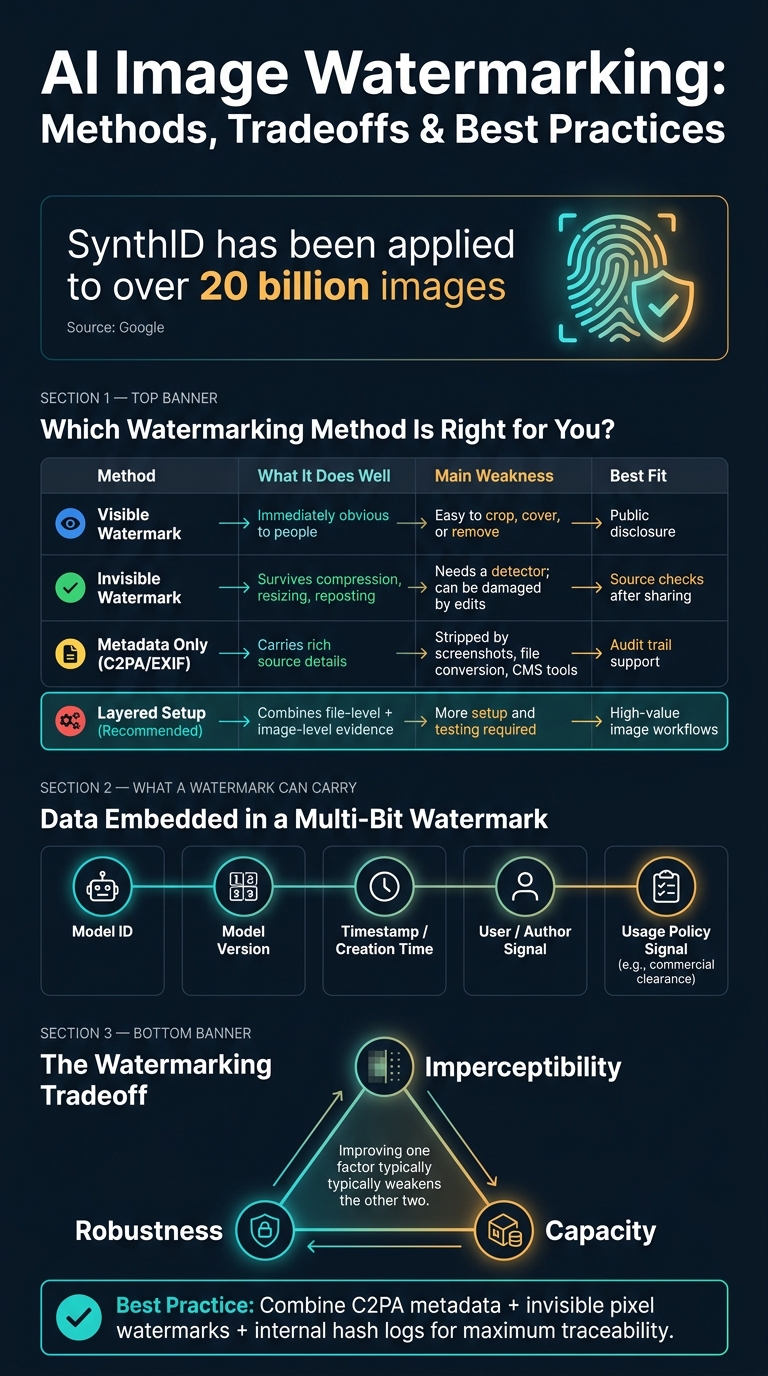
AI Image Watermarking Methods: Comparison & Tradeoffs
Watermarking in Generative AI: Opportunities and Threats
sbb-itb-903b5f2
How AI Image Watermarking Works
For an AI image to stay traceable, the watermark has to remain detectable after the image leaves the generator. That means the mark gets embedded during generation or right after it. The goal is simple: the signal should still show up after compression, reposting, or even a screenshot. Better systems can verify that signal without needing the original file. But that only works if the watermark can survive the kinds of edits images run into every day.
Visible Watermarks vs. Invisible Watermarks
Visible watermarks are the obvious kind: logos, text labels, or color overlays placed right on the image. They make authorship clear at a glance, but they're also easy to remove. A quick crop or basic edit can wipe them out.
Invisible watermarks work differently. They hide signals inside the image's pixel data or frequency structure, where people can't see them but software can read them. Google's SynthID uses this method and has been applied to over 20 billion images. These marks are designed to survive JPEG compression, resizing, and social media filters, which often remove metadata. That matters because invisible marks support post-publication verification, and that's what accountability leans on. Even so, they help with verification; they don't stop misuse.
Here's the practical split:
- Use visible watermarks when you want immediate, obvious disclosure.
- Use invisible watermarks when you need traceability that can stand up to forensic review.
That difference shapes who the mark is for: people, software, or both.
Embedding, Detection, and Verification
The core difference between visible and invisible marks is where the signal lives.
A watermark passes through creation, insertion, sharing, and verification. First, the AI model produces the base image. Then the watermark system modifies the image data using a secret key. It may hide the signal in visually busy parts of the image or place it in mid-frequency data, which tends to survive compression better than direct pixel-level edits. Some systems go one step further and embed the signal during generation itself.
After that, the image gets shared. It might be uploaded, screenshotted, or re-encoded along the way. Verification comes later, when a detector scans the image, often without the original file, and returns a confidence score for whether a watermark is present. That score should be treated as evidence, not proof. Detection can show that a signal exists, but it does not mean the image is safe from tampering.
What Information a Watermark Can Carry
Detection tells you whether a watermark is present. This section looks at what that watermark can actually encode.
A watermark can carry more than a simple AI-made flag. More advanced setups use multi-bit watermarking to embed small data fields inside the image, such as model ID, timestamp, and user signals.
Model, Timestamp, and Generation Context
The data points often linked to a watermark include the model identity, the model version, and the creation time. In plain terms, that creates a record tied to a specific generation event.
In practice, systems often combine these fields with a second provenance layer. Some pair rich metadata with a pixel-level watermark so provenance can survive even when metadata gets stripped out. That matters because metadata can be removed pretty easily, while a layered setup tends to hold up better. Still, neither layer replaces systems like EXIF or XMP. They work alongside them to form a more complete audit trail.
Prompt Author and Usage Policy Signals
Some systems link an image to a specific authorized user or workflow. That can tie the image to a person, a process, or a permission level, which strengthens traceability beyond simple model attribution.
Some systems are also testing usage policy signals embedded in the watermark itself. Those signals could show whether an image is cleared for commercial use or restricted under certain licensing terms.
These signals can improve attribution, but they still rely on downstream verification. Even then, they remain open to edits and attacks.
Limits, Tradeoffs, and Tamper Resistance
Watermarking helps with traceability, but it doesn't give you airtight proof.
Why Watermarks Can Fail After Edits or Attacks
A watermark can break down after pretty common image edits. Metadata-based markers like C2PA and EXIF tags live at the file-format layer, which means a screenshot or file conversion can strip them out completely. Pixel-level watermarks tend to hold up better, but they're not bulletproof. Heavy JPEG compression, aggressive cropping, added noise, and rotation can all weaken the signal inside the image.
The bigger problem is adversarial attacks. These attacks make tiny, engineered pixel changes that can fool detection systems while leaving the image looking the same to a person viewing it. That's why the hard part isn't just adding a watermark at generation time. It's whether that watermark still holds up once the image starts moving through the messiness of actual use.
Some newer methods can survive fairly large crops, which is a step in the right direction. But more robustness usually means more system complexity, and even then, the risk doesn't go away.
Visible vs. Invisible Watermarking: Practical Tradeoffs
| Factor | Visible Watermarking | Invisible Watermarking |
|---|---|---|
| Detectability | Easy for people to notice right away | Usually needs a specialized detector |
| Impact on User Experience | Can change image appearance and presentation | Little visual effect in normal viewing |
| Best Use | Disclosure | Technical verification when a detector is available |
| Removal Risk | Often easier to crop, cover, or edit out | Harder to notice, but still can be weakened by edits, compression, or attacks |
Watermarking involves a tradeoff between imperceptibility, robustness, and capacity. Push one up, and the other two usually take a hit. That's why many systems combine metadata with pixel watermarks: one layer can carry more detail, while the other is meant to last longer under editing or file handling.
In day-to-day use, watermarking works best as one part of a broader provenance workflow.
Using Watermarking in Real Workflows and Final Takeaways
Where Watermarking Helps in Everyday Image Workflows
Watermarking makes the most sense at the moment content leaves your hands. That might be when a design goes to a client, a marketing image is lined up for publishing, or an internal draft moves into review.
In day-to-day production, C2PA Content Credentials can keep provenance attached from image generation through later edits. With a supported editor, someone can inspect the signed manifest and confirm the model source as well as any human edits.
One practical issue: some CMS and publishing tools strip C2PA metadata during resizing or compression. So it’s smart to check that before you rely on it. For high-value assets, keep an internal hash registry so you can match published files back to the originals. Still, that only works if downstream tools keep the same evidence intact.
Conclusion: What Watermarking Can and Cannot Guarantee
What matters most isn’t just whether an image had a watermark at the start. It’s whether that mark survives every handoff.
Watermarking helps with traceability, but only if the workflow keeps it in place. Metadata is easy to lose, and invisible pixel watermarks can be weakened by heavy editing or manipulation. In practice, the strongest setup combines C2PA metadata, invisible pixel watermarks, and internal logs.
FAQs
Can AI watermarking prove an image is authentic?
Yes. AI watermarking can help verify where an image came from by embedding detectable signals that indicate it was generated by AI.
That said, it’s not foolproof. Watermarks can be removed, weakened, or obscured through editing, compression, cropping, or forgery.
What edits are most likely to break an invisible watermark?
Edits most likely to break an invisible watermark include:
- Cropping
- Resizing
- Heavy compression
- Color adjustments
- Content-aware edits, like object removal or scene regeneration
Why do these edits matter? Because an invisible watermark usually lives at the pixel level. When you cut, shrink, compress, or heavily alter an image, you can weaken that signal or wipe it out altogether.
Why use watermarking if metadata can already track source?
Watermarking puts a durable, imperceptible signal straight into an image’s pixels. That signal can stick around even after cropping, resizing, or social media re-uploads.
Metadata, on the other hand, can be stripped out or changed during those same steps. So for content traceability, watermarking is usually the more reliable option.