
How Load Balancing Reduces AI Deployment Costs

Load balancing saves money in AI deployments by efficiently routing requests to reduce idle resources, avoid rate limit penalties, and optimize model usage. Here's how it works:
- Smart Routing: Directs simple tasks to cheaper models and complex tasks to high-performance ones, cutting token costs by up to 60%.
- Dynamic Batching: Groups requests to maximize GPU usage, reducing GPU needs by 50–75%.
- Cache-Aware Strategies: Improves cache hit rates, cutting input token costs by 50–90%.
- Geographic Routing: Lowers latency and costs by distributing workloads across regions.
- Mixed Hardware Optimization: Matches workloads with the right hardware, preventing overloading or underutilization.
Key metrics like GPU utilization, latency, and cost per request help fine-tune these strategies, ensuring lower expenses and better performance. Tools like NanoGPT simplify multi-model routing while offering a pay-as-you-go model for cost-efficient AI serving.
Takeaway: Load balancing isn't just a technical necessity; it's a cost-saving strategy that improves AI deployment efficiency while keeping budgets under control.
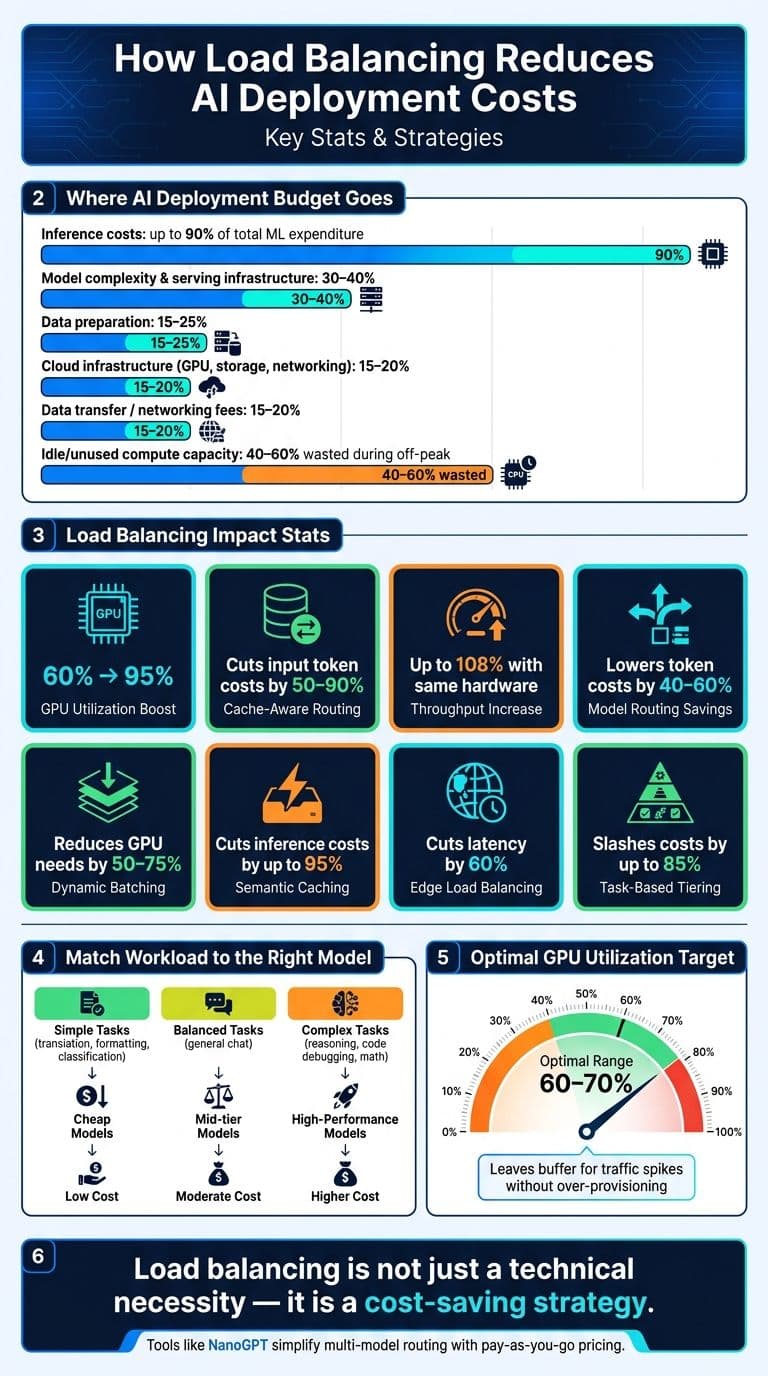
How Load Balancing Cuts AI Deployment Costs: Key Stats
Cost Drivers in AI Model Deployment
Key Cost Components of AI Deployment
When deploying AI models, the costs go far beyond the initial training. Inference costs dominate the ongoing expenses, often accounting for up to 90% of total machine learning expenditures in operational systems. For instance, training a model like Meta's LLaMA 2 cost around $4 million in GPU hours, but that expense is a one-time event. The real financial burden lies in serving the model to users daily.
Breaking down the costs, you typically see:
- Model complexity and serving infrastructure: 30–40% of the budget
- Data preparation: 15–25%
- Cloud infrastructure (GPU provisioning, storage, networking): 15–20%
An often-overlooked expense is data transfer fees. In high-throughput scenarios, networking costs between services and regions can quietly eat up 15–20% of your inference budget.
Another hidden cost? Idle compute. For example, a single unused SageMaker endpoint can rack up over $1,000 monthly, and many organizations over-provision for peak traffic, leaving 40–60% of their capacity unused during quieter periods.
These varied cost drivers highlight the importance of smarter routing strategies, paving the way for load balancing to play a major role in reducing expenses.
How Load Balancing Affects Costs
The way requests are routed has a huge influence on costs. Effective load balancing can boost GPU utilization from 60% to 95%. One infrastructure team shared this insight:
"The difference between 60% and 90% GPU utilization translates to millions in infrastructure costs for large deployments." - Introl
Cache-aware routing is another game-changer. Traditional round-robin routing scatters requests, which lowers the prompt cache hit rate. In contrast, cache-aware routing keeps cached data intact, reducing input token costs by 50–90% and increasing throughput by up to 108% using the same hardware.
"Load balancing for LLMs is fundamentally different from load balancing for traditional services... Prompt caching is the reason." - Mohammad Ashar Khan, Senior Software Engineer, DigitalOcean
Another cost-cutting strategy is model routing, where simpler queries are directed to less expensive models, while more complex tasks are handled by high-performance models. This approach can lower token costs by 40–60%.
Metrics to Track for Cost Optimization
To truly understand and optimize costs, track these key metrics:
| Metric Category | What to Track | Why It Matters |
|---|---|---|
| Latency | Time to First Token (TTFT), P95/P99 latency | High latency may indicate over-provisioning or poor routing; low latency supports higher request density |
| Efficiency | Tokens per second, average batch size | Measures how much work you’re getting per dollar spent on GPUs |
| Resource | GPU utilization, KV cache hit rate | Identifies idle waste and evaluates the effectiveness of caching in reducing compute demand |
| Financial | Cost per 1,000 requests, cost per conversation | Links infrastructure performance directly to business outcomes |
For optimal results, aim for GPU utilization in the 60–70% range. This ensures enough capacity for traffic spikes, avoiding p99 latency issues and costly emergency scaling. Pair this with queue depth monitoring - if queues are growing even at 70% utilization, it’s a sign your load distribution needs adjustment.
"Don't optimize for average utilization alone. Optimize for useful utilization - the percentage of accelerator time spent on requests that match the business SLA." - Bot365
Lastly, move beyond simple hourly cost tracking. Focus on cost per successful response, a metric that accounts for retries, timeouts, and cache misses. These hidden factors can significantly inflate your actual cost per request.
sbb-itb-903b5f2
Building a Cost-Efficient Load Balancing Strategy
Matching Strategies to Workload Types
To manage costs effectively, it’s crucial to align routing strategies with the specific characteristics of your workloads. Not all AI requests are created equal, and treating them the same can lead to unnecessary expenses. A practical approach is to categorize workloads into three tiers based on complexity:
- Simple tasks: These include translation, formatting, and classification.
- Balanced tasks: General chat queries fall into this category.
- Complex tasks: Examples include multi-step reasoning, code debugging, and advanced math.
This tiered framework allows for smarter routing decisions. Lightweight tasks can go to cost-efficient models, while high-performance models are reserved for more demanding jobs, maximizing efficiency.
Another key factor is latency sensitivity. For user-facing features, maintaining P95 latency under 100ms is critical. In contrast, background batch jobs can tolerate delays if it means achieving higher throughput at a lower cost. Stateful conversational workloads, such as chatbots, require special handling to benefit from session affinity and KV cache reuse, which can reduce Time to First Token (TTFT) by up to 80%. Combining these distinct workload types under a single routing policy is a common mistake that often results in higher costs.
By understanding these workload tiers, you can choose algorithms that balance precision and cost savings.
Choosing the Right Load Balancing Algorithms
Your choice of algorithm directly influences both performance and cost. Here’s a quick guide to help you decide:
| Algorithm | Best Fit | Limitations |
|---|---|---|
| Round-robin | Uniform requests, identical backends | Doesn’t account for cache hits or latency |
| Weighted round-robin | Mixed hardware or API key tiers | Requires manual adjustments as capacity changes |
| Least-connections | Streaming or long-running requests | Ignores token consumption variability |
| Latency-based | Latency-sensitive, user-facing features | Needs ongoing P95 tracking over rolling windows |
| Cache-aware | Conversational AI, RAG pipelines, long prompts | May lead to uneven load distribution |
For most user-facing applications, latency-based routing is a reliable default. It avoids overloaded endpoints and adapts to geographic differences without requiring manual intervention. On the other hand, if you’re managing streaming responses or long-running inference jobs, least-connections is a better choice. It prioritizes the number of in-flight requests rather than focusing solely on connection speed.
"Inference cost optimization is not about finding one magic trick - it is about understanding the economics at each layer and applying the right tool to the right problem." - EngineersOfAI
While algorithm selection is critical, optimizing for mixed hardware environments is just as important.
Load Balancing Across Mixed Hardware and Models
In setups with mixed GPU fleets, such as A100 and V100 GPUs, it’s essential to assign weights based on throughput rather than the number of instances. For example, A100 GPUs process requests 1.7x faster than V100s. If weights are assigned equally, the slower hardware will become overloaded. Instead, weights should reflect the actual processing capacity of each type of hardware.
For lightweight tasks, deploy smaller language models on high-core CPU instances, keeping GPU accelerators available for larger models that require higher throughput. This ensures that expensive GPU time isn’t wasted on simple tasks, such as running a basic classification request on an A100, which can cost around $3 per hour on-demand. Pair this strategy with tiered routing logic that prioritizes reserved or provisioned capacity, only falling back to on-demand endpoints when absolutely necessary.
"Load balancing determines whether AI inference systems achieve 95% GPU utilization or waste 40% of compute capacity through inefficient request distribution." - Introl Blog
Boosting AI Performance: Networking for AI Inference
Techniques for Cost-Effective AI Load Balancing
These methods fine-tune load balancing strategies to reduce inference costs while maintaining strong performance.
Dynamic Batching to Cut Costs and Latency
Dynamic batching is an excellent way to lower inference costs. Instead of processing each request individually, grouping requests into a single forward pass maximizes GPU utilization.
"Batching is the single most effective optimization for LLM serving... it can improve throughput by 2-4x." - Nitesh Singhal
This approach can reduce GPU needs by 50–75% for the same workload. To implement this, set a maximum wait time of 10–20ms to gather enough requests for batching without adding noticeable latency. During low-traffic periods, shorten the timeout, and during high-traffic peaks, extend it to handle more requests efficiently.
Managing request priorities is another layer of optimization.
Using Priority Queues to Manage Traffic
Not all requests are created equal. For example, a user awaiting a real-time response has different requirements than a background job running overnight. Priority queues help address these differences by encoding them directly into the routing logic. High-priority requests (like user-facing, time-sensitive tasks) are processed first with the fastest available resources. Meanwhile, lower-priority tasks (such as batch jobs or asynchronous processing) use any spare capacity.
When primary capacity reaches 90%, secondary capacity can be activated to maintain service levels. This avoids the cost of running expensive resources at full capacity all the time.
These techniques pair well with geographic routing for further cost and performance improvements.
Cross-Region and Edge-Based Load Balancing
Geographic routing can dramatically lower latency and costs. Cloudflare Workers AI showcased this by distributing inference across 285 cities using edge load balancing, cutting latency by 60% compared to centralized serving.
When choosing a deployment model, consider the trade-offs:
- Active-Active deployments: Operate across multiple regions simultaneously, allowing rapid failover within seconds. However, they add roughly 8% to operational costs.
- Active-Passive setups: Keep a backup region on standby, which adds only about 3% to costs. Failover times are slower, measured in minutes, but this setup works well for most AI workloads unless you're handling critical real-time processes.
| Deployment Pattern | Cost Increase | Failover Speed | Best For |
|---|---|---|---|
| Active-Active | ~8% | Seconds | Financial transactions, critical paths |
| Active-Passive | ~3% | Minutes | Non-critical tasks |
| Provider-Regional Split | Variable | Seconds | High-performance global applications |
For effective use, pair geographic routing with health checks every 10 seconds to monitor p99 latency and error rates. If error rates exceed 5%, use circuit breakers to stop routing to problematic endpoints, preventing widespread outages.
Using NanoGPT for Cost-Efficient Inference

Handling multi-model routing can be complex, but NanoGPT simplifies the process. This platform provides access to multiple AI models - like ChatGPT, DeepSeek, Gemini, Flux Pro, DALL-E, and Stable Diffusion - through a single, pay-as-you-go system. By storing data locally, NanoGPT reduces integration challenges and addresses compliance concerns for sensitive workloads.
With NanoGPT, you can route tasks efficiently: lightweight models handle simpler jobs, while flagship models manage more complex reasoning. There's no need to manage multiple vendor contracts or API keys. The pay-per-use structure ensures you only pay for actual usage, aligning perfectly with the cost-saving goals of load balancing.
Measuring and Refining for Ongoing Cost Savings
Load balancing isn't a one-and-done task - it requires constant monitoring to keep costs in check as traffic patterns and model usage evolve.
Setting a Cost and Performance Baseline
Start by measuring your current performance. Keep an eye on metrics like Requests Per Minute (RPM), Tokens Per Minute (TPM), error rates, and P50, P95, and P99 latency across all endpoints. These numbers help you understand how much work your system handles, pinpoint bottlenecks, and identify what your slowest users experience. If you're working with self-hosted models, also track GPU VRAM usage and compute utilization. Poor request distribution can lead to wasted capacity, so this data is crucial.
To stay on top of expenses, break down costs by model and provider. This transparency makes it easier to spot areas where weighted routing could reduce spending.
Defining Targets and Testing Configurations
Once you’ve established baseline metrics, use them to set clear performance and cost targets. For example, aim for GPU utilization in the 60–70% range - not 100%. The extra capacity acts as a buffer for traffic spikes and ensures you don’t exceed P99 latency thresholds. When autoscaling, set scale-up triggers at 60% utilization instead of 80%, as loading a model can take 30–90 seconds.
To ensure consistent routing and accurate comparisons, use methods like consistent hashing (e.g., based on trace_id). Also, monitor semantic cache hit rates - higher hit rates reduce API token usage. In fact, semantic caching can cut inference costs by as much as 95%.
Automating Policy Updates Based on Metrics
After defining and testing your targets, automate updates to maintain efficiency. Set up alerts to flag issues like endpoints exceeding their TPM limit, sudden error rate increases, or spikes in VRAM usage. Use circuit breaker patterns to remove unhealthy endpoints from rotation automatically, and test them for recovery using exponential backoff.
For infrastructure updates, tools like Terraform or Ansible ensure your routing policies are consistent and traceable. Before rolling out predictive scaling in production, test it in "forecast only" mode to verify that its decisions align with actual traffic patterns. This simple precaution can help you avoid unexpected expenses.
Conclusion: Key Takeaways and Next Steps
Efficient load balancing does more than just cut costs - it helps prevent outages and ensures low latency. It’s a practical way to reduce the expenses of AI deployment while keeping performance intact. The concept is simple: match the complexity of incoming requests to the right model. This task-based tiering approach alone can slash costs by as much as 85%.
Beyond cost savings, load balancing enhances system reliability. A solid strategy minimizes the risks of provider outages, avoids rate limit bottlenecks, and ensures latency remains predictable. Techniques like semantic caching, dynamic batching, and latency-based routing, when used together, can lead to even greater cost reductions.
For those not ready to dive into managing their own multi-provider setup, NanoGPT offers a convenient alternative. It provides pay-as-you-go access to various models - such as ChatGPT, Gemini, Deepseek, and image generation tools like Flux Pro and DALL-E - without requiring subscriptions or fixed costs. Plus, since your data stays local on your device, it addresses privacy concerns often associated with third-party gateways.
Take the first step by implementing one change, track the results, and let small adjustments pave the way for significant savings.
FAQs
Which load balancing tactic cuts AI inference cost the fastest?
Dynamic model routing is a smart way to cut down on AI inference costs quickly. It works by assigning tasks to the best-suited models in real time, making sure resources are used efficiently and expenses stay under control. This method helps distribute workloads effectively while keeping deployment costs manageable.
How do I pick a load balancing algorithm for my AI workload?
Choosing the right load balancing algorithm depends on the specific demands of your workload. For tasks where the workload is evenly distributed, round robin is a solid choice as it allocates requests across servers in a balanced way, avoiding congestion. On the other hand, if your workloads vary or you're aiming to reduce costs, weight-based routing might be better since it directs traffic based on server capacity and efficiency. Lastly, health-aware routing is ideal when system reliability is a concern, as it adjusts traffic flow depending on the health and availability of servers. Consider factors like workload variability, desired response times, and budget constraints to determine the best fit for your AI deployment.
What metrics should I track to prove load balancing is saving money?
To understand how load balancing can save costs, focus on tracking key metrics such as GPU utilization, request throughput, latency, batching efficiency, and cache hit rates. These metrics provide insight into how efficiently resources are being used and highlight performance gains, helping you fine-tune your setup for maximum cost efficiency.