
Integrating PyTorch Models with Data Pipelines
If your PyTorch job stalls, the model often isn’t the problem - the data path is.
I’d sum the article up like this: pick the right dataset type, keep preprocessing consistent, tune loading so the GPU stays fed, and save enough metadata to rerun the same job later. The article also points out a hard number worth remembering: in one S3 case, GPU idle time reached 95.44% when data loading was not set up well.
Here’s the short version:
- I’d use map-style datasets for indexed local data
- I’d use iterable datasets for streams, APIs, and remote sources
- I’d keep
__init__light and load samples on demand - I’d put preprocessing in transforms and batching in
collate_fn - I’d move fixed prep work offline and keep random augmentation online
- I’d tune
num_workers,pin_memory,persistent_workers, andprefetch_factor - I’d do a 1-epoch smoke test before a full run
- I’d save more than weights: data version, preprocessing, config, and code version too
At a glance, the article is about one thing: turning raw data into steady, repeatable model input without wasting GPU time or losing track of what changed.
That’s the frame I’d keep in mind before reading the rest.
How Data Loaders Work in PyTorch (Step-by-Step)

sbb-itb-903b5f2
Designing a PyTorch Dataset for External Data Sources
Once you’ve picked the source type, the next job is making sure your Dataset reads from it in a clean, predictable way.
Map-style vs. iterable-style datasets: which to use
Use map-style datasets for indexed local files or tables. Use iterable-style datasets for streams, APIs, remote databases, and other high-latency sources.
The big difference shows up in how shuffling works. Map-style datasets can shuffle across the whole dataset by randomizing indices. Iterable datasets usually use a shuffle buffer, which mixes samples only inside a fixed window. That uses less memory, but it’s not the same as full-dataset shuffling.
Worker behavior matters too. With multiple workers, iterable datasets need manual sharding, often with torch.utils.data.get_worker_info(), so workers don’t read the same samples twice. Map-style datasets can shard by index. Iterable datasets need that sharding logic spelled out to avoid duplicates.
Writing clean custom Dataset methods
Keep __init__ light. Only load records when __getitem__ or __iter__ asks for them.
A common slip-up is pulling all records into memory during __init__. That may work at first, then fall apart once the dataset gets big. A better pattern is to load only metadata up front, like file paths, labels, or IDs, and do the actual read later in __getitem__ or inside the iterator. That keeps memory use under control as data grows.
For image datasets, __init__ should store a list of paths and labels, while __getitem__ opens the file, decodes it, and returns a tensor. The same idea works for CSV or JSONL data: store record IDs or enough metadata to find each sample, then fetch it on demand.
If each sample would otherwise need its own request, use __getitems__ for batched reads. For high-latency sources, batched fetching can cut request overhead.
For async sources, wrap async reads in a synchronous IterableDataset iterator.
Where to place transforms, validation, and batching logic
A clean dataset setup separates three jobs:
- The
Datasetdefines what the data is - Transforms define how the data is preprocessed
collate_fndefines how samples become a batch
Dataset-wide checks, like making sure files exist or required CSV columns are present, belong in __init__. Per-sample checks, like spotting a corrupted image, belong in __getitem__.
Pass transforms into the dataset as a callable and apply them inside __getitem__. That makes the dataset easier to reuse across training and validation pipelines. Use random transforms for training and deterministic transforms for validation.
After retrieval and transforms, batch assembly belongs in collate_fn. Use collate_fn to pad variable-length samples and build nested batches instead of stuffing batching logic into the model.
"Code for processing data samples can get messy and hard to maintain; we ideally want our dataset code to be decoupled from our model training code for better readability and modularity." - PyTorch Documentation
Connecting PyTorch to ETL and Orchestrated Pipelines
Production pipelines need orchestration outside the training loop. Keep extraction, validation, scheduling, and artifact tracking separate from model code. It sounds simple, but this split saves a lot of pain later. The separation starts with data access: files, object storage, databases, or streams each need a different read pattern.
Reading from files, object storage, databases, and streams
For local files and database tables, indexed reads usually make sense. For object storage and live feeds, streaming readers are often the better fit. Tools like WebDataset (tar-based) and MosaicML StreamingDataset can iterate over cloud object storage without pulling down the entire dataset first, which is a big deal when datasets are large.
On S3, the loader you pick can have a clear effect on throughput. Before training starts, validate the schema and confirm that expected files are present. It’s much better to catch a bad partition or missing shard up front than halfway through an expensive run. If you need recovery, StatefulDataLoader snapshots can help you resume with fewer repeated samples.
Once the data source is locked in, the next choice is what to precompute and what to leave for load time.
Offline preparation vs. online loading
A good rule of thumb is simple: move deterministic preprocessing offline, and keep stochastic augmentation online.
- Offline: Resizing, tokenization, and feature extraction produce the same result every run, so compute them once and cache them.
- Online: Random crops, flips, and normalization change across epochs and help model robustness, so apply them during loading.
Store preprocessed artifacts in partitioned formats like Parquet or sharded tar archives, then load them lazily. That keeps storage organized and avoids doing the same work over and over.
Those decisions are easier to manage when the training job is driven by config instead of hardcoded settings.
Using PyTorch inside broader AI workflows
A trained PyTorch model almost never lives by itself. Its outputs - embeddings, predictions, or generated content - usually move into downstream APIs, content systems, or inference endpoints. So it helps to treat training as one node in a larger DAG, not as a one-off script sitting on its own.
Orchestrators like Apache Airflow, Ray, and n8n can coordinate validation, job submission, and checkpoint handling, while the training code stays stateless and config-driven. In practice, that means the training script should accept a structured JSON or YAML file with dataset paths, hyperparameters, and callback URLs supplied by the orchestrator. Each run then becomes idempotent and much easier to retry.
Improving Throughput and Preventing Pipeline Bottlenecks
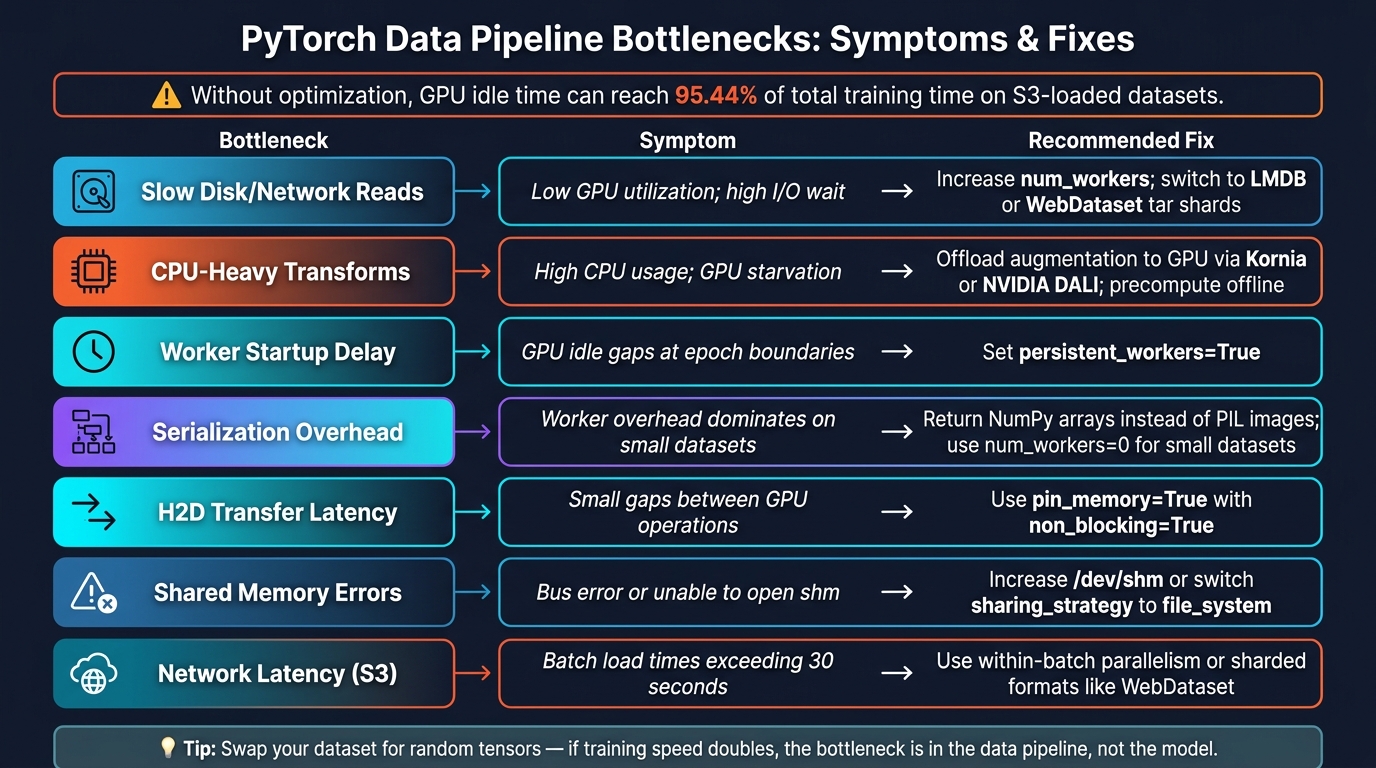
PyTorch Data Pipeline Bottlenecks: Symptoms & Fixes
Once orchestration is set up, the next step is simple: keep the GPU busy.
In external data pipelines, stalls usually come from loader workers, storage latency, preprocessing, or host-to-device transfer. In practice, that means trouble can show up anywhere along the path from storage → preprocessing → batching → GPU transfer.
Tuning DataLoader for faster training
num_workers is usually the setting with the biggest impact. When num_workers=0, data loading happens in the main process, so the GPU ends up waiting for each batch. A good starting point is num_workers = min(os.cpu_count(), 8) or 2–4 workers per GPU in multi-GPU setups.
From there, increase the value until throughput stops improving. More workers don't always help. Push it too far, and you can run into I/O contention and memory pressure.
Since external pipelines often break down at the CPU-to-GPU handoff, transfer settings matter too. Use pin_memory=True with non_blocking=True so host-to-device copies can overlap with compute.
persistent_workers=True helps avoid worker restart overhead at every epoch.
You can also increase prefetch_factor, but only after checking RAM usage. It scales memory demand with both worker count and batch size.
If the loader already looks tuned, the next place to look is upstream: storage format and preprocessing.
Cutting I/O and preprocessing overhead
Storage format has a big effect on pipeline speed. The goal is to cut down seeks, decode time, and serialization overhead.
LMDB uses memory-mapping, which avoids repeated file open/close work. That makes it a good fit for random access on local SSDs. WebDataset tar shards work better for sequential reads from cloud object storage like S3, where random access is costly.
That difference can be huge. For ImageNet-style datasets loaded from S3 without optimization, GPU idle time can hit 95.44% of total training time.
Another common slowdown is repeated preprocessing. Cache deterministic preprocessing offline, and leave stochastic augmentation online. In plain English: don't keep paying the cost for the same decode, parse, and serialization work over and over.
Common bottlenecks and how to fix them
Before changing five knobs at once, match the symptom to the source.
| Bottleneck | Symptom | Recommended Fix |
|---|---|---|
| Slow disk/network reads | Low GPU utilization; high I/O wait | Increase num_workers; switch to LMDB or WebDataset tar shards |
| CPU-heavy transforms | High CPU usage; GPU starvation | Offload augmentation to GPU via Kornia or NVIDIA DALI; precompute offline |
| Worker startup delay | GPU idle gaps at epoch boundaries | Set persistent_workers=True |
| Serialization overhead | Worker overhead dominates small datasets | Return NumPy arrays instead of PIL images; use num_workers=0 for small datasets |
| H2D transfer latency | Small gaps between GPU operations | Use pin_memory=True with non_blocking=True |
| Shared memory errors | "Bus error" or "unable to open shm" | Increase /dev/shm or switch sharing_strategy to file_system |
| Network latency (S3) | Batch load times exceeding 30 seconds | Use within-batch parallelism or sharded formats like WebDataset |
A simple way to isolate the issue is to swap the dataset out for random tensors. If training speed roughly doubles, the bottleneck is in the data pipeline, not the model.
torch.profiler is also useful here. It can show CPU gaps between CUDA ops and help separate pipeline stalls from work that's limited by the GPU.
Validating, Shipping, and Maintaining the Pipeline
Running a dry run before full training
Once throughput looks good, do a smoke test before you kick off full training.
A simple way to do that is to run --epochs 1 on a small sample first. That short run helps surface the annoying stuff early: shape mismatches, corrupted files, and train/validation split mistakes. It’s a small step, but it can save hours.
Set drop_last=True during training so you don’t end up with a smaller final batch when you’re using batch-sensitive layers. For validation, keep transforms deterministic. Save random augmentation for training only. And if a file fails to decode, catch that error inside __getitem__ and log the bad file instead of letting the whole job crash.
Reproducibility, monitoring, and artifact handling
After the pipeline runs cleanly, package the exact artifacts you’ll need to reproduce it later.
Start with torch.manual_seed() so shuffling and initialization are repeatable. Then save the full setup around the model, not just the weights. That includes:
state_dict- model code version
- preprocessing logic
- data version and hyperparameter metadata
Miss even one of those, and recreating the same result months later gets a lot harder.
For tracking, mlflow.pytorch.autolog() can log hyperparameters, loss curves, and model signatures for you. In production, log input hashes alongside the model version so you can trace prediction drift back to a schema change when something starts looking off.
When you save checkpoints, save model.state_dict() instead of the full model object. If the checkpoint is large, move the model to CPU before saving it. That helps avoid CUDA out-of-memory errors.
Conclusion: From raw data to reliable PyTorch training
With validation and artifact handling in place, reliable PyTorch pipelines come down to a few parts working together: dataset choice, clean preprocessing, ETL integration, DataLoader tuning, and a dry run before training at scale.
FAQs
How do I choose between map-style and iterable datasets?
Choose based on your data size and how you need to read it. Use a map-style dataset when the full dataset fits in memory or sits on disk and you need random access by index. That setup works well for most standard tasks.
Use an iterable-style dataset when you're dealing with very large data or when random reads are slow or not possible. It reads data lazily as you iterate, which makes it a good fit for massive datasets and streaming workflows.
What DataLoader settings should I tune first?
Start with num_workers and pin_memory to keep the GPU fed with data.
Set num_workers based on your dataset type. More workers aren't always better. If you're working with small or tabular datasets, too many can add serialization overhead and slow things down instead of helping.
Turn on pin_memory=True so data can move to the GPU faster through asynchronous transfers.
After that, test prefetch_factor to control how many batches each worker prepares ahead of time. You can also use persistent_workers=True to keep worker processes alive between epochs, which cuts the cost of tearing them down and starting them again.
What should I save besides model weights?
Save more than just weights if you want a PyTorch model you can reproduce later and ship without headaches.
You should also keep:
- the model architecture code
- the preprocessing logic, like tokenizers or image transforms
- metadata such as hyperparameters, training data versions, and evaluation scores
For checkpoints, save the optimizer state dictionary too. That way, training can pick up where it left off instead of starting from scratch.
For deployment, package everything the model needs to be rebuilt and run the right way. If the weights are the engine, the rest is the wiring, fuel, and instructions. Leave any of that out, and things can go sideways fast.