
Jackson vs. Gson: Parsing API Responses in Java

When it comes to parsing JSON in Java, Jackson and Gson are two of the most popular libraries. Each has its strengths and is suited to different use cases. Here’s what you need to know:
- Jackson is known for its speed, flexibility, and ability to handle complex JSON structures. It’s ideal for large datasets, high-concurrency environments, and enterprise-level applications. It also integrates seamlessly with frameworks like Spring Boot.
- Gson is simpler and easier to set up, making it great for smaller projects, rapid prototyping, and Android apps. It works well for straightforward JSON-to-Java mappings but may struggle with large or deeply nested data.
Key Differences:
- Performance: Jackson is faster, especially for large datasets or high-concurrency scenarios, thanks to its streaming API and bytecode generation.
- Memory Usage: Jackson uses less memory due to its incremental processing. Gson loads entire datasets into memory, which can lead to higher RAM consumption.
- Ease of Use: Gson requires minimal setup and is forgiving with unknown fields. Jackson offers more features but has a steeper learning curve.
- Complex JSON: Jackson handles polymorphic types and circular references natively, while Gson requires custom logic.
- Integration: Jackson is the default choice for enterprise frameworks like Spring Boot, while Gson is more common in standalone or Android projects.
Quick Comparison:
| Feature | Jackson | Gson |
|---|---|---|
| Performance | Faster for large datasets | Slower for larger or complex data |
| Memory Usage | Lower (streaming API) | Higher (loads entire dataset) |
| Ease of Use | Requires more setup | Simple and quick setup |
| Complex JSON Handling | Built-in support for polymorphism | Requires custom deserialization |
| Integration | Default in Spring Boot, JAX-RS | Common in Android, standalone apps |
Bottom Line: Use Jackson for enterprise-grade applications or when dealing with large, complex JSON. Choose Gson for smaller, simpler projects where ease of use is a priority.
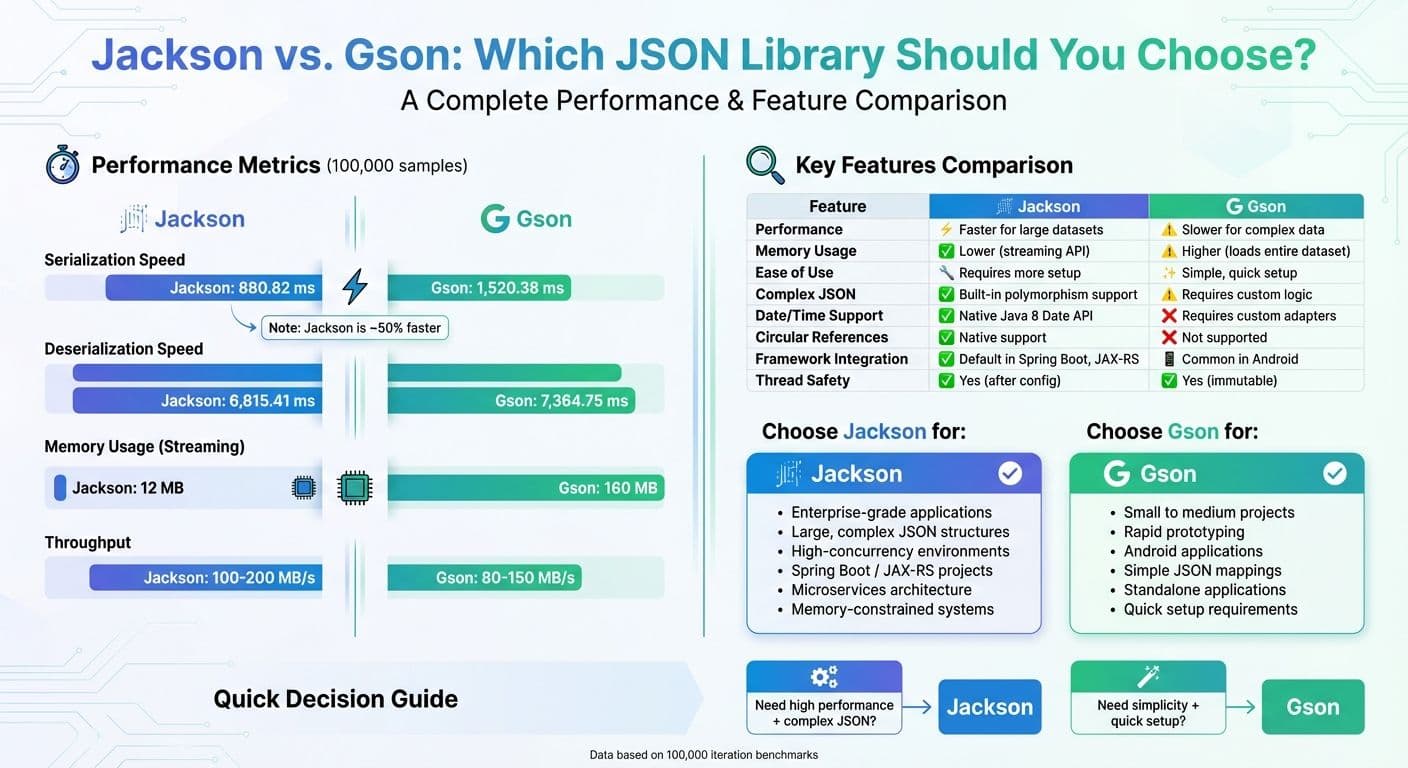
Jackson vs Gson Performance and Features Comparison Chart
Choosing Between Jackson and Gson for Better Performance
sbb-itb-903b5f2
What is Jackson?
Jackson is a Java library designed for data processing, developed by FasterXML. It's widely recognized as the default JSON engine for Spring Boot and major JAX-RS implementations like Jersey and RESTEasy.
One of Jackson's strengths lies in its modular design, which lets developers pick and choose the tools they need. It consists of three key modules:
- jackson-core: Handles low-level streaming APIs.
- jackson-annotations: Offers customization options via annotations.
- jackson-databind: Provides high-level data binding.
Jackson's Main Features
Jackson provides three primary ways to handle JSON data:
- Streaming API: A low-level, token-based approach that's perfect for processing massive datasets efficiently.
- Tree Model: Lets you work with JSON as an in-memory tree structure, making it easy to traverse and manipulate.
- Data Binding: Automatically converts JSON data into Java objects (POJOs) and vice versa, using the versatile
ObjectMapper.
Jackson is particularly strong when dealing with complex JSON structures. It offers annotations like:
@JsonTypeInfo,@JsonSubTypes, and@JsonIdentityInfofor handling polymorphism and circular references.@JsonIgnorePropertiesto skip unexpected fields safely.@JsonPropertyand@JsonAliasto map fields with inconsistent naming.
Its performance edge comes from bytecode generation and optimized data-binding mechanisms, which reduce processing overhead. Jackson is even faster than Java's built-in binary serialization. Plus, it supports modern Java features, such as records and sealed classes introduced in Java 17+, making it a great fit for current domain models.
How to Set Up and Use Jackson
To get started with Jackson, you'll need to add the jackson-databind dependency to your Maven pom.xml. This will automatically include jackson-core and jackson-annotations as well:
<dependency>
    <groupId>com.fasterxml.jackson.core</groupId>
    <artifactId>jackson-databind</artifactId>
    <version>2.18.2</version>
</dependency>
Here’s a simple example of using Jackson to parse JSON into a Java object:
ObjectMapper mapper = new ObjectMapper();
// Parse JSON string from API into a POJO
MyResponse response = mapper.readValue(jsonString, MyResponse.class);
For better performance, reuse the same ObjectMapper instance across your application. Why? Because creating a new ObjectMapper is resource-intensive. Once configured, it’s thread-safe and can handle multiple requests concurrently.
If you’re working with Java's modern date types, like LocalDate, you’ll need to register the JavaTimeModule. To do this, include the jackson-datatype-jsr310 dependency. This step ensures accurate serialization and deserialization of date-related fields.
Next, we’ll take a closer look at how Gson tackles similar tasks.
What is Gson?
Gson is an open-source Java library from Google, designed to convert Java objects to JSON and back again. Since its initial release on May 22, 2008, it has gained widespread use, now powering more than 577,000 projects. Its main appeal lies in its focus on simplicity, making it a go-to choice for straightforward JSON-to-Java mapping tasks.
Unlike other libraries that depend on annotations or specific getter/setter patterns, Gson employs reflection-based data binding. This method directly maps JSON to Java fields, allowing it to work seamlessly with arbitrary Java objects - even when you can't modify the source code to add annotations. During deserialization, Gson uses a "target type tree" to ensure only expected types are instantiated, while ignoring any unexpected JSON fields.
One of Gson's standout features is that its instances are thread-safe. You can reuse a single instance across multiple threads, making it an efficient option for handling concurrent API requests without creating new instances for every operation. Performance tests have shown that Gson can handle deserialization tasks involving strings over 25MB in size and collections containing as many as 87,000 objects without any issues. Let’s dive into its core features and setup process.
Gson's Main Features
Gson provides two ways to get started: you can either use new Gson() for default settings or opt for GsonBuilder when you need custom configurations. By default, Gson produces compact JSON output (without unnecessary whitespace) and excludes null values, keeping responses lightweight.
Thanks to its reflection-based design, you can parse JSON into Java objects without needing to annotate every field. This simplicity sets it apart from Jackson, which relies on a modular design. If there are fields you don’t want to serialize or deserialize, you can simply mark them with the transient keyword.
When working with generic types like List<MyClass>, Gson overcomes Java's type erasure using the TypeToken class. This is particularly useful for API responses that involve lists or other parameterized types. For example, if you're deserializing a list of objects, you can use new TypeToken<List<MyClass>>(){}.getType() to ensure Gson retains the full type information.
| Feature | Default Behavior | Customization Option |
|---|---|---|
| JSON Format | Compact (no whitespace) | setPrettyPrinting() via GsonBuilder |
| Null Handling | Excluded from output | serializeNulls() via GsonBuilder |
| Field Naming | Matches Java field names | @SerializedName or FieldNamingPolicy |
| Exclusion | Skips static and transient fields | @Expose or ExclusionStrategy |
How to Set Up and Use Gson
To integrate Gson into your project, add the following dependency to your Maven pom.xml file:
<dependency>
    <groupId>com.google.code.gson</groupId>
    <artifactId>gson</artifactId>
    <version>2.13.2</version>
</dependency>
Here’s a quick example of how to parse an API response into a Java object:
Gson gson = new Gson();
// Convert JSON string to a Java object
MyResponse response = gson.fromJson(jsonString, MyResponse.class);
For generic collections, use TypeToken to retain type information:
Type listType = new TypeToken<List<MyResponse>>(){}.getType();
List<MyResponse> responses = gson.fromJson(jsonString, listType);
To save resources and maintain consistency, create a single Gson instance and reuse it throughout your application. This ensures efficient and uniform handling of all JSON operations.
Performance: Jackson vs. Gson
Speed Test Results
When it comes to performance, Jackson consistently outpaces Gson in most scenarios. For instance, in a benchmark involving 100,000 serialization iterations, Jackson completed the task in about 880.82 milliseconds, while Gson took 1,520.38 milliseconds - making Jackson around 50% faster. Similarly, during deserialization of the same 100,000 samples, Jackson averaged 6,815.41 milliseconds, compared to Gson's 7,364.75 milliseconds.
Memory usage paints a similar picture. Jackson's streaming approach required only 12 MB, while Gson consumed 160 MB. This difference is especially critical in high-traffic environments, where speed and memory efficiency directly impact system performance.
"Jackson is widely regarded as the fastest JSON library in Java. Jackson's performance stems from its efficient architecture. It uses bytecode generation and a highly optimized data-binding mechanism that minimizes overhead."
– Eleftheria Drosopoulou, Business Analyst, Java Code Geeks
However, Gson does hold its own in certain cases. For example, benchmarks from 2021 using Java 11 revealed that Gson can rival Jackson when handling both small (1 KB) and large (190 MB) files under specific configurations.
| Performance Metric | Jackson | Gson |
|---|---|---|
| Serialization (100,000 samples) | 880.82 ms | 1,520.38 ms |
| Deserialization (100,000 samples) | 6,815.41 ms | 7,364.75 ms |
| Memory Usage (Streaming) | 12 MB | 160 MB |
| Best Use Case | Large datasets, high concurrency | Small projects, rapid prototyping |
Next, let’s explore how these libraries handle more intricate JSON structures, where Jackson's strengths become even more evident.
Working with Complex JSON Data
When it comes to processing complex or deeply nested JSON, Jackson has a clear edge. Its streaming API enables incremental processing, which avoids loading the entire document into memory. This is a game-changer for handling API responses with multiple nested objects or extensive arrays.
Jackson achieves this efficiency through bytecode generation, which reduces overhead. In contrast, Gson relies on reflection-based binding, which can be slower and more resource-intensive. For scenarios involving polymorphic types or circular references - common in real-world API responses - Jackson offers native solutions using annotations like @JsonTypeInfo. Gson, on the other hand, requires custom deserialization logic to handle such cases.
Because of these capabilities, Jackson is often the go-to choice for enterprise applications that deal with complex data structures.
Memory Usage and Scalability
How Much Memory Each Library Uses
When managing large API payloads or handling thousands of requests per second, memory usage becomes a key concern. Jackson stands out here thanks to its streaming API, which processes JSON incrementally by loading only small portions into memory. On the other hand, Gson loads entire object graphs before processing, leading to higher RAM consumption.
Jackson's streaming approach significantly reduces memory usage compared to Gson, which tends to create many short-lived objects during parsing. This constant object creation increases garbage collection activity, potentially impacting performance.
"Jackson has a lower memory footprint compared to Gson. This is partly due to Jackson's streaming capabilities, which allow it to process JSON data in smaller chunks rather than loading the entire dataset into memory at once."
– Toxigon
For extremely large files that exceed the available RAM, Jackson's streaming capabilities are indispensable. Its JsonParser can handle massive datasets without triggering an OutOfMemoryError, making it ideal for backend services that need to process hundreds of concurrent API requests. This memory efficiency directly impacts how well each library performs under heavy loads.
Handling High Traffic and Thread Safety
Both Jackson and Gson are thread-safe in multi-threaded environments. Jackson's ObjectMapper is thread-safe after configuration, while Gson's immutability ensures thread safety as well. However, Jackson tends to handle high-concurrency scenarios more effectively. Its lower memory requirements allow it to scale better under heavy traffic.
Jackson's use of bytecode generation reduces overhead in concurrent environments, while Gson's reliance on reflection-based binding can create performance bottlenecks. In streaming benchmarks, Jackson achieves throughput rates of 100–200 MB/s, outperforming Gson's 80–150 MB/s.
"For backend services that handle hundreds or thousands of requests per second, Jackson reduces the server footprint and keeps latency low."
– Marco Bytes
Jackson's widespread adoption as the default JSON library for frameworks like Spring Boot and major JAX-RS implementations highlights its efficiency in high-traffic scenarios. Projects like the OpenClinica Project have also chosen Jackson to meet the demands of complex JSON processing at scale. While Gson remains a solid option for lightweight projects or quick prototypes, Jackson is the better choice for production-grade systems that require efficient API response parsing and scalability.
Ease of Use and Integration
How Easy is Setup?
Gson keeps things simple. Just add the gson dependency to your build file, create an instance with new Gson(), and you're ready to parse JSON. No extra configuration or boilerplate code is required. Plus, Gson can access private fields without needing public getters or setters, which reduces the amount of code you need to write in your POJOs.
Jackson, on the other hand, requires more setup. To get started, you'll need to include the jackson-databind library and configure the ObjectMapper. Unlike Gson, Jackson typically expects your classes to have public getters and setters, or you'll need to use annotations for private fields. If you're working with Java 8+ date types like LocalDate or LocalDateTime, you'll also have to register the jackson-datatype-jsr310 module to avoid runtime issues. Additionally, Jackson includes null fields by default, so you'll need to configure it explicitly to exclude them.
"Gson is appreciated for its simplicity and ease of use. It allows straightforward serialization and deserialization... with minimal configuration."
– Eleftheria Drosopoulou, Business Analyst
Error handling differs between the two. Jackson uses checked exceptions like JsonParseException and JsonMappingException, which you must handle explicitly. It also throws UnrecognizedPropertyException for unknown JSON fields, which is helpful for catching schema mismatches but requires extra configuration if you want it to ignore these fields. On the other hand, Gson uses unchecked runtime exceptions and, by default, silently ignores extra JSON fields, making it more forgiving but potentially hiding mapping issues. Both libraries are thread-safe, so you can reuse their instances (ObjectMapper for Jackson and Gson for Gson) instead of creating new ones for every operation.
These differences in setup and error handling can influence how well each library integrates with your Java project.
Compatibility with Java Frameworks
When it comes to integrating with popular Java frameworks, the differences between these libraries become even clearer. Jackson is the go-to choice for enterprise applications. It's the default JSON provider for Spring Boot and major JAX-RS implementations like Jersey, Apache CXF, RESTEasy, and Restlet. As of February 2026, Spring Boot 4 uses Jackson 3 by default, offering improved features such as ISO date handling and immutable JsonMapper objects. If you're building REST APIs with Spring, Jackson works seamlessly - no extra setup needed.
"When Spring Boot 4 and Jackson 3 arrived, I finally felt like the ecosystem was catching up to how we actually build APIs."
– Jitin Kayyala, Javarevisited
Gson shines in standalone applications and Android development. Its smaller size and lower memory usage make it perfect for mobile apps or lightweight projects where enterprise-level features aren't necessary. If you're not working within the Spring ecosystem or need a quick and simple solution, Gson's minimal configuration is a big plus. However, for production-ready microservices that handle complex JSON structures, Jackson's extensive annotation support (like @JsonView and @JsonIgnore) and its modular system make it better suited for enterprise-level needs.
Feature Comparison for API Parsing
Side-by-Side Feature Comparison
When it comes to parsing API responses in Java, different libraries offer distinct approaches, each with its own strengths. Here's a closer look at how Jackson and Gson handle key features:
For managing generics, Jackson relies on TypeReference<T> or JavaType, while Gson uses TypeToken<T> to tackle Java's type erasure. Custom deserialization also highlights differences: Jackson uses StdDeserializer<T> registered via SimpleModule, whereas Gson employs JsonDeserializer<T> registered through GsonBuilder.
Handling polymorphic types like a List<Shape> (with both Circles and Squares) is another area where these libraries diverge. Jackson offers built-in support using @JsonTypeInfo and @JsonSubTypes annotations, while Gson requires writing custom logic to achieve the same.
Date and time parsing is more straightforward with Jackson, thanks to its support for Java 8 Date API types like LocalDate and LocalDateTime through the jackson-datatype-jsr310 module. It also allows date formatting using the @JsonFormat annotation. Gson, on the other hand, lacks native support for these modern date types, meaning developers need to create custom type adapters or set a global format with GsonBuilder.
| Feature | Jackson | Gson |
|---|---|---|
| Generics Support | Uses TypeReference<T> or JavaType | Uses TypeToken<T> |
| Custom Deserialization | Supported via annotations or SimpleModule | Supported with JsonDeserializer or TypeAdapter |
| Date/Time Parsing | Supports Java 8 Date API with JavaTimeModule and @JsonFormat | Requires custom type adapters; global format via GsonBuilder |
| Null Safety | Fine-grained control with @JsonInclude | Global setting using .serializeNulls() on GsonBuilder |
| Extra/Malformed Fields | Configurable with FAIL_ON_UNKNOWN_PROPERTIES | Ignored by default |
| Polymorphism | Built-in support using @JsonTypeInfo and @JsonSubTypes | Requires custom deserialization logic |
| Circular References | Supported with @JsonIdentityInfo | Not directly supported |
Jackson's approach to handling extra or malformed fields is configurable through the DeserializationFeature.FAIL_ON_UNKNOWN_PROPERTIES setting. This can be turned off to allow backward compatibility when new fields are added to an API, or left on to enforce strict schema validation. In contrast, Gson ignores unknown fields by default, making it more forgiving but less rigorous for validating API contracts.
Circular references are another area where Jackson excels, offering native support with the @JsonIdentityInfo annotation. Gson, however, lacks direct support for this and may require more complex workarounds to handle such scenarios effectively.
These comparisons highlight the nuanced differences between Jackson and Gson, giving developers a clearer understanding of which library might better suit their specific needs.
Conclusion
When deciding between Jackson and Gson, it all comes down to your project's specific needs. Jackson is the go-to choice for enterprise-level applications that need to handle large JSON payloads, achieve high performance, or require advanced features like polymorphic type handling and support for circular references. Its integration with frameworks like Spring Boot and JAX-RS, combined with its streaming API, ensures better memory efficiency. As Eleftheria Drosopoulou highlights:
"Jackson stands out as the best-performing library for most scenarios, particularly when speed, memory efficiency, and scalability are priorities".
On the other hand, Gson shines with its simplicity and ease of use. It's a solid pick for small-to-medium projects, rapid prototyping, or standalone applications where minimal configuration is key. It’s especially handy when you don’t have access to the source code of the entities being deserialized. However, while Gson performs adequately with smaller datasets, its efficiency drops off when handling larger ones.
Jackson consistently outpaces Gson in serialization and deserialization tasks, particularly in high-concurrency environments. For high-traffic APIs, microservices, or Spring-based applications, Jackson’s better throughput and memory optimization make it the industry favorite. In contrast, for smaller projects or straightforward data structures, Gson’s user-friendly API and minimal setup provide a more seamless development process. Both libraries are thread-safe and ready for production, so the choice boils down to prioritizing performance and advanced capabilities with Jackson or simplicity and quick implementation with Gson.
FAQs
How do I parse generic API responses like List<T>?
To handle generic API responses like List<T> in Java, it's crucial to explicitly define the type during deserialization. Here's how you can do it with two popular libraries:
Using Jackson
Jackson provides the TypeReference class for this purpose:
ObjectMapper mapper = new ObjectMapper();
List<T> list = mapper.readValue(jsonString, new TypeReference<List<T>>() {});
Using Gson
With Gson, you can achieve the same result using TypeToken:
Type listType = new TypeToken<List<T>>() {}.getType();
List<T> list = new Gson().fromJson(jsonString, listType);
Both approaches ensure that the deserialization process correctly interprets the generic type T within the list.
How can I handle Java time types like LocalDate and LocalDateTime?
Gson doesn’t come with out-of-the-box support for Java 8 date-time types like LocalDate and LocalDateTime. To handle these, you’ll need to create custom serializers and deserializers. On the other hand, Jackson makes things simpler with its built-in Java 8 module. This module streamlines the process of serializing and deserializing these date-time types, making Jackson a more convenient option if you're looking to save time and avoid extra setup.
What’s the best way to reuse ObjectMapper or Gson safely in multi-threaded apps?
To reuse ObjectMapper or Gson safely in multi-threaded applications, it's best to create a single shared instance and use it across threads. Both libraries are designed to be thread-safe, as long as they are properly set up. To achieve this, you can define a static final instance in a utility or singleton class. This approach avoids the need to repeatedly create new instances, which not only minimizes overhead but also boosts performance.