
Legal API Integration for Contract Summary Text
If you use AI for contract summaries, the main rule is simple: keep it in draft mode until a U.S. attorney checks it.
I’d boil the article down to this: legal teams can use API-based text generation to draft clause summaries, intake notes, vendor paper overviews, and client update drafts inside tools like CLM, DMS, and matter systems. But the workflow only works safely when I keep inputs structured, split text by clause, limit what data leaves the firm, block export before attorney approval, and store as little prompt data as possible.
A few points stand out right away:
- Best early use cases: clause summaries, intake notes, vendor contract triage, and draft client updates
- Main risk: a bad summary can shape negotiation or client decisions if no lawyer checks it
- Best input setup: clause-level chunks, defined terms, party roles, governing law, and dated context
- Best output setup: bullets, short narratives, or JSON, based on the task
- Review rule: every summary stays labeled AI-assisted draft until a licensed U.S. attorney approves it
- Data rule: keep full contract text in firm systems, cut vendor storage, and use
store: falsefor sensitive work - Security baseline: TLS, AES-256, RBAC, MFA, audit logs, redaction, and short log retention
- Key stat: the article cites a 2024 industry summary saying 40% of U.S. law firms had a breach, and 56% of those breaches involved sensitive client data
What I like about the article is that it treats AI summaries as a workflow control issue, not a model issue. The model drafts. The lawyer decides. That’s the frame you should carry into any rollout.
How To Summarize Legal Documents (with AI)
sbb-itb-903b5f2
How the API pipeline works in a legal contract summary workflow
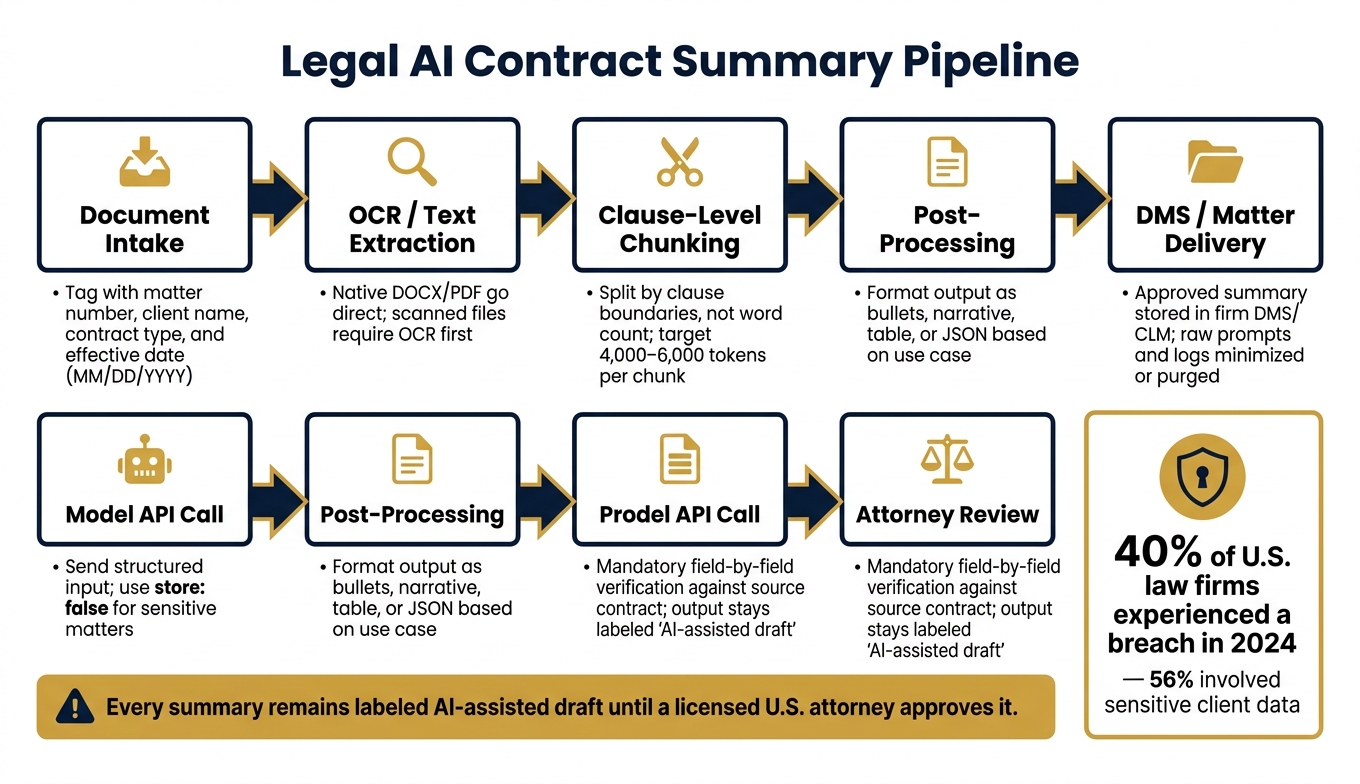
Legal AI Contract Summary Pipeline: Safe Integration Workflow
A contract summary pipeline usually moves through intake, OCR or text extraction, clause-level chunking, prompt building, model calls, post-processing, and then delivery back to the DMS or matter file. The big risk shows up early: losing the meaning of a clause before anyone reviews it.
Document intake should tie straight into the repositories your team already uses. When a contract lands in iManage or NetDocuments, tag it with the matter number, client name, contract type, and effective date in MM/DD/YYYY format before AI processing begins. After that, native files like DOCX or text-based PDFs can move straight to extraction. Scanned files need to go through OCR first.
Chunking is where things can go sideways. If you split text by word count alone, you can break apart the exact legal unit a lawyer would read as one idea. A better move is to split by clause boundaries. That keeps the summary tied to the same unit attorneys review. Aim for chunks of about 4,000–6,000 tokens, and include any defined terms the clause relies on.
How to structure inputs for better clause summaries
Each chunk sent to the API should include the full clause text plus structured metadata. That means governing law and jurisdiction, effective date, party names and roles, and a clause-type label like Indemnity or Auto-Renewal. For example, a clause might note New York law; venue in federal and state courts in New York County. Without that context, the model may treat the clause like plain boilerplate instead of reading it through the right legal lens.
The prompt should also ask for specific, named outputs. Don’t leave it loose. Ask for fields such as:
- indemnifying party
- covered claims
- liability cap in USD
- carve-outs
Use jurisdiction and governing-law context to keep the summary aligned with U.S. commercial drafting norms. It also helps to add risk-flagging instructions, such as note any term that is unusually risky for a U.S. buyer, such as uncapped indemnity or auto-renewal with fewer than 30 days' notice. That pushes the model toward the points attorneys tend to care about first.
Output formats that fit U.S. legal workflows
Different users need different output shapes. For internal review, bullet fields work well. For client updates, a short narrative is often enough. For risk triage, tables are easier to scan. And for CLM ingestion, JSON is the cleanest fit.
If the pipeline can choose the format based on the user’s action - internal review, client update, or playbook comparison - the output is ready to use right away. No extra cleanup. No awkward copy-and-paste step after the summary is done.
When NanoGPT fits as an integration layer
NanoGPT works well as an integration layer when the workflow needs local data storage and optional PII redaction before prompts reach the model provider. If redaction fails, the service stops the workflow instead of letting client data go out unmasked. In that setup, human review becomes the next control point.
Review rules and risk controls for legal summary text
Once the pipeline produces a draft, review controls determine whether it can move ahead. Every AI-generated contract summary must be reviewed by a licensed U.S. attorney before it leaves draft status. This section lays out the checklist, labeling, and approval gates that make that rule stick.
Human review requirements before client use
Before any clause summary, intake note, or client update moves out of draft, the responsible attorney must complete a structured review, not just a fast skim. The workflow should require a direct comparison against the source contract, with confirmation of:
- Governing law and forum selection
- Limitation of liability caps and carve-outs
- Termination rights and notice periods
- Dispute resolution terms such as arbitration, venue, and rules like AAA or JAMS
Those fields should stay blocked until the attorney confirms each one. Until then, the summary should not be exportable or sent by email.
If the workflow does not enforce review, draft output can end up being treated like final work product. That is where things go off the rails. Labels should stay locked until attorney approval. Non-lawyer staff may generate drafts, but they cannot remove the AI-assisted label or send content outside the system. Every output should remain marked as AI-assisted draft until attorney approval.
Key risk points across the pipeline
Each stage of the pipeline brings its own risks. Send only the data needed for the task, and apply tokenization or pseudonymization to client identifiers at ingestion.
At the model output stage, one of the main risks is stale legal assumptions. For instance, a summary may fail to reflect recent state-law limits on non-competes. The model should not make enforceability conclusions. Prompts should be limited to describing what the contract says, and they should include a date stamp such as "Analysis current as of [MM/DD/YYYY]."
For storage and logging, verify retention through system configuration. Do not assume zero-retention settings apply to every input.
These controls line up with specific failure points in the pipeline.
Risk category table: where each risk appears and how to control it
| Risk Category | Pipeline Stage | Control |
|---|---|---|
| Confidentiality / Privilege | Data ingestion, prompt construction | Tokenize or pseudonymize client identifiers; restrict API access to the matter team only |
| Hallucination / Inaccuracy | Model output | Constrained prompts; field-by-field extraction; attorney verification against the source contract |
| Incomplete extraction | Chunking, prompt construction | Use clause-boundary chunks and include defined terms |
| Outdated legal assumptions | Model output, post-processing | Prohibit enforceability conclusions in prompts; use jurisdiction-specific review checklists |
| Privilege loss from logs | Storage and logging | Short retention windows; encrypted logs; access controls limited to authorized personnel |
| Raw output treated as final | Output delivery | Draft-only workspace; role-based permissions; mandatory attorney sign-off before export |
Use fail-closed redaction: if redaction is unavailable, stop the workflow.
Data storage, retention, and U.S. compliance expectations
Once review controls are in place, storage and retention become the next big issue. They shape whether summaries stay defensible, discoverable, and private. In plain terms, storage and retention are legal controls. That matters because a 2024 industry summary found that 40% of U.S. law firms had a breach, and 56% of those breaches involved sensitive client data.
What data to store and what to minimize
Store only what the legal team needs to review, approve, and keep.
Full contract text and approved summaries should stay in the firm’s DMS, CLM, or matter system. Vendor-side storage should be cut down to metadata only. For most client files, a practical retention window is 5–10 years after matter close, and some state bar sample policies call for 10 years.
Clause extracts and intake notes should sit in the same matter workspace as the source contract. That way, they fall under the same retention rules, litigation hold process, and eDiscovery workflow.
Raw prompts, intermediate outputs, and long API logs that repeat contract text should not be stored. If troubleshooting logs are needed, keep them metadata-only. That means things like:
- request IDs
- timestamps
- user IDs
- model version
- error codes
Those logs should not include contract text. For sensitive matters, use store: false so the vendor keeps no prompt or response content.
Privacy-by-design controls for API integrations
Use TLS for data in transit, AES-256 for data at rest, RBAC by matter team, MFA, and immutable audit logs.
Model training on submitted data should be turned off. Vendor retention should be set to 30 days or zero for sensitive matters.
Some teams also want local storage at the integration layer. In that setup, NanoGPT is a fit when the workflow calls for local device storage plus pay-as-you-go API access.
Data handling table: type, sensitivity, storage location, and retention
| Data Type | Sensitivity | Storage Location | Retention Period | Access Role |
|---|---|---|---|---|
| Full contract text | High | Firm DMS/CLM (on-prem or private cloud) | 7–10 years after matter close | Matter attorneys and paralegals |
| Clause extracts | High | Same matter workspace as source contract | Same as underlying matter | Matter team; KM only if de-identified |
| Generated summaries and risk flags | High | Matter management tool or DMS | Same as matter | Matter team and supervising partner |
| Raw prompts and responses | High (if text is included) | Firm-controlled log system only; not vendor | 7–30 days for troubleshooting | Limited IT/engineering staff |
| Metadata (timestamps, user IDs, model version) | Medium | Logging/monitoring platform | 1–3 years | IT, security, and legal ops |
| PII and client identifiers | High | Redacted in flight; mapping table in firm system | 0 days at vendor | None (masked before API call) |
Conclusion: A practical framework for safe contract summary integration
The main lesson is simple: process discipline matters more than the model. Treat each step - scope, input structure, review, and storage - as a policy choice, not a system default. The rollout rules below turn that idea into a workflow teams can actually use.
Key points to carry into implementation
Start narrow. Begin with internal clause summaries for attorney review. Keep higher-risk uses - client-facing summaries, final work product, or anything that gives an opinion on enforceability - on hold until review protocols and error tracking are mature.
Structure inputs before sending them. Send only the clause text that matters, label it with the section type, and pair it with a clear task instruction. That keeps the model focused and cuts down on drift.
Build attorney approval into the workflow, not just the policy. Don’t rely on good intentions or a written rule sitting in a folder. Block external export until attorney approval is recorded.
Monitor what matters. After launch, track error rate, review time, per-request cost, and access-control incidents. Those signals tell you if the workflow is stable enough to expand.
The best results come when AI is used as governed drafting support, with attorneys making the final call.
FAQs
How do I connect a legal API to my CLM or DMS safely?
Use a secure backend proxy instead of calling the API straight from the frontend. That setup helps protect credentials, handle authentication, enforce rate limits, and sanitize inputs before anything reaches the model.
Store API keys in secure environment variables or a secrets service. Turn on PII redaction before data reaches the model, use HTTPS, and apply strict role-based access control.
NanoGPT adds a privacy layer that swaps sensitive data with temporary placeholders during processing.
What should an attorney review before approving an AI contract summary?
Before approving an AI-generated contract summary, an attorney should review it for accuracy, factual correctness, and compliance. Just as important, they should make sure the summary lines up with internal business logic.
The review should also check how the summary handles PII, whether the model invented anything, and whether the text violates any policies. That way, the final version is reliable, polished, and fit to share with a client.
What data should never be stored in API logs for legal summaries?
Never store credentials or other high-risk data in API logs for legal summaries.
That means no API keys, auth tokens, passwords, private key material, webhook URLs, stack traces, internal connection details, or sensitive user data.
For privacy, log only the tool name and status.
If NanoGPT is used, it can swap detected credential-like secrets with safe labels and not put them back into outputs.