
How Local Storage Impacts RTO Planning

Local storage can speed up recovery but comes with risks. Here's what you need to know:
- RTO (Recovery Time Objective): The maximum acceptable downtime for systems after a disruption. Faster recovery is critical for essential systems like payment processing.
- Local Storage Benefits: Faster recovery compared to off-site backups and better control over sensitive data. Examples include SSDs, NAS, and on-premises servers.
- Challenges: Local-only setups are vulnerable to disasters (fire, theft, ransomware) and hardware failures. These can make RTO targets unachievable.
- AI Workflows Risks: Local-first AI tools like NanoGPT store data on devices but often lack backup integration, risking data loss in failures.
- Solutions:
- Use the 3-2-1 backup rule: Three data copies on two media types, with one off-site.
- Test recovery plans quarterly to ensure downtime aligns with RTO goals.
- For privacy-focused setups, combine local backups with encrypted off-site copies or multi-site redundancy.
Balancing speed, resilience, and privacy is key. Local storage works best when paired with robust backup strategies to protect against catastrophic events.
How Local Storage Affects RTO Outcomes
Local Storage Setups and RTO Tradeoffs
The way you configure local storage has a direct impact on recovery times after disruptions. For example, workstation-based storage offers convenient access during normal operations but creates challenges when hardware fails. Recovery in these cases can be unpredictable - you’ll need to replace the device, reinstall the operating system and applications, and restore files. This process can take anywhere from several hours to days, depending on the situation.
On the other hand, on-premises server rooms equipped with centralized backup tools can significantly improve recovery times. Using image-based backups stored on local appliances, you can restore complete server configurations with just one operation. This reduces recovery times for critical workloads from hours to mere minutes. If you incorporate synchronous mirroring between two local storage arrays, failover can occur automatically, minimizing downtime to nearly zero in most hardware failure scenarios.
For the strongest recovery capabilities, centralized NAS or SAN systems combined with high-availability clustering are top-tier options. These systems maintain multiple data copies across redundant hardware, enabling automatic failover. This ensures applications continue running even if individual components fail. However, this setup comes with a tradeoff: because production systems and backups are housed in the same location, they are more vulnerable to site-wide disasters like fires or floods.
Up next, let’s explore how privacy regulations in the U.S. shape decisions around data storage and recovery strategies.
Privacy Laws and Data Residency Requirements
Technical considerations aside, U.S. privacy laws also play a key role in shaping local storage strategies for recovery time objectives (RTO). Regulations like HIPAA require healthcare organizations to have contingency plans and backups capable of restoring protected health information, while the GLBA enforces similar requirements for financial institutions. While these laws don’t specify exact storage locations, many organizations choose local or on-premises storage to maintain control over sensitive data and limit third-party risks.
State-level privacy laws and contractual obligations further complicate storage decisions. Although the U.S. lacks a comprehensive national data localization law, many organizations face customer or contractual requirements to keep data within the United States - or even within specific facilities. This often leads to local or U.S.-based hybrid architectures. For instance, you might store primary data and quick-recovery backups on-premises while replicating encrypted copies to a second U.S. data center for disaster recovery. AI tools that store data locally also fit well within these compliance-driven approaches.
Common RTO Problems in Local Storage Environments
Endpoint Data and Shadow IT Risks
One of the biggest challenges in local storage environments is the risk posed by endpoint data and shadow IT practices. Users often save critical files on local drives, USB devices, or unauthorized sync tools, bypassing formal backup systems. This creates a significant gap in protection. Even if core servers are restored within the planned recovery time objective (RTO), users can still face delays because essential files are stranded on compromised endpoints. For many U.S. organizations, a planned 4-hour recovery can stretch into days when IT teams must replace devices and manually restore files. Backup vendors regularly highlight incomplete endpoint protection as a key reason for extended recovery times.
Let’s dive into how reliance on single devices or sites adds even more complexity to recovery.
Single-Device or Single-Site Dependency
When recovery depends on a single workstation, NAS, or on-premises server, recovery speed is limited by physical constraints. If the only complete backup is stored in one building or on one device, any loss - whether from hardware failure or disaster - can mean starting from scratch before recovery even begins. This issue is particularly concerning for organizations based in areas prone to wildfires, hurricanes, tornadoes, or power grid failures. A localized incident can wipe out both production and backup systems, stretching recovery timelines from hours to weeks.
Even smaller disruptions can cause major delays. For example, a stolen laptop containing critical local-only data or a failed on-premises NAS acting as both primary and backup can lead to lengthy recovery processes. In these cases, IT teams often face additional hurdles like sourcing new hardware, reinstalling systems, and manually reconstructing data. For smaller businesses, which typically aim for recovery within 4–8 business hours, such delays can be devastating. A regional office relying on a single server rack may find itself out of action for weeks if environmental damage destroys its physical assets.
This challenge becomes even more pronounced with the rise of AI workflows, which we’ll explore next.
Inconsistent Backup Coverage for Local AI Workflows
Local-first AI workflows present a newer but equally pressing risk. Many of these workflows operate outside standard backup protocols, leaving critical AI-generated assets - such as prompt libraries, draft contracts, or code snippets - unprotected. For instance, tools like NanoGPT explicitly save outputs like chat histories and marketing materials directly to the user’s device, with no centralized account or backup option. In the event of a ransomware attack or device failure, the loss of these local AI workspaces can disrupt entire teams or even halt entire pipelines.
The problem is compounded by the lack of centralized oversight. With tools designed to operate independently of IT systems, it becomes difficult to track where critical data is stored. This not only increases recovery times but also forces IT teams to recreate essential assets - such as prompts, templates, and workflows - from scratch, further delaying operations.
What You MUST Know Before Learning Backups | Data, Backup, RPO, RTO, Data Loss Explained Simply!
sbb-itb-903b5f2
Privacy-Focused Solutions for Local RTO Planning
3-2-1 Backup Rule for RTO Planning
Using the 3-2-1 Backup Rule
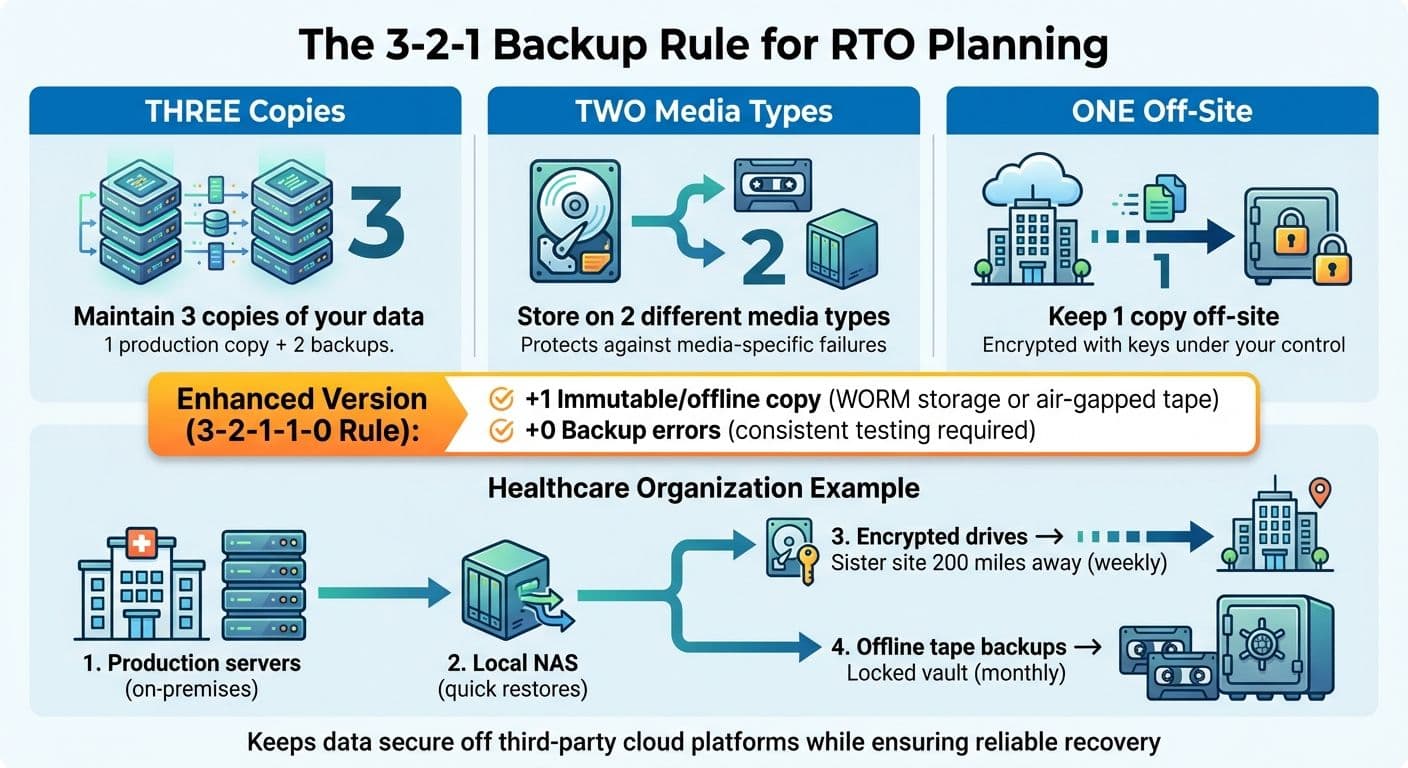
The 3-2-1 backup rule is a time-tested strategy for balancing data privacy and recovery efficiency. The rule suggests maintaining three copies of your data: one production copy, one local backup, and one off-site backup. These copies should be stored on two different types of media, with one copy kept off-site. For organizations prioritizing privacy, it’s crucial that the off-site backup is encrypted using keys under your control, rather than relying on a third-party cloud provider. This off-site copy could be stored in a second company-owned facility, on encrypted drives rotated between secure locations, or within a self-hosted private setup.
An updated version of this approach, the 3-2-1-1-0 rule, adds an extra layer of security by including an immutable or offline copy (such as WORM storage or air-gapped tape) and focuses on achieving zero backup errors through consistent testing. For instance, a healthcare organization might keep its production servers on-premises, use a local NAS for quick restores, send encrypted drives weekly to a sister site 200 miles away, and store monthly offline tape backups in a locked vault. This setup ensures patient data remains secure and off third-party cloud platforms while providing a solid foundation for reliable system recovery.
Standard Backup and Recovery Practices
Image-based backups are a powerful tool for capturing entire systems in one snapshot, allowing for rapid full restores. To minimize data loss and downtime, combine these with frequent incremental backups for critical workloads. For databases, email servers, and essential applications, use application-aware backups (leveraging VSS or native APIs) to create crash-consistent snapshots, avoiding lengthy repair processes.
Testing your recovery procedures regularly - ideally at least once a quarter for mission-critical systems - is key to ensuring recovery times align with your stated RTO. If recovery consistently takes longer than planned, it’s time to revisit your infrastructure or recovery strategy. Testing scenarios should include single-server hardware failures, ransomware recovery using clean snapshots, and full site outages requiring off-site restoration. Research shows that organizations skipping routine disaster recovery tests often face recovery times two to four times longer than those with validated plans.
For AI workflows, however, standard practices need some adjustments.
Configuring AI Workflows for RTO Readiness
Tools like NanoGPT, which store data locally to prioritize privacy, introduce unique challenges for recovery planning. According to NanoGPT, all interactions are stored directly on the device, ensuring privacy but increasing the risk of losing critical assets if backups aren’t properly configured.
To address this, ensure that all critical AI assets - such as prompt libraries, chat histories, and code snippets - are included in your backup strategy. Configure NanoGPT data directories to reside on backed-up local volumes as part of your 3-2-1 backup plan. Use endpoint backup agents with client-side encryption to secure these directories. Additionally, document reinstallation processes and save links to backed-up configuration files to streamline recovery and avoid unnecessary reconfiguration.
Comparing Local, Off-Site, and Hybrid Storage for RTO
Local-Only Storage: Pros and Cons
Local-only storage delivers unmatched speed for recovering from common incidents. For example, a NAS or local appliance on a 10 Gbps LAN can restore 2 TB of data in less than an hour, far outpacing internet-based recovery methods. This makes it a go-to option for organizations aiming for extremely short recovery time objectives (RTOs), often measured in minutes.
However, this speed comes with a significant risk: a single point of failure. Disasters like fire, flooding, theft, or ransomware attacks that encrypt both production systems and local backups can result in total data loss. Even Microsoft's locally redundant storage (LRS), which keeps three copies of data within a single datacenter, cannot protect against site-wide catastrophes such as a building fire or flood. In such cases, recovery becomes impossible without an off-site backup. This is why experts strongly advocate for combining local storage with at least one off-site backup, especially when speed is critical.
Hybrid Storage Models for RTO Resilience
Hybrid storage models strike a balance between rapid recovery and geographic resilience. By combining local storage with off-site or cloud replication, organizations can achieve both speed and disaster preparedness. A typical hybrid setup involves an on-premises server for quick restores, while encrypted copies of the data are asynchronously replicated to a secondary location. In this setup, a server failure allows for recovery from the local copy in minutes, and catastrophic site failures trigger a failover to the off-site backup within a few hours.
This approach aligns with modern best practices like the 3-2-1-1-0 rule, which emphasizes having an immutable copy of data and ensuring zero backup errors. For example, Azure's geo-redundant storage replicates data across two regions, maintaining six copies (three in each region) to protect against regional disasters. While this adds some complexity to the recovery process compared to local-only restores, it ensures survivability in the face of large-scale incidents. Hybrid storage, therefore, offers a reliable way to meet tight RTOs for everyday failures while safeguarding against catastrophic events - something neither local-only nor cloud-only solutions can achieve on their own.
RTO Planning When Privacy Requires Local Storage
When privacy regulations or user expectations demand that data remain on-premises, organizations face unique challenges in maintaining RTO without compromising confidentiality. For example, healthcare providers may be required to store patient data locally, or AI workflows might necessitate keeping prompts and outputs on the user’s device. In such cases, organizations can still build robust RTO strategies by combining local storage for primary data and processing with encrypted, minimal off-site backups for disaster recovery. Off-site data encrypted with locally controlled keys ensures that it remains unreadable without those keys, preserving privacy while enabling recovery if the primary site is compromised.
For organizations unable to send any data off-site due to strict regulatory constraints, multi-site local redundancy becomes a critical solution. This involves maintaining multiple company-owned facilities in different U.S. regions, connected via private links. Each facility is treated as "local" from a compliance standpoint, while geographic separation ensures resilience. Tools like NanoGPT, which store interactions locally, can be configured to back up directories on encrypted local volumes and replicate them to a second secure facility. This setup maintains the privacy guarantees users expect while eliminating the risk of single-device dependency, making it possible to meet RTO targets even under stringent privacy requirements.
Conclusion
Local storage is great for quick recovery from everyday mishaps, but privacy-focused recovery time objective (RTO) planning requires more than just speed. The real danger lies in relying solely on local backups. A single disaster - whether it’s a fire, flood, or ransomware attack - can wipe out all on-premises data in one go, making even the most aggressive RTO targets unachievable. For organizations that prioritize privacy, the goal should be to combine privacy and resilience. This can be achieved with strategies like encrypted off-site backups, multi-site redundancy, or private colocation, which safeguard against catastrophic loss while keeping sensitive data secure.
To strengthen resilience, proven backup strategies are a must. The 3-2-1 backup rule continues to be a cornerstone of effective RTO planning: maintain three copies of your data, store them on two different types of media, and ensure one copy is off-site. These measures can be implemented within U.S.-controlled facilities or through encrypted storage solutions where encryption keys remain local. For teams leveraging privacy-first AI workflows - such as tools like NanoGPT, which store conversations directly on users’ devices - consistent local backups and fast workstation recovery are critical, as there’s no cloud safety net to fall back on.
Another key factor is rigorous testing, which bridges the gap between theoretical RTO targets and real-world performance. Recovery efforts often fail during actual incidents due to incomplete backups, lack of automation, or unprepared personnel. Conducting regular recovery drills - whether annually or quarterly - and tracking actual recovery times ensures your local storage setup, backup processes, and runbooks can meet the demands of your business. Standardization and automation further enhance recovery speed by simplifying backup verification and restoration workflows.
FAQs
What are the key risks of using only local storage for RTO planning?
Relying solely on local storage for Recovery Time Objective (RTO) planning comes with its share of risks. For one, limited data redundancy means that hardware failures could lead to data loss, a scenario no organization wants to face. On top of that, scalability issues can arise, as local storage often struggles to keep up with increasing data demands or enable secure sharing across systems.
There's also the risk of physical threats - like damage, theft, or natural disasters - that could derail recovery efforts entirely. To address these challenges, consider implementing proper backup strategies and exploring hybrid solutions. These approaches not only enhance data protection but also align with privacy-focused practices.
How can organizations ensure fast recovery while protecting data privacy?
Organizations can balance speed and privacy in their recovery strategies by using local storage to keep sensitive data on-site. This approach minimizes dependency on cloud systems, which can sometimes lead to delays or potential privacy challenges.
For added security, implementing privacy-focused measures like encryption, strict access controls, and local AI tools is key. By utilizing solutions that process data directly on users' devices, organizations can achieve quicker recovery times while maintaining complete control over sensitive information.
What is the 3-2-1 backup rule, and how does it support RTO planning?
The 3-2-1 backup rule is a trusted method for safeguarding your data. Here’s how it works: keep three copies of your data, store two on different types of media (like an external hard drive and a USB flash drive), and ensure one copy is kept offsite for extra protection.
This approach plays a key role in Recovery Time Objective (RTO) planning, as it guarantees access to your data even if you face hardware failures, cyberattacks, or natural disasters. By sticking to this rule, you can reduce downtime and keep your operations running smoothly, even during unexpected disruptions.