
Local vs. Cloud Storage: AI Data Retention Costs
If you keep AI data for years, local storage often costs less. If you need easy setup and flexible space, cloud storage is easier at the start.
I’d boil the article down like this: cloud storage looks cheap on day one, but monthly fees, restore charges, and $0.08–$0.12 per GB egress can push the total much higher over time. Local storage asks for upfront hardware spend, but after that, costs are mostly power, drive swaps, and my time.
Here’s the short version:
- Cloud wins early for small or changing datasets, often under 5 TB
- Local wins later when I keep multi-terabyte archives for years
- Egress is the cloud bill that catches people off guard
- Local gives me more privacy control, but I have to handle upkeep and backups
- Cold cloud tiers are cheap at rest, but restores can take 12–48 hours
- A hybrid setup often works best: local for hot data, cloud for backups and archives
For example, standard cloud storage sits around $0.023/GB-month. That is about $23/TB-month, before data transfer out. By contrast, a local NAS may cost a few hundred dollars upfront, then level out over a multi-year period.
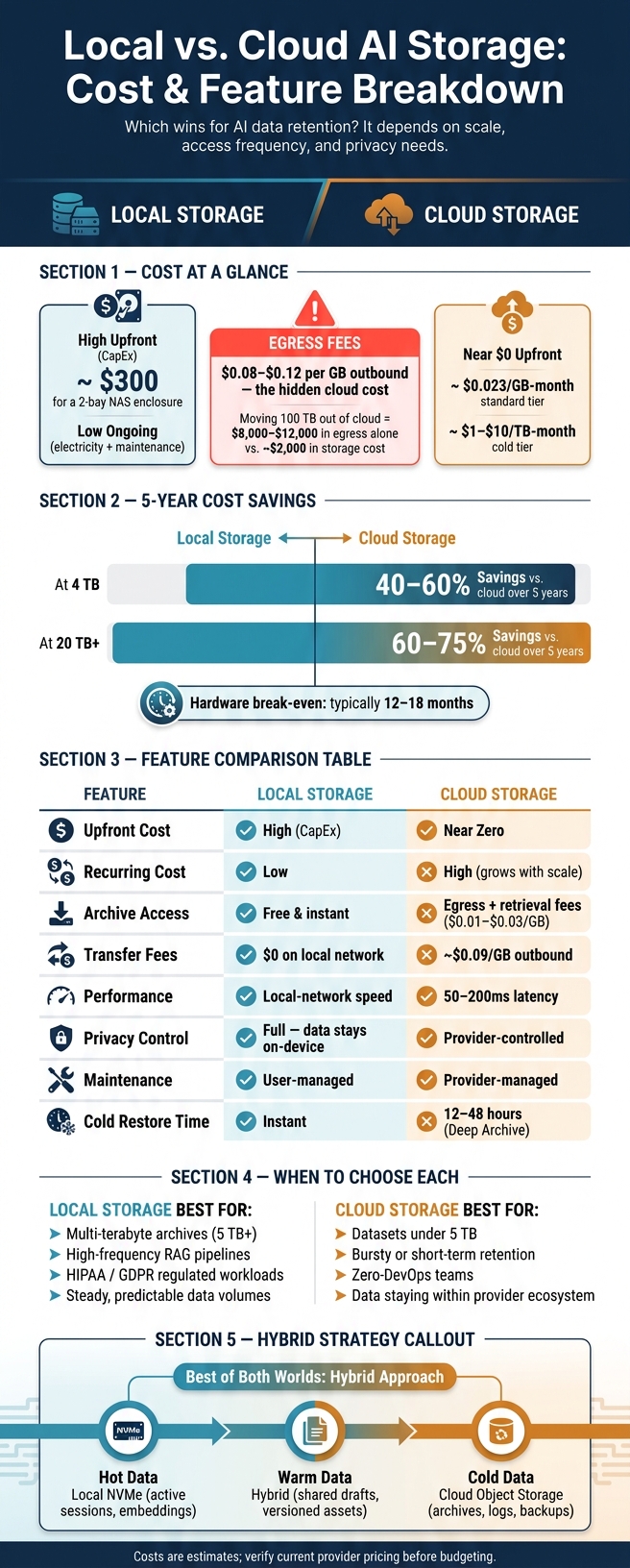
Local vs. Cloud AI Storage: 5-Year Cost & Feature Comparison
CLOUD Prices vs NAS Prices - HOW MUCH??????
sbb-itb-903b5f2
Quick Comparison
| Factor | Local Storage | Cloud Storage |
|---|---|---|
| Starting cost | Higher upfront | Low upfront |
| Long-term cost | Lower at scale | Keeps growing month by month |
| Access to archived data | No transfer fee on local network | Egress and restore fees may apply |
| Speed | Fast on local network | Slower due to network delay |
| Privacy | I control the hardware and files | Access depends on provider settings and terms |
| Upkeep | I handle hardware, failures, and backups | Provider handles infrastructure |
| Best fit | Steady, private, high-volume retention | Small, bursty, or short-term retention |
My takeaway: if your AI workflow stores lots of logs, outputs, checkpoints, and image sets, the right choice is less about sticker price and more about how much data you keep, how often you pull it back, and how private it needs to stay.
Local Storage: Higher Upfront Cost, More Control Over Long-Term Retention
For archived outputs, prompt libraries, checkpoints, and training sets, local storage moves spending away from monthly bills and into hardware, electricity, and upkeep. That setup works best when your AI data is stable and easy to plan for.
Local Cost Components for AI Datasets and Outputs
Hard drives have an annual failure rate (AFR) of 1% to 3%, so it’s reasonable to plan for at least one drive replacement every five years. A 2-bay NAS running 24/7 uses about 15–30 watts. At $0.12/kWh, that creates a steady power cost. A UPS adds another line item, but it can protect writes during outages.
Local storage keeps data on your own hardware. That gives you more privacy, but it also puts security on your shoulders. A personal NAS may need 2–4 hours a month of maintenance, and production setups can take much more. At that point, labor stops being a small detail and starts becoming a big part of the bill.
When Local Retention Makes Financial Sense
Local storage often gets cheaper faster than teams expect. Once retention grows into the multi-terabyte range, hardware costs get spread across several years, and the per-GB price can fall well below cloud pricing.
This works best for data you don’t move around much or pull back very often. Archived images and finalized artifacts are a good fit. If they stay local, you avoid cloud egress fees, and costs tend to level off after the upfront hardware buy. In regulated workflows, that extra control can justify the higher starting cost.
The tradeoff shifts once retention moves to cloud infrastructure, where getting started costs less, but the fees keep coming.
Cloud Storage: Low Entry Cost, Flexible Scaling, and Ongoing Retention Fees
Local storage tends to pile most of the cost up front. Cloud storage works differently. It turns retention into a monthly bill, and the total spend depends on more than raw storage size. You also have to account for retrieval and egress.
Cloud Pricing Factors That Affect AI Retention Budgets
Standard storage costs about $0.023 per GB-month, while colder tiers drop to roughly $1 to $10 per TB-month. Those cheaper tiers make sense for training archives and older AI outputs that you almost never touch.
The sneaky cost is often egress. Sending data out of a cloud region usually costs $0.08 to $0.12 per GB, and for AI workloads, that charge can become the biggest item on the bill. Move 100 TB out of a U.S. cloud region, and egress alone can run more than $5,000, even when the storage itself costs only about $2,000.
Request charges can add up too, especially when you're dealing with logs and checkpoints that get read and written all the time. Cold-tier restores bring their own fees, usually $0.01 to $0.03 per GB. On top of that, some tiers come with minimum storage terms. For example, Deep Archive has a 180-day retention rule, so you may still get billed even if you delete a checkpoint early.
When Cloud Retention Is the Better Fit
Cloud storage fits best when your storage needs are unpredictable, short-term, or variable. For datasets under 5 TB, the ease of setup and steady monthly billing often make the extra cost worth it.
It also works well when data stays inside the same cloud provider’s ecosystem, because that can remove egress fees from the equation. For long-term log retention or compliance archiving, Glacier Deep Archive is the cheapest option at about $0.00099 per GB per month. The catch is restore speed: getting data back can take 12 to 48 hours. If retention rules depend on fast access, that delay can be the dealbreaker.
Local vs. Cloud: Cost, Performance, and Privacy Compared
Egress is just one piece of the bill. The full retention picture also includes hardware, access speed, privacy, and maintenance. That’s why the five-year total cost is the test that matters.
Short-Term Affordability vs. Five-Year Total Cost
Cloud storage is easier on day one. You don’t need to buy hardware, and for datasets under 1 TB, it’s often the cheaper option because there’s no upfront equipment spend.
That changes fast as data grows. At 4 TB, local storage often reaches break-even sooner and can cut costs by 40%–60% compared with cloud. At 20 TB and above, local storage can cut costs by 60–75% over five years, and the hardware often pays for itself within 12 to 18 months.
A 2-bay NAS enclosure can cost about $300 as a one-time purchase. That single buy can replace years of monthly cloud charges. Cloud bills keep climbing as retention periods get longer, access goes up, and storage needs expand.
Hidden Cost Risks: Egress, Retrieval, Downtime, and Overprovisioning
Both options have traps that don’t show up in the headline price.
On the cloud side, the big issue is retrieval volume. If your team pulls older data often or needs to recover large archives, egress fees of $0.09/GB can add up fast. What looks cheap at rest can get expensive the minute people start using the data.
Local storage has its own weak spots. Downtime, drive failures, RAID setup, backups, and labor all carry a cost. Cheap hardware stops looking cheap when systems go down or your team has to spend hours keeping everything running.
Comparison Table: Local vs. Cloud for AI Retention
The tradeoffs are easier to see side by side.
| Factor | Local Storage | Cloud Storage | Practical Impact |
|---|---|---|---|
| Upfront Cost | High (hardware CapEx) | Near zero | Cloud suits startups and testing; local suits scaled operations |
| Recurring Cost | Low (electricity + maintenance) | High (monthly fees, per-GB) | Local saves 40–75% at scale |
| Archive Access Cost | Free and instant | Egress + retrieval fees | Cloud costs spike during large recoveries |
| Transfer Fees | $0 on local network | ~$0.09/GB outbound | High-volume data movement strongly favors local |
| Performance | Local-network speed | 50–200ms network latency | Local is essential for real-time RAG pipelines |
| Privacy Control | Full - data never leaves | Provider-controlled access | Local is often better for HIPAA and GDPR compliance |
| Maintenance Effort | High - user-managed | Low - provider-managed | Cloud reduces admin work |
| Ideal Workload | Steady, high-volume, private | Bursty or low-volume | Match your architecture to your actual usage pattern |
Privacy is another sharp dividing line. Local storage gives you direct control because the data stays in-house. Cloud storage depends on provider rules, access controls, and contract terms. For healthcare, legal, and defense AI workloads, that difference can matter a lot.
Those tradeoffs set up the next question: what retention plan makes the most sense when privacy is a top concern?
Retention strategies for privacy-conscious AI users
A simple decision framework: Local, cloud, or hybrid
A simple rule works well here: match storage to how often you use the data.
Think of AI data in three buckets based on access frequency. Hot data - active sessions, embeddings, and chunks you pull all the time - should live on local NVMe for the fastest access. Warm data - shared drafts, review files, and versioned assets - usually works best in a hybrid setup. Cold data - archives, logs, and backups - fits cloud object storage.
Use the table below to line up storage with your workload and privacy needs.
How local-first tools can lower retention costs
Keeping files local cuts recurring cloud fees and limits privacy exposure. When prompts, outputs, and interaction logs stay on your device, retention is almost free after the hardware purchase.
NanoGPT stores prompts, outputs, and interaction history locally on your device, which cuts recurring cloud retention fees and keeps sensitive data off third-party servers.
Use this summary to map your retention plan to workload and privacy needs.
| Strategy | Best For | Cost Structure | Privacy Level |
|---|---|---|---|
| Pure Local | High-frequency RAG, air-gapped needs, 24/7 steady workloads | High upfront (CapEx), low ongoing | Maximum - data stays on-device |
| Pure Cloud | Bursty use, shared access, zero-DevOps teams | Low upfront, high variable (OpEx) | Provider-managed access |
| Hybrid | Production agents needing both speed and durability | Balanced; local for performance, cloud for backup | High - sensitive data stays local |
Match storage to usage. Classify data by temperature, estimate break-even, and factor in privacy before you commit.
FAQs
When does local storage become cheaper than cloud?
Local storage usually makes more financial sense when usage is steady and high-volume. If you're a moderate-to-heavy user spending $100 or more per month, buying local hardware can often pay for itself in 3 to 12 months.
Cloud tends to work better for sporadic, light, or experimental workloads. But for steady operations, local setups can cut long-term costs by 30% to 50%.
How much can egress fees increase cloud storage costs?
Egress fees are the charges you pay to pull data out of cloud storage. And they can hit harder than most teams expect.
Here’s a simple example: moving 100 TB of data can cost more than $5,000, even if the storage itself cost only $2,000.
That gap matters. A lot.
For high-volume workflows, egress fees can add hundreds of dollars per month before any inference tasks even start. In some cases, that makes cloud storage up to 40% more expensive than on-premises options.
What data should I keep local, in the cloud, or both?
Keep sensitive or regulated data - like financial, legal, or medical info - on your device when privacy and compliance are a top concern. Local storage also makes sense for high-volume, predictable work, especially when you want to avoid per-token costs. NanoGPT supports this by storing chat data on your device.
Use the cloud for complex or specialized work that pushes past local hardware limits, or for occasional, bursty jobs. Many users go with a hybrid setup: local for private, routine tasks and cloud for advanced or high-capacity needs.