
RAM vs. VRAM: Which Matters for AI Models?
If you're running AI models on your computer, both RAM and VRAM are critical - but they serve different purposes. Here's the quick breakdown:
- RAM handles loading models, preprocessing tasks (like tokenization), and acts as overflow storage when VRAM runs out. It's essential for large models and multitasking.
- VRAM is the GPU's high-speed memory, directly impacting how fast your AI generates responses. If your model doesn't fit in VRAM, performance can drop by 5-30x.
Key Takeaways:
- For 7B models: 16 GB of RAM and 12 GB of VRAM is the minimum.
- For 70B+ models: You’ll need 64+ GB of RAM and 48+ GB of VRAM (or multiple GPUs).
- VRAM is a hard limit - if the model doesn’t fit, expect major slowdowns.
Quick Comparison:
| Memory Type | Purpose | Speed (Bandwidth) | Impact on AI Performance |
|---|---|---|---|
| RAM | General-purpose memory for CPUs | ~50–100 GB/s | Loads models, handles overflow |
| VRAM | High-speed GPU memory | ~600–1,000+ GB/s | Directly affects token generation speed |
To avoid slowdowns, prioritize VRAM for GPU tasks and ensure you have enough RAM for system stability. Quantization techniques can also help reduce memory requirements by up to 75%.
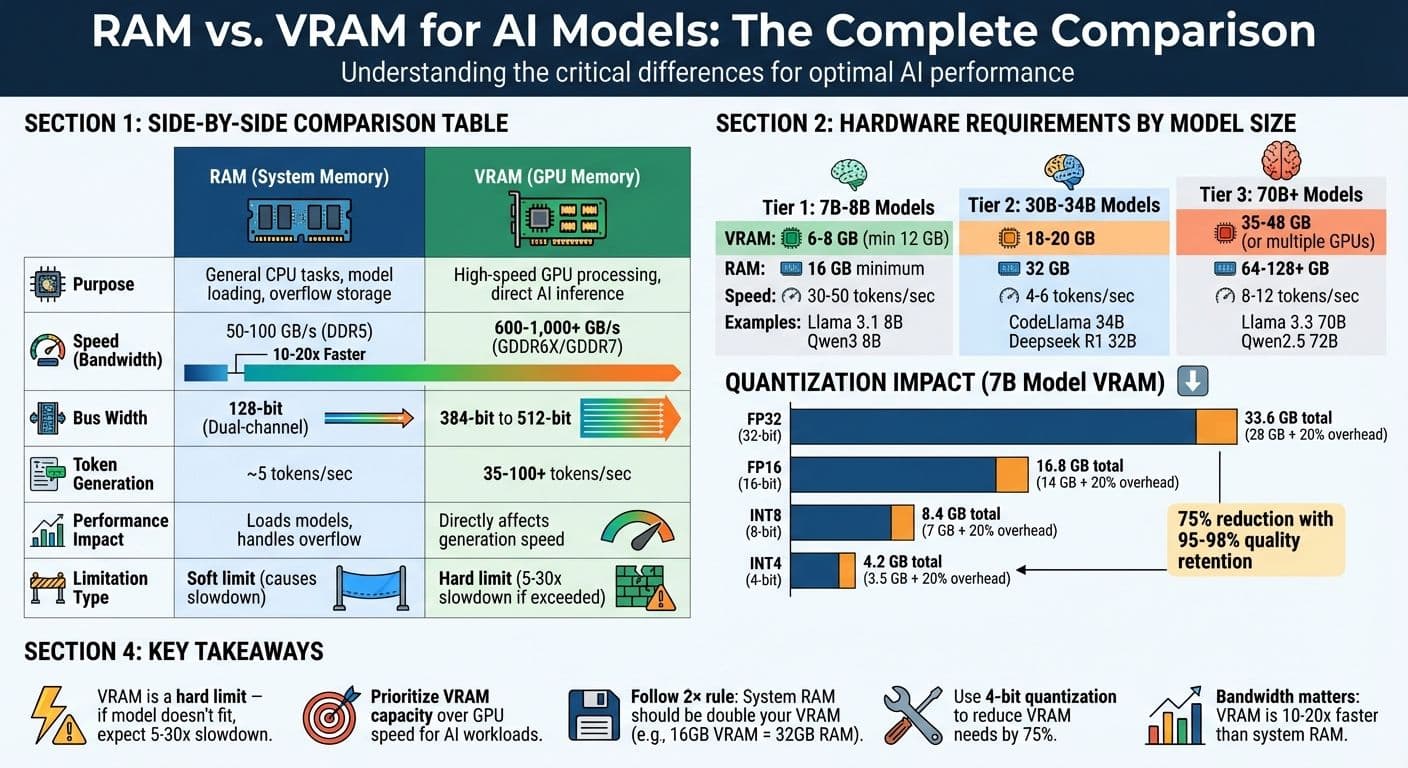
RAM vs VRAM Comparison for AI Models: Speed, Bandwidth, and Requirements
How to Run LARGE AI Models Locally with Low RAM - Model Memory Streaming Explained
What is RAM and How It Works with AI Models
RAM, or Random Access Memory, is essentially your computer's short-term memory. It's where the CPU temporarily stores instructions and data while processing tasks. This includes everything from your operating system to AI application frameworks like Python and even the user interface you're using at the moment. Think of RAM as a middle ground between your computer's slower permanent storage (like an SSD or hard drive) and the ultra-fast VRAM on your graphics card.
When you're working with AI models, RAM plays a crucial role. It acts as a staging area during the initial loading process. Model weights are first loaded from storage into RAM and then transferred to VRAM for GPU processing. If your model is too large to fit entirely in VRAM, RAM steps in as overflow storage. However, this "hybrid inference" setup significantly slows down performance - by as much as 5 to 30 times.
RAM also handles preprocessing tasks, such as tokenization and storing the KV cache for extended context windows. Here's an example: an 8B parameter model with a 32K context window requires about 4.5 GB of memory just for the KV cache.
During the loading phase, RAM usage can temporarily spike to 1.5–2 times the final model size. This means that even if your model can theoretically fit into VRAM, a lack of sufficient system RAM can lead to loading failures before inference even begins. As ApX Machine Learning puts it:
"Think of your computer's memory like a workspace. While the CPU is the worker doing calculations, it needs a place to temporarily hold the instructions and data it's actively working on." – ApX Machine Learning
RAM Specifications That Matter
When it comes to AI workloads, capacity is the most important factor. For instance, a 70B parameter model running at FP16 precision needs around 140 GB of memory. Quantization techniques can reduce this requirement by up to 75%. For smaller models, 16 GB of RAM is the bare minimum for running 7B models, but power users working with larger models or advanced setups like Retrieval-Augmented Generation (RAG) indexes should aim for 64 GB.
Speed and bandwidth are also critical, especially if you're relying on the CPU for inference. DDR5 memory offers higher bandwidth than DDR4, which can improve performance for CPU-based tasks. Systems built on AMD Threadripper or Intel Xeon platforms, which support multi-channel memory configurations, can further enhance this bandwidth. But even with these upgrades, system RAM bandwidth still lags far behind that of VRAM.
Multitasking capacity is another key consideration. Your operating system and background applications typically consume 2–4 GB of RAM before you even start working on AI tasks. To avoid performance issues caused by swapping to disk, it's a good idea to keep at least 4–6 GB of RAM free.
How RAM Handles Data Preprocessing
RAM isn’t just for loading models; it also supports essential preprocessing tasks. For example, tokenization - the process of converting text into numerical tokens that AI models can interpret - takes place in RAM using the CPU. If you're working with vector databases, often used in RAG systems, RAM is where these indexes are stored and managed. Depending on the size of your knowledge base, these indexes can take up several gigabytes.
When VRAM runs out, RAM acts as a fallback for CPU-based inference. While this allows you to run models that exceed your GPU's capacity, it comes with a steep performance penalty. In fact, CPU-based inference using system RAM is typically 10 to 100 times slower than GPU-based inference. Tools like llama.cpp can help by offloading parts of the model to the GPU while keeping the rest on the CPU. However, even in a partial offload scenario, where 70% of the model runs on the GPU and 30% on the CPU, inference speeds can drop significantly - from 40–45 tokens per second to just 10–15 tokens per second.
| Model Size | RAM (Recommended) | Typical Use Case |
|---|---|---|
| 7B - 8B Parameters | 16 GB | General-purpose, high-quality chat |
| 13B - 14B Parameters | 32 GB | Power users, professional coding |
| 30B - 40B Parameters | 48 GB - 64 GB | Complex reasoning, expert-level tasks |
| 70B+ Parameters | 64 GB - 128 GB+ | Enterprise, research-grade analysis |
To make the most of limited RAM, you can reduce context window sizes (e.g., from 4096 to 2048 tokens) and set environment variables like OLLAMA_MAX_LOADED_MODELS=1 to prevent multiple models from loading at once. Keep an eye on memory usage using tools like Task Manager (Windows) or free -h (Linux) to ensure you always have 4–6 GB of free RAM available.
What is VRAM and How It Works with AI Models
VRAM, short for Video Random Access Memory, is a high-speed memory found in your graphics card. Think of it as the GPU's private workspace - a space reserved for storing everything it needs to run AI models efficiently. Unlike system RAM, which is shared across your operating system, applications, and the CPU, VRAM is exclusively dedicated to the GPU.
When running AI models, VRAM holds essential components like model weights (parameters that define the AI), the KV cache (used by the attention mechanism to reference previous tokens), and intermediate activations (temporary calculations during processing). This exclusive, high-speed storage is what enables GPUs to significantly outperform CPUs when it comes to AI inference. While system RAM can create bottlenecks, VRAM's dedicated access ensures the GPU operates at its full potential.
System RAM can't replace VRAM. If you try to run models using system memory, expect inference speeds that are 30 times slower. The reason lies in the bandwidth difference. High-end DDR5 system RAM delivers about 50–100 GB/s, while modern GPU memory achieves speeds of 600–1,000+ GB/s - a 10- to 20-fold advantage. For instance, HBM3 memory in NVIDIA's H100 GPUs can hit up to 3 TB/s, a staggering 40 times faster than DDR5's peak of 76 GB/s.
When a model's memory demands exceed the available VRAM, it spills over into slower system RAM. This spillover can turn generation times from seconds into minutes, with performance dropping anywhere from 5 to 30 times. Simply put, the amount of VRAM you have directly determines how efficiently your hardware can handle AI models.
VRAM Specifications That Matter
Capacity is the most critical factor for AI workloads. For example, a 7B-parameter model using FP16 precision requires around 14 GB of VRAM just to store the weights - before adding extra overhead for the KV cache and intermediate activations. A good rule of thumb: multiply the model's parameter count by 2 (for FP16 precision) and add 20% for additional overhead like the KV cache, intermediate calculations, and framework requirements.
Bandwidth plays a major role in determining how fast the GPU can access data stored in VRAM. Token generation speed often depends on memory bandwidth, as GPU cores can sit idle while waiting for data to load. This is why a slower GPU with ample VRAM can sometimes outperform a faster GPU that lacks sufficient memory.
Architecture also matters. Modern GPUs use advanced memory types like GDDR6X or HBM3, which are specifically designed for the parallel processing demands of AI. These memory types offer ultra-low latency and sustain the high bandwidth needed to keep thousands of GPU cores running efficiently.
Another often-overlooked factor is CUDA overhead. Frameworks like PyTorch and libraries such as cuDNN typically consume 0.5–1 GB of VRAM just to run their environment before the model even loads. For example, an 8 GB graphics card might only leave 7–7.5 GB available for the actual model.
How VRAM Powers GPU-Accelerated AI Inference
With these specifications in mind, VRAM enables GPUs to process AI models using parallel computing. Unlike CPUs, which handle tasks sequentially, GPUs can perform thousands of calculations simultaneously - as long as all the required data fits in VRAM and is accessible at lightning-fast speeds.
The performance difference is striking. For example, benchmarks with an RTX 4060 showed a model running entirely in VRAM achieving 40.58 tokens per second. When some layers were offloaded to system RAM, performance plummeted to just 8.62 tokens per second - a 4.7× slowdown. This drop isn't gradual; it's steep. As Orbit2x aptly put it:
"VRAM has become the single most critical constraint in AI development... shifting from a technical detail to a make-or-break factor."
The KV cache adds another layer of complexity. Its size grows linearly with the context length, meaning VRAM usage increases as conversations or text generations become longer. For instance, an 8B model with a 32K context window requires about 4.5 GB of VRAM just for the KV cache. Even if you start with enough free VRAM, extended use can eventually lead to an Out-of-Memory error as the cache continues to expand.
To mitigate VRAM demands, quantization techniques can be used. By switching from 16-bit precision (FP16) to 4-bit precision (INT4), VRAM requirements can drop by roughly 75%, while maintaining 95–98% of the model's quality. This means a 13B model that would typically need 26–30 GB of VRAM could fit into just 8–12 GB, making it feasible for consumer-grade GPUs.
| Precision Format | Bytes per Parameter | VRAM for 7B Model (Weights) | Total with 20% Overhead |
|---|---|---|---|
| FP32 (32-bit) | 4 | 28 GB | 33.6 GB |
| FP16 (16-bit) | 2 | 14 GB | 16.8 GB |
| INT8 (8-bit) | 1 | 7 GB | 8.4 GB |
| INT4 (4-bit) | 0.5 | 3.5 GB | 4.2 GB |
RAM vs. VRAM: Performance Differences
When it comes to performance, RAM and VRAM are built for entirely different purposes, and the gap between them is massive. System RAM is optimized for low latency, making it suitable for general CPU tasks. On the other hand, VRAM is designed for high bandwidth and throughput, which is crucial for demanding workloads like AI token generation.
Modern VRAM in GPUs can deliver bandwidths of 600–1,000+ GB/s - a staggering 10–20x advantage over system RAM. Take the NVIDIA RTX 5090 as an example: it uses a 512-bit bus with GDDR7 memory, achieving an impressive 1,790 GB/s of bandwidth. In comparison, a typical consumer PC with dual-channel DDR5-5000 RAM maxes out at around 80 GB/s.
This bandwidth difference has a direct impact on performance. As Chavy Levi from Hardware Corner aptly puts it:
"For LLM inference, bandwidth is the king of speed".
To put this into perspective, a consumer CPU with dual-channel RAM (~83 GB/s) might only generate 5 tokens per second. Meanwhile, an RTX 4090 with ~1,008 GB/s of bandwidth can produce over 80–100 tokens per second. That’s the difference between waiting several minutes and receiving near-instant responses.
The disparity in memory bandwidth affects not just token generation but also the overall speed of AI inference.
Performance Comparison Table
| Feature | System RAM (DDR5) | VRAM (GDDR6X/GDDR7) |
|---|---|---|
| Primary Optimization | Low Latency (CPU tasks) | High Bandwidth (GPU throughput) |
| Typical Bandwidth | 50–100 GB/s | 600–1,000+ GB/s |
| Bus Width | 128-bit (Dual-channel) | 384-bit to 512-bit |
| Inference Speed | ~5 tokens/sec | 35–100+ tokens/sec |
| Physical Form | Removable DIMM sticks | Soldered chips on PCB |
VRAM’s architecture is tailored for parallel data access, allowing it to handle hundreds of memory transactions simultaneously. High-end GPUs feature wide memory buses - 384-bit or 512-bit - while consumer CPUs are typically limited to 128-bit dual-channel configurations. The table makes it clear how these architectural differences translate into real-world performance.
How Bandwidth Affects AI Token Generation Speed
AI inference workloads are memory-bandwidth bound, not compute-bound. Every token generated requires the processor to read gigabytes of model parameters. Higher bandwidth allows GPUs to access these parameters faster, significantly increasing token output rates.
However, when a model exceeds the available VRAM and spills over into system RAM, performance doesn’t just slow - it plummets. This is because data must travel across the PCIe bus, introducing latency on top of system RAM’s already lower bandwidth.
Token generation involves two key phases: prompt processing (prefill) and token generation (decoding). While prompt processing relies on GPU cores and is compute-intensive, token generation depends heavily on memory bandwidth. As the KV cache grows during longer conversations, more bandwidth is required. If VRAM runs out, the system starts tapping into slower system RAM, turning what should be instant responses into frustrating delays.
For those running AI models on CPUs, the number of memory channels is more important than sheer RAM speed. A server with 12 channels of older DDR4 memory can outperform a consumer desktop with 4 channels of faster DDR5. For example, an octa-channel workstation setup can reach over 200 GB/s, generating 20–30 tokens per second - still slower than a GPU, but far more practical than a dual-channel system.
sbb-itb-903b5f2
When RAM Matters More Than VRAM
System RAM plays a crucial role when VRAM alone can't handle the load, particularly in scenarios involving AI models running on CPUs. In these cases, system RAM is responsible for storing model weights and managing inference. With local tools, it's possible to run models on CPUs, even without high-end GPUs, making ample system RAM a necessity in such setups .
Before generating tokens, the CPU uses system RAM for tasks like tokenization, data cleaning, and I/O operations. Large datasets often exceed the capacity of consumer-grade GPUs, forcing the system to rely on RAM instead . Similarly, models with a high number of parameters can surpass the limits of GPU VRAM, making system RAM the fallback solution, especially since it’s more readily available on most consumer hardware.
RAM also acts as a safety net for your system. The operating system, background apps, and browser tabs all share the same memory pool. To avoid performance issues like disk-based swap usage, it's recommended to keep 4–6GB of RAM free as a buffer. Additionally, loading a model can temporarily spike memory usage to 1.5–2× the model's final size, so having extra RAM headroom is essential to prevent crashes during this process. These factors highlight why system RAM becomes critical when VRAM reaches its limits.
When models exceed your GPU's VRAM capacity, system RAM steps in to handle the overflow. However, this can significantly impact performance. For instance, in a test with the Gemma-3-27b model, token generation speed dropped from 46.45 tokens per second to just 1.57 tokens per second when relying on system RAM.
For users with Apple M-series chips, the line between RAM and VRAM blurs due to their unified memory architecture. In these systems, a single memory pool serves both the CPU and GPU . Full-stack developer Cristian Sifuentes explains:
"Unified memory is VRAM; aim for M2 Pro 32GB+ for 13-B Q4"
This unified design makes having a higher RAM capacity even more important, as it directly determines the size of the model you can run at optimal speeds.
In scenarios like NanoGPT deployments, where you're working with extensive AI models locally, finding the right balance between RAM and VRAM is essential to maintain performance and avoid bottlenecks.
When VRAM Matters More Than RAM
When running AI models directly on your GPU, VRAM takes center stage. Unlike system RAM, VRAM acts as a hard limit - if your model doesn’t fit entirely within it, performance takes a serious hit. Here's why: VRAM bandwidth is crucial. If your model exceeds the VRAM capacity, data has to shuffle between system RAM and the GPU via the PCIe bus, creating a massive bottleneck. For instance, a benchmark on an NVIDIA RTX 4060 (8 GB VRAM) showed a performance of 40.58 tokens per second when fully utilizing VRAM. But when the model spilled over into system RAM, the speed plummeted to 8.62 tokens per second - a staggering 4.7x slowdown. This limitation directly impacts token generation speed, with significant latency becoming unavoidable when VRAM overflows.
There’s more to consider. Beyond storing model weights, VRAM also needs to handle the growing KV cache during tasks with long context windows. The KV cache grows linearly with context length and can, in some cases, consume more memory than the model weights themselves. For example, an 8B model running at a 32K context window requires around 4.5–5 GB of VRAM just for the KV cache. This is especially critical for real-time applications, like coding assistants or chatbots, which often need to generate 40–80 tokens per second. Without enough VRAM, these applications can’t perform efficiently.
In local GPU setups, the size of your VRAM directly determines which models you can run and how well they’ll perform. In fact, a slower GPU with more VRAM can often outperform a faster GPU with less memory, simply because the latter might not be able to load larger models at all.
Model Sizes and VRAM Requirements
How much VRAM you need depends on the size of the model and the quantization method you use. A popular approach is Q4_K_M quantization, which can reduce VRAM requirements by about 75% while retaining 95–98% of the model’s original quality. This makes optimizing quantization a key strategy for local AI setups.
| Model Size | Recommended VRAM | Example Models |
|---|---|---|
| 3B – 4B | 3 – 4 GB | Llama 3.2 3B, Qwen3 4B |
| 7B – 9B | 6 – 8 GB | Llama 3.1 8B, Qwen3 8B |
| 12B – 14B | 10 – 12 GB | Gemma 3 12B, Phi-4 14B |
| 22B – 35B | 16 – 24 GB | Gemma 3 27B, Deepseek R1 32B |
| 70B – 72B | 48 GB (or 2×24GB) | Llama 3.3 70B, Qwen2.5 72B |
These estimates assume Q4_K_M quantization and account for basic overhead. However, if you’re working with longer context windows, you’ll need to factor in additional VRAM for the KV cache. For instance, at a 32K context, an 8B model would require an extra 4.5–5 GB of VRAM just for the cache.
RAM and VRAM Requirements for Common AI Models
When it comes to running AI models effectively, understanding the hardware requirements is essential. This ensures you avoid buying GPUs that can't handle the load or encountering failures during inference. The hardware demands of AI models vary significantly depending on their size and the level of quantization applied. For the best results, the model should fit entirely within the VRAM.
For example, a 7B parameter model in FP16 precision needs approximately 28 GB of VRAM just for storing its weights. However, quantization can drastically lower this requirement. Switching to INT8 reduces the VRAM need to around 7 GB, and INT4 brings it down even further to just 4 GB, making it more accessible for consumer-grade hardware. Using 4-bit quantization (Q4_K_M) maintains around 95–98% of the model's quality while slashing VRAM usage by 75%.
System RAM also plays a critical role. As a rule of thumb, your system RAM should be double the VRAM capacity. For instance, if your GPU has 16 GB of VRAM, you should aim for 32 GB of system RAM. This additional memory handles operating system overhead, temporary loading spikes (up to twice the model size), and CPU-based preprocessing. Balancing VRAM and system RAM is key to running AI models efficiently on local hardware.
Hardware Requirements by Model Size
Here’s a breakdown of hardware recommendations based on model size:
| Model Size | Minimum VRAM (4-bit Quantized) | Recommended System RAM | Token Generation Speed | Example Models |
|---|---|---|---|---|
| 8B | 6–8 GB | 16 GB | 30–50 tokens/sec | Llama 3.1 8B, Qwen3 8B |
| 30B–34B | 18–20 GB | 32 GB | 4–6 tokens/sec | CodeLlama 34B, Deepseek R1 32B |
| 70B | 35–42 GB | 64 GB | 8–12 tokens/sec (GPU) | Llama 3.3 70B, Qwen2.5 72B |
| 120B+ | 80+ GB | 128+ GB | 2–3 tokens/sec | GPT-3 scale models |
These recommendations assume efficient quantization and moderate context lengths (4K–8K tokens). If you’re working with extended contexts, such as 32K tokens, expect to need an additional 4.5 GB of VRAM just for the key-value cache on an 8B model.
For training, the memory requirements are even more demanding. For instance, training a 7B model in FP32 precision requires around 112 GB of memory to store parameters, gradients, and optimizer states. This highlights the steep hardware demands of training compared to inference.
Conclusion: Finding the Right Balance
When setting up a local AI system, prioritizing VRAM is key. If your GPU doesn't have enough VRAM, the workload spills over into the system RAM, which can slow performance by 5 to 30 times. For most users, GPUs with 12GB to 32GB of VRAM offer a solid middle ground. This range supports 7B models at high precision or larger models when using quantization.
A good rule of thumb is the 2× VRAM rule: pair your GPU's VRAM with double the amount of system RAM (e.g., a GPU with 16GB VRAM should have 32GB of system RAM). This helps keep background tasks running smoothly and prevents delays caused by swapping. Striking this balance ensures efficient AI inference and helps you achieve a cost-effective, high-performance setup.
Cost is another important factor. If you're on a budget, focus on VRAM capacity rather than peak GPU speed. For example, a used RTX 3090 with 24GB of VRAM (around $900) can handle larger models better than a newer 12GB RTX 4070 Ti. Entry-level setups for local AI typically start with a GPU offering 12GB of VRAM paired with 32GB of system RAM, with total costs ranging from $500 to $800.
To further optimize VRAM usage, consider 4-bit quantization (Q4_K_M). This method reduces VRAM requirements by approximately 75% while maintaining 95–98% of the model's quality. For instance, a 70B model that would normally need 140GB of VRAM in full precision can run on just 40–48GB when quantized. This makes it possible to split workloads across two consumer GPUs instead of relying on expensive enterprise-grade hardware.
Your hardware choices should align with your goals:
- For 7B–8B models, aim for 12GB of VRAM and 32GB of system RAM.
- For 30B–70B models, look for 24GB of VRAM and 64GB of system RAM.
- For 70B+ models, plan for 48GB or more of VRAM (often using multiple GPUs) and at least 128GB of system RAM.
FAQs
Why is VRAM more important than RAM for running AI models locally?
When running AI models locally, VRAM is essential because it serves as the GPU's dedicated memory, storing the model's parameters and activations. Unlike system RAM, VRAM is specifically designed for high-speed data processing, which makes it indispensable for tasks like training and inference.
If your system runs out of VRAM, it has to offload data to the much slower system RAM. This can cause noticeable performance drops, slowing down your workflows. To run large AI models smoothly and efficiently, having sufficient VRAM is crucial for avoiding these slowdowns and achieving the best performance.
What is quantization, and how does it reduce VRAM usage when running AI models?
Quantization is a method that helps shrink AI models by using lower-precision formats to store their weights - like 8-bit instead of the usual 32-bit. This approach drastically cuts down the memory needed to store and operate the model, making it more manageable for systems with limited GPU memory (VRAM).
Beyond saving memory, quantization also boosts processing speed. This makes it a practical choice for running AI models locally, especially on devices with less powerful GPUs, without losing much in terms of performance.
What hardware do I need to run large AI models locally?
To run large AI models locally, you'll need a well-balanced system with adequate GPU memory, system RAM, CPU power, and fast storage. Here's what you should aim for:
For models with 7–13 billion parameters, a GPU with 16–24 GB of VRAM is recommended. If you're working with larger models (30 billion parameters or more), you'll likely need 24–32 GB of VRAM, unless you use optimized quantization techniques to make them compatible with smaller GPUs.
On the CPU side, a 12–16 core processor - such as an AMD Ryzen 9 or Intel Core i9 - will handle tokenization and data processing efficiently. For system memory, 64–128 GB of DDR5 RAM is ideal, ensuring smooth performance even when running additional services alongside the model. Storage is also critical; a 2–4 TB NVMe SSD offers the speed needed for loading models quickly and reducing latency, while a basic HDD can be used for archiving less frequently accessed data.
Here’s a practical build to consider:
- GPU: NVIDIA RTX 5070 Ti (16 GB VRAM) or RTX 4090/5090 (24+ GB VRAM)
- CPU: AMD Ryzen 7 7800X3D or another 12-core processor
- RAM: 64 GB DDR5, with the option to upgrade to 128 GB for handling larger models
- Storage: 2–4 TB NVMe SSD for fast access
With this setup, you'll be able to run most open-source AI models, such as NanoGPT's tools for text and image generation, while keeping all your data securely on your local device.