
Checklist for Optimizing AI Latency with Async Processing

Asynchronous processing is the key to reducing AI system latency and improving responsiveness. Unlike synchronous methods that block operations until a task is completed, async processing allows tasks to run concurrently, ensuring faster response times and better user experiences. Here's a quick summary of how to optimize latency using async techniques:
- Measure latency: Track key metrics like P50, P95, and Time to First Token (TTFT) to identify bottlenecks.
- Use async frameworks: Leverage tools like Python's
asyncioor Node.js'sasync/awaitfor non-blocking operations. - Enable streaming: Deliver outputs incrementally using Server-Sent Events (SSE) or WebSockets to reduce TTFT.
- Parallelize tasks: Run independent tasks simultaneously to save time.
- Cache and prefetch: Store frequently requested data and predict future needs to avoid redundant computations.
- Advanced techniques: Implement speculative execution, dynamic batching, and queue management for further latency reductions.
ML Latency No More- Useful Patterns to Reduce ML Prediction Latency to Sub X ms | PyData NYC 2022
Core Checklist for Implementing Async Processing
To make the most of asynchronous processing and reduce AI latency, here's a practical checklist to guide you.
1. Measure Current Latency Metrics
Start by establishing a baseline for your system's performance. Focus on three key metrics: P50 (median latency, where half of the requests are faster), P95 (95th percentile, showing the slower end of response times), and TTFT (Time to First Token, the delay before users see the first output). Use tools like Locust or Apache Bench to simulate at least 1,000 requests under realistic conditions with varied payload sizes. Analyze the results using numpy.percentile to get precise insights into response times. This baseline will help you measure improvements and pinpoint bottlenecks after implementing async processing.
2. Use Async Frameworks and Libraries
Choose an async framework that works well with your programming language. For Python, asyncio is a solid choice for non-blocking I/O, and aiohttp is excellent for async HTTP requests. If you're using Node.js, the async/await syntax paired with libraries like axios or node-fetch can handle non-blocking API calls effectively. When working with NanoGPT, use tools like asyncio.gather() in Python or Promise.all() in JavaScript to run multiple tasks simultaneously. For example, using await Promise.all([nanoGPT.textGen(prompt1), nanoGPT.imageGen(prompt2)]) can cut latency by up to 50%, allowing you to handle text and image generation concurrently while maintaining local data privacy.
3. Enable Streaming Responses
Enhance user experience by implementing streaming with SSE (Server-Sent Events) or WebSockets. This allows tokens to be delivered incrementally, reducing TTFT and giving users faster feedback. In Python, using FastAPI with NanoGPT, you can set stream=True in API calls and yield tokens with async for token in client.stream(prompt): yield token. This method can bring TTFT down to under 200 ms and improve perceived latency by 40–50%. Streaming is particularly effective for conversational AI and real-time generation tasks, as it lets users see output immediately. NanoGPT’s OpenAI-compatible endpoints support streaming for models like ChatGPT and Stable Diffusion, making it easier to decouple rendering from full computation.
4. Parallelize Independent Tasks
Identify tasks that can run independently and execute them at the same time. For example, if you need to generate a text summary and an accompanying image, use Python's asyncio.gather() to process both simultaneously. If text generation takes 4 seconds and image generation takes 6 seconds, sequential processing would require 10 seconds. Parallel execution, however, completes both in just 6 seconds - a 40% time savings. NanoGPT’s December 2025 platform supports querying multiple AI models at once, enabling side-by-side comparisons of responses. The "Multiprompt" feature combines outputs from different prompts into one cohesive result, streamlining workflows for complex content creation.
5. Implement Caching and Prefetching
Avoid redundant computations by caching frequently requested data and prefetching anticipated information. Tools like Redis or Python’s functools.lru_cache with TTL settings can store results for common prompts. For instance, use cache.get_or_set_async(key=hash(prompt), compute=nanoGPT.gen(prompt)). Prefetching can also save time by loading likely-needed resources in advance, such as generating common image variants while text generation is still in progress. One media company cut token usage by 45% and improved response times by 40–50% through a combination of parallel processing and caching strategies. These techniques not only lower latency but also reduce costs on the NanoGPT platform.
Advanced Techniques for Reducing Latency
Once you've mastered the basics of asynchronous practices, it's time to explore advanced methods that can take latency reduction to the next level.
Speculative Execution for Sequential Tasks
Speculative execution is all about predicting what comes next and processing it ahead of time. If the prediction is correct, the results are ready instantly. If it's wrong, you simply discard the unnecessary computations. For example, in a NanoGPT chatbot, after answering a user's query, the system could preemptively generate responses to likely follow-up questions like "Can you explain further?" or "What’s the price?" using asynchronous methods. This technique can cut perceived latency by 30–50%, as demonstrated in Google's PaLM 2 optimizations.
The trick is to monitor your accuracy - or "hit rate." A hit rate of 70% or higher makes speculative execution worthwhile. To implement this in Python, you can use asyncio alongside concurrent.futures to manage these tasks. Keep it efficient by limiting speculative tasks to two or three at a time to avoid overwhelming resources. These predictive strategies also work hand-in-hand with dynamic batching and queue management for even better performance.
Dynamic Batching and Queue Management
Dynamic batching groups similar requests into a single call to an AI model, maximizing efficiency. By batching requests, GPU utilization can jump from 20–30% to 80–90%, reducing per-request latency by as much as 60%. Tools like Ray Serve or Celery simplify this process. For instance, with Ray, you can set up a deployment using batch=True and configure max_batch_size=16 to handle NanoGPT requests in batches automatically.
Queue management is equally critical. Using a system like Redis for priority queues allows you to prioritize interactive user queries. Meta’s Llama serving team achieved 2x throughput with less than 10% latency regression by dynamically scaling batch sizes - starting from 4 during high traffic and increasing to 32 during quieter periods. To keep things smooth, set a timeout of around 200 ms for enqueue-to-dequeue operations. If the timeout is exceeded, fall back to single inference to maintain responsiveness.
Optimize Prompt and Output Handling
Fine-tuning how prompts and outputs are handled can also shave off valuable milliseconds. For prompts, consider async compression techniques. Token pruning - such as removing stop words using NLTK in a background thread - can reduce token counts by 20–40%. Alternatively, you can use smaller models like DistilBERT for semantic compression before sending data to NanoGPT. Prompt templating with caching is another great option. Twitter’s Grok AI utilized the LLMLingua library to compress prompts, cutting token counts by 25% and lowering latency from 1.2 seconds to 0.7 seconds p50.
On the output side, limiting token lengths can significantly reduce computational overhead. For example, setting max_tokens=150 can cut compute time by 30–60%, as shown in Anthropic Claude benchmarks. In NanoGPT workflows, user benchmarks from 2025 revealed that capping Flux Pro image generation descriptions at 64 tokens reduced costs by 35% and latency by 28%. A practical way to implement this is by offering user-configurable sliders for token limits, with defaults set between 100 and 200 tokens. Pair this with early stopping when end-of-sequence tokens appear to optimize both speed and resource use.
sbb-itb-903b5f2
Monitoring and Validating Async Implementations
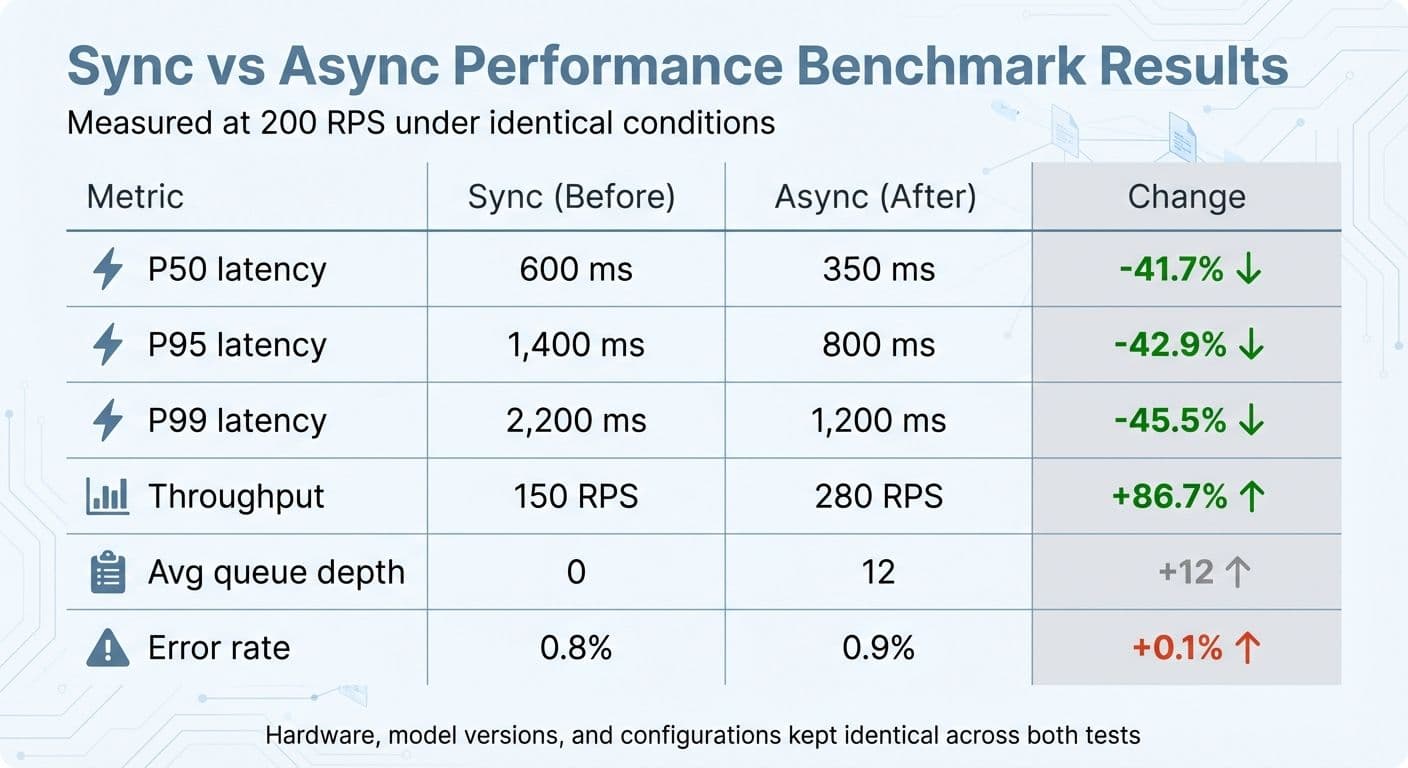
Synchronous vs Asynchronous Processing Performance Comparison
Getting async processing up and running is just the beginning - you also need to keep an eye on the right metrics to ensure your changes are delivering results. One of the most important sets of metrics to track is end-to-end latency percentiles like P50, P90, P95, and P99. Focusing only on averages won't cut it. Tail latency, in particular, is critical because many production AI systems show that P95 and P99 latency can be 2–10 times higher than the median. To maintain system reliability, reducing tail latency is just as important as improving median latency. These metrics form the backbone of a structured monitoring framework.
Keep tabs on queue depth (how many requests are waiting), concurrency (the number of tasks running at once), and throughput (requests per second). These will help you spot any signs of saturation or misconfiguration. Tracking cache hit rates is also crucial - a jump from 40% to 80% can dramatically reduce both median and tail latency. For workflows like NanoGPT that involve multiple models, monitoring cache performance across text and image generation endpoints ensures consistent optimization.
Don't overlook error and timeout rates, as they can point to resource thrashing or event loop starvation. Set up alerts for when P95 latency exceeds your service-level agreement (e.g., 800 ms for chat completions) or when queue depth grows disproportionately compared to throughput. For streaming responses, such as token-by-token text generation, track time-to-first-token separately from total completion time so users get a faster initial response.
Key Metrics to Monitor
Effective monitoring happens at three levels: requests, queue/executor, and model/inference layers. Time each API call to capture start and end points, expose metrics like current queue depth, worker utilization, and active tasks, and record details like model invocation times, batch sizes, and whether the call was served from cache.
Send all these metrics to a monitoring backend like Prometheus or CloudWatch. Build dashboards that link P95 latency to queue depth, concurrency, and CPU/GPU usage. For AI-specific metrics, track the ratio of model inference time to I/O time. Aim for GPU utilization between 70% and 90% - low utilization under heavy load suggests batching needs improvement, while near-100% utilization with growing queue times could indicate system overload. Also, set alerts for sharp drops in cache hit rates (e.g., from 80% to 40%), as this often signals an impending latency spike.
Benchmarking Performance Improvements
Once you've set up monitoring, use controlled benchmarking to validate the impact of async improvements. Start by capturing baseline metrics under realistic load conditions, including latency percentiles (P50, P90, P95, P99), throughput, resource utilization, and error rates. Test under typical peak load scenarios, such as 200 requests per second (RPS), to establish a solid comparison point.
Use load-testing tools like k6 or Locust to design an A/B-style benchmark. Run two tests: one with your current synchronous setup and another with async enabled. Make sure both tests use identical hardware, model versions, and configurations. Record the metrics for each test and compare them to assess the improvements:
| Metric | Sync (Before) | Async (After) | Change |
|---|---|---|---|
| P50 latency (ms) | 600 | 350 | -41.7% |
| P95 latency (ms) | 1,400 | 800 | -42.9% |
| P99 latency (ms) | 2,200 | 1,200 | -45.5% |
| Throughput (RPS) | 150 | 280 | +86.7% |
| Avg queue depth | 0 | 12 | +12 |
| Error rate (%) | 0.8 | 0.9 | +0.1 |
This table provides a clear snapshot of whether async changes are delivering measurable benefits without sacrificing reliability. When rolling out new async logic, consider using canary deployments. Route a small percentage (1–5%) of traffic initially and monitor for spikes in P95 latency, error rates, or any negative impact on business metrics. Tools like OpenTelemetry can also help by visualizing async workflows. They can show which tasks run in parallel and which are blocked, helping confirm that independent processes are overlapping as intended rather than running sequentially.
Key Takeaways for Optimizing AI Latency
Asynchronous processing is a game-changer when it comes to cutting down latency, with reductions of 40–50% reported across various real-world applications. To get started, begin by measuring your baseline performance metrics. From there, implement asynchronous frameworks, enable streaming responses, parallelize tasks that don't depend on each other, and use caching to eliminate redundant processing.
Combining strategies - like lowering token counts and running independent tasks in parallel - can lead to response times that are up to 50% faster. These techniques work together to create a foundation for platforms like NanoGPT to deliver top-tier performance.
In the NanoGPT ecosystem, asynchronous processing doesn't just slash latency; it also boosts privacy and improves the overall user experience. NanoGPT’s pay-as-you-go model takes full advantage of async processing to handle both text and image generation simultaneously, ensuring faster outputs while maintaining privacy.
For even greater efficiency, advanced methods such as dynamic batching, speculative execution, and edge optimizations can push latency below one second, even under heavy workloads. Keeping an eye on critical metrics - like latency, throughput, and cache hit rates - is crucial to confirm that your asynchronous techniques are delivering results without creating new bottlenecks.
Final Thoughts on Async Optimization
The checklist and advanced methods mentioned earlier highlight the importance of asynchronous processing in meeting user demands for quick AI responses. By benchmarking performance, following a structured approach, and integrating advanced techniques, systems can achieve both high throughput and consistently low latency.
FAQs
How does asynchronous processing help reduce AI latency?
Asynchronous processing improves the speed of AI systems by enabling tasks to run at the same time rather than one after another. This approach allows multiple operations to be handled simultaneously, cutting down on delays and making responses quicker.
By preventing bottlenecks and spreading out workloads more effectively, asynchronous processing boosts the performance and responsiveness of AI-powered applications. It's a key method for ensuring systems deliver fast and dependable results.
What metrics should I track to ensure optimal performance with async processing?
To keep your asynchronous processes running smoothly, focus on tracking critical metrics like response time, throughput, error rate, queue length, and resource utilization (such as CPU and memory usage). These metrics are essential for spotting bottlenecks, optimizing resource use, and ensuring your application performs seamlessly.
By consistently reviewing these indicators, you can tackle potential problems early and adjust your system to improve both latency and reliability - key factors for AI-driven applications.
How do caching and prefetching help improve AI application latency?
Caching and prefetching are two powerful techniques that help cut down on latency, making responses faster and more efficient. Caching works by storing frequently accessed data or predictions closer to the user. This way, when the same data is needed again, it can be retrieved almost instantly, without having to process it from scratch.
Prefetching, on the other hand, takes a proactive approach. It predicts what users might request next based on their behavior and loads that data ahead of time. So, when the request actually comes in, the data is already prepared and ready to go, reducing any potential delays.
Using these methods, AI systems can respond to user queries more quickly, ensuring smoother and faster interactions in real-time applications.