
Best Practices for Proprietary AI Frameworks on Edge Hardware
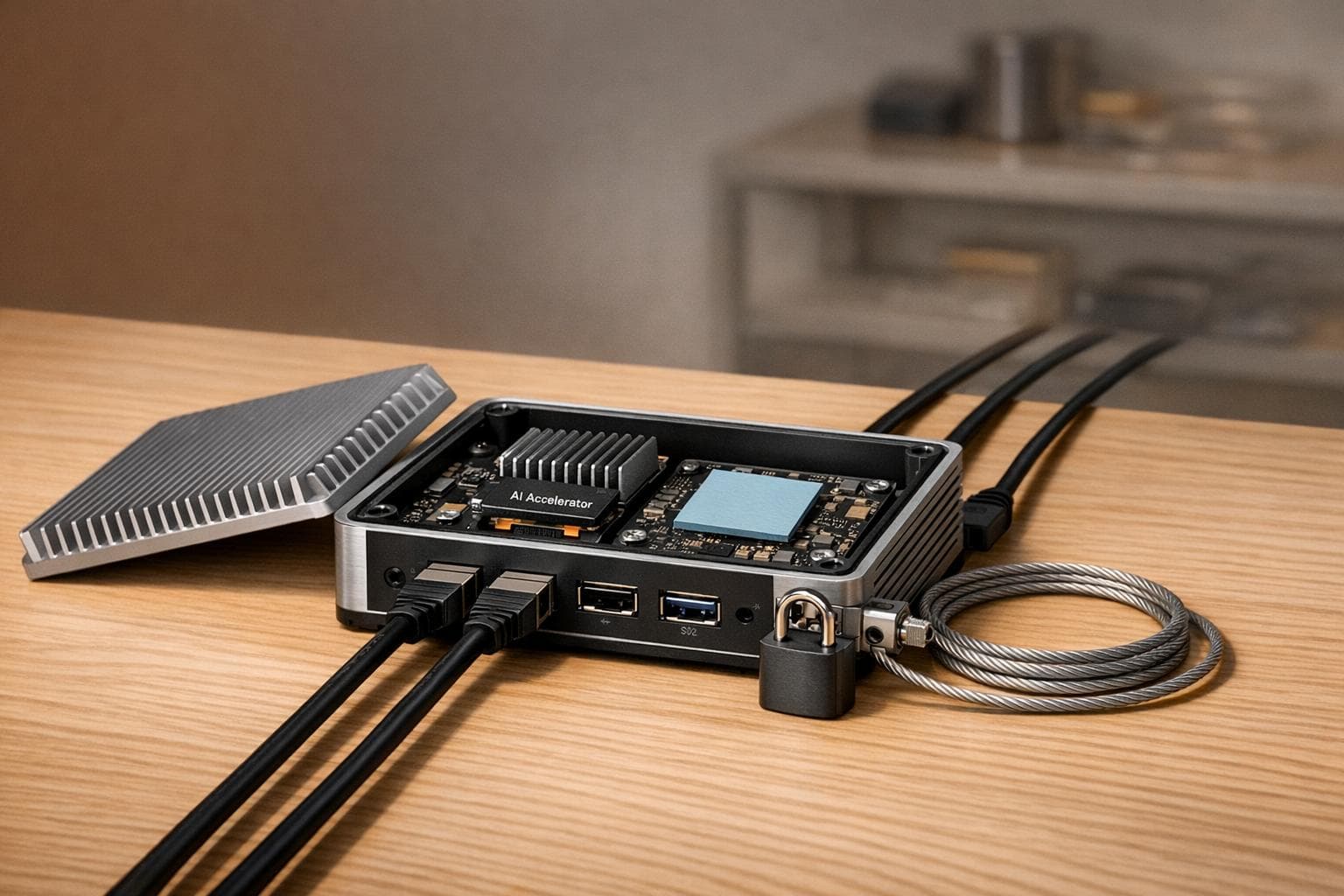
Running AI on edge hardware is challenging but rewarding. Here’s why: it delivers ultra-fast response times, keeps data private, and works without internet. But it’s not all smooth sailing. Edge devices have limited memory, heat issues, and vendor lock-in risks. Plus, updating models securely is tricky.
To succeed, you need to:
- Match hardware and tasks: Use the right chips (e.g., NPUs for speed) and test directly on devices.
- Optimize models: Shrink them with quantization and pruning to save space and power.
- Avoid vendor lock-in: Build modular systems and use open standards like ONNX.
- Automate deployments: Use containers, GitOps, and telemetry for consistent updates.
These steps help you overcome edge AI hurdles and ensure smooth, cost-effective deployments.
EDGE AI TALKS: Write Once, Deploy Everywhere: The Model-Agnostic AI Deployment
sbb-itb-903b5f2
Common Challenges in Integrating Proprietary AI Frameworks
Deploying proprietary AI frameworks on edge hardware presents several hurdles. Let's break down the key issues: hardware constraints, vendor lock-in, and security risks.
Hardware Limitations and Resource Constraints
The main bottleneck for edge hardware isn't raw processing power - it's memory bandwidth. Transformer decoding, which involves fetching billions of weights repeatedly, pushes memory bandwidth to its limits. As a result, Neural Processing Units (NPUs) can throttle by 20–30% when temperatures climb above 55–60°F. NVIDIA Research highlights this challenge:
Inference throughput scales primarily with memory bandwidth, since transformer decoding requires fetching billions of weights repeatedly, overwhelming data movement capacity rather than compute units.
This leads to unpredictable performance. Models that run smoothly in controlled lab settings may slow down significantly in warmer or real-world environments.
RAM capacity is another limiting factor. Devices with 8GB of RAM, for instance, struggle to handle multi-model workflows as of 2026. To address this, the industry has introduced "AI Tiers" to classify devices: flagship hardware (Tier 1) can handle models with up to 3 billion parameters, while entry-level devices (Tier 3) max out at 700 million parameters.
Adding to the challenge is a global DRAM shortage. High-Bandwidth Memory costs have surged 3–4x since 2024, with memory now accounting for 40–50% of total hardware costs.
While these hardware constraints are tough enough, proprietary frameworks add another layer of complexity through rigid ecosystem dependencies.
Vendor Lock-In and Ecosystem Fragmentation
Proprietary frameworks often tie developers to specific ecosystems, making it difficult to switch platforms. Models built for one vendor's hardware typically require extensive rewrites to run on a different platform. Specialized AI chips like NPUs, TPUs, and other custom accelerators rely on proprietary SDKs and drivers, creating dependencies that are hard to break.
Switching frameworks isn't just about rewriting code - it also involves re-optimizing models and recalculating costs. This adds operational risks. As nezhar.com warns:
When a provider shuts down a model you depend on, your production system breaks overnight.
Scaling becomes a logistical nightmare when hardware across edge fleets varies. Organizations managing thousands of devices across different hardware generations face immense challenges in maintaining compatibility.
These dependencies also amplify security risks and maintenance challenges.
Security and Maintenance Challenges
Updating AI models on edge devices is far more complex than standard firmware updates. Modern models often exceed several hundred megabytes, making over-the-air (OTA) updates slow and risky. Without proper safeguards, a failed update can render devices inoperable. In fact, poorly implemented or unsigned update systems are the #1 cause of large-scale incidents in edge deployments.
Distributed deployments are particularly vulnerable to security threats. Proprietary frameworks are susceptible to tampered models, supply-chain malware, and lateral network attacks, where a single compromised device can expose an entire network. Additionally, shipped models are at risk of intellectual property theft or unauthorized modifications.
Managing these deployments becomes even more challenging when different devices run varying model versions. This inconsistency leads to unpredictable behavior and increases support costs. While telemetry can help monitor model health, it introduces privacy concerns. Without measures like differential privacy or local data aggregation, telemetry systems risk exposing sensitive user information.
Addressing these challenges is essential for improving the performance and security of proprietary AI frameworks on edge devices.
How to Ensure Compatibility and Performance
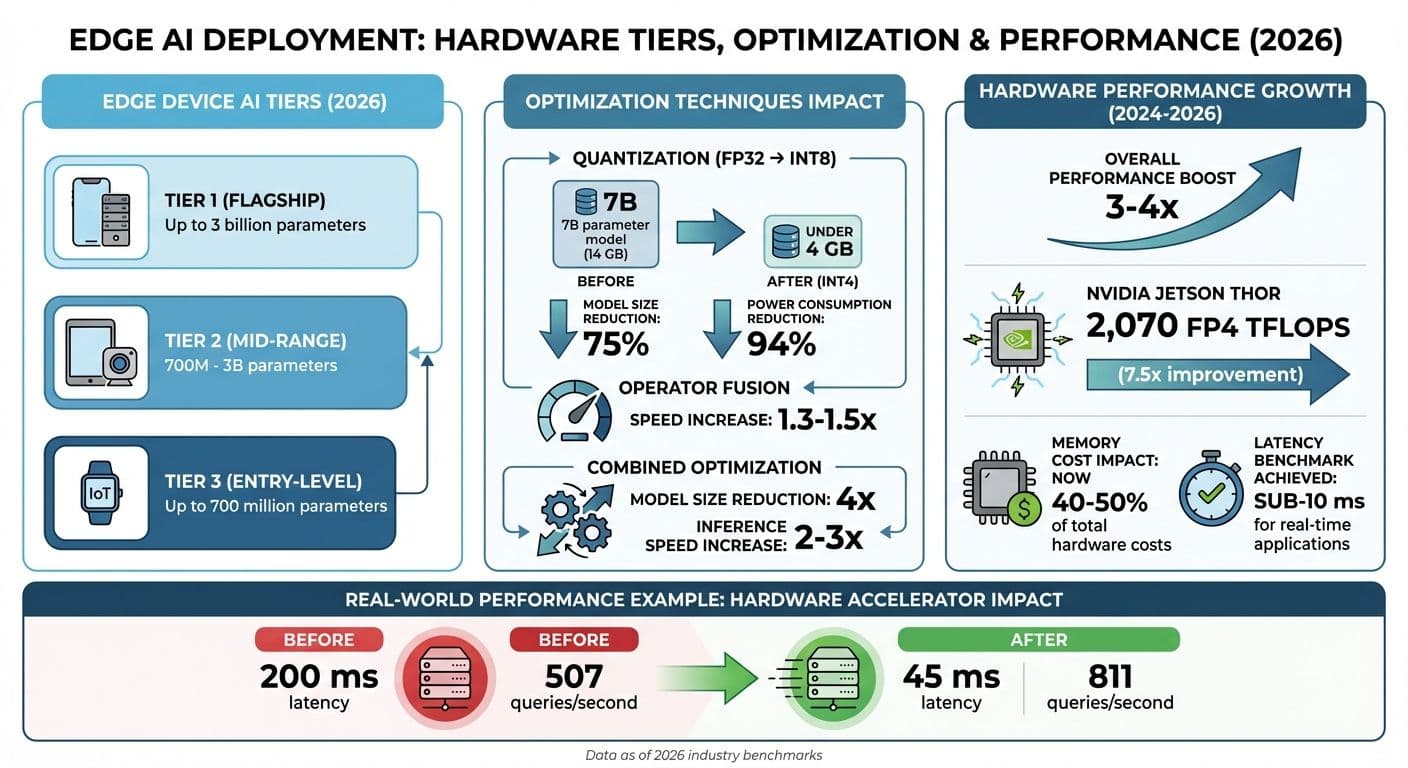
Edge AI Hardware Performance Tiers and Optimization Impact Comparison
Running proprietary AI frameworks efficiently on edge hardware requires more than just plugging in the specs - it demands careful evaluation and fine-tuning. The goal? Pairing your framework with the actual capabilities of your device, not just what the spec sheet promises.
Evaluating Framework-Hardware Compatibility
To get the most out of your hardware, you need to evaluate it thoroughly. The type of hardware you choose should be based on the complexity of your task. For instance:
- Microcontrollers (MCUs): Ideal for simple tasks like gesture detection.
- Microprocessors (MPUs): Better suited for more demanding tasks like object classification.
- NPUs or FPGAs: Deliver the performance needed for low-latency requirements.
But here’s the catch: cloud-based simulations often miss critical factors like chipset-specific firmware tweaks, memory alignment, or thermal effects. That’s why benchmarking directly on the physical device is a must.
One key area to watch is operator support. If your hardware accelerator doesn’t support certain operators, it might fall back to the CPU - drastically increasing latency by 3–10×. Tools like NVIDIA's trtexec can help measure throughput and median latency directly on your hardware. Just remember to exclude the first 2–3 runs to account for NPU initialization.
Set clear performance benchmarks. For example, your INT8 quantized model should run as fast as or faster than its FP32 counterpart. If it doesn’t, operator fallback might be the culprit. A real-world case: In February 2026, the EdgeGate Engineering Team tested a MobileNet-style person-detection model on Snapdragon 8 Gen 3 hardware using a Samsung Galaxy S24. Surprisingly, their INT8 quantized model used more memory - 124.66 MB compared to 121.51 MB for FP32 - due to tensor alignment issues that cloud simulations completely missed.
With compatibility sorted, let’s move to optimization techniques that can further enhance performance.
Model Optimization Techniques
Optimizing your model is crucial for running efficiently on edge devices. Quantization, for example, can significantly shrink model size and reduce power usage. Converting from FP32 to INT8 can cut model size by up to 75%, and 8-bit operations use over 94% less power compared to 32-bit ones. For large language models, INT4 quantization can take a 7 billion parameter model from 14 GB of VRAM down to under 4 GB.
Quantization-Aware Training (QAT) is another powerful approach. By simulating quantization errors during training, QAT helps the model adjust its weights for low-precision formats, maintaining better accuracy than Post-Training Quantization (PTQ). If you’re using PTQ, calibrate with 100–500 real-world samples to get accurate activation ranges.
Structured pruning offers another way to boost efficiency. By removing entire blocks of parameters, like filters or neurons, you can reduce model size and speed up inference on standard hardware without needing specialized sparse-tensor support. For the best results, combine techniques: prune first, then apply knowledge distillation, and finally quantize.
Using Tools for Hardware Acceleration
Modern tools simplify the process of optimizing performance while tackling compatibility challenges. For example:
- Google LiteRT (formerly TensorFlow Lite): Provides unified access to NPUs and GPUs across Android, iOS, and IoT platforms via its CompiledModel API.
- NVIDIA TensorRT SDK: Optimizes inference with mixed precision (FP32, FP16, INT8, FP4) and includes specialized transformer optimizations.
Properly configured hardware accelerators can deliver massive performance improvements. Take the Google Coral USB Accelerator or NVIDIA’s ModelOptimizer: they’ve been shown to reduce latency from 200 ms to just 45 ms while boosting throughput from 507 to 811 queries per second. Enabling TensorFloat-32 (TF32) on Ampere GPUs and newer models can also provide instant speedups with minimal effort. Additionally, APIs like LiteRT's TensorBuffer allow for zero-copy buffer interop, eliminating costly data transfers between preprocessing and inference stages.
How to Reduce Vendor Lock-In and Maintain Flexibility
Vendor lock-in happens when your system becomes so dependent on a provider that switching to another option feels impossible. The key to avoiding this? Build flexibility right from the start.
Designing Modular Architectures
The first step to creating a more portable system is breaking your AI platform into independent layers. Instead of constructing a single, unified system, divide it into five key components: Model (inference), Orchestration (logic and workflows), Storage (vector databases), Observability (monitoring and tracing), and Infrastructure (compute resources). This structure ensures that changes in one area - like replacing your model provider - don’t disrupt your entire system.
To avoid being tied to proprietary APIs, use a standardized interface like an LLMProvider class. For orchestration, rely on open-source frameworks such as LangChain, CrewAI, or AutoGen, which run in any Python environment. Steer clear of cloud-native agents like Bedrock Agents or Vertex AI Agents, as they often lock you into specific vendor ecosystems.
"The orchestration layer is where portability is won or lost." – theorem.agency
For edge deployments, modular model bundling can be a game-changer. Pair a base model with swappable LoRA adapters, allowing you to update specific features without overhauling the entire model. Use A/B partition layouts for updates, so there’s always a fallback option if a new component fails health checks.
Want to test your architecture’s flexibility? Try the 90-Day Migration Test. This exercise identifies high-risk dependencies and ensures your system is ready for change. Skipping this planning step is a common reason why 70% to 95% of AI agent projects fail to reach production.
Using Open Standards and Interoperable Solutions
Adopting open standards like ONNX (Open Neural Network Exchange) can eliminate framework dependencies altogether. Models exported via ONNX can be deployed across platforms seamlessly. ONNX Runtime provides a consistent interface while utilizing device-specific accelerators like CPUs, GPUs, or NPUs through "Execution Providers".
The numbers back this up: 89% of organizations using AI rely on open-source frameworks, and they report a 35% lower total cost of ownership compared to proprietary tools. By 2028, it’s expected that 70% of multi-LLM applications will use AI gateways to avoid vendor lock-in.
The Model Context Protocol (MCP) acts like a universal translator, allowing you to switch LLMs or reasoning engines without having to rewrite custom integrations.
"Relying on a single vendor's closed-box AI model for your core product is like hardcoding a specific server's IP address into your boot sequence. When the hardware eventually fails or moves, your entire application crashes and you have absolutely zero automated failover." – Pawan Patra, Developer and Technologist
To further protect against lock-in, implement an AI gateway with a unified API abstraction layer. This setup dynamically routes inference tasks based on factors like cost, latency, or complexity. Use JSON formatters at the gateway level to standardize internal schemas, regardless of which model processes the prompt. Package models as versioned artifacts with metadata about input/output schemas and required operators. This approach minimizes deployment errors, especially on constrained hardware.
These strategies not only improve compatibility but also set the foundation for systems that can adapt to future needs.
Planning for Long-Term Sustainability
Combining modular architectures with open standards is just the beginning. Long-term adaptability requires thoughtful planning. Start by decoupling raw and derived data, treating raw data as the ultimate source of truth.
Organize your AI systems as independent microservices, with separate services for tasks like text processing, vector storage, and inference. This makes it easier to upgrade individual components without disrupting the entire system. Use adapter patterns to abstract external API calls, so you can swap out models or databases with minimal changes to your business logic. Standardize outputs with canonical JSON schemas to avoid rigid dependencies on what a model returns.
"The lock-in isn't the bill. It's the shape of your stack." – Joey Mazars
Maintain a "golden set" of 50–200 test cases and route 5–10% of traffic through alternative models periodically to ensure portability. Before committing to any vendor, calculate the "Migration Tax" - the time and cost of switching your stack within 90 days. If it seems impossible, you’re dealing with a dependency, not a choice.
| Feature | Open-Source AI Frameworks | Proprietary AI Frameworks |
|---|---|---|
| Long-term ROI (2026) | 35% | 20% |
| Flexibility | High (Modular/Interoperable) | Low (Vendor-specific APIs) |
| Data Control | High (Data Sovereignty) | Variable (Potential Data Gravity) |
| Initial Setup | Higher (Requires expertise) | Lower (Fast to start) |
Finally, negotiate exit strategies upfront. Include clear data ownership clauses and documented exit procedures in contracts to avoid legal entanglements. Limit vendor SDK logic to a single module per system (e.g., crm.py, slack.py), making integrations easily replaceable - like swapping out batteries.
Deployment and Integration: Practical Tips and Tools
Rolling out your AI framework across numerous edge devices demands consistent environments, automated setups, and scalable systems. These three pillars are the backbone of a reliable deployment strategy, ensuring your AI performs seamlessly in real-world conditions.
Using Containerization for Consistency
Containers address a critical challenge: making sure your AI model behaves the same during testing and in actual deployment. Tools like Docker and Podman let you package your framework, model, dependencies, and configuration files into a reproducible environment.
For edge devices, creating multi-architecture images is key. For instance, you can build ARM64 images for Raspberry Pi 5 and x86 images for Intel NUCs, then store them under a shared registry tag. Modern container engines will automatically fetch the appropriate variant. Use multistage builds to strip out unnecessary components like build tools, keeping images lightweight - essential for devices with limited storage.
Podman’s daemonless architecture is especially handy for resource-constrained hardware, such as devices with 4–8 GB of RAM. Automating storage cleanup with systemd timers to remove unused containers and images can help avoid storage issues.
"Podman's lightweight, daemonless architecture makes it well-suited for these constraints." – Nawaz Dhandala, Author, OneUptime
For devices with unreliable connectivity, offline deployment bundles are a lifesaver. Use podman save or docker save to create portable packages for USB or SCP transfer. Adding local health checks and watchdog scripts to restart failing services further boosts reliability.
This containerized approach simplifies automated rollouts and ensures consistent performance across devices.
Automation and Configuration Management
Once you’ve established consistent environments with containers, automation becomes the next step. Manually configuring devices doesn’t scale, especially when managing hundreds or thousands of units. Tools like Flux CD enable GitOps workflows, treating ML models as versioned OCI artifacts. With this setup, new models pushed to a registry can automatically roll out to specific device groups - like all Raspberry Pi devices in a particular region running a specific firmware.
"Flux CD provides exactly the GitOps infrastructure needed to manage this [ML model] lifecycle." – Nawaz Dhandala, Author
Fleet management platforms like Azure IoT Hub, Mender, and balena simplify large-scale deployments. These platforms use deployment manifests and device tags to target updates effectively. For example, Azure IoT Hub allows you to add AI modules only to GPU-equipped devices without altering other configurations.
To validate performance on actual hardware, integrate Hardware-in-the-Loop testing into your CI/CD pipeline. This ensures models meet latency and memory requirements before deployment. Canary updates - rolling out changes to a small percentage of devices - help identify potential issues before a full rollout. Monitor for crashes or latency spikes, and set automated rollback triggers if metrics like crash rates or latency exceed acceptable thresholds.
Ensuring Scalability with Edge AI Solutions
Scalability builds on containerization and automation, ensuring smooth operations even as your fleet grows. Lightweight Kubernetes distributions like K3s handle orchestration for inference servers like NVIDIA Triton, offering resource management without the overhead of full Kubernetes. For simpler setups, systemd or Docker Compose can manage services and multi-container environments effectively.
Resource management is critical for edge devices. Use cgroups to limit memory and CPU usage, ensuring system stability. Techniques like zram and tmpfs can reduce storage wear and improve latency. Pinning resource-intensive inference tasks to specific CPU cores can also minimize context switching and boost performance.
To save bandwidth, deploy container deltas that transfer only the differences between image versions instead of the entire image. Atomic swaps using symlinks allow instant model updates and rollbacks without re-downloading large files. Packaging models as versioned artifacts, complete with metadata on input/output schemas and hardware requirements, reduces deployment errors.
Edge-native telemetry provides valuable insights. Lightweight agents can collect metrics like CPU, RAM, and NPU usage, as well as model-quality signals such as embedding drift. By batching uploads, you can monitor both system health and performance indicators like p95/p99 latency, ensuring your AI framework operates reliably.
| Deployment Component | Tool/Practice Examples | Purpose |
|---|---|---|
| Device Management | Mender, balena, AWS IoT | OTA delivery, artifact signing, and rollback |
| Runtime Orchestration | K3s, Docker Compose, systemd | Managing container lifecycles and hardware access |
| Optimization Tools | ONNX Runtime, TVM, GPTQ/AWQ | Quantization and hardware-specific compilation |
| Edge Telemetry | Prometheus exporters, Fluent Bit | Monitoring resource usage and model performance |
Conclusion
Turning practical deployment strategies into a scalable edge AI solution requires careful integration of insights and a focus on adaptability.
Deploying edge AI effectively means balancing hardware limitations, performance tuning, and modular design. Challenges like limited memory, vendor lock-in, and security vulnerabilities must be addressed by aligning model size to hardware capabilities, implementing techniques like quantization and pruning, and ensuring flexible system architecture. These steps aren't just helpful - they're essential for achieving success.
Between 2024 and 2026, hardware capabilities saw a 3-4x performance boost, even as DRAM shortages drove memory costs to account for 40-50% of total hardware expenses. For example, NVIDIA's Jetson Thor now offers 2,070 FP4 TFLOPS, marking a 7.5x improvement over earlier models. These rising memory costs highlight the growing importance of aggressive model compression to control expenses.
"Deploying AI models at the edge is a game-changer - enabling real-time intelligence and independence from connectivity." – Promwad
By adopting optimization techniques, organizations can achieve a 4x reduction in model size and a 2-3x increase in inference speed. Operator fusion further enhances performance, delivering an additional 1.3-1.5x speedup without compromising accuracy. These advancements make it possible for even complex models to operate on devices with constrained resources, meeting the sub-10 ms latency required for real-time applications.
The rapid evolution of transformer-optimized accelerators and auto-compression tools emphasizes the importance of staying adaptable in edge AI deployments. Start with pilot projects, closely monitor results, and iterate quickly. By focusing on security, embracing modular architectures, and leveraging hardware-specific runtimes, you can create efficient, secure, and scalable edge AI systems that meet the demands of modern applications.
FAQs
How do I choose the right edge hardware for my model?
When selecting edge hardware, it's essential to focus on a few critical aspects to ensure optimal performance and future-proofing. Here's what to keep in mind:
- Hardware Specifications: For demanding tasks, consider top-tier GPUs like the NVIDIA A100 or H100. Pair these with generous RAM capacities (128–512 GB) and fast NVMe SSDs to handle workloads efficiently and maintain smooth operations.
- Scalability: Think ahead. Equip your setup with tiered storage options and high-speed interconnects to accommodate future growth and evolving demands without significant overhauls.
- Latency and Privacy: Sensitive applications often require minimal delays and robust data protection. On-premises solutions are ideal for achieving low latency and maintaining strict privacy controls.
By focusing on these factors, you can ensure your edge hardware meets both current and future needs effectively.
How can I prevent INT8/INT4 quantization from reducing accuracy?
To reduce accuracy loss when performing INT8 or INT4 quantization, consider using quantization-aware training (QAT) or post-training calibration. These approaches help ensure the model maintains its performance despite the lower precision.
A good starting point is experimenting with formats like FP8, which can serve as a stepping stone before transitioning to INT8 or INT4. This approach helps strike a better balance between efficiency and accuracy.
Additionally, focus on proper calibration and choose a quantization scheme that aligns with your specific model and deployment needs. Tailoring these strategies to your use case is key to preserving accuracy during low-precision quantization.
What’s the best way to ship secure OTA model updates with rollback?
To safely deliver Over-The-Air (OTA) model updates with the ability to roll back, start by using signed bundles to confirm the update's authenticity. Incorporate A/B partitioning, which allows updates to be applied to one partition while keeping the other intact for fallback.
Make sure to include rollback mechanisms so you can revert to the last stable version if any problems occur. Enhance reliability and security by adding health checks, using staged deployments like canary releases, and applying cryptographic verification at every step of the update process. These measures ensure a smooth and secure update experience.