
Server Refresh Cycles for AI Workloads
AI servers age by workload, not by calendar. If I’m running training jobs hard, I should expect GPUs to make sense for only 1–3 years, while inference and dev/test gear can stay in use for 3–7 years.
Here’s the short version:
- Training clusters refresh fastest because they run hot, stay busy, and get outclassed fast by new GPU generations.
- Inference fleets usually last longer because older GPUs can still meet latency and cost targets on lighter tasks.
- Power, cooling, and maintenance matter as much as purchase price. In many cases, the GPU box is only 40%–60% of total cost.
- Book depreciation and useful life often don’t match. A server may be depreciated over 5–6 years but stop making financial sense after 1–3 years.
- Support end dates, failure data, and performance-per-watt gains should drive replacement timing more than a fixed 3-year or 5-year rule.
- Retirement has risk too. Data wipe rules, export controls, and disposal steps can delay or shape refresh decisions.
One number stands out to me: under heavy AI training use, GPU fleets can see about a 9% annual failure rate, or about 27% over three years. That’s why a single refresh policy for every server type no longer works.
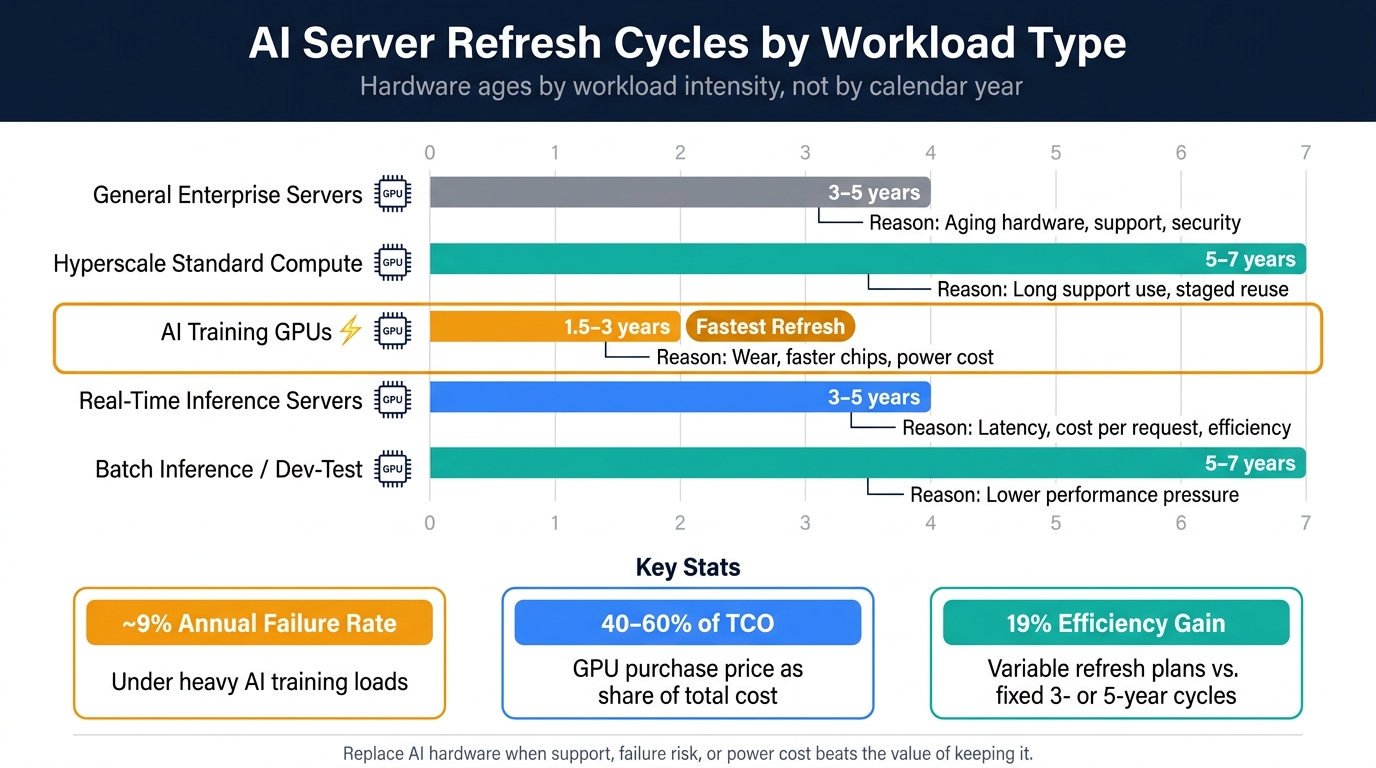
AI Server Refresh Cycles by Workload Type
AI GPU Depreciation Makes Sense - Extending Refresh Cycles is Appropriate in 2025
sbb-itb-903b5f2
Quick Comparison
| Hardware / Workload | Common Life Span | Main Reason to Replace |
|---|---|---|
| General enterprise servers | 3–5 years | Aging hardware, support, security |
| Hyperscale standard compute | 5–7 years | Long support use, staged reuse |
| AI training GPUs | 1.5–3 years | Wear, faster chips, power cost |
| Real-time inference | 3–5 years | Latency, cost per request, efficiency |
| Batch inference / dev-test | 5–7 years | Lower performance pressure |
If I had to reduce the whole article to one rule, it would be this: replace AI hardware when support, failure risk, or power cost starts to beat the value of keeping it.
How AI Workloads Change Refresh Timing
Those baseline AI refresh ranges get tighter once you look at the workload itself. AI workloads shorten refresh timing because training pushes hardware much harder than general-purpose server use.
Training Clusters vs. Inference Fleets
Training clusters take the biggest beating. They often run at 60–70% utilization, which speeds up physical failure compared with general-purpose enterprise servers. The result is an estimated annualized failure rate (AFR) of about 9%, which adds up to a cumulative failure rate of roughly 27% over three years under heavy training loads.
And wear isn't the only issue. New GPU architectures tend to show up every 18–24 months, and each new generation brings large performance jumps. That means older hardware can become too expensive to keep for training well before it actually fails.
Inference hardware usually has a longer runway. Older GPUs can still hit latency and cost goals when they're moved to lighter workloads. In practice, that can stretch hardware life across a few stages: training first, then real-time inference, then batch inference or internal analytics.
Utilization, Failure Rates, and Support Windows
Refresh timing is usually driven by three signals: utilization stress, failure rates, and vendor support windows. Power efficiency is now a fourth trigger as rack densities move past 120 kW per rack.
Refresh Cycles by Workload Type: Comparison Table
The table below sums up how refresh timing shifts by workload. The ranges reflect current research on AI hardware lifecycles.
| Workload Type | Typical Refresh Cycle | Primary Drivers | Obsolescence Risk | Support Window |
|---|---|---|---|---|
| AI Training Clusters | 1.5–3 years | Time-to-train, memory bandwidth, AFR | Extreme | 2–3 years |
| Real-Time Inference Servers | 3–5 years | Latency targets, cost-per-request, power efficiency | Moderate | 3–5 years |
| Batch Inference | 5–6 years | Throughput, TCO, residual value | Low | 5+ years |
| Dev/Test | 5–7 years | Same stack, adequate performance | Low | 5+ years |
Training clusters refresh the fastest. Inference lands in the middle, between training systems and standard enterprise gear.
What Research Shows About Cost, Depreciation, and TCO
CapEx vs. Operating Cost Over Hardware Life
Once refresh timing is set by workload, TCO becomes the next screen. And this is where training and inference start to split in a big way. They don't just need different levels of performance. They also age differently from a cost standpoint.
A $375,000 NVIDIA DGX H100 is just the opening bill. The full cost keeps building over time through power, cooling, maintenance, networking, and electricity. Power infrastructure adds about $7.00 per watt. Cooling adds another $2.50 per watt. On top of that, you have about $5,000 per year in maintenance, $2,000 for networking fabric, and ongoing electricity costs at U.S. energy rates of $20–$40 per MWh. Put simply, the GPU purchase itself is often only 40%–60% of total TCO.
Depreciation Schedules vs. Real Performance Lifecycles
Hyperscalers often depreciate AI servers over 5–6 years, even though their practical useful life is often closer to 1–3 years because of fast obsolescence and physical wear.
AWS put that tension out in the open in February 2025. It shortened its server useful life estimate from six years to five years, citing the "increased pace of development in AI." That shift led to $920 million in accelerated depreciation for Q4 2024 alone, along with a $700 million hit to operating income.
The performance gap behind this mismatch is huge. NVIDIA's Blackwell B200 can deliver 40x–50x better inference performance than the H100, which means older hardware can stop making economic sense long before it physically breaks down. Princeton CITP makes the same point from another angle: AI chips often last only 1–3 years in practice, while accounting books still stretch them across 5–6 years.
Researchers call this an accounting subsidy: reported costs lag real replacement timing.
That disconnect between useful life and book life is what turns refresh policy into a governance issue.
Aggressive, Balanced, and Extended Refresh Models: Comparison Table
The right refresh model depends on workload type, risk tolerance, and how close your accounting treatment needs to stay to day-to-day operating reality. Research points to three broad approaches:
| Refresh Model | Target Workloads | CapEx Profile | Operational Risk | Efficiency Gains | Book-Life Alignment |
|---|---|---|---|---|---|
| Aggressive (2–3 Years) | Frontier model training, latency-sensitive inference | Very high; frequent massive outlays | Low; hardware remains under warranty/support | Highest; rapid adoption of latest perf/watt GPUs | Poor; requires writing off undepreciated assets |
| Balanced (3–4 Years) | Production inference, general enterprise AI | Moderate; aligns with major architecture shifts | Medium; wear begins in year 3 | High; captures significant generational gains | Good; aligns with typical IT hardware life |
| Extended (5–6 Years) | Batch processing, non-critical dev/test | Lowest; maximizes accounting life | High; increased failure rates and thermal degradation | Lowest; high power draw for lower relative throughput | Excellent; matches 5–6 year book depreciation |
One finding stands out: variable refresh plans beat fixed 3-year or 5-year cycles by 19% in efficiency metrics. That matters because a rigid schedule can look neat on paper while leaving money on the table in practice.
Lifecycle Planning for On-Premises and Privacy-Sensitive AI Setups
Once TCO says it’s time to replace hardware, on-prem teams still have to deal with support terms, data handling rules, and end-of-life disposal.
Decision Triggers That Should Drive Refresh Timing
For on-prem and privacy-sensitive AI, refresh timing should follow support status, failure data, workload changes, and efficiency gains, not a fixed calendar. A neat three-year or four-year schedule may look good on paper, but it can miss the signals that matter most.
Warranty expiry is the clearest trigger. Enterprise support contracts need to stay active, and consumer warranties are often void in commercial data center environments. When OEM support ends, you’re left with two choices: move to third-party maintenance or accept more downtime risk. That tradeoff gets harder in high-use training clusters, where the annualized failure rate is about 9%, adding up to a 27% cumulative failure rate over three years.
Telemetry matters just as much. If failure rates move above the vendor’s expected MTBF, that’s a sign to start a formal review instead of waiting for the next budget cycle. Power efficiency is another big one. When a new GPU generation delivers more than 2x the efficiency of your current fleet, the cost of running older gear can start to beat the case for keeping it in service.
Workloads can also outgrow hardware before the hardware breaks. A move from basic chat-style AI to agentic AI workflows, where tasks chain across multiple steps and need more memory bandwidth, can change what your systems need to handle. Software requirements can do the same. If your stack now needs FP8 support, an earlier refresh may not be optional.
Policy and Governance Factors
After reliability, policy often decides how fast hardware can leave service.
Governance isn’t just paperwork. It affects refresh timing, how long retirement takes, and whether retired hardware can be reused, resold, or must be destroyed.
Decommissioning is part of the refresh decision because data destruction can be the most expensive step. The Morgan Stanley case is a stark example: about 4,900 devices, some holding unencrypted customer data, ended up at auction sites and later led to more than $155 million in penalties and settlements.
For AI hardware, NIST SP 800-88 is the standard for data sanitization. GPUs can hold model weights and inference data in memory until they are properly power-cycled and sanitized. Use Purge-level sanitization - cryptographic erase or block erase - on media that supports it. Retiring hardware without certified destruction leaves risk on the table.
Export controls add another checkpoint. Retiring or reselling high-end GPUs like the H100 or A100 can fall under Bureau of Industry and Security (BIS) rules tied to ECCN 3A090.a, with penalties that can top $370,000 per violation.
The table below shows how the main governance factors affect refresh timing in practice:
| Factor | Lifecycle Stage Impacted | Decision Trigger | Effect on Refresh Cycle |
|---|---|---|---|
| Warranty/EOL | Maintenance | Expiry of OEM support; support cost vs. hardware value | Forces refresh or move to TPM |
| Telemetry Thresholds | Operation | Failure rate > MTBF; Annualized Failure Rate (AFR) | Accelerates refresh to avoid downtime |
| Security Requirements | Retirement | NIST 800-88 compliance; chain of custody documentation | Requires certified destruction/ITAD |
| Data Locality Policies | Deployment/Retirement | Changes in residency laws; BIS ECCN classification (e.g., 3A090.a) | May prevent resale or export |
| Performance/Watt | Operation | >2x efficiency gain in new generation; tokens per second / watt | Shortens cycle to reduce OpEx |
In day-to-day operations, these rules can push a server into retirement before raw performance does.
E-waste laws in 25 states and Washington, D.C. also affect retirement planning.
Where NanoGPT Fits in a Broader AI Access Strategy
For low-risk work that doesn’t justify owned infrastructure, some demand can move to pay-as-you-go access.
For privacy-sensitive tasks, NanoGPT can shift ad hoc text and image generation off owned hardware because it uses pay-as-you-go access and stores data locally on the user’s device.
Conclusion: A Practical Refresh Framework for AI Servers
AI server refresh timing should follow workload, utilization, power cost, maintenance cost, and business need - not a fixed calendar. In plain English, the decision should come down to fit for the job, not how old the server looks on paper.
Use one lifecycle plan across procurement, deployment, and operations. TCO should matter more than sticker price because power, cooling, maintenance, and depreciation often make up most of the total cost, and book life often runs longer than useful life.
When the numbers support replacement, governance decides how retirement happens. For privacy-sensitive on-premises environments, decommissioning should include rigorous data sanitization protocols.
In practice, keep reviewing refresh timing based on a small set of clear signals:
- A new generation delivers more than 2x performance per watt
- Sustained utilization stays above 80%
- Maintenance costs exceed the hardware's value
- Vendor support ends for the GPU architecture
That kind of discipline keeps AI infrastructure aligned with operational needs, governance rules, and financial reality.
FAQs
How do I know when an AI server is no longer cost-effective to keep?
For AI workloads, fixed refresh cycles often miss the mark because this space moves fast. A calendar-based swap sounds neat on paper, but it can leave you holding gear that’s too slow, too costly to run, or just not built for the models you need now.
Instead, track clear cost and performance signals like these:
- New hardware delivers 2x+ performance
- Memory no longer supports required model sizes
- Maintenance exceeds 20% of replacement cost
- Inference costs, thermal throttling, or utilization above 80% hurt efficiency
- New systems match training throughput at half the energy cost
That approach is a lot more grounded in what your team is dealing with day to day. If your systems are choking on larger models, running hot under load, or costing too much per inference, that’s your cue. And if newer machines can hit the same training throughput while using half the energy, the math starts to change fast.
Should training GPUs be repurposed for inference before retirement?
Yes. Repurposing training GPUs for inference is a standard, recommended way to get more use out of hardware.
Here’s the basic idea: move older GPUs from top-tier training into production inference, then later into batch processing or testing. That lets organizations stretch the economic life of each GPU and get more from the money already spent.
The catch is simple. This works well only if internal workload volume is enough to keep each tier busy. If the demand is there, the same hardware can keep doing useful work long after it stops being the best fit for front-line training.
What data and compliance steps can delay an AI server refresh?
Data and compliance rules can slow AI server refresh cycles in a big way. A company might try to move procurement along faster, but strict checks tied to data governance and cost exposure can still drag the process out.
Hardware retirement brings another layer of friction. In the U.S., export rules add legal work that’s hard to skip and easy to get wrong. Screening buyers, verifying end users, keeping records, and making sure data sanitization is done right can all slow disposition. They can also increase audit risk and reduce the value recovered from retired equipment.