
Streaming AI Responses in Java: Best Practices
If I want live AI text in a Java app, I start with SSE. I use WebSockets only when the client must send messages during generation. That one choice drives setup, scaling, failure handling, and UI behavior.
Here’s the short version:
- Streaming cuts perceived wait time from about 8–10 seconds to near-immediate feedback, even though total generation time stays about the same.
- SSE fits one-way token streaming like chat replies, summaries, and backend relays.
- WebSockets fit two-way sessions like stop buttons, tool approvals, and live multimodal flows.
- In Java, I keep the pipeline non-blocking, forward chunks as they arrive, and treat missing end markers like
[DONE]as stream failures. - I also watch for proxy buffering, idle timeouts, heartbeats, API key safety, and log redaction.
A few points matter most if you’re building this now:
- Use
Flux<String>/ServerSentEvent<?>/Multi<String>for SSE - Use typed events for WebSockets
- Batch tiny token chunks to cut network chatter
- Persist only the final response, not every partial token
- Send pings about every 30 seconds if long pauses can happen
- Keep keys on the server, never in the browser
Real-Time AI Streaming with Spring AI | Build ChatGPT-like Streaming API
sbb-itb-903b5f2
Quick Comparison
| Topic | SSE | WebSockets |
|---|---|---|
| Traffic direction | Server → client | Two-way |
| Best use | Token streaming | Interactive sessions |
| Browser support | EventSource |
WebSocket client |
| Reconnect behavior | Built in | You handle it |
| Infra setup | Simpler over HTTP | More connection state |
| Good fit for AI apps | Most chat streams | Stop/cancel, tools, live session control |
My takeaway: for most Java AI apps, SSE is the default because it is simpler and fits the common “prompt in, tokens out” flow. I move to WebSockets only when the session needs back-and-forth control.
That’s the core of the article: pick the right transport, stream chunks right away, keep the server reactive, and guard against buffering, disconnects, and data leaks.
Choose Between SSE and WebSockets
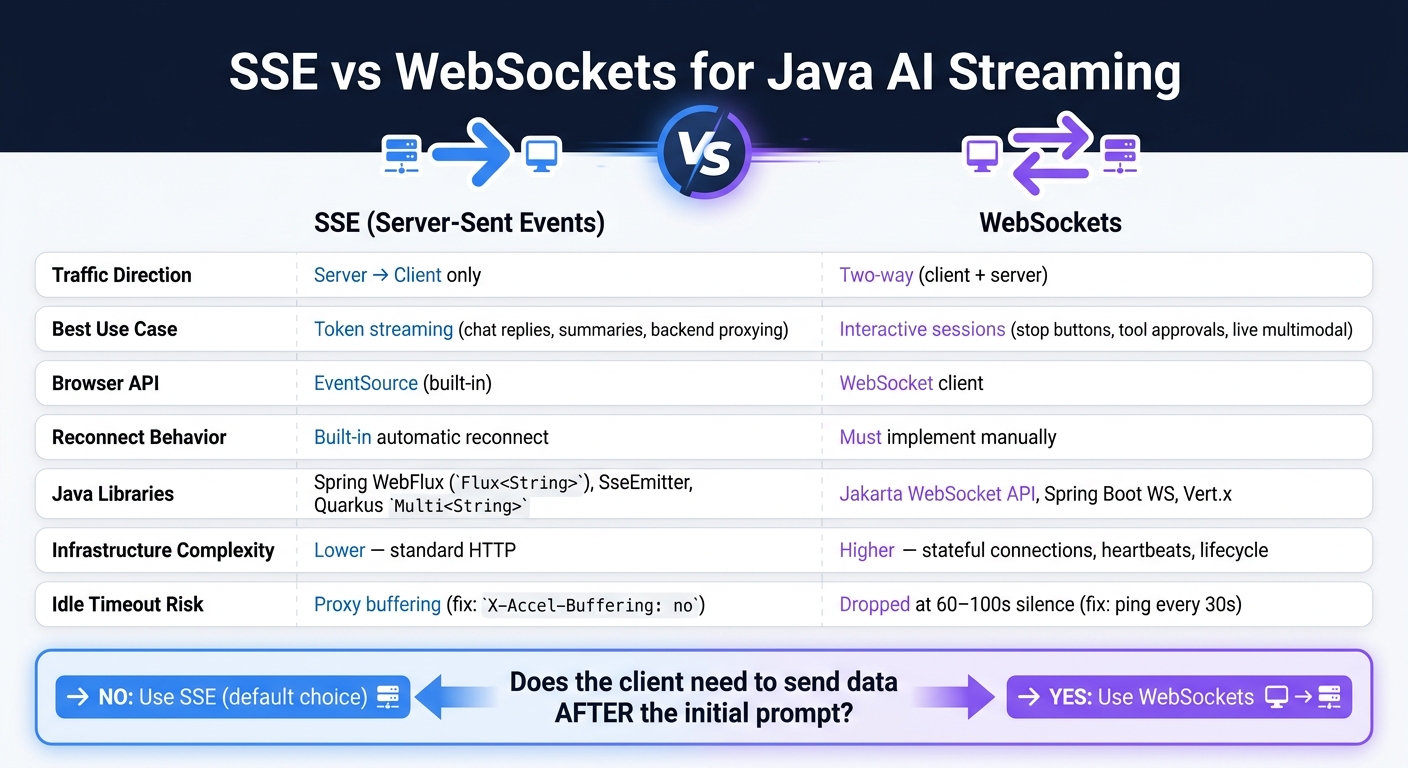
SSE vs WebSockets for Java AI Streaming: Quick Comparison Guide
Use SSE when the server only needs to stream text back to the client. Use WebSockets when the client needs to talk back during the same session. That’s the simplest way to make the call in Java.
| Dimension | SSE | WebSockets |
|---|---|---|
| Interaction model | One-way push | Two-way session control |
| Java server libraries | Spring WebFlux (Flux<String>), Spring MVC (SseEmitter), JAX-RS / Quarkus (Multi<String>) |
Jakarta WebSocket API, Spring Boot WebSocket support, Vert.x |
| Operational complexity | Lower - works cleanly through standard HTTP infrastructure | Higher - requires connection lifecycle, heartbeats, and state management |
| Best fit | Interactive sessions | Chat completions, summarization, backend proxying of AI API streams |
SSE for Simple Token Streaming
SSE is the best default for the most common AI setup: the client sends a prompt, and the server streams tokens back. The response comes as text/event-stream chunks and ends with data: [DONE]. In the browser, EventSource handles the stream.
On the Java side, Spring WebFlux is a common pick. You return a Flux<String> with MediaType.TEXT_EVENT_STREAM_VALUE, and Project Reactor takes care of non-blocking delivery. If you're on a servlet stack, use SseEmitter and set a timeout long enough for your longest response. In Quarkus or JAX-RS, Mutiny’s Multi<String> works with MediaType.SERVER_SENT_EVENTS.
There’s one thing that trips people up: reverse proxies and CDNs can buffer SSE responses. When that happens, the stream looks frozen until the buffer fills up. With nginx, you’ll often need X-Accel-Buffering: no, or a similar setting, so tokens pass through right away.
If the client never needs to send anything during the stream, you can stop here.
WebSockets for Interactive Real-Time Sessions
WebSockets fit cases where the client needs to send data while generation is still in progress. Think tool-call approvals in an agentic workflow, a stop generating button that cancels mid-stream, or a multimodal app that mixes live audio input with streamed text output.
With WebSockets, both directions use one TCP connection. In Java, the Jakarta WebSocket API gives you a standard, container-managed option. Spring Boot WebSocket support and Vert.x are also common choices. Since WebSocket connections are stateful and long-lived, you need to plan for heartbeats, explicit close handling, and reconnect logic from day one.
How to Pick the Right Transport
Use one rule: Does the client need to send anything after the initial prompt?
If the answer is no, SSE is usually the better choice. That covers the common flow where a user sends a prompt, your backend forwards it to an AI API, and tokens stream back to the UI. It’s simpler to build, easier to run through standard HTTP infrastructure, and the browser’s built-in EventSource will reconnect on its own.
If the answer is yes, use WebSockets. That’s the right fit for sessions that are interactive or bidirectional. Just know that you’ll need to handle the connection lifecycle, heartbeat logic, and reconnect behavior yourself, because WebSockets do not reconnect on their own the way EventSource does.
A good path is to start with SSE, then add WebSockets only when the session needs two-way control. The next section shows how to implement each transport in Java.
Implement SSE Streaming in Java
Once you pick SSE, the Java backend should relay upstream tokens to the client as they arrive. Don’t buffer the whole reply. The point is simple: show tokens fast, not after the model finishes.
| Component | Primary Responsibility |
|---|---|
| AI API (Upstream) | Generates tokens; formats output as data: SSE frames; sends [DONE] to signal completion |
| Java Backend (Proxy) | Authenticates with the API key; opens the upstream stream; parses and forwards chunks; manages backpressure and timeouts |
| SSE Client (Browser/Mobile) | Opens the connection; reads data: lines; assembles partial tokens into readable text; updates the UI incrementally |
The Java backend keeps the API key off the client and relays tokens downstream. In practice, that means the backend acts like a pass-through stream, not a holding tank.
Server-Side SSE with Spring WebFlux or JAX-RS
Start by wiring the server to forward chunks the moment they show up.
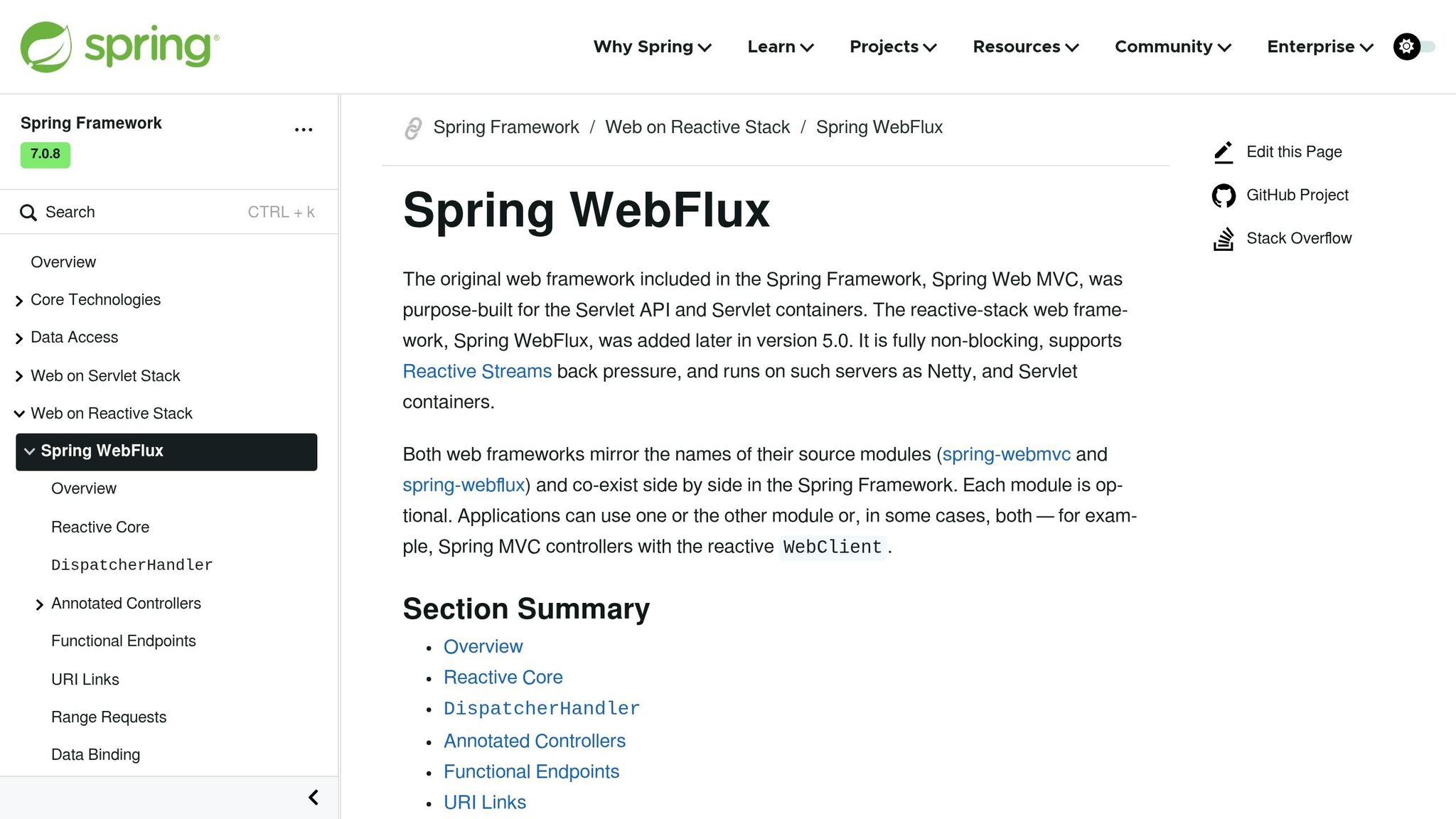
In Spring WebFlux, expose a POST endpoint that returns Flux<String> or Flux<ServerSentEvent<?>> and set produces = MediaType.TEXT_EVENT_STREAM_VALUE. Project Reactor handles non-blocking delivery, so the request thread stays free while tokens move through the pipeline.
If your AI SDK uses callbacks instead of returning a Flux, bridge it with a backpressure-aware sink. Emit each token into the sink from the callback, then return sink.asFlux() from the controller.
In JAX-RS, stream each chunk as it arrives. Never build the full response in memory first.
Two rules matter here:
- Do not buffer the full response before sending it downstream.
- Always detect the
[DONE]sentinel and complete the reactive stream cleanly. If[DONE]never arrives, treat that as a failure.
Client-Side SSE Parsing and Response Assembly
For a Java client, OkHttp EventSource is a solid way to read SSE streams from another service. Read each data: line, remove the prefix, and parse the JSON delta.
When the stream contains plain text deltas, append them right away. That’s what makes the UI feel live instead of laggy. If the stream includes partial tool-call JSON, hold those fragments until the JSON is complete, then process them.
Proxying NanoGPT Streams Through a Java Backend
When proxying NanoGPT streams, the Java backend sends a POST request to /v1/chat/completions with "stream": true in the JSON body and Accept: text/event-stream in the headers. NanoGPT sends OpenAI-compatible SSE frames: each data: line contains a JSON chunk with a delta field that carries the partial token, and the stream ends with data: [DONE].
The final chunk may include finish_reason. If you set stream_options: { "include_usage": true }, it may also include token usage data.
API key safety is non-negotiable here. Store the NanoGPT key in an environment variable, add it on the server as Authorization: Bearer <KEY>, and never let it reach the browser. The browser should get only the streamed data needed to render the response.
If you’re running behind nginx, turn off proxy buffering. Add proxy_buffering off and send the X-Accel-Buffering: no response header so tokens reach the client right away.
WebSockets follow the same relay pattern, but they also bring bidirectional control and connection lifecycle handling.
Implement WebSocket Streaming in Java
After you’ve picked WebSockets for two-way sessions, the next job is handling connection state, event types, and lifecycle control.
Server-Side WebSocket Setup and Lifecycle
Start by mapping each incoming message to a typed event and a clear session state.
In Quarkus with WebSockets.Next, use @WebSocket(path = "/ws/stream") to define the endpoint and @OnTextMessage to handle incoming questions. Return Multi<String> for token-only streams or Multi<ChatEvent> for typed events like PartialResponseEvent, PartialThinkingEvent, and ToolExecutedEvent.
Session state is a big deal here. Annotate your AI service with @SessionScoped so the assistant keeps conversation history for the life of the connection, not just one request-response cycle. For lifecycle handling, add clear handlers for close and error events. Complete the sink when processing finishes, and emit an error if the upstream source fails. That kind of discipline sets up the client-side behavior in the next subsection.
Java WebSocket Clients for Streamed AI Output
Use typed events instead of raw strings. That way, the client can tell the difference between content, metadata, and control signals without playing detective. A PartialThinkingEvent should not be rendered the same way as a PartialResponseEvent, and metadata like token counts and finish reasons should go to app logic, not straight to the UI.
Send content deltas to the UI. Route metadata to application logic.
Backpressure, Heartbeats, and Graceful Shutdown
Once the stream is live, you need to manage flow control and idle timeouts.
If your consumer falls behind, backpressure becomes the issue. In Spring WebFlux, Sinks.many().unicast().onBackpressureBuffer() keeps chunks for a short time instead of dropping them, and .bufferTimeout() can batch single-character emissions into larger frames before they go over the wire.
Long-running tool calls bring a different headache: silence. Cloudflare drops connections that stay silent for 100 seconds, and AWS ALB and Nginx often default to 60-second idle timeouts. Send a ping every 30 seconds to keep the connection alive. If the client sends a cancel message, cancel the upstream subscription or close the client stream at once so you don’t keep generating tokens no one will read. On shutdown, close the sink on purpose and release session state.
Best Practices for Performance, Reliability, Security, and Privacy
After you’ve picked the transport and wired the stream, the day-to-day work moves to throughput, failure recovery, and data safety. Reactive pipelines handle a lot of this for you, but the details still make a big difference.
Process Chunks Without Blocking
Start with flow control. Never block inside Flux or Multi chains. If you do, you can freeze the Netty I/O threads and stall active streams on the server. Keep callbacks short so those I/O threads stay open for incoming and outgoing work.
For storage, write to the database only after the stream finishes. Keep interim updates in memory, then persist only the final response. If a consumer is slow, use a backpressure-aware sink. And when tokens are tiny, batch them into short updates before you send them. That cuts chatter without changing the stream’s behavior.
Monitor Stream Health and Recover from Failures
Once your streams are non-blocking, the next problem is silent failure. Watch first-token latency, token throughput, and completion rates. Those three signals tell you a lot about stream health.
You should also require a terminal marker to confirm that the stream ended cleanly. If you hit EOF without a terminal marker, treat it as a failure. Use onErrorResume to emit a typed error event before closing.
[DONE],message_stop, orresponse.completedconfirm clean completion
That kind of marker matters more than it may seem at first glance. Without it, a dropped connection can look like a finished response when it wasn’t.
Protect Transport and Output Data
Once flow control and failure handling are in place, lock down the stream itself. Use HTTPS for SSE and WSS for WebSockets. Strip keys and sensitive content from logs. And bind stop signals to the active stream only, so one session can’t affect another.
NanoGPT stores data locally, so keep retention and buffer size tight. Stream chunks straight to the client instead of holding large blocks in memory.
| Category | Practice | Key Detail |
|---|---|---|
| Performance | Batch small tokens | Group very small tokens into short updates before sending |
| Performance | Ephemeral vs. persisted writes | Keep interim updates in memory; persist only the final response |
| Reliability | Terminal markers | [DONE], message_stop, or response.completed confirm clean completion |
| Reliability | Typed error events | Emit an error event like AI_STATE_ERROR before closing |
| Security | Encrypted transport | HTTPS for SSE, WSS for WebSockets |
| Security | Log redaction | Strip keys and sensitive content from logs |
| Privacy | Minimal retention | Stream chunks to the client directly; avoid buffering large amounts in memory |
| Privacy | Session scoping | Bind stop signals to the active stream only |
Conclusion and Key Takeaways
For text-only AI streaming in Java, SSE is the default pick. Use WebSockets only when the session needs messages flowing from the client back to the server. That one call shapes the rest of the stream.
Once you’ve picked the transport, keep everything reactive and non-blocking. Return Flux<String> or Multi<String>, avoid blocking calls, and batch tiny token chunks with backpressure-aware sinks.
Then shift your attention to reliability and security. Watch stream health, deal with disconnects, and set timeouts. If you hit EOF without a terminal marker, treat it as a failure. And if you’re proxying through a Java backend, keep API keys out of client-side code and let the backend handle cancellation.
Streaming can cut perceived AI response latency from several seconds down to milliseconds. If you get transport, flow control, and security right early, the rest is mostly tuning.
FAQs
When should I switch from SSE to WebSockets?
Use WebSockets only when you need true bidirectional, low-latency communication that SSE can't handle. That includes collaborative editing, real-time multiplayer gaming, voice or video signaling, and high-frequency chat.
For standard AI token streaming, SSE is usually the better fit. It runs over simple, stateless HTTP, works more easily with proxies, supports automatic reconnection, and often comes with lower infra costs.
How do I detect a broken AI stream in Java?
Watch for dropped connections and replies that stop too soon. If you hit an unexpected EOF or never get a proper completion signal, treat it as an error or a cue to retry.
If you use reactive streams like Project Reactor, subscribe to the error signal so you can catch failures. Also check that incoming JSON fragments are complete, because a broken stream can leave data cut off.
What usually causes SSE streaming delays?
SSE streaming delays usually come from infrastructure that sits between your app and the client, like proxies, load balancers, or CDNs. Those layers may buffer data before passing it along, which slows down token-by-token delivery.
To cut that down, set X-Accel-Buffering: no for Nginx and Cache-Control: no-cache so intermediaries don’t cache the stream.
You can also run into delays inside the app itself. A common cause is the server not flushing the output stream after each chunk. Another is tokens piling up in internal buffers or reactive sinks when that buffering isn’t needed for backpressure.