
How Text-to-Speech Integrates With AI Systems
TTS is the last step in a voice AI stack: it turns LLM text into speech, and if you want the system to feel fast, the whole loop usually needs to stay near sub-300 ms.
If I had to boil the article down, I’d say this:
- TTS sits after STT and the LLM in the voice loop.
- Latency lives or dies on streaming: don’t wait for the full reply if you can start on sentence-sized chunks.
- Model choice sets the trade-off between sound quality, inference time, and compute use.
- Where you run TTS matters: cloud is easy to start with, self-hosted cuts network delay, and on-device keeps audio local.
- Good text prep matters: dates, money, acronyms, and phone numbers often need cleanup before speech.
- Live voice apps need barge-in handling so playback stops when the user starts talking.
- Production teams should watch p95/p99 first-audio time, success rate, queue depth, and dropouts.
A few numbers stand out:
- Modern neural TTS can score about 4.4 to 4.6 MOS
- Some low-latency systems can hit 40–90 ms to first audio
- Streaming playback can cut about 300–600 ms from perceived delay
- Semantic turn detection can reduce false interruptions by about 45%
- HiFi-GAN-class vocoders can run at 100x+ real-time on a GPU
If you’re building voice AI, the short answer is simple: stream early, normalize text before synthesis, pick the right deployment model, and treat turn-taking as part of the product, not just the model stack.
That’s the core of the article, in plain English.
Master OpenAI's Text-to-Speech & Speech-to-Text: Ultimate Tutorial with Code
sbb-itb-903b5f2
Core Architecture of TTS in an AI Stack
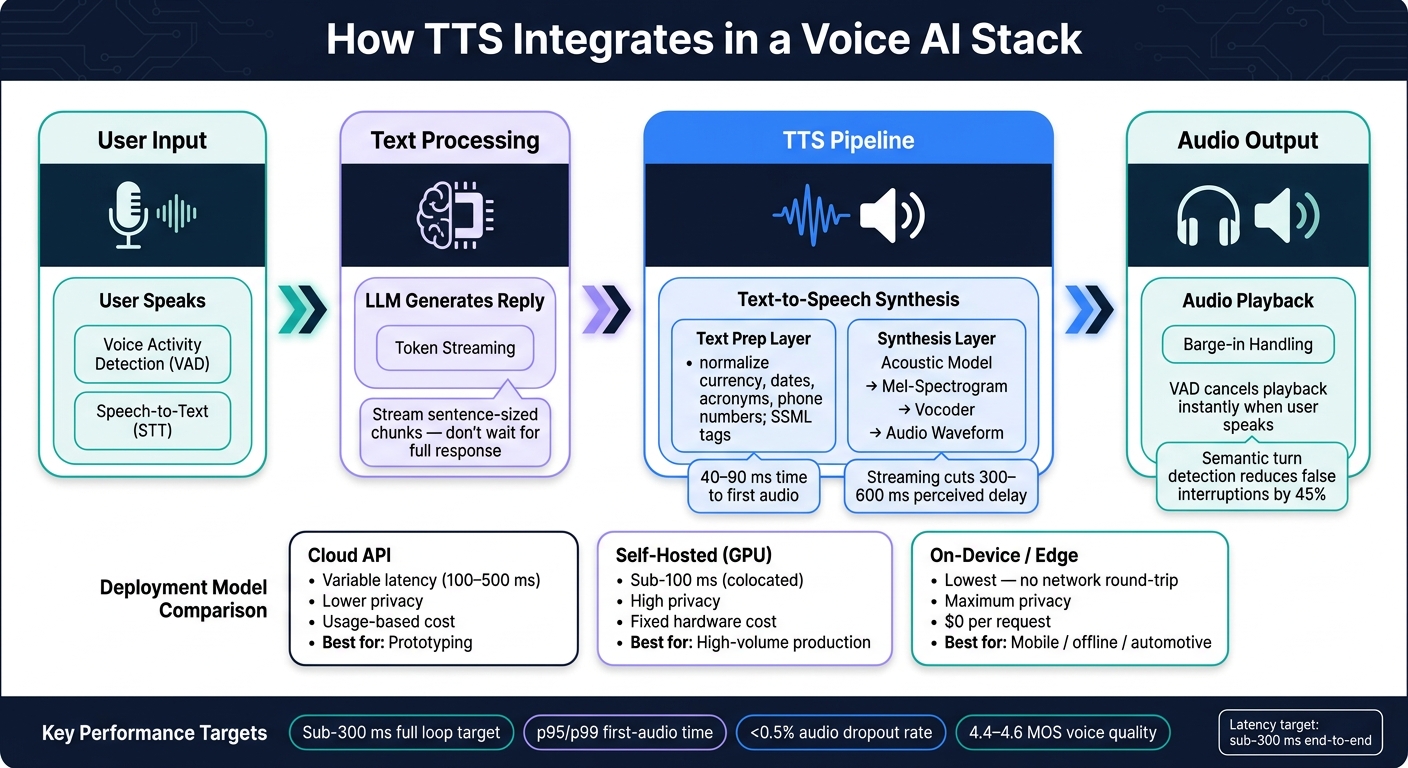
Voice AI Stack: How TTS Fits Into the Full Pipeline
How the TTS Pipeline Works
A TTS pipeline has two main parts: a text-prep layer and a synthesis layer.
The text-prep layer gets raw text ready for speech. It turns formats like "$12.50" into spoken language, maps letters to phonemes, and plans prosody. Then the synthesis layer turns that output into audio. An acoustic model predicts a mel-spectrogram, and a vocoder turns it into a playable waveform.
The model you choose shapes the speed-versus-quality trade-off. Autoregressive models like Tacotron 2 can sound very good, but inference is slower. Non-autoregressive models like FastSpeech 2 generate spectrograms in parallel and can reach up to 270x faster inference. End-to-end models like VITS merge both stages into one step. Diffusion-based models like Grad-TTS let you shift between speed and quality by changing the number of denoising steps. GAN-based vocoders like HiFi-GAN can synthesize audio at over 100x real-time on a GPU.
Those two stages set the latency floor and quality ceiling for everything else in the stack.
Systems That Connect to TTS
TTS almost never works alone. In a live voice agent, a few surrounding layers make the whole thing feel responsive instead of stiff. Voice Activity Detection (VAD) detects when a user stops speaking. A turn-taking model decides whether a pause means the speaker is done or just thinking. Barge-in handling stops TTS playback the moment the user interrupts. Put together, these layers make the system feel closer to a conversation than a scripted demo.
The LLM-to-TTS handoff is usually the main latency bottleneck. The fix is simple in principle: start synthesis as soon as a stable chunk of text is ready. That handoff has a direct effect on perceived response time in voice apps. For transport, WebSockets are a good fit for bidirectional, token-by-token streaming, while standard HTTP streaming is simpler for one-shot narration requests.
Deployment Models and Infrastructure Trade-Offs
Once the pipeline is set, the next call is where synthesis should run.
| Deployment Model | Latency Profile | Privacy Level | Cost Impact (USD) | Best-Fit Scenario |
|---|---|---|---|---|
| Cloud API | Variable (Network RTT + 100–500 ms) | Lower (Data leaves your infra) | Usage-based (per character/min) | Fast prototyping, low-volume apps |
| Self-Hosted (GPU) | Predictable (sub-100 ms, colocated) | High (on-prem or VPC) | Fixed (Hardware + ops) | High-volume production (>10M chars/mo), data residency needs |
| On-Device / Edge | Lowest (No network round-trip) | Maximum (Fully offline) | $0 per request (Device compute) | Mobile apps, offline accessibility, automotive |
Commercial cloud APIs give you the fastest path to setup. Self-hosted models, especially when colocated with your LLM, swap network calls for memory copies. That can make a big difference when every millisecond matters.
For privacy-sensitive use cases like healthcare scheduling, financial services, or systems with data residency rules, self-hosted or on-device inference keeps audio data inside your own infrastructure. The trade-off is more engineering work. In practice, latency, cost, and privacy are all tied to the same core choice: where synthesis runs.
How TTS Integrates With Other AI Systems
Connecting TTS to Text Generation Models
Once the pipeline and deployment model are set, the next step is connecting TTS to the systems around it: the model that writes the reply and the player that speaks it.
A common mistake is waiting for the full LLM response before sending anything to TTS. That slows the whole experience down. A better setup streams LLM tokens into TTS in sentence-sized chunks. The main trick here is sentence-boundary chunking: buffer text until a sentence ends with ., !, or ?, then send that chunk to synthesis. This helps speech sound natural while keeping latency low.
The text-generation layer can feed replies straight into TTS. And when text generation, chunking, and synthesis run at the same time, latency drops even more.
Building Full Voice Loops With Speech-to-Text
In live agents, handing text from one system to another is only half the battle. The other half is timing. If the system talks over the user, pauses too long, or cuts in at the wrong moment, the whole interaction feels clunky.
In production, STT endpointing, first-token latency, and TTS first-audio time all need to stay inside a tight latency target to keep the loop responsive. High-performance setups push toward sub-300 ms.
Barge-in handling is a big part of that. The moment VAD detects that the user has started speaking again, TTS playback is canceled right away. That makes the agent feel less like a recording and more like a conversation.
Semantic turn detection adds another layer. It uses both audio and text cues to tell the difference between a real pause and a thinking gap. That cuts false interruptions by about 45% compared with VAD-only systems.
Using TTS in Apps, Devices, and Multimodal Systems
The right integration pattern depends on where the voice shows up.
For live conversation, streaming TTS is usually the better fit. For pre-rendered prompts or audiobooks, batch TTS works well and can handle 1–5 seconds of generation time. In real-time voice apps, some low-latency systems can hit 40–90 ms time to first audio.
SSML localization helps the system say common U.S. formats the right way, including 12-hour time, MM/DD/YYYY dates, USD amounts, and letter-number codes:
| Requirement | SSML Pattern Example |
|---|---|
| 12-hour time | <say-as interpret-as="time" format="hms12">2:30pm</say-as> |
| MM/DD/YYYY date | <say-as interpret-as="date" format="mdy">06/18/2026</say-as> |
| USD currency | <say-as interpret-as="currency">USD 45.50</say-as> |
| Spelling/codes | <say-as interpret-as="characters">ABC123</say-as> |
In multimodal systems, SSML <mark> timestamps let the UI highlight text in sync with spoken audio. That’s handy for accessibility tools, e-learning platforms, and reading assistants. It’s also smart to wrap these SSML patterns in helper functions, so switching providers doesn’t force changes across the app’s logic.
These integration choices set up the latency and reliability trade-offs covered next.
Performance, Quality, and Reliability Optimization
Once TTS is live, latency and uptime decide whether the voice loop feels smooth or awkward.
Reducing Latency From Text to Audio
Latency usually comes from four places: preprocessing, inference, vocoding, and transport. In most setups, the biggest win comes from handling text and audio at the same time instead of waiting for the whole response to finish first.
Streaming synthesis is often the single biggest change a team can make. If you play the first audio chunk as soon as it’s ready, you can trim 300–600 ms off total latency. That kind of cut matters. A voice agent that starts speaking half a second earlier feels much more natural.
Caching helps too. Static phrases like greetings, error messages, and confirmations don’t need to be synthesized over and over. Reusing them avoids extra synthesis calls and lowers both latency and cost.
| Technique | Typical Latency Improvement | Effort | Best-Fit Use Case |
|---|---|---|---|
| Streaming Synthesis | Reduces TTFB by 500 ms+ | Moderate | Conversational AI |
| Model Colocation | 200–400 ms (removes network hops) | High | Real-time voice agents |
| WebRTC/UDP | 100–250 ms improvement | High | Low-latency voice loops |
For transport, WebRTC over UDP is the better pick for real-time voice loops when low delay is the goal.
Scaling Throughput While Controlling Cost
Once latency looks good, the next problem is scale. A setup that works fine in a one-user demo can start to wobble fast in production.
At scale, default API TPS limits can become a bottleneck, and latency can degrade by 30–50% when you move from single-user testing to production concurrency. That’s where scaling choices start to matter.
Horizontal scaling adds capacity in a straight line, but cost climbs in a straight line too. Batching cuts per-request cost, but there’s a trade-off: it adds delay. That makes batching a better match for batch jobs or long-form audio than for live agents. Quantization, including INT8, FP8, or smaller distilled models, can cut inference time and memory use without a major hit to output quality.
| Scaling Strategy | Throughput Impact | Cost Impact (USD) | Operational Complexity |
|---|---|---|---|
| Horizontal Scaling | High | Linear increase | Moderate |
| Batching | High | Lower per-request cost | Low (adds latency) |
| Self-Hosting | Very High | High upfront, low marginal | Very High |
Improving Voice Quality and Production Reliability
After speed, the next job is making the voice sound good and keeping the system steady under live traffic.
Use neural TTS when natural-sounding speech matters. Save concatenative synthesis for simple alerts and basic notifications. In day-to-day use, voice quality usually depends on preprocessing, model size, and monitoring more than anything else.
Preprocessing is where many rough edges get cleaned up. It handles abbreviations, domain terms, dates, numbers, and structured formats like phone numbers or product codes. Without that step, even a strong model can stumble on simple inputs. SSML pronunciation dictionaries and <say-as> tags help the model read those items the right way.
Model size matters too. Larger models usually sound better, but they also add latency and cost. Compact or quantized models are often the better fit for live systems because they can reach 100–200 ms synthesis time and still perform well for real-time agents.
| Voice Configuration | Quality | Latency | Cost | Best Use Case |
|---|---|---|---|---|
| Neural (Large) | Highest | 300 ms+ | High | Branded assistants |
| Neural (Compact/Turbo) | High | 100–200 ms | Moderate | Real-time agents |
| Concatenative | Low | Ultra-low | Very Low | Simple notifications |
| Quantized (FP8/INT8) | Moderate–High | Very Low | Low | Edge/mobile apps |
On the reliability side, production teams should watch p95/p99 time to first audio, success rate, queue depth, and audio dropouts. A good target is keeping dropouts below 0.5%. For failures, use exponential backoff for transient errors and circuit breakers to isolate services that are failing. And before launch, load test at 2–3x expected peak traffic. That’s often where hidden capacity gaps show up - long before users do.
Implementation Best Practices and Conclusion
Once you've mapped the pipeline and made the latency trade-offs, the last job is making the integration safe to run in production.
Prepare AI-Generated Text for Speech
Raw LLM output usually isn't ready to speak as-is. Before text goes to the TTS engine, clean it up first.
Text normalization comes first. Normalize currency, dates, abbreviations, and acronyms before synthesis. If you're dealing with domain terms or odd acronyms, use SSML <say-as> tags to make pronunciation explicit.
For streaming setups, hold text until a sentence ends - usually at a period, question mark, or exclamation mark - before sending it to TTS. If you cut audio in the middle of a sentence, the result sounds awkward and choppy. Spoken replies should also stay short, ideally 1–3 sentences, because long paragraphs tend to sound stiff out loud.
In regulated or customer-facing use cases, put a content filter between the LLM and the TTS request. Some providers reject content that breaks safety rules, so filtering before synthesis helps you avoid failed requests.
After normalization is in place, the wrapper and rollout plan do a lot of the work to keep the system steady in production.
Design Reusable APIs, Testing, and Rollouts
It helps to wrap TTS calls in an internal service layer. A central wrapper keeps voice settings in one place, which means you can update voice configuration without touching every app that uses speech. For repeated prompts, cache common prompts under a normalized text key to cut latency and cost in high-traffic systems.
Testing a TTS integration takes more than checking uptime. You also want to watch:
- Time to first audio
- Mean Opinion Score (MOS) for naturalness
- Word Error Rate (WER) for intelligibility
The wrapper should also recover cleanly from rate limits and common API failures. That means exponential backoff plus explicit handling for 401, 413, and 429 responses.
Those same metrics should guide rollouts and model swaps. If you're changing voices or moving to a new model version, roll changes out in stages and watch the numbers before sending more traffic.
Conclusion: Key Decisions That Shape a Good TTS Integration
Deployment choice affects latency, privacy, and cost. That one call ripples through the rest of the stack.
Clear contracts between LLMs, STT, and TTS matter more than any one model pick. Streaming at each stage, normalizing text before synthesis, and handling barge-in the right way are the things that make a voice loop feel smooth instead of clunky.
For US-facing products, localize dates, currencies, and number formats from day one so spoken output matches English (US) conventions. Build reliability in before launch with exponential backoff and direct handling for rate limits and common TTS errors. If you want pay-as-you-go access to TTS models, NanoGPT offers models like gpt-4o-mini-tts on a per-use basis with no subscription required.
Voice quality sits right in front of the user, so these integration choices carry more weight than they may seem at first.
FAQs
How do I choose between cloud, self-hosted, and on-device TTS?
Choose based on your needs for performance, privacy, and infrastructure.
Cloud-based TTS works best when you want high-quality voices, multilingual support, and the ability to scale fast without dealing with hardware. Self-hosted or on-device TTS makes more sense for low-latency or privacy-sensitive use cases, since it removes network dependence and keeps data inside your own infrastructure.
What is a good latency target for a real-time voice AI app?
For real-time voice apps, the metric that matters most is time-to-first-byte (TTFB). That’s the gap between user input and the moment audio starts playing.
A solid target is under 200 ms. At that point, conversations tend to feel natural and responsive, not laggy or awkward.
Some high-performance systems can hit 50–80 ms. On the other hand, once delays climb past 500 ms, the experience can start to feel disjointed or even broken.
How should I format LLM output before sending it to TTS?
For most applications, you can send raw LLM output straight to a TTS API. Modern services usually handle text normalization on their own, so you often don’t need an extra cleanup step.
If you want speech to feel more natural and start playing sooner, split the output into smaller, sentence-sized chunks. That lets synthesis begin earlier instead of waiting for the full response.
With multiple speakers, keep each conversation thread clearly separated. This helps preserve steady voice assignment and more natural prosody.