
How Token Revocation Works in OAuth 2.0

Token revocation in OAuth 2.0 is a method to immediately deactivate access or refresh tokens when they're no longer needed. This process ensures tokens can't be used after logout, password changes, or app uninstallation, enhancing security. Defined in RFC 7009, it introduces a revocation endpoint where clients can send HTTP POST requests to invalidate tokens.
Key Points:
- Revocation Endpoint: Clients send requests to invalidate tokens via a specific URL (e.g.,
/oauth2/revoke). - Token Types: Supports revoking both access and refresh tokens; revoking refresh tokens also invalidates associated access tokens.
- Response: Servers return an HTTP 200 status, even for invalid or expired tokens, to prevent token discovery.
- Security: Revoking tokens reduces risks in distributed systems, particularly for compromised or unused tokens.
- Refresh Token Rotation: Ensures old tokens are invalidated when new ones are issued, flagging potential breaches.
Best Practices:
- Use
token_type_hintto optimize revocation requests. - Authenticate confidential clients with
client_idandclient_secret. - For JWTs, consider using blocklists or the phantom token pattern for real-time validation.
Revocation is essential for managing user sessions securely and preventing token misuse in OAuth 2.0 systems.
OAuth 2.0 Token Revocation
sbb-itb-903b5f2
Understanding the Token Revocation Endpoint
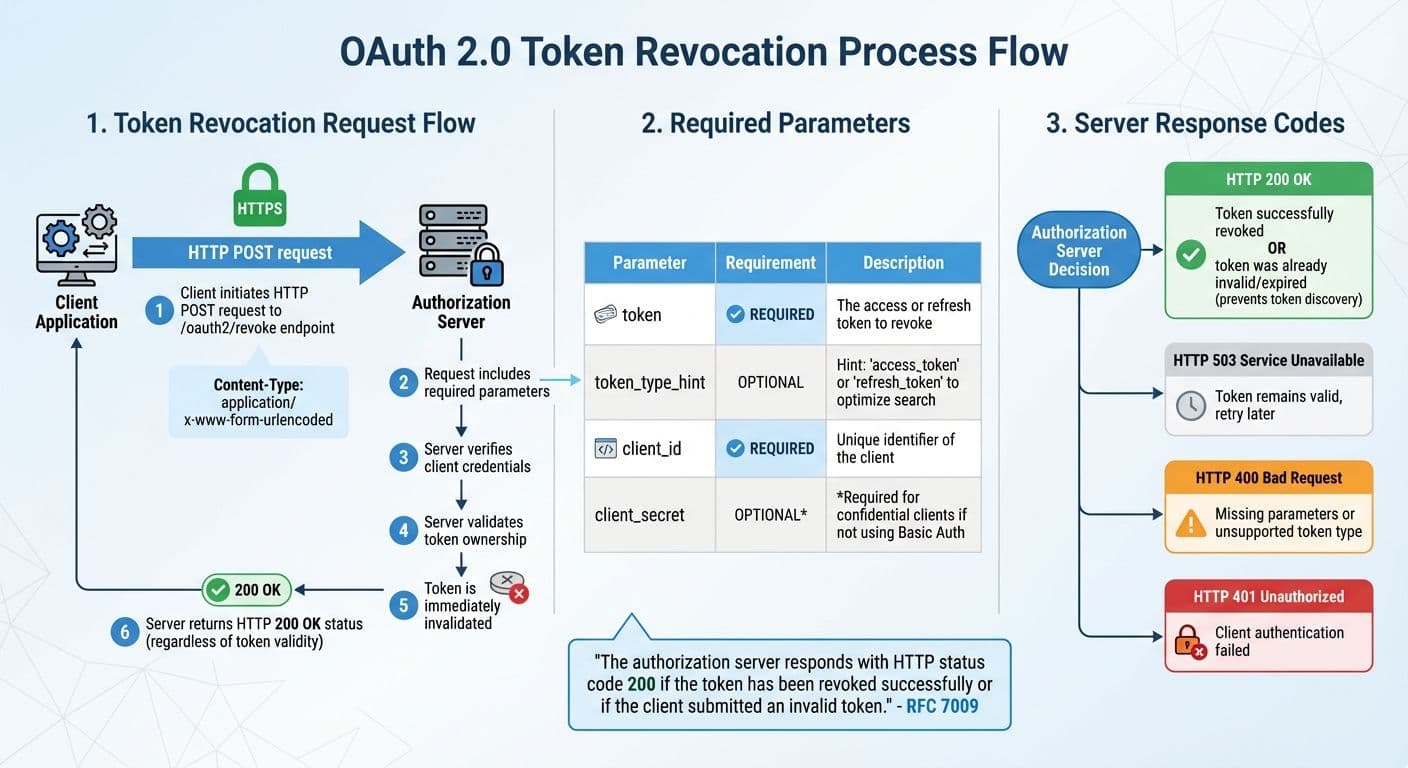
OAuth 2.0 Token Revocation Process Flow and Parameters
The token revocation endpoint is a specific URL provided by the authorization server where clients can send requests to invalidate tokens. To revoke a token, you send an HTTP POST request to this endpoint (typically /oauth2/revoke) using the application/x-www-form-urlencoded content type. It's essential to use HTTPS to protect sensitive credentials during transmission.
The server will verify the client's credentials and confirm that the token was issued to that client. Once validated, the token is immediately invalidated. However, in distributed systems, there may be a short delay before the revocation propagates across all components.
"The authorization server responds with HTTP status code 200 if the token has been revoked successfully or if the client submitted an invalid token." - RFC 7009
This standardized HTTP 200 OK response is returned regardless of whether the token was successfully revoked or was already invalid, expired, or previously revoked. This design prevents attackers from using the endpoint to identify valid tokens.
Parameters Required for Revocation Requests
When making a revocation request, you must include the token parameter, which specifies the token to invalidate. Optionally, you can include token_type_hint to indicate whether the token is an access_token or refresh_token, which can help the server optimize its search. If the hint is incorrect or omitted, the server will search across all token types.
| Parameter | Requirement | Description |
|---|---|---|
token | REQUIRED | The access or refresh token to revoke. |
token_type_hint | OPTIONAL | A hint about the token type (access_token or refresh_token) to optimize the search. |
client_id | REQUIRED | The unique identifier of the client making the request. |
client_secret | OPTIONAL (*) | Required for confidential clients if not using Basic Authentication. |
(*) Required for confidential clients if Basic Authentication is not used.
Client Authentication and Server Response
Confidential clients, such as server-side applications, must authenticate themselves during token revocation. This can be done by including the client_id and client_secret in the request body or using HTTP Basic Authentication. Public clients, like mobile or single-page applications, which cannot securely store a secret, may only need to provide their client_id if the server allows revocation without full authentication.
When a token is successfully revoked, the server responds with an HTTP 200 OK status and an empty response body. If the server returns HTTP 503, it means the token remains valid, and the request should be retried after some time. Other error responses like HTTP 400 (due to missing parameters or unsupported token types) or HTTP 401 (failed client authentication) indicate issues that need fixing. Next, we'll explore how access and refresh token revocation works within this framework.
Revoking Access Tokens vs. Refresh Tokens
Understanding how revocation impacts access and refresh tokens is crucial for managing sessions effectively. These tokens serve different purposes and have distinct behaviors when revoked. An access token is a credential that allows access to protected resources, while a refresh token represents the user's authorization for an application to act on their behalf. Essentially, the refresh token underpins the user's consent, and access tokens are temporary credentials derived from it.
Revoking an access token only invalidates that specific credential. In most cases, the client can use its refresh token to request a new access token without requiring further user interaction. On the other hand, revoking a refresh token invalidates the entire session. According to RFC 7009, this action should also render all associated access tokens invalid. This cascading effect forces the user to re-authenticate to establish a new authorization session.
"When revoking an active refresh token, the authorization server revokes the corresponding delegation and all related access tokens. This ultimately results in the application not being able to operate on the user's behalf anymore." - Jacob Ideskog, CTO, Curity
The timing of token invalidation also varies. Opaque access tokens are checked with the authorization server and invalidated immediately. However, JWTs (JSON Web Tokens) are self-contained and validated locally by APIs, so they remain valid until their expiration, even if they've been revoked. Access tokens typically expire within 5 to 15 minutes, while refresh tokens can last for days or even weeks.
Below, we'll break down how revocation works for each token type.
How Access Token Revocation Works
Opaque access tokens are stored on the server and revoked by marking them as invalid. JWTs, being stateless, are not stored on the server and remain valid until their expiration unless specific measures are taken, such as the phantom token pattern or blacklists. Once issued, a JWT is valid until the "exp" claim specifies its expiration, regardless of any revocation attempts.
"Once you issue a JWT, it remains valid until it expires. If a user logs out, their token is still technically valid." - Nawaz Dhandala, OneUptime
To handle JWT revocation effectively, one popular approach is the phantom token pattern. In this setup, the client receives an opaque token, which the API gateway exchanges for a JWT before forwarding requests to internal services. This allows the gateway to verify the opaque token's status while benefiting from JWT's efficiency. Another method involves maintaining a blacklist of revoked JWTs. Using the "jti" (JWT ID) claim, revoked tokens can be stored in a fast database like Redis. For large systems, caching up to 10,000 blacklisted entries locally can reduce the need to query a central database for every request.
How Refresh Token Revocation Works
Revoking a refresh token targets the user's authorization grant itself. When the authorization server processes a revocation request for a refresh token, it invalidates the token and all access tokens derived from the same grant. This ensures that no access tokens remain active after the session has ended.
Revoking refresh tokens is particularly important in scenarios like logging out from all devices, responding to security incidents, or after a password change. Given that refresh tokens are long-lived, implementing refresh token rotation adds an extra security layer. In this process, every time a refresh token is used, a new one is issued, and the old one is invalidated. If a previously rotated token reappears, it signals a potential security breach, prompting the system to revoke the entire token set immediately.
"If a used token shows up again (and rotated), it shouldn't just say 'access denied.' It should panic... It should immediately revoke the entire token family." - Devraj Patel, Founder & Identity Architect, SSOJet
Per RFC 7009, systems must support refresh token revocation, while revoking access tokens is only recommended. This underscores the critical role refresh tokens play in managing the entire authorization lifecycle.
When to Use Token Revocation
Token revocation becomes necessary when tokens pose a potential security risk. Common scenarios include user-initiated logouts and security incidents like password changes. Revoking tokens in these situations ensures they can no longer be misused.
According to RFC 7009, a client should "invalidate its tokens if the end-user logs out, changes identity, or uninstalls the respective application". Without revocation, tokens remain active and susceptible to exploitation. Below, we explore two key scenarios where revocation is essential.
User Logout
When a user logs out, clearing local session data is only part of the process. It’s equally important to notify the authorization server. As Madhavan Sahu from MojoAuth explains, "Clicking logout might clear a cookie but doesn't always tell the auth server to kill the token". To properly end the session, the client must send a POST request to the server's revocation endpoint.
Revoking the refresh token during logout is especially important because it serves as the foundation for generating new access tokens. Jacob Ideskog, CTO at Curity, highlights this, stating, "To actually disrupt any access from the client, it is necessary to revoke the refresh token". Without this step, access tokens derived from the refresh token could remain valid for extended periods - potentially an hour or more. Therefore, revocation should occur before clearing local session data to ensure security.
Password Changes and Security Incidents
Beyond logouts, security-related events demand immediate token invalidation.
For example, password changes do not inherently revoke OAuth 2.0 tokens, creating a potential vulnerability. To close this gap, systems should automatically revoke tokens whenever a password is updated or a security breach is detected.
In January 2026, Google Workspace showcased this approach by automatically revoking OAuth 2.0 tokens for Gmail scopes whenever an enterprise user changed their password. This proactive measure instantly blocked unauthorized API access. For opaque tokens, revocation is immediate since resource servers validate token status in real time. However, JWTs (JSON Web Tokens) remain valid until their expiration unless additional safeguards, like blacklists, are employed.
Best Practices for Token Revocation
Implementing token revocation effectively requires careful attention to both security and performance. These practices help ensure revoked tokens can’t be exploited while keeping your system running smoothly.
Using Token Type Hints
The token_type_hint parameter indicates whether the token being revoked is an access_token or a refresh_token. While optional, providing this hint can make the revocation process faster by guiding the server to the correct storage location. As RFC 7009 explains, "Clients MAY pass this parameter in order to help the authorization server to optimize the token lookup".
For example, the Curity Identity Server, as of March 2025, uses token_type_hint to narrow the scope of its search, which "speeds up the request slightly". Similarly, the Authlete API prioritizes its search based on the hint: if it’s refresh_token, it examines refresh token records first; if it’s access_token or missing, it starts with access token records. If the hint is incorrect or absent, the server performs a broader search to ensure the token is still revoked.
However, this optimization isn’t without risks. Malicious clients could misuse the hint to cause expensive database queries. As Jacob Ideskog, CTO at Curity, points out, "A hint may simply speed up the request slightly". Despite this, the benefits of using token_type_hint complement other safeguards in distributed environments.
| Feature | access_token Hint | refresh_token Hint | No Hint Provided |
|---|---|---|---|
| Primary Search | Access token database/cache | Refresh token database/cache | Server-defined default (often access tokens first) |
| Fallback | Search refresh tokens if not found | Search access tokens if not found | Comprehensive lookup of all types |
| Efficiency | High (if correct) | High (if correct) | Lower (requires type detection or multiple lookups) |
Managing Public Client Revocation
Public clients, like Single Page Applications, face unique challenges during token revocation because they can’t securely store a client secret. RFC 7009 specifies that these clients must include their client_id in revocation requests, and the server must confirm that the token was issued to the provided client_id. As Firstyear, maintainer of Kanidm, explains, "Possession of the token is required to revoke the token... if you possess the token, you should be able to revoke it".
To address these challenges, public clients should use CORS-enabled endpoints and consider the phantom token pattern. In this setup, an API Gateway exchanges opaque tokens for JWTs, checking their validity before forwarding requests. Combining this with short-lived access tokens reduces the risk window if a token isn’t immediately revoked in distributed systems.
Maintaining Blocklists and Real-Time Validation
Centralized validation is critical for handling revoked tokens, especially in environments that rely on local JWT verification. Using the phantom token pattern at the API Gateway ensures that revoked tokens are filtered out before reaching backend services. This setup supports real-time updates, which are crucial for effective token revocation.
When managing blocklists, mark tokens as "revoked" instead of deleting them. Authlib documentation warns, "Since token MUST be unique, it would be dangerous to delete it... It would be secure to mark a token as revoked". This practice eliminates the risk of accidentally reissuing a deleted token as valid.
For distributed systems, implement event-driven notifications to propagate revocation updates in real time. These events should originate from the authorization server and update blocklists across all services. To maintain security, ensure all revocation-related traffic uses HTTPS, and work to minimize delays in token revocation propagation.
Conclusion
Token revocation plays a key role in the OAuth 2.0 framework, offering a way to instantly invalidate tokens before their expiration. As RFC 7009 states, "Cleaning up tokens using revocation contributes to overall security and privacy since it reduces the likelihood for abuse of abandoned tokens". This functionality is crucial for enabling logout processes, addressing security breaches, and managing user sessions effectively.
When an access token is revoked, only that specific token becomes invalid. However, revoking a refresh token has a broader effect - it not only disables the refresh token itself but also invalidates all associated access tokens, effectively ending the session and preventing further token issuance.
To maximize the effectiveness of token revocation, consider these best practices: use the token_type_hint parameter, enforce strong client authentication, and implement strategies like blocklists or the phantom token pattern for JWTs. These steps ensure that even revoked tokens cannot be misused.
Additionally, the authorization server should always return an HTTP 200 status code when processing revocation requests, regardless of whether the token is valid or already revoked. This prevents unintentional information leaks while confirming the client's request has been acknowledged. Combined with HTTPS-only endpoints and cascading revocation policies, this approach strengthens token lifecycle management in distributed systems.
FAQs
Should I revoke the access token or the refresh token on logout?
Revoking the access token during logout is a smart move to immediately end the current session and block any further use. While revoking the refresh token is optional, doing so adds an extra layer of security by preventing the generation of new access tokens. For a secure logout process, prioritize revoking the access token and consider revoking the refresh token as well to completely end access.
How can I make JWT revocation work in real time?
To set up real-time JWT revocation, you need to create a token revocation endpoint following the OAuth 2.0 Token Revocation specification (RFC 7009). Here's how it works:
- Send a POST request to the revocation endpoint.
- Include the token you want to revoke, a type hint (either
access_tokenorrefresh_token), and the client credentials. - The server will validate the token and immediately revoke it. Once revoked, the server responds with an HTTP 200 status code.
This process ensures tokens are invalidated instantly, providing secure session management and better control over user access.
What client authentication is required to call the revocation endpoint?
To reach the revocation endpoint, client authentication is usually necessary. This involves using methods such as the client ID and client secret, or other supported approaches, to confirm the identity of the client making the request. These measures are in place to ensure that token revocation is both secure and properly authorized.