
Zero-Shot and Few-Shot Text Generation: Key Concepts Explained

Zero-shot and few-shot text generation are techniques for guiding AI models to perform tasks without requiring extensive training or labeled datasets. Here's a quick breakdown:
- Zero-Shot: The model completes tasks based solely on instructions, without examples. It's quick and cost-effective but may struggle with complex tasks.
- Few-Shot: Includes 2–5 examples in the prompt to demonstrate the desired format or style. This improves accuracy, especially for structured or domain-specific tasks, but uses more tokens and costs slightly more.
Key Takeaways:
- Zero-Shot works best for simple tasks like sentiment analysis or summarization.
- Few-Shot excels at tasks requiring patterns, structure, or specific outputs, like extracting data from invoices or crafting content in a specific tone.
- Cost: Few-shot is more expensive due to longer prompts but offers better reliability for complex tasks.
- Use platforms like NanoGPT to experiment with both approaches across multiple AI models.
Pro Tip: Start with zero-shot for basic tasks. If results are inconsistent, switch to few-shot with carefully chosen examples to enhance accuracy.
How Zero-Shot and Few-Shot Text Generation Work
Zero-Shot vs Few-Shot Learning
Zero-shot learning asks a model to handle a task it hasn’t been explicitly trained for, relying solely on its pretraining and the instructions provided in the prompt. On the other hand, few-shot learning gives the model a small set of examples - usually two to five - that demonstrate the task, its format, and the style of the desired output.
The difference lies in how the model is guided. Zero-shot learning uses instructions alone, while few-shot learning supplements instructions with examples to clarify expectations. Zero-shot relies heavily on the model’s ability to generalize from its training data and follow instructions. Few-shot, however, uses the examples provided in the prompt to help the model recognize patterns and adapt its output. Thanks to advancements in instruction-tuning, zero-shot prompting has become more effective for tasks that previously required multiple examples. This distinction is crucial for understanding how language models process prompts.
How Language Models Process Prompts
Large language models generate predictions based on the context provided in the prompt and their pretraining. In zero-shot scenarios, the model relies entirely on the instructions in the prompt to guide its output. For example, as discussed earlier, it uses the instruction alone to predict the next tokens. In few-shot scenarios, the examples embedded in the prompt allow the model to perform in-context learning. By observing these examples, the model identifies patterns, which helps improve its performance on tasks like sentiment analysis or extracting structured data.
In-context learning doesn’t alter the model’s parameters but instead temporarily adjusts its internal activations. Research suggests that large language models can mimic meta-learning, acting as though they’ve quickly mastered a new task by following the examples provided. This ability to replicate patterns, tone, and structure from the prompt is at the heart of how these models process instructions and examples.
Key Terms Defined
- Zero-shot: The model performs a task using only the instructions provided, without any examples.
- One-shot: A single example is included alongside the instructions, such as:
Example: Input: … Output: … Now: Input: … Output: … - Few-shot: The prompt includes multiple examples (typically two to five) to demonstrate the task. For instance, a prompt might include several entries like:
Text: … Sentiment: …
followed by a new query for the model to process.
The number of examples in a few-shot prompt can significantly influence the model’s performance. Generally, more examples lead to improved accuracy, as the model better replicates the patterns demonstrated in the prompt through in-context learning.
The Mechanics of Zero-Shot and Few-Shot Prompting
How Zero-Shot Prompting Works
Zero-shot prompting involves giving the model a direct instruction without providing any examples. The model relies entirely on its pretraining and ability to follow instructions to understand and complete the task at hand.
This method works best for straightforward tasks like sentiment classification, basic summarization, or simple translation. Modern models are designed to process natural language instructions effectively, often handling tasks without needing examples. They generate text one word at a time, predicting each word based on the input prompt and their training data.
While zero-shot prompting is faster and requires fewer tokens, it can struggle with more complex, domain-specific, or format-sensitive tasks. In these cases, the lack of examples might make it harder for the model to produce the desired output.
How Few-Shot Prompting Works
Few-shot prompting, on the other hand, involves providing 2–5 examples to establish the task, expected format, and style. By including these examples, the model can identify patterns through in-context learning, which improves its accuracy and consistency without altering its internal parameters.
For instance, in a few-shot sentiment classification prompt, you might include examples that show the input-output format and label options. The model then uses this structure to process new inputs.
This approach is particularly effective for tasks like structured data extraction. For example, resources like LearnPrompting demonstrate how to design prompts that extract details from job postings - such as Position, Company, Education, Experience, Salary Range, Work Type, Location, and Deadline - into a consistent format. By seeing a few examples, the model learns to reliably parse new job descriptions into the same structured output. Few-shot prompting also helps maintain a specific tone or style, such as creating travel itineraries that match a desired length and voice.
Understanding these methods provides a foundation for designing prompts that yield better results.
Guidelines for Writing Effective Prompts
Mastering prompt design starts with understanding when to use zero-shot or few-shot prompting. For simple tasks, start with zero-shot prompts. If the results are unclear or inconsistent, switch to few-shot prompting.
For zero-shot prompts, make sure the task, constraints, and desired output format are clearly stated. For example, you might specify: "Return only one of: positive, negative, neutral." To improve clarity, use delimiters like quotes or triple backticks to isolate relevant text, such as "Text: '...' ".
When using few-shot prompts, include 2–5 high-quality examples that are representative of the task. Keep the structure consistent - use the same order for fields, separators, and style. Place the examples before the final query, and ensure the query matches the format of the examples. If you need structured outputs like JSON or bullet lists, include at least one fully correct example in the desired format.
Be concise. Long or overly complex prompts can confuse the model and waste tokens. If the output is too lengthy or off-topic, specify the desired length and scope, such as: "Use 2–3 bullet points, under 100 words." For U.S.-specific content, specify details like U.S. English spelling, MM/DD/YYYY date format, and currency in USD with the $ symbol. Also, keep token limits in mind - if the prompt becomes too long, consider summarizing inputs or reducing the number of examples. Few-shot prompts use more tokens, which can increase costs and bring you closer to token limits.
Zero-shot, One-shot and Few-shot Prompting Techniques Explained | Prompt Engineering | Generative AI
Zero-Shot vs Few-Shot: A Comparison
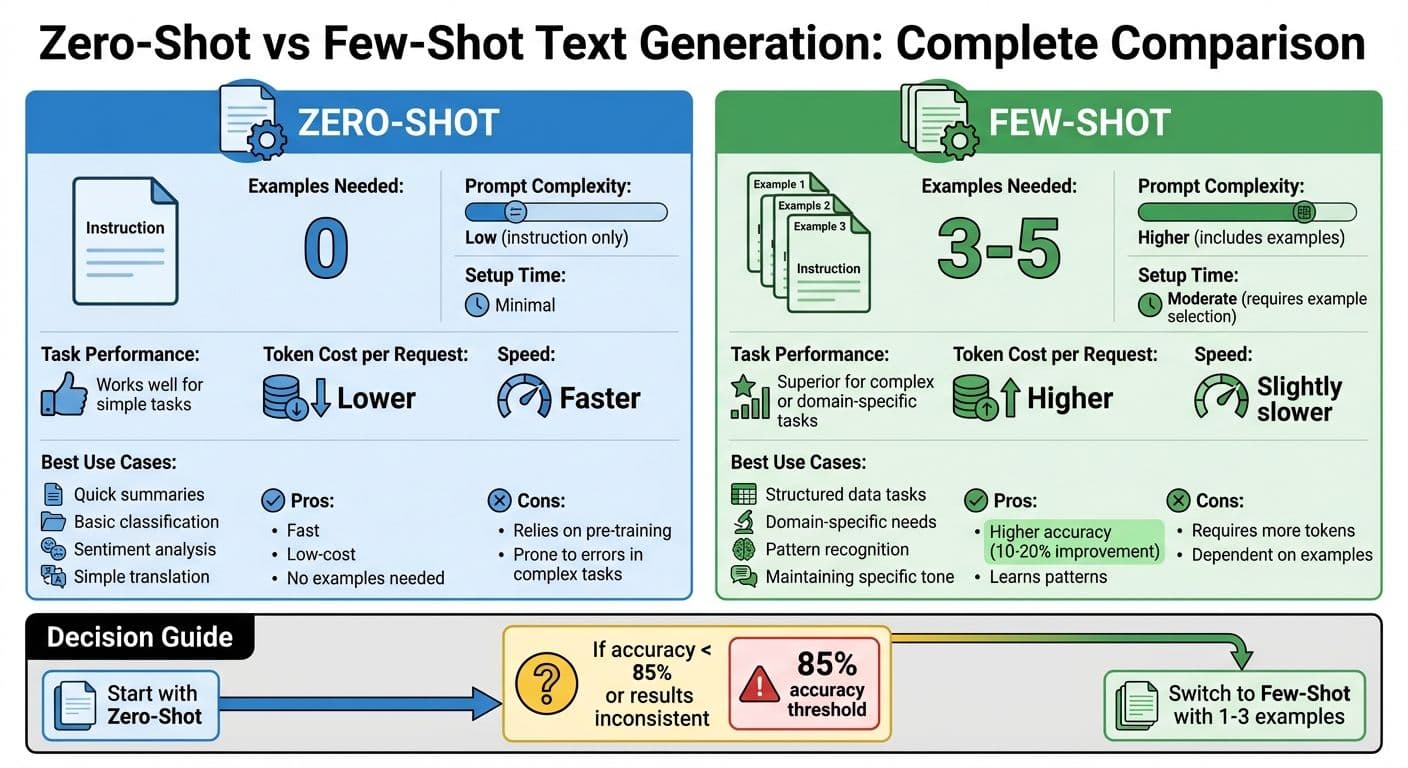
Zero-Shot vs Few-Shot Text Generation: Complete Comparison Guide
Main Differences Between Zero-Shot and Few-Shot
The key distinction between zero-shot and few-shot prompting lies in the use of examples. Zero-shot prompting relies solely on instructions - no examples are provided. This means the model has to depend entirely on its pretraining to understand and execute the task. On the other hand, few-shot prompting includes a handful of examples (typically 3–5) to illustrate the desired format, style, or pattern.
For straightforward tasks, zero-shot prompting often gets the job done. However, when tasks are more intricate or domain-specific - like extracting structured data from U.S. invoices (e.g., line items, totals in USD, taxes, PO numbers) or categorizing support tickets into custom company-defined categories - few-shot prompting tends to perform better. The examples provide the model with much-needed context, especially in cases where the required format or domain is not well represented in the model's training data. These differences not only affect performance but also play a role in cost and speed, as explained below.
Cost and Speed Factors
Few-shot prompts consume more tokens, which increases the cost per request and adds a bit of latency. On the flip side, zero-shot prompts are leaner and faster, making them a great choice for tasks that need to be processed in high volumes. For instance, zero-shot is ideal for real-time tasks like classifying customer messages, where speed and efficiency are critical.
In contrast, for tasks that are low-volume but high-stakes, such as analyzing contracts, the extra time and cost associated with few-shot prompting are often worth it for the added accuracy and reliability. NanoGPT’s pay-per-use model allows users to experiment with both approaches to find the best fit for their specific needs. The table below provides a side-by-side comparison.
Comparison Table: Zero-Shot vs Few-Shot
| Aspect | Zero-Shot | Few-Shot |
|---|---|---|
| Examples Needed | 0 | 3–5 |
| Prompt Complexity | Low (instruction only) | Higher (includes examples) |
| Setup Time | Minimal | Moderate (requires example selection) |
| Task Performance | Works well for simple tasks | Superior for complex or domain-specific tasks |
| Token Cost per Request | Lower | Higher |
| Speed | Faster | Slightly slower |
| Best Use Cases | Quick summaries, basic classification | Structured data tasks, domain-specific needs |
For simple and common tasks, start with zero-shot prompting to save on cost and processing time. If the results are inconsistent or fail to meet your requirements, consider switching to few-shot. Use carefully curated examples tailored to your needs, such as U.S. date formats (MM/DD/YYYY), properly formatted dollar amounts, or any specialized labels relevant to your domain.
sbb-itb-903b5f2
Common Uses for Zero-Shot and Few-Shot Text Generation
Task Types and Examples
Zero-shot and few-shot text generation methods open up a world of practical applications. Zero-shot, for instance, shines in tasks like sentiment analysis, summarization, and translation, relying entirely on pretraining without requiring examples. Imagine prompting a model with, "What is the sentiment of this statement?" and receiving an answer like "Neutral." Or, consider asking it to summarize the sentence, "The quick brown fox jumps over the lazy dog to reach the other side of the hill", and getting a concise summary in return.
Few-shot prompting, on the other hand, is especially effective for tasks requiring pattern recognition. It works well for structured data extraction, specific text classification, or even crafting content in a particular style. For example, GPT-4 can classify text like "It doesn’t work!" as "negative" when given examples such as "Great product, 10/10: positive" and "Didn't work very well: negative." Few-shot prompting also excels at converting messy, unstructured job postings into clean, structured formats like:
"Position: Data Scientist, Company: AI Innovations Ltd, Salary Range: $60,000 – $80,000."
Beyond that, it’s a handy tool for generating travel itineraries, creating quizzes, or drafting marketing copy tailored to a specific tone or style.
Improving Prompts Through Iteration
A great starting point is to use a zero-shot prompt as a baseline. If the results aren’t consistent, you can enhance them by adding a one-shot example and then gradually including 2–3 carefully chosen examples. This iterative approach often improves both consistency and accuracy. For example, placing examples that closely match your task first can help guide the model more effectively. Also, make sure to specify the desired output format clearly - whether it’s a single word, a list, JSON, or even properly formatted currency like $50,000.
This method works particularly well for tasks that rely on recognizing clear patterns. Studies suggest that refining prompts in this way can improve accuracy by 10–20% compared to zero-shot prompting alone.
Testing Prompts Across Multiple Models in NanoGPT
Refining prompts is just one piece of the puzzle. With NanoGPT, you can test these prompts across multiple models like ChatGPT, Gemini, and Deepseek. This pay-as-you-go platform allows you to compare outputs side-by-side, giving you a clear picture of which model delivers the best results for your specific task.
For U.S.-based users, this tool is especially useful for ensuring outputs meet local conventions, such as using dollar signs with comma separators (e.g., $60,000), MM/DD/YYYY date formats, and imperial units where needed. Since all data is stored locally on your device, you can safely experiment with different prompt structures and model combinations to optimize your results.
To make things even easier, NanoGPT includes an "Auto Model" feature that automatically selects the most suitable model for your query. This streamlines the testing process, saving both time and effort while ensuring top-notch results.
Guidelines for Better Zero-Shot and Few-Shot Prompting
Core Principles of Prompt Design
Crafting effective prompts hinges on three key elements: clarity, specificity, and consistent formatting. Clarity means giving direct, unambiguous instructions. Specificity involves detailing expectations, including the desired output format. Consistent formatting, such as using uniform patterns like "Text: [text] Sentiment:", helps the model understand and follow your instructions better.
For few-shot prompts, it's best to include 2–5 relevant examples. This approach can improve accuracy by 10–15%. However, adding more than 10 examples can dilute focus and may exceed token limits. To maximize effectiveness, arrange examples in order of relevance, placing the most similar ones first. These principles are essential for tailoring prompts to specific fields or tasks.
Adjusting Prompts for Specific Domains
Once you master the basics of clarity and specificity, you can adapt prompts for specialized domains by integrating relevant terminology and conventions. For example:
- Finance Tasks: Use formatting specific to U.S. standards, like dollar amounts with commas and dates in MM/DD/YYYY format, to ensure localized and accurate outputs.
- Healthcare Applications: Include examples that reflect patient data formats while ensuring compliance with U.S. HIPAA regulations. This can boost relevance by up to 25%.
In e-commerce, a zero-shot prompt might look like this:
"Summarize sales data in US format: Revenue: $12,345.67 on 12/14/2025 for 5.2 miles delivery. Output as bullet points with $ currency and MM/DD/YYYY."
This kind of prompt adapts to American conventions and imperial units without requiring examples, making it ideal for quick, localized outputs.
Pros and Cons: Zero-Shot vs Few-Shot
The table below highlights the trade-offs between zero-shot and few-shot approaches in prompt design:
| Aspect | Zero-Shot | Few-Shot |
|---|---|---|
| Pros | Fast, low-cost, no examples needed | Higher accuracy, learns patterns |
| Cons | Relies on pre-training, prone to errors in complex tasks | Requires more tokens, dependent on examples |
| Best Use Cases | Simple tasks like classification or summarization | Structured tasks or creative outputs |
Zero-shot is ideal for straightforward tasks like sentiment analysis or basic translations, where speed and cost are priorities. On the other hand, few-shot excels in structured outputs - such as extracting job details into lists - or creative tasks like planning travel itineraries. Including a few examples ensures the model aligns with your desired format.
A good starting point is zero-shot prompting. If accuracy falls below 85%, try adding 1–3 examples and test variations across models like NanoGPT to determine what works best for your needs. With these strategies, you can refine your prompts to handle a variety of tasks, from extracting structured data to generating creative content.
Summary
Zero-shot generation relies solely on an instruction and the model's pretraining knowledge, making it ideal for quick tasks like summarizing emails or categorizing feedback. It's straightforward and efficient but may lack precision for specialized tasks.
Few-shot text generation, on the other hand, uses two or more examples to demonstrate the task's pattern. This method shines when consistency in style, format, or domain-specific behavior is needed - think structured data extraction, multi-step reasoning, or maintaining a specific brand tone.
The choice between these methods comes down to a trade-off: zero-shot is faster and more cost-effective due to shorter prompts, but it may fall short in accuracy for niche tasks. Few-shot, while slightly more expensive in terms of token usage, offers better accuracy and control. For U.S.-based teams, the added cost is minimal compared to the improvement in quality.
Language models generate text based on patterns in the input. Instructions and examples act as "in-context training", guiding the model's output toward the desired task and style. The beauty of this approach? There's no need to retrain the model - crafting effective prompts is the key to controlling outcomes in both zero-shot and few-shot setups.
NanoGPT simplifies access to top-tier AI models like ChatGPT, Deepseek, and Gemini with a pay-as-you-go structure - no subscriptions required. This setup helps teams manage costs efficiently. Plus, by storing data locally on your device, NanoGPT aligns with U.S. privacy norms, making it a safer option for working with sensitive documents.
To get the most out of these tools, focus on refining your prompts. Start with simple zero-shot prompts for everyday tasks, and switch to few-shot prompts when accuracy and consistency are critical. Iterative refinement - tweaking wording, adding or adjusting examples, and testing across NanoGPT's models - can help you strike the right balance between quality, speed, and cost. For recurring tasks, consider building an internal prompt library. This allows your team to reuse successful patterns, saving time and reinforcing the strategies outlined here.
FAQs
When should I use zero-shot versus few-shot text generation?
Zero-shot text generation shines when the AI is tasked with tackling completely new or unfamiliar challenges without any prior examples. It's particularly useful in situations where no context or guidance is provided, allowing the model to generate responses entirely on its own.
On the other hand, few-shot text generation works better when you can supply a handful of examples to steer the model. These examples act as a guide, helping the AI grasp the preferred format, tone, or context. This approach is especially helpful for tasks that demand specific styles or more detailed and accurate outputs.
What mistakes should I avoid when creating prompts for zero-shot and few-shot learning?
When crafting prompts for zero-shot and few-shot learning, there are a few pitfalls you’ll want to steer clear of:
- Unclear or ambiguous instructions: If the instructions are vague, the model might produce outputs that miss the mark entirely.
- Lack of context: Without enough background information, the model may struggle to grasp the task at hand.
- Overly complex or detailed prompts: Overloading the model with excessive details can overwhelm it and hurt accuracy.
- No specified format or style: If you don’t define how the output should look, you may end up with inconsistent or unusable results.
For better outcomes, focus on creating prompts that are straightforward, precise, and include just the right amount of guidance to help the model perform effectively.
What’s the cost difference between zero-shot and few-shot prompting, and is the extra expense justified?
Few-shot prompting tends to be more expensive than zero-shot prompting because it involves processing extra examples, which adds to the computational load. However, this added cost is often worth it for tasks that are more complex or demand higher accuracy, as few-shot prompting generally provides more precise and relevant outcomes.
For straightforward tasks, zero-shot prompting might do the job just fine while keeping costs lower. In the end, the decision comes down to the specific demands of your project and whether the improved performance justifies the additional expense.