Using OpenWebUI with NanoGPT's API
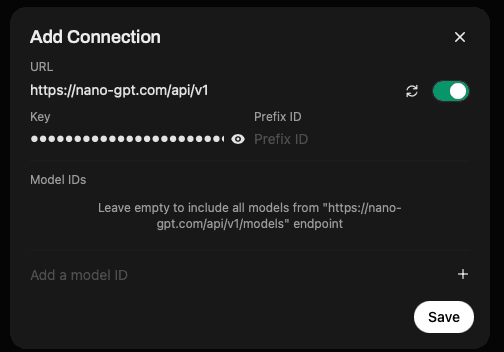
Want to use OpenWebUI with NanoGPT? Here's a quick guide to get you started.
Quick Setup Guide
- Get your API key from nano-gpt.com/api
- In OpenWebUI, go to Settings and find the "Add Connection" option
- Enter the following details:
- URL:
https://nano-gpt.com/api/v1 - API Key: Your key from step 1
- Prefix ID: (Optional) Leave empty or add a custom prefix
- Model IDs: Leave empty to include all available models
- URL:
That's it! Once you save the connection, you'll have access to all NanoGPT models through OpenWebUI.
Available Models
You can access all our models through this integration, including:
- ChatGPT
- Claude 3.7 Sonnet
- Gemini 2.0 Pro
- Perplexity
- And many more!
For a complete list of available models and their pricing, visit our pricing page.
Why Use NanoGPT with OpenWebUI?
- Full Model Access: Get access to all our models through a single API connection
- Simple Setup: Just one URL and your API key needed
- Cost-Effective: Pay only for what you use
- Reliable Performance: Fast response times and high uptime
- Flexible Usage: Switch between models easily within the interface
Need Help?
If you run into any issues or have questions about using NanoGPT with OpenWebUI, feel free to:
- Join our Discord server for community support
- Contact our support team at support@nano-gpt.com