
Transparent Image Generation: Ethics Guide

If people can mistake an AI image for a real photo, it should be labeled, logged, and handled with tight privacy limits.
That’s the whole point of transparent image generation. From my reading, the article comes down to five checks you can use right away:
- Label the image clearly so people know it is synthetic
- Keep a record of how it was made without storing more user data than needed
- Limit data collection and retention so prompts, images, and logs are not mixed together
- Give users direct controls like delete, export, and telemetry opt-out
- Block or review high-risk content such as non-consensual intimate imagery, child sexual content, and misleading political deepfakes
I’d sum it up like this: transparency is not just a label. It also means showing where the image came from, what the system stored, and how the platform handles risky requests.
A few points stood out:
- The article says visible labels, captions, and metadata should work together
- It calls for audit trails with model version, timestamp, settings, and safety outcome
- It says raw prompts should not be logged when broad tags can do the job
- It points to C2PA Content Credentials, now ISO/IEC 22144, as a way to attach provenance data
- It says platforms should publish five public policy documents: use policy, labeling policy, privacy policy, enforcement/reporting policy, and internal review process
Here’s the short version:
| Area | What I should do |
|---|---|
| Disclosure | Add a plain label like “AI-generated image” |
| Provenance | Store metadata and a timestamp, such as 08/01/2026 03:45:12 PM (America/New_York) |
| Privacy | Keep content, logs, and billing data separate |
| User control | Offer delete, wipe, export, and opt-out settings |
| Safety | Run prompt checks and output checks, then explain blocks in plain English |
Bottom line: if I publish or ship AI image tools, I should make sure people can tell what is synthetic, how it was made, and what data was kept.
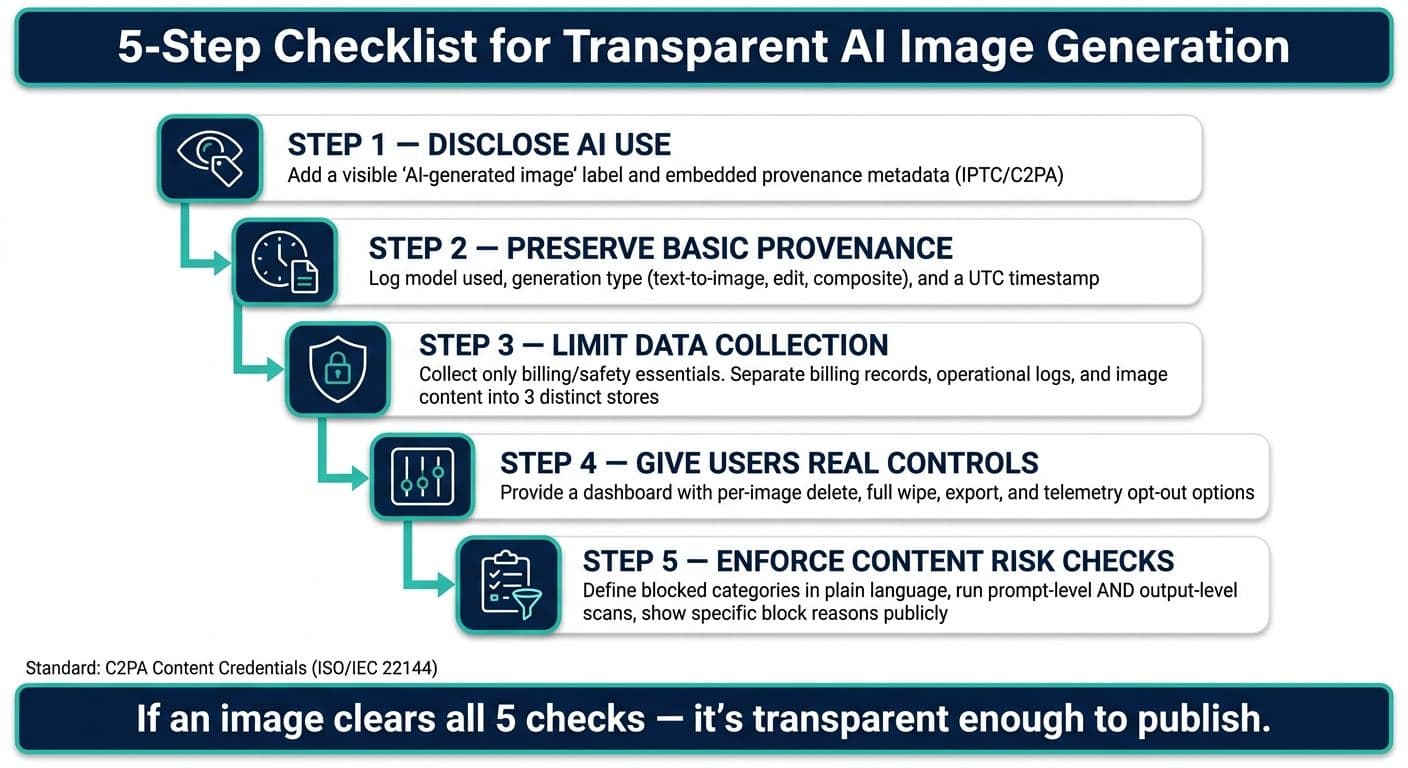
5-Step Checklist for Transparent AI Image Generation
Lesson 20: Using AI Image Generators Safely and Ethically (AI for Absolute Beginners)
sbb-itb-903b5f2
Disclosure standards for AI-generated images
Disclose whenever a reasonable viewer could mistake the image for a real photo, real person, or real event. That same rule applies to client work, portfolio images, ads, and public posts. If there's any doubt, disclose.
Visible labels, captions, and metadata should work together
A single disclosure signal isn't enough. Captions can disappear. Images get downloaded, cropped, and reposted with no context. Metadata can also get stripped during re-uploads. That's why these three layers should work together:
| Disclosure channel | What it does | Practical note |
|---|---|---|
| Visible label (on-image or overlay) | Immediate human notice | Small corner text stays visible in screenshots and reposts. |
| Caption / alt text | Contextual clarity for viewers and screen readers | Alt text should state that the image is synthetic. |
| Embedded metadata (IPTC, C2PA) | Machine-readable traceability | Provenance metadata supports machine-readable disclosure when preserved. |
Use labels like AI-generated image, synthetic portrait, or AI-edited photo. Keep them plain and easy to spot.
For alt text, start with the synthetic status. For example, AI-generated illustration of a city skyline at night tells people what they're looking at right away, including in accessibility settings.
Cases that require stronger disclosure
Some cases call for stronger labels: realistic faces, synthetic portraits of real people, political imagery, news-style visuals, and ads.
If the image shows a real person in synthetic form, be direct. A label like Synthetic depiction of [name], not a real photograph removes guesswork.
Clear labels cut confusion and can build trust.
How NanoGPT can support disclosure by default

NanoGPT keeps history on the user's device by default. That makes it a good fit for default disclosure steps, such as an export label turned on by default, optional IPTC/C2PA metadata, and local reminders for photorealistic faces or news-style scenes.
For small teams, the workflow can stay simple:
- Generate the image
- Export with provenance turned on
- Add the caption label
- Check that the uploaded version still shows it
Labels tell viewers what they're seeing. Audit trails record how the image was made.
Audit trails, privacy limits, and user control
What an ethical audit trail should record
Once an image gets labeled, the next issue is simple: can the system show how that result happened? An ethical audit trail should record what happened and why - without keeping banned content.
At a minimum, log the model identifier and version number, a timestamp in standard U.S. format like 08/01/2026 03:45:12 PM (America/New_York), key generation settings such as resolution, aspect ratio, sampler type, inference steps, and guidance scale, plus the safety system’s decision. A structured entry like outcome=blocked, risk_code=S2, policy_ref=ChildSafety-03 lets a reviewer see the result at a glance without storing banned content.
Don’t log raw prompts if category tags can do the job. Swap full prompt text for high-level tags like portrait, medical context, or fantasy scene.
That kind of record only helps if it stays separate from content and personal data.
Privacy limits: collect less, retain less, separate content from operations
The rule here is straightforward: collect less, keep it for less time, and separate content from operations. In practice, that means storing three data types in three different places, each with its own access rules.
| Data type | What it includes | Suggested retention |
|---|---|---|
| Content store | User prompts, generated images, local history | User-controlled |
| Operational logs | Model version, timestamps, safety codes | Short retention |
| Billing records | Transaction amounts in USD, payment tokens | Required by law |
Support staff should only have access to anonymized operational logs. Billing staff should only see payment records.
Facial images and health-related prompts need extra care. Generated or uploaded images may look like real people, so avoid using user-supplied facial images for training unless the user has clearly opted in. And never log face embeddings in general telemetry systems. Treat health-related prompts as sensitive by default: keep them for less time, restrict access, and don’t use them for model improvement unless the user explicitly opts in.
Once those storage boundaries are in place, transparency stops being a vague promise and becomes something users can act on.
User controls that make transparency real
Give users three clear controls:
- Per-image deletion
- Full local wipe
- Telemetry opt-out
The telemetry setting should explain, in plain language, that basic operational logging may still be needed, but prompts and images won’t be used for training or analytics if the user opts out. Per-image deletion should remove both the image and the prompt used to make it from local storage right away, and from any linked server-side content store unless a legal retention exception applies. A full wipe should clear cached images, prompts, and local logs, with a clear confirmation of what will be deleted.
NanoGPT stores history locally on the user’s device by default. That gives users direct control over their data instead of forcing them to depend on server-side settings.
A privacy dashboard should show what is stored, where it lives, how long it stays there, and offer one-click delete and export controls. The next layer is policy: what the platform blocks, flags, or sends for review.
Content risk checks and platform policy design
Policy turns disclosure and user controls into rules a platform can actually enforce.
Risk categories that need firm guardrails
Some content should be blocked outright. Other kinds may need narrow carve-outs and tight controls. The key is to spell out the rule clearly and publish any exceptions so users aren't left guessing.
Here are the categories that need the toughest limits:
- Non-consensual intimate imagery: block it, including realistic edits of clothed photos.
- Sexual content involving minors: ban it, including stylized or age-regressed content.
- Deepfakes that could mislead on elections, emergencies, or public health: block them when they could mislead.
- Graphic violence: allow it only with clear context and plain-language labels.
- Hate imagery: block it when it promotes violence, extermination, or dehumanization against protected groups.
- Self-harm content: block instructions and glorification.
- Impersonation: block it when it falsely portrays real people.
Requests involving real people need tighter review. That matters even more when a prompt combines a real name, a realistic style, and a sensitive topic like elections or public health emergencies.
Recent laws now require fast removal of non-consensual intimate imagery, including AI-generated deepfakes, and the EU AI Act bans child sexual abuse material and nudification content.
Once those rules exist, users should be able to see how enforcement works in practice.
How to explain prompt checks and output checks to users
Most safety systems work in two stages: prompt screening and output scanning.
Prompt-level screening happens before generation starts. The system checks the text for keywords, intent patterns, and named entities tied to real people or institutions. Low-risk prompts move forward. Medium-risk prompts may be partly changed - for example, by removing a real person's name - with a plain-language note that tells the user what changed. High-risk prompts are blocked before the image is made.
Output-level scanning is the second layer. A harmless-looking prompt can still lead to a bad result, so platforms scan generated images for nudity, sexual content involving minors, hate symbols, graphic violence cues, self-harm cues, and face similarity to known public figures or uploaded reference photos. This isn't perfect. False positives happen, which is why appeals matter.
When a request is blocked, the notice should name the policy category, explain the rule in plain English, and point to a safer option. For example: "This request was blocked because it may create non-consensual intimate imagery of a real person. Try using a fully fictional character instead." If an image is allowed but marked sensitive, the notice should also explain any limits on distribution, such as a ban on use in ads or promoted content. Users should also be told whether the call was automated or involved human review, plus how to ask for a second look if they think the decision was wrong.
These checks shouldn't live only in private moderation playbooks.
The policy documents every image platform should publish
Clear governance needs public documents, not just internal notes. At a minimum, every image platform should publish five core documents: an Acceptable Use Policy, a Labeling Policy, a Privacy Policy, an Enforcement and Reporting Policy, and an Internal Review Process document. Together, they should lay out what is banned, how synthetic content is labeled, what data is collected and kept, how violations are handled, and how edge cases move up for review.
| Area | Transparent practice | Why it matters |
|---|---|---|
| Disclosure | Default AI labels and machine-readable metadata | Makes synthetic content easier to identify |
| Auditability | Audit trails and periodic public reports | Lets users and regulators evaluate safety performance |
| Privacy | Minimal metadata and user-controlled deletion | Limits unnecessary data exposure |
| Safety | Layered prompt and output checks with plain-language block notices | Reduces harmful generations and makes enforcement understandable |
| Governance | Published policies and appeal mechanisms | Makes enforcement consistent and auditable |
Public reports also make it easier for users and regulators to compare enforcement over time.
Implementation checklist and conclusion
A five-part checklist for transparent image generation
The standard is pretty simple: people should know the image is synthetic, how it was made, and what the platform kept.
Use this checklist as the final review step before publication.
| Check | What it means in practice |
|---|---|
| Disclose AI use | Add a visible AI-generated label and embedded provenance metadata. |
| Preserve basic provenance | Log the model used, the generation type (text-to-image, edit, or composite), and a UTC timestamp. |
| Limit data collection | Collect only what you need for billing and safety review - request counts, model identifiers, and timestamps. Use the shortest lawful retention period for logs. Separate billing records from image content. |
| Give users real controls | Provide a dashboard to view stored data, delete images or history, and export provenance metadata. |
| Enforce content risk checks with clear policies | Define blocked categories in plain language, run both prompt-level and output-level scans, and show users a specific reason when a request is blocked. Publish the rules publicly. |
Retain commercial audit logs for the period required by law or policy, capturing the AI tool used, input hash, and operator timestamp.
If an image clears these five checks, it's transparent enough to publish.
Key takeaways
Transparency in AI image generation is not just about slapping a label on an output. It covers five connected areas: disclosure, auditability, privacy limits, user control, and safety guardrails. When a platform or team handles all five, it builds something labels alone can't: real trust.
Trust grows when image tools are clear about what they generate, what they store, and what they block. Local storage cuts down collection at the source. Published policies and plain-language block notices make enforcement easier to understand instead of leaving users in the dark.
The C2PA Content Credentials standard - now an ISO standard (ISO/IEC 22144) and embedded in tools like Adobe and DaVinci Resolve - gives teams a practical, interoperable way to attach a tamper-evident provenance trail to every image. Pair that with minimal data collection, clear deletion paths, and layered content checks, and you have a workflow that holds up under scrutiny - from clients, regulators, and audiences alike.
FAQs
When does an AI image need a label?
All AI-generated images should be clearly labeled to support transparency, build trust, and meet ethical and regulatory expectations.
Use visible markers like "Generated with AI" or "Visualizing concept with AI", and include machine-readable metadata such as ai_generated: true and model details in formats like XMP or JSON-LD.
What should an ethical audit trail include?
An ethical audit trail should follow an image through its full lifecycle: ingest, train, generate, and export. To cut tampering risk, route that trail through an independent gateway instead of the same system that creates the image.
Each record should include a UUID, an ISO 8601 UTC timestamp, and the model version hash.
Also include:
- Authenticated user ID and role
- Prompt text or SHA-256 hashes, plus seeds, settings, and model version
- Moderation logs, classifier scores, and review overrides
- Cryptographic signatures or HMACs
When forensic access is needed, keep records in encrypted separate storage and control access with RBAC.
How can a platform stay transparent without collecting too much data?
Platforms can stay transparent by keeping verifiable audit trails without hanging on to raw prompts or images. That gives them a way to show what happened without stockpiling sensitive material they don't need.
One way to do this is with cryptographic commitments, like salted hashes or Merkle roots. These methods support accountability while cutting down how much private data gets stored.
They can trim exposure in a few other ways too:
- Use anonymized identifiers instead of direct personal details
- Keep sensitive data on the user’s device when possible
- Offer simple, user-facing summaries, then provide deeper documentation for auditors
That approach helps everyday users understand the basics, while giving reviewers the detail they need.