
Real-Time AI Apps with Azure OpenAI APIs

If an AI app feels slow, people stop using it. My main takeaway is simple: Azure OpenAI works best in live apps when teams combine streaming, tight prompts, close regional deployment, and policy checks before and after model use.
Here’s the full picture in plain English:
- I saw a clear pattern across the cases: speed alone is not enough
- The strongest setups pair low-latency text generation with task-focused workflows
- SSE is the default fit for one-way text streaming
- WebSockets, SignalR, and WebRTC fit voice or two-way sessions
- Prompt size, output length, and region choice have a direct effect on response time
- PII/CUI redaction, zero-retention, BYOK, and output checks matter in healthcare, finance, and similar fields
- Fallback behavior matters because low delay does not help if the app fails under load
A few numbers stand out:
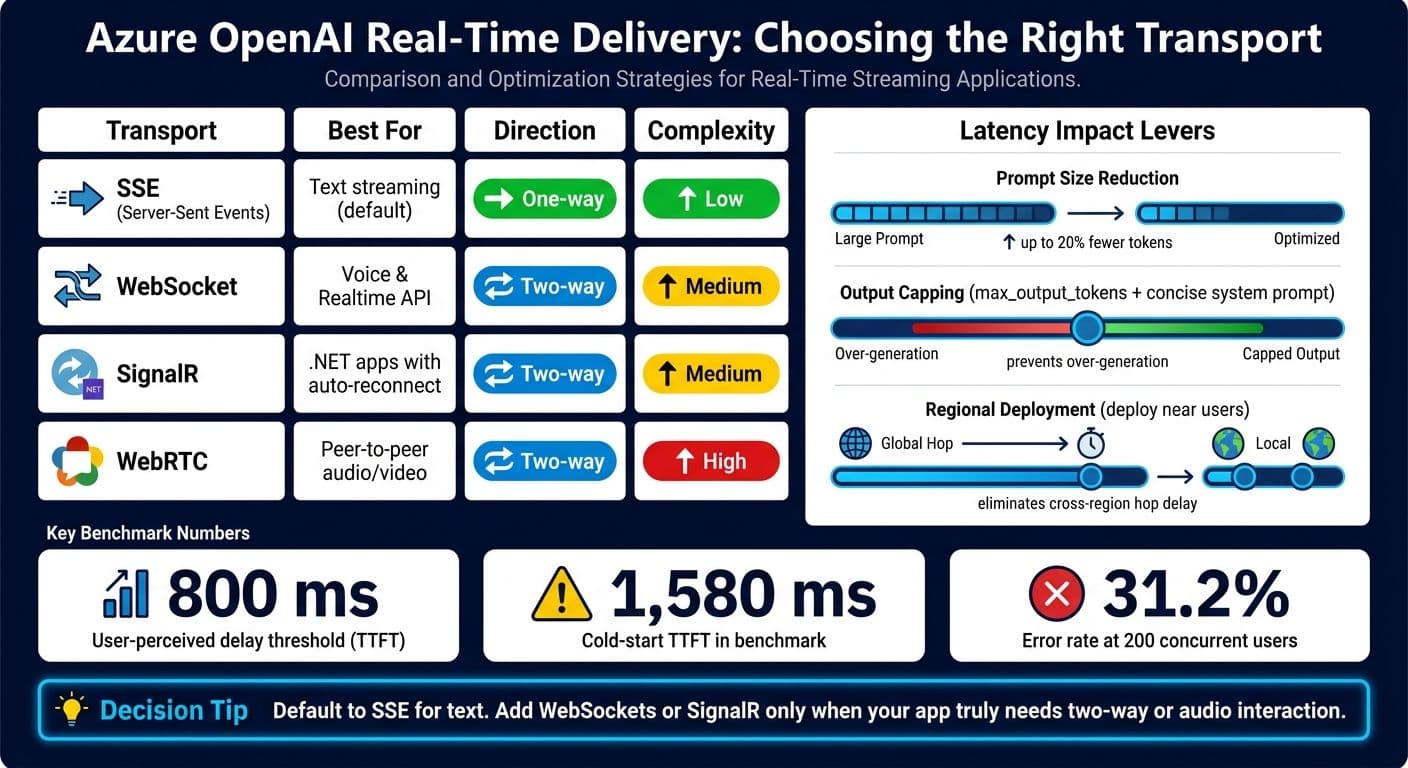
- Users start to notice delay above 800 ms time to first token
- One benchmark cited 1,580 ms cold-start TTFT
- That same test showed a 31.2% error rate at 200 concurrent users
- One engineering case reported 3x higher first-month adoption for domain-specific agents
What does that mean for you?
If you’re building a live AI app on Azure OpenAI, I’d keep the plan simple:
- Stream output
- Trim prompts
- Limit response length
- Deploy near users
- Redact sensitive data before model input
- Add fallback paths for rate limits and outages
In short: the article shows that live Azure OpenAI apps do best when delivery speed, workflow fit, and governance are built together from day one.
Azure OpenAI Features That Power Real-Time Apps
Streaming text generation and real-time conversational APIs
Set "stream": true in your chat completions request, and the API will stream Server-Sent Events (text/event-stream) frames as tokens are generated instead of making you wait for the full response. In practice, that means the user starts seeing output almost right away.
Each frame includes a response.output_text.delta event with a small text chunk. Then response.output_text.done marks the end of the text, and the [DONE] marker closes the stream. This token-by-token delivery improves time to first token and helps keep the UI responsive. But there’s a catch: it only works if your app passes each chunk to the client right away.
For voice use cases, the OpenAI Agents SDK voice pipeline and RTClient samples for the Realtime API use that same step-by-step delivery pattern for audio.
A few simple choices can help trim delay:
- Use shorter prompts
- Keep outputs smaller
- Cache repeated context to cut both latency and cost
Infrastructure requirements for low-latency delivery
Your app needs to forward streamed chunks to the client immediately, not hold the full response in a buffer. You’ll also want to deploy your Azure OpenAI resource in the region closest to your users, use exponential backoff with the Retry-After header for rate limits, and apply prompt caching to cut repeated processing overhead.
Those delivery decisions shape whether the model feels real-time in production. They’re also what make live customer, clinical, and operations workflows work at scale.
Stream Azure OpenAI Responses Token by Token in Python
Case Studies: Real-Time Azure OpenAI Apps in Production
The production cases below show what happens when Azure OpenAI is placed right inside live workflows. This isn’t about drafting content in the background. It’s about generating text while a customer, clinician, agent, or operator is still in the middle of the interaction.
Discovery Bank: live financial assistance
Discovery Bank is a documented financial-services example of real-time Azure OpenAI use. The core issue is simple: when a customer is having a live conversation, even small delays can make the assistant feel out of sync and less helpful.
Landsberg Hospital and Ally Financial: live documentation and call summarization
Both cases use real-time transcription to send spoken input to Azure OpenAI, which turns that speech into structured text as the interaction unfolds. In clinical settings, that means drafting notes during the visit instead of leaving staff to finish them later. In contact centers, it creates call notes on its own and cuts down the time agents spend wrapping up after each call.
Industrial operations: turning telemetry into real-time text insights
Raw sensor data and system logs aren’t easy to use in the moment. In industrial deployments, Azure OpenAI turns telemetry into plain-language alerts and anomaly explanations as conditions shift. Instead of staring at streams of figures, operators get text they can act on, even when data is coming in from several systems at the same time. These setups tend to work best as task-specific agents with tailored prompts.
These production patterns lead straight into the delivery and latency trade-offs discussed next.
sbb-itb-903b5f2
Design Patterns and Trade-Offs Across Real-Time Implementations
Azure OpenAI Real-Time Streaming: Transport Options & Latency Trade-Offs
The production cases above don’t all use the same setup, and that choice changes how “live” the app feels.
Streaming delivery options: SSE, WebSocket, SignalR, and WebRTC
Transport is one of the first calls you have to make. SSE fits one-way text streaming. WebSocket fits back-and-forth voice. And for jobs that don’t need live interaction, async polling is often enough.
SSE streams partial outputs over standard HTTP with the Accept: text/event-stream header and stream: true. WebSockets support the Realtime API and RTClient samples for bidirectional, voice-heavy flows. SignalR sits on top of WebSockets and adds automatic transport fallback plus connection handling for .NET apps, so teams don’t have to manage reconnect logic by hand. WebRTC works well for peer-to-peer audio and video when low latency matters and a server relay would just add extra delay. For noninteractive requests, async polling lets clients fetch results later, with requests that can run for up to about 800 seconds.
For most text-generation use cases, SSE is the simple default. WebSockets, SignalR, and WebRTC make sense when the app actually needs two-way or peer-to-peer audio. If not, that extra setup can feel like using a power drill to hang a picture frame.
Once transport is set, the next place to trim delay is the prompt and the output.
Latency reduction: shorter prompts, smaller outputs, closer regions
Shorter prompts, smaller outputs, and closer regions can shave off latency. The trade-off is less context.
Keeping only the system prompt and the latest messages, while dropping older context, can cut token counts by roughly 20%. A tight system instruction such as "Be concise. Under 3 sentences." paired with max_output_tokens helps stop the model from producing more than the app needs. Deploying near the model endpoint also avoids cross-region hops that add measurable delay in production.
That said, speed by itself isn’t enough. A fast system that breaks under policy limits or outage cases won’t hold up for long.
Privacy, compliance, and fallback behavior in real-time systems
In regulated flows, latency, compliance, and failure handling have to work as one system.
A common pattern is to place Microsoft Presidio in front of the model to redact PII before input is sent. For stored responses, retention_days: 0 turns on zero-retention mode for flows involving protected health or financial data. If a team needs longer storage, BYOK encryption gives them control over stored responses, while platform defaults stay at 7 days and the range can be set from 0 to 365 days.
Sticky routing keeps requests on the same backend, which helps preserve prompt cache hits. But there’s a catch: if that provider goes down, the system returns a 503 instead of switching over on its own. For user-facing apps where uptime matters more than cache savings, disabling sticky routing is usually the safer call. PyRIT and Guardrails check model outputs for hallucinations and bias before users see them.
Put together, these controls make regulated real-time deployments workable in production.
Conclusion: What the Research Shows About Real-Time Azure OpenAI Apps
Across these production cases, one thing stands out: model quality by itself isn’t enough to make a real-time app work in practice. The teams with the best results got three things right at the same time: low-latency streaming, task-specific prompts, and a good fit with the way people already work.
The numbers back that up. Latency shapes adoption. Users notice delays above 800 ms TTFT, and one benchmark model averaged 1,580 ms cold-start TTFT with a 31.2% error rate at 200 concurrent users - a failure mode that calls for fallback handling.
General chat also wasn’t the top performer in production. Purpose-built agents did better. In one engineering firm, domain-specific agents saw 3x higher first-month adoption. The reported ROI came from lining the tool up with actual engineering workflows, not from using a more general assistant.
In regulated work, governance isn’t a nice extra. It’s part of deployment. PII and CUI detection, along with fallback design, help keep real-time systems usable in production.
Real-time Azure OpenAI apps work best when speed, workflow fit, and governance are built together.
FAQs
How do I choose between SSE and WebSockets?
Both Server-Sent Events and WebSockets can stream tokens bit by bit, which helps cut down time-to-first-token.
Choose SSE if you want a simple, standard way to stream responses over HTTP. It works out of the box across NanoGPT endpoints like chat completions and responses.
Use WebSockets when your app needs two-way, full-duplex communication.
What should I optimize first to reduce latency?
First, set a performance baseline. Measure P50, P95, and TTFT under realistic concurrent load so you know how the system behaves when people are using it at the same time.
Then trim output length by setting max_tokens close to the response size you expect. That alone can cut latency by up to 50%.
Streaming helps too. It improves perceived latency because users start seeing tokens arrive bit by bit instead of waiting for the full response.
How can I make a real-time app safer for sensitive data?
Use NanoGPT to help protect privacy by keeping data on the user’s device instead of sending it to outside servers.
For API security, use TEE-backed models to check enclave attestation and signatures. Also enable the paid input safety preflight with the moderation header for authenticated requests. And keep API keys out of your code by storing them in environment variables or secure config files, then rotate them on a regular schedule.