
Common Data Preprocessing Mistakes That Increase Costs

Bad preprocessing can waste money fast. If you send 2,000 tokens when 500 would do, or train on duplicate and bloated data, you pay more for compute, storage, API calls, and retraining.
Here’s the short version: I’d cut cost by shrinking inputs, stopping leakage, keeping training and production preprocessing the same, using lighter encoding and imputation choices, and trimming prompts before every model call. The article backs this up with numbers like $12.9 million per year lost to poor data quality, 50%–80% lower chat input costs from sliding windows, and about 50% lower batch API pricing for the right jobs.
If I wanted the main takeaways in one glance, they’d be these:
- Remove waste first: extra columns, duplicate rows, repeated text, and oversized images all add cost.
- Split before preprocessing: fitting scalers, imputers, or encoders before the train-test split can lead to bad test results and later retraining.
- Keep one pipeline: mismatched preprocessing between training and production leads to errors, rework, and extra runs.
- Watch feature expansion: one-hot encoding high-cardinality fields can blow up memory and slow training.
- Handle missing data with care: dropping too much data or imputing the wrong way can hurt model quality and force more work later.
- Scale only when the model needs it: some models need scaling, while tree-based models often do not.
- Trim generative AI requests: long chat history, boilerplate, and unstable prompt templates can push token bills up fast.
- Use caching and batching when possible: stable prompt prefixes and grouped requests can cut request cost by a large margin.
| Mistake area | What goes wrong | Cost impact | Simple fix |
|---|---|---|---|
| Input size | Too many columns, duplicates, large files | More compute and storage | Keep only needed data |
| Data splitting | Leakage from pre-split transforms | Bad evaluation, retraining | Split first, fit after |
| Pipeline mismatch | Different training vs. production rules | Failures and rework | Reuse the same pipeline artifact |
| Encoding | Huge sparse matrices from one-hot encoding | More memory and slower runs | Use hashing, target/frequency encoding, or embeddings |
| Missing data | Over-dropping rows or bad imputation | Signal loss and extra retraining | Add missing flags and fit on training only |
| Scaling | Wrong scaling choice or no scaling | Slower learning or wasted steps | Match scaling to model type |
| Prompt size | Full histories and repeated context | Higher token bills | Use sliding windows and summaries |
| Request handling | No caching or batching | Higher API cost | Keep prompts stable and batch background jobs |
So the core point is simple: cost control starts before the model runs. Clean data, small inputs, and tight prompts usually do more for spend than people expect.
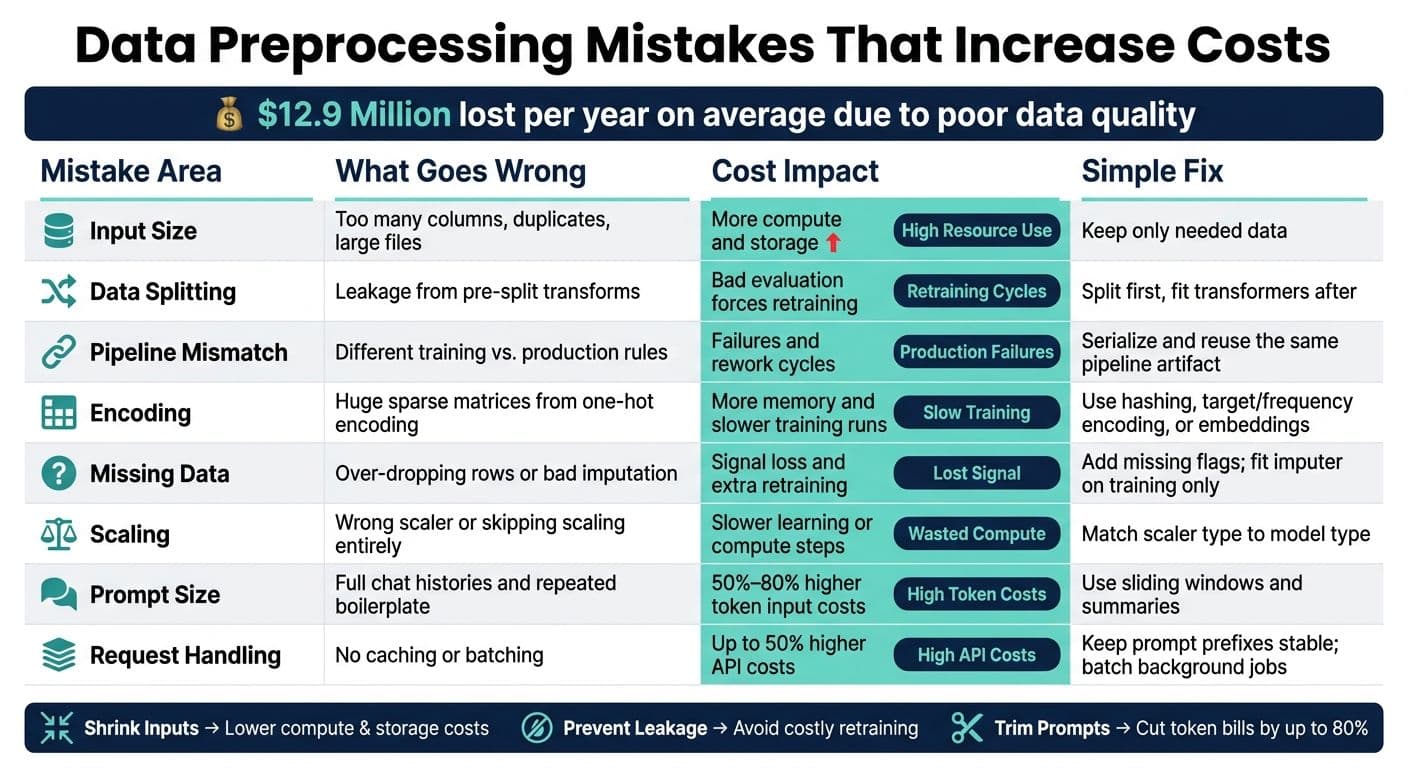
Data Preprocessing Mistakes: Cost Impact & Fixes at a Glance
Oversized and Noisy Inputs That Waste Compute
The biggest cost leak is simple: too much input. Unused columns, duplicate rows, and oversized files push compute up without making results better. In most cases, the first cost savings come from shrinking what you send in.
Keeping Every Feature, Field, or Metadata Column
More columns don't automatically lead to better predictions. A churn prediction model may only need 8–12 attributes out of 40 available columns. If you feed in all 40, you use more RAM, training takes longer, and every inference call carries extra baggage.
The fix is pretty plain: keep the smallest set of attributes your task needs, and cut the rest. Columns that are mostly missing should usually go too, because they add little signal for the cost they create. If you're working with dense, high-dimensional structured data, PCA can help shrink input volume.
Leaving Duplicates and Repeated Records in the Dataset
Duplicate records are an easy way to burn money without noticing. Every repeated row adds extra training work. In bulk inference jobs, it also means paying to process the same item twice.
A good cleanup flow looks like this:
- Start with exact-match deduplication
- Then check for near-duplicates
- Then strip repeated boilerplate at the paragraph level
The threshold for near-duplicate detection should match your corpus. A legal archive, for example, needs a different bar than a product catalog.
The same idea applies to images too: only send the resolution the task calls for.
Using Images and Files at Higher Resolution Than the Task Requires
Oversized images can drain compute fast. A vision model usually doesn't need full camera resolution for every task. Standardize file formats and image sizes around what the job needs, then compress when some quality loss is okay.
On NanoGPT, larger images increase per-request cost directly. Resizing and compressing files before submission is one of the simplest ways to cut per-request cost without changing your model or prompt logic.
sbb-itb-903b5f2
Bad Data Splits and Leakage That Force Expensive Retraining
After you cut input size, the next cost trap is leakage. It makes evaluation look better than production, and that gap often shows up at the worst time.
Data leakage can quietly inflate scores and push teams into costly retraining later. At that point, you’re paying in retraining time and extra engineering work that could have been avoided. A review by Kapoor and Narayanan found that data leakage affected 294 published scientific papers across 17 fields. If it appears that often in peer-reviewed research, it can just as easily slip into a production pipeline.
Fitting Scalers, Imputers, or Encoders Before the Train-Test Split
A common mistake is fitting a scaler, imputer, or encoder on the full dataset before the split. That leaks test-set information into training. If you run fit_transform on the full dataset first, the transformer learns from test-set statistics. In plain English, the test set has already shaped training.
That can make model quality look far better than it is. In fraud detection, pre-split normalization has produced an accuracy of 0.996 while masking a recall of only 0.80, meaning the model missed one in five fraudulent transactions despite looking nearly perfect.
The fix is simple: split first, then fit. Compute scaling parameters and imputation values from training rows only. After that, apply those frozen parameters to the validation and test sets.
Use a single pipeline so splitting, fitting, and transformation happen in the right order. During cross-validation, transformers should refit only on the training fold and then be applied to the validation fold.
Using Different Preprocessing Logic in Training and Production
Another easy way to create trouble is rebuilding preprocessing in production with different mappings, defaults, or scaling rules. Even small differences can break input consistency. Then you end up with failed inference tests, more rework, and yet another deployment cycle.
The safer move is to serialize the fitted training pipeline and reuse that same artifact in production. Version the pipeline alongside the model so you can track preprocessing changes.
Encoding, Missing Data, and Scaling Errors That Increase Resource Use
Once you’ve fixed bad splits and leakage, the next place teams waste compute is in encoding, imputation, and scaling. These sound like small pipeline choices. They’re not. They can blow up memory, slow training, and push you into extra retraining runs.
One-Hot Encoding High-Cardinality Fields Into an Oversized Feature Space
High-cardinality fields like IDs, URLs, and long-tail categories can make one-hot encoding balloon into a giant sparse matrix. In plain English, you end up training on a huge table that’s mostly zeros.
That creates a few problems at once:
- Memory use jumps
- Training gets slower
- Inference latency goes up because the model still has to process those sparse vectors on every prediction
For high-cardinality fields, better picks are target encoding, hashing, frequency encoding, or embedding layers. It also helps to cap rare categories with a frequency threshold and map them to OTHER. Save one-hot encoding for low-cardinality fields, where it stays small and useful.
Handling Missing Values Inconsistently or Too Aggressively
Sparse encodings waste space. Bad imputation wastes signal.
If you drop every row with a missing value, you often throw away more than you think. Your training set gets smaller, and the missingness itself may carry meaning. A blank income field in a loan application, for example, tells you something about the applicant.
A simple fix is to add a missing-value flag like income_was_missing before imputing. That way, the model can still use the signal tied to the missing field.
For numeric columns, mean or median imputation is usually a good starting point. For categorical columns, add a clear "unknown" category instead of guessing the mode. The table below gives a practical starting point based on how much data is missing:
| Missingness Level | Numerical Strategy | Categorical Strategy |
|---|---|---|
| < 5% | Mean or median imputation | Mode imputation |
| 5%–40% | Model-based imputation or add missing indicator | Add "missing" or "unknown" category |
| > 40% | Drop the feature | Drop the feature |
One rule matters more than it may seem: fit your imputer on training data only. Then apply those same parameters to validation and production. If you don’t, you leak information and make offline results look better than they are.
Skipping Feature Scaling for Models That Require It
Distance-based and gradient-based models need scaling. Without it, large-number features can drown out smaller ones, even when the smaller ones matter more.
Take a salary column from $30,000 to $200,000 and an age column from 18 to 65. If you skip scaling, salary can dominate just because of its numeric range. The model starts leaning on scale instead of signal, and you spend more compute just trying to get to a usable result.
Not every model needs this. Tree-based models like XGBoost, Random Forest, and LightGBM are scale-invariant, so scaling adds overhead without helping.
For models that do need scaling, match the scaler to the data:
- Use
StandardScalerfor roughly normal distributions - Use
MinMaxScalerwhen bounded inputs are needed - Use
RobustScalerwhen the data has large outliers, since it relies on the median and interquartile range instead of getting pulled around by extreme values
A lot of pipeline waste comes from this kind of mismatch. The model isn’t broken. The prep step is just making it work harder than it should.
Token and Request Mismanagement in Generative AI Workflows
In generative workflows, preprocessing means trimming prompts and shaping requests before they hit the model. That makes preprocessing a cost-control step, not just a cleanup task. If you send more than the model needs, you pay for every extra token. With token-based pricing, that waste shows up straight on your bill.
Sending Redundant Context, Boilerplate, or Full Histories to the Model
Every token you send is billed as input. That includes repeated headers, boilerplate copy, and chat history you never trimmed. In chat workflows, this adds up fast. By message 21 in a session, accumulated history can hit 4,600 tokens, and all of it gets billed again on the next call.
The fix is simple: trim context before sending it.
- Keep only the most recent turns with a sliding window.
- Replace older messages with a short summary.
- For documents over 2,000 tokens, summarize them locally or use a lower-cost model before sending them to the main API.
This kind of cleanup can save a lot. Sliding windows can cut chat-related input costs by 50% to 80%, and summarizing long documents before analysis has shown an 82% cost reduction.
Once you trim context, the next leak usually shows up in prompt structure.
Writing Prompts Inconsistently So Similar Requests Can't Be Cached
Ad hoc prompt building is one of the costliest habits in generative AI workflows. A small change in field order, extra whitespace, or a timestamp dropped at the top of the prompt can break caching. Then you pay full price for requests that are almost the same as ones you already sent.
Prompt caching works only when the cached prefix stays identical. Put stable instructions and tool schemas first. Move dynamic fields like timestamps and user input to the end. That order matters more than many teams think.
When the structure stays consistent, cached input tokens are billed at about 10% of the standard rate. And when teams audit prompt templates every quarter, they often find that 40% to 60% of the content can be removed without hurting output quality.
After prompt structure is cleaned up, the next step is traffic routing.
Ignoring Batching and Request Grouping Opportunities
Not every AI call needs an instant reply. Document classification, embedding generation, content moderation, and bulk data enrichment are all strong fits for batching. Batch APIs can handle requests within a 24-hour window at about a 50% discount compared with standard rates.
A good setup separates traffic by job type. Send live user interactions through standard APIs, and push background work to batch endpoints. For day-to-day control, use sliding windows for live chats, summaries for long context, and batch processing for back-office tasks. Also set a hard max_tokens limit on every call so tool-call loops don't run wild.
Conclusion: Build Preprocessing With Cost Control in Mind
Preprocessing isn't just data cleanup. It's a cost-control step.
That's the big lesson behind all of these mistakes: cost control starts before the model runs. Every decision matters - what you keep, how you split it, how you encode it, and how much context you send. Those choices shape storage, compute, token use, and even whether you end up retraining later. Poor data quality already costs organizations an average of $12.9 million per year.
The pattern here is pretty simple: shrink inputs, prevent leakage, keep preprocessing consistent, and avoid wasteful encoding. Steps like deduplication, dtype downcasting, and standardized prompt templates cut extra work before the model ever sees the data. And the savings can be big. Dtype optimization alone can reduce memory use by over 60%.
Model choice still matters. But data readiness has a direct impact on cost efficiency. On a pay-as-you-go platform, every token and byte you remove lowers spend right away. Clean inputs, tight prompts, and consistent pipelines deliver the highest cost savings.
FAQs
How do I know which features to remove first?
Use a systematic approach to balance performance and model complexity:
- Drop features with more than 40% missing values.
- Remove redundant or irrelevant features that add noise.
- Use Principal Component Analysis to cut down redundancy.
- Check for data leakage, especially when a feature has a correlation above 0.95 with the target.
What is data leakage, and why is it expensive?
Data leakage happens when a model accidentally learns from information it should never see during training. In many cases, that means data from the test set or from the future slips into the training process. When that happens, the model picks up patterns it would not have access to once it's live.
Why does that matter so much? Because it can make the model seem far more accurate in validation than it actually is. On paper, the results look great. In practice, the model can fall apart. That gap often leads to costly incidents, bad business calls, and long, frustrating debugging work.
When should I batch, cache, or trim AI requests?
Use batching for non-urgent, high-volume tasks to cut costs and improve throughput. If the work doesn’t need an instant reply, group it together and process it in batches. It’s one of the simplest ways to handle more work without driving up spend.
Cache frequent or similar queries so you don’t repeat the same work again and again. When the same request keeps showing up, a cache can save time and lower usage.
Trim requests too. Keep conversations short, compress context, and start fresh when the context changes. That cuts wasted compute, so you pay only for what your task needs.