
Top Frameworks for AI CPU Benchmarks
AI CPU benchmarking frameworks are tools designed to measure how well CPUs handle machine learning and deep learning tasks. They assess performance metrics like speed, accuracy, and energy efficiency for both training and inference. These benchmarks help developers compare hardware, optimize models, and choose the right framework for specific workloads.
Key points:
- MLPerf: Industry-standard, peer-reviewed benchmarks for diverse use cases like datacenters, mobile, and automotive AI tasks. Tracks metrics like latency, throughput, and tokens per second.
- Geekbench AI: Quick benchmarking for CPUs, GPUs, and NPUs. Offers scores for single precision, half precision, and quantized formats.
- OpenVINO Benchmark Tool: Intel-focused profiling with detailed layer-level insights and optimization hints for latency or throughput.
- ONNX Runtime: Flexible backend for testing across different hardware setups, supporting multiple execution providers.
- DeepBench: Focuses on kernel-level operations like matrix multiplications, useful for identifying computational bottlenecks.
Quick Comparison
| Framework | Focus Area | Key Metrics | Hardware Support | Notes |
|---|---|---|---|---|
| MLPerf | Industry-standard AI benchmarks | Latency, throughput, TPS | Broad (CPU, GPU, etc.) | Peer-reviewed results |
| Geekbench AI | Quick, cross-platform benchmarks | Precision scores (FP32, etc.) | CPU, GPU, NPU | User-friendly, fast results |
| OpenVINO Benchmark Tool | Intel-specific optimization | Layer timing, latency | Intel hardware | Detailed layer-level metrics |
| ONNX Runtime | Versatile backend for AI testing | Latency, throughput | Broad | Supports multiple accelerators |
| DeepBench | Kernel-level performance | Matrix ops, convolutions | Broad | Low-level insights |
These frameworks let you measure and optimize AI workloads for CPUs, ensuring better performance and efficiency across different tasks. Always align benchmarking tools with your specific AI goals for the best results.
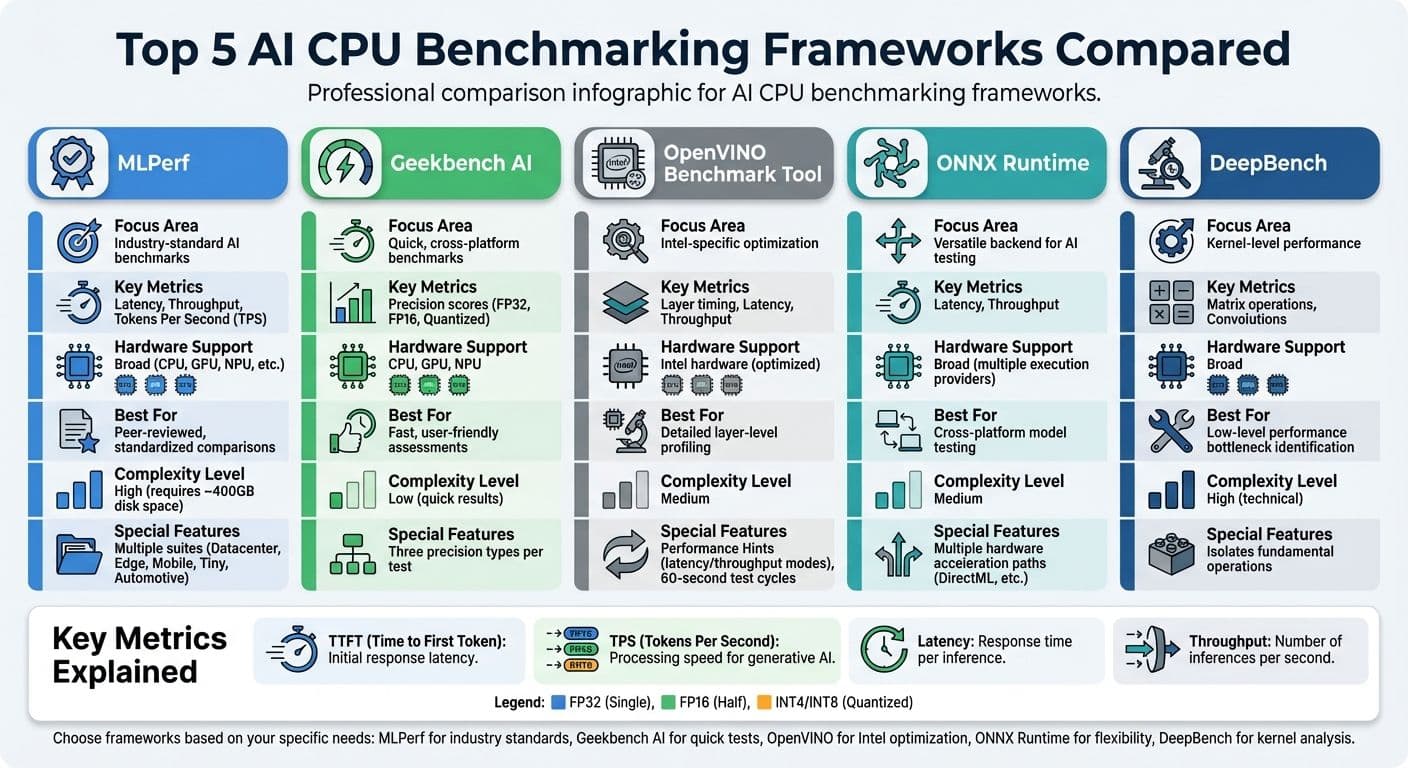
AI CPU Benchmarking Frameworks Comparison: Features, Metrics, and Hardware Support
How to Evaluate AI CPU Benchmarking Frameworks
When selecting benchmarking frameworks, focus on those that provide clear, practical metrics. The best options strike a balance between thorough testing and ease of use. Below, we’ll explore the key factors to consider.
AI Workloads and Model Support
A good benchmarking framework should cover the specific AI workloads you plan to run. For instance, MLPerf offers tailored suites for various environments, including Datacenter, Edge, Mobile, Tiny (for ultra-low-power applications), and Automotive, making it a reliable choice for industry-standard comparisons. Meanwhile, Geekbench AI works across multiple operating systems, adding versatility.
For large language models (LLMs), frameworks like NVIDIA NeMo Evaluator and OpenBench are designed to handle tasks such as coding, math reasoning, and safety testing. NeMo Evaluator includes over 100 benchmarks from 18 open-source evaluation tools, while OpenBench supports more than 95 benchmarks across over 30 model providers. If you need to test a wide range of models, MLAgility simplifies the process with turnkey benchmarking for over 1,000 prebuilt PyTorch models on hardware like Intel Xeon CPUs. The range of supported models directly affects how benchmarks reflect an AI CPU's performance.
Metrics and Testing Methods
The metrics tracked by a framework determine how meaningful its results are. For example, inference latency is measured in two ways: Time to First Token (TTFT) and total response latency. Throughput, on the other hand, measures processing speed - either as Tokens Per Second (TPS) for generative AI or as the number of inputs processed per second for standard models.
Accuracy is another critical factor. It ensures that performance improvements don’t compromise output quality. For instance, MLPerf Client v1.5 sets specific accuracy thresholds for Massive Multitask Language Understanding (MMLU): Llama 3.1 8B Instruct must hit a score of 52, while Phi 4 Reasoning 14B requires 70. Energy efficiency is equally important, especially for mobile devices and data centers. Metrics like energy per inference, average power usage, and tokens processed per megawatt help evaluate performance in these contexts.
Testing should also cover different precision levels - such as Single Precision (FP32), Half Precision (FP16), and Quantized formats (INT4, INT8) - to understand trade-offs in performance. Running at least one warm-up cycle followed by multiple performance tests helps ensure stable averages. Additionally, testing across different prompt sizes (e.g., 1K to 8K tokens) is crucial, as larger contexts demand more CPU resources.
"As we build systems at unprecedented scale, it's critical for the ML community to have open, transparent benchmarks that reflect how inference really performs across hardware and software. InferenceMAX™'s head-to-head benchmarks cut through the noise and provide a living picture of token throughput, performance per dollar, and tokens per Megawatt."
- Peter Hoeschele, VP of Infrastructure and Industrial Compute, OpenAI
Usability and Real-World Application
The ease of using a framework significantly impacts its adoption. For example, NeMo Evaluator simplifies setup by using Docker containerization to bundle dependencies for reproducibility. Similarly, CLI tools like OpenBench's bench eval and NeMo's nemo-evaluator-launcher make it easy to list, describe, and run benchmarks.
Frameworks like MLAgility lower the entry barrier further by enabling model benchmarking without requiring code changes through its "benchit" command. For interpreting results, look for features like interactive UIs for logs, live dashboards for real-time tracking, and detailed performance reports. Frameworks that support multiple model providers through a single interface can simplify cross-platform comparisons.
To ensure accurate results, make sure background processes don’t interfere with benchmarks. Tools like TorchBench help by automating machine configurations, controlling processor states, and minimizing performance noise caused by interrupts or frequency scaling. When using MLPerf, only trust results labeled as "configuration tested by MLCommons", as they’ve undergone peer review and accuracy validation.
Top Frameworks for AI CPU Benchmarks
Here’s a breakdown of the most commonly used frameworks for AI CPU benchmarking. Each one offers distinct advantages depending on whether you’re after industry-standard comparisons, quick and practical tests, or deeper insights into optimization.
MLPerf

MLPerf is widely regarded as the industry benchmark for AI performance testing. Developed by MLCommons, it emphasizes fairness, reproducibility, and peer-reviewed results across various hardware setups. The MLPerf Client suite is tailored for personal computers - like laptops, desktops, and workstations - making it a great choice for testing generative AI workloads, such as Large Language Models (LLMs), on consumer hardware.
This framework tracks metrics like Time to First Token (TTFT) and Tokens Per Second (TPS) for LLMs, alongside traditional measurements like latency and throughput. It uses 4-bit integer (int4) quantization to ensure models can fit within typical PC memory limits. However, running the full suite requires about 400GB of free disk space.
Due to its complexity, only results validated by MLCommons are officially recognized. Submitting results typically requires MLCommons membership, but open-source reference implementations are available for general use. If you’re looking for a faster, less complex option, the next framework might be more suitable.
AI Benchmark
Geekbench AI offers a faster and more user-friendly alternative for benchmarking. It provides three types of scores for each test: Single Precision, Half Precision, and Quantized. Its cross-platform compatibility makes it ideal for quick comparisons across different systems.
The tool evaluates performance on CPUs, GPUs, and Neural Processing Units (NPUs), aligning with modern hardware needs. While a free version is available for personal use, Pro and Corporate licenses unlock features like automated testing, offline mode, and support for commercial applications. This framework prioritizes speed over detailed diagnostics, making it a practical choice for quick assessments.
OpenVINO Benchmark Tools
Intel’s OpenVINO Benchmark Tool (benchmark_app) is designed for detailed profiling on Intel-based hardware. It supports various model formats, including OpenVINO IR, ONNX, TensorFlow, TensorFlow Lite, PaddlePaddle, and PyTorch. A standout feature is its Performance Hints, which automatically optimize runtime settings for your hardware.
For real-time applications like robotics or interactive UIs, the -hint latency setting is ideal. For batch processing tasks requiring high throughput, the -hint throughput option maximizes parallel inference. The tool runs CPU inference for 60 seconds using randomized data to calculate stable averages.
Additionally, it provides detailed layer-by-layer performance metrics (e.g., jit_avx512_I8 for 8-bit precision) and wall-clock timing for each layer. While highly detailed, its focus on Intel hardware limits its utility for cross-vendor benchmarking.
ONNX Runtime Performance Testing
ONNX Runtime is a versatile backend that works well for various benchmarking scenarios, including those within MLPerf Client suites. It supports multiple hardware acceleration paths, such as DirectML for Windows-based AI testing. This flexibility makes it a valuable tool for testing models across different configurations without switching frameworks.
The runtime measures standard metrics like latency and throughput and supports multiple execution providers for different hardware targets. Its strength lies in its adaptability - you can benchmark the same model across CPUs, GPUs, and other accelerators using a consistent interface. While it lacks specialized features, it serves as an excellent reference point when comparing results from other tools.
DeepBench and Microbenchmark Suites
DeepBench and similar microbenchmark tools focus on kernel-level operations, such as matrix multiplications, convolutions, and activations. These tests reveal raw computational performance by isolating fundamental operations.
While not suitable for end-to-end testing, DeepBench is invaluable for identifying performance bottlenecks at the kernel level. It’s particularly useful for hardware vendors and researchers working on new CPU architectures. For most developers, however, higher-level frameworks are more practical for everyday benchmarking tasks.
sbb-itb-903b5f2
How to Use Benchmarking Frameworks in Practice
Using Multiple Frameworks Together
When it comes to performance analysis, combining multiple benchmarking frameworks can provide a more complete picture. No single framework can address every aspect of performance. For instance, MLPerf offers industry-standard, peer-reviewed comparisons of complete hardware and software stacks, while Geekbench AI provides quick, multidimensional snapshots of CPU, GPU, and NPU performance. Using both together allows for thorough evaluations alongside quick assessments.
The OpenVINO Benchmark complements general frameworks by showcasing how Intel-specific optimizations impact latency and throughput. Similarly, pairing MLPerf Inference, which evaluates "Single Stream" and "Server" scenarios, with MLPerf Client, designed for local PC workloads like code analysis, delivers a comprehensive view of performance from data centers to individual devices. This scenario-based testing ensures the results align with the specific needs of your deployment.
For tasks like quantization, comparing results across multiple frameworks can highlight the impact of converting FP32 models to INT4. For example, MLPerf Client demonstrates how INT4 quantization allows large language models (LLMs) like Llama 3.1 8B Instruct to fit within typical PC memory while meeting accuracy benchmarks, such as achieving an MMLU score of 52. Testing the same quantized model across frameworks ensures that performance improvements don’t come at the cost of quality.
Benchmarking Best Practices
To get accurate and meaningful results, it’s crucial to maintain strict control over your test environment. On systems with both integrated and discrete GPUs, use configuration flags (such as the -i switch in MLPerf) to specify the processor being tested. Standardized datasets, like OpenOrca for LLMs or ImageNet for vision tasks, are essential for making results comparable across different frameworks.
Pay close attention to memory constraints. Running a model that exceeds available RAM can cause performance to plummet to just 1–2 tokens per second. Always ensure that your test models fit within the hardware’s memory limits before drawing conclusions about performance.
By following these practices, you can better interpret benchmark results and apply them effectively to optimize AI systems.
Applying Benchmark Results to Local AI Systems
A targeted approach to benchmarking ensures that CPU performance metrics translate into real-world improvements for AI applications. For example, platforms focused on privacy, like NanoGPT, rely on benchmarks to optimize models for on-device operation. Metrics such as Time to First Token (TTFT) and Tokens Per Second (TPS) are particularly important for delivering responsive AI experiences without relying on cloud infrastructure.
Understanding the trade-offs between latency and throughput is key when selecting hardware. For interactive applications requiring real-time responses, benchmarks like OpenVINO can guide developers to prioritize latency (using -hint latency). On the other hand, for batch processing tasks, focusing on throughput (-hint throughput) is more appropriate. Since TTFT often represents the longest wait time in interactions with LLMs, optimizing this metric can significantly enhance the user experience for locally run models.
Benchmarks also reveal concurrency zones, which help identify system limits. For instance, in the overloaded zone, latency spikes while throughput plateaus, signaling that the hardware is at capacity. This insight allows platforms like NanoGPT to allocate resources effectively, ensuring multiple simultaneous model requests don’t degrade overall performance for users.
Conclusion
Benchmarking frameworks play a crucial role in providing fair and standardized evaluations of CPUs for AI workloads. They offer consistent measurements that allow comparisons across hardware platforms, helping assess performance on real-world tasks - like large language model interactions or image classification. This helps determine if your current hardware meets today’s AI needs and prepares for future demands.
These benchmarks go beyond basic throughput, uncovering performance details across various precision levels. Tools like Geekbench AI and MLPerf evaluate single precision, half precision, and quantized formats. This ensures that even when models are quantized to fit memory constraints, they still meet quality benchmarks such as MMLU accuracy.
Metrics like Time to First Token (TTFT) and Tokens Per Second (TPS) further refine hardware decisions, offering guidance for responsive, on-device AI systems like NanoGPT. Additionally, software optimizations in inference engines and scheduling bridge the gap between theoretical and practical results - improvements that ongoing benchmarking can monitor.
Greg Brockman highlighted the importance of evaluation, saying, "Without evals, it can be very difficult and time intensive to understand how different model versions might affect your use case". This insight applies equally to hardware assessments. By combining multiple benchmarking frameworks and following best practices - such as controlled testing environments and rigorous accuracy checks - you can fine-tune AI systems for specific tasks. This approach ensures that infrastructure investments translate into tangible performance gains. With these tools, developers can maximize CPU efficiency for both training and inference, delivering measurable improvements in AI applications.
FAQs
How do MLPerf and Geekbench AI differ when benchmarking AI on CPUs?
MLPerf and Geekbench AI are both tools used to benchmark AI performance on CPUs, but they cater to different needs and audiences.
MLPerf is a community-developed suite that focuses on delivering detailed and standardized comparisons. It evaluates aspects like speed, latency, throughput, and model quality across diverse scenarios, including both training and inference tasks. With strict guidelines and a public leaderboard, MLPerf is tailored for researchers and hardware manufacturers who need precise and reproducible results.
Geekbench AI, in contrast, is designed with consumers in mind. It offers quick, easy-to-digest scores by evaluating ten AI workloads, such as vision and natural language processing, across multiple precision levels. Supporting platforms like Windows, macOS, and mobile devices, Geekbench AI provides a simple way to gauge AI performance without diving into the complex metrics that MLPerf emphasizes.
What should I consider when choosing an AI CPU benchmarking framework for my workloads?
To pick the best AI CPU benchmarking framework, start by focusing on your workload's unique requirements. Think about the types of models you work with - whether it's vision, speech, or large language models - and the precision levels you need, such as single-precision, half-precision, or quantized formats. Tools like Geekbench AI stand out by evaluating multiple real-world tasks across different precision levels, giving you a well-rounded look at your CPU's capabilities.
Compatibility with your current software stack is another key factor. For instance, Geekbench AI supports widely-used runtimes like OpenVINO and ONNX Runtime, making it a flexible choice. If you're looking for more customization, open-source options like Benchflow let you design Docker-based benchmarks tailored to your needs. Don’t forget to weigh licensing and costs - some frameworks are free, while others might require a paid license for advanced features.
Lastly, think about the framework's ecosystem and how often it gets updates. An active community, regular updates, and features for sharing results can make benchmarking easier and more meaningful. By matching the framework to your workload, software setup, and budget, you'll get precise and actionable insights to guide your decisions.
Why is it important to test AI performance with different precision levels like FP32 and INT8?
Testing AI models at various precision levels, like FP32 (32-bit floating point) and INT8 (8-bit integer), offers valuable insights into how quantization affects performance. Using reduced-precision formats such as INT8 can boost processing speed and energy efficiency, though it might come with a slight trade-off in accuracy.
By examining these precision levels side by side, you can better assess how to balance speed, power usage, and accuracy to achieve optimal performance in practical AI applications.