Using Roo Code with NanoGPT
Want to use Roo Code with NanoGPT? Here's all you need to know.
Setup Instructions
- Get your API key from nano-gpt.com/api
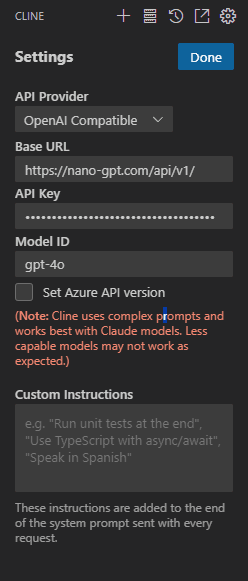
- In Roo Code settings, add a new Custom Model with these details:
- API Provider: OpenAI Compatible
- Base URL: https://nano-gpt.com/api/v1/
- API Key: Your key from step 1
- Model ID: gpt-4o
That's it! You can now use Roo Code with every model you can think of. Model names are on our pricing page - important ones are o1, claude-3-5-sonnet-20241022, yi-lightning, deepseek/deepseek-chat, or just any other model you fancy.
Want to explore available models? Visit our pricing page.