
Hybrid storage scaling: key AI tradeoffs
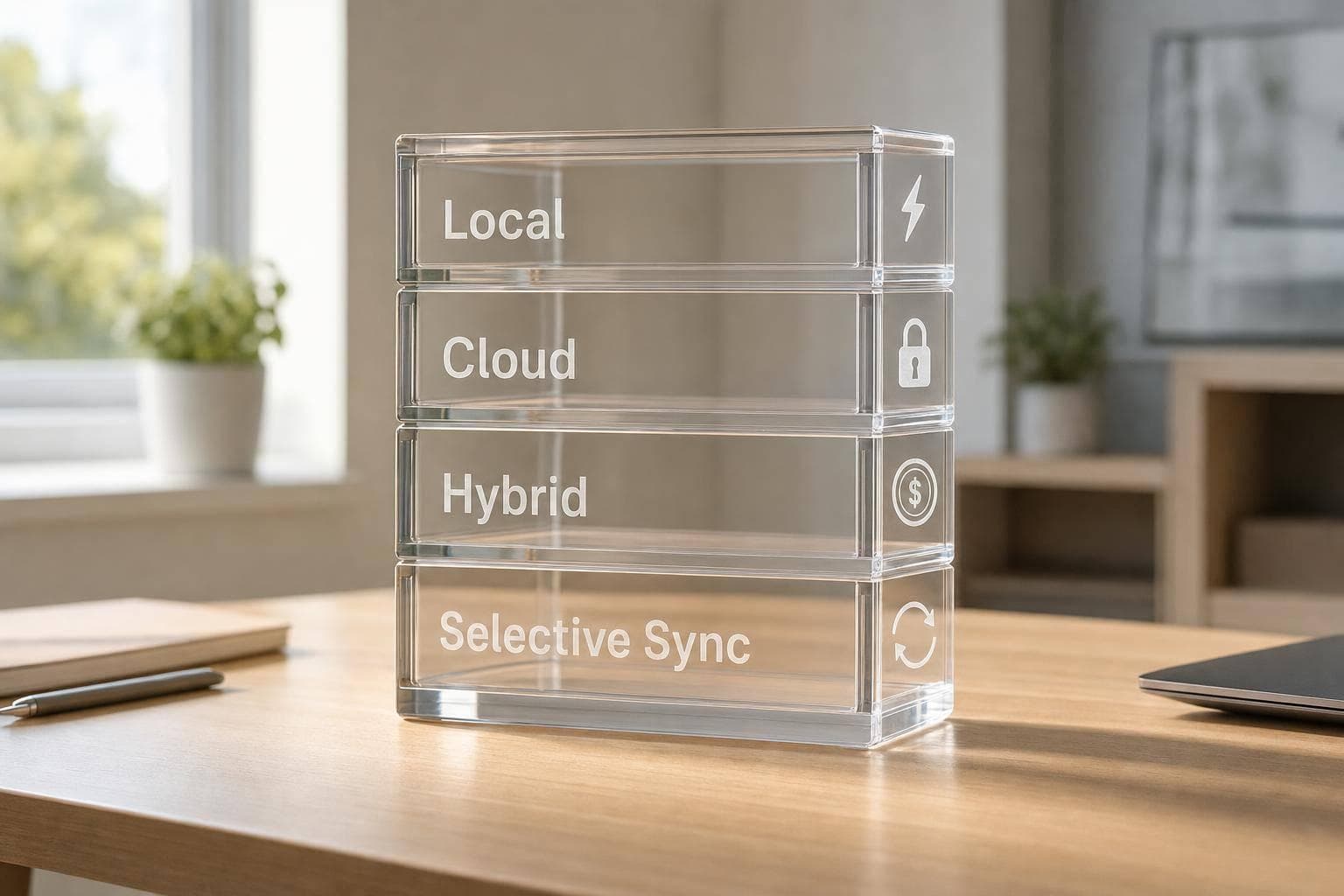
If I had to boil this down to one line, it’s this: your storage setup decides how fast your AI history loads, how much control you keep, and how much you pay as that history grows.
If you use AI a lot, prompt logs and image files stack up fast. A 512 GB laptop can feel roomy at first, then fill up much sooner than expected. At the same time, cloud storage can solve space limits, but monthly costs like $0.02 to $0.03 per GB for hot storage add up over time. That’s why the main choice is simple: local speed and control vs. cloud scale and sync.
Here’s the short version:
- Local-first: best if you want the fastest access, offline use, and data that stays on your device
- Cloud-first: best if you switch devices often or work with other people
- Hybrid hot-cold: best if you want recent files fast but older files cheaper to keep
- Selective sync: best if you want to choose exactly what stays local and what goes online
The tradeoffs come down to four things:
- Speed: local storage can be under 1 ms, while cloud reads are often 20 to 300 ms
- Privacy: local storage gives you more direct control; cloud storage depends on provider rules
- Cost: local storage is mostly a one-time hardware cost, while cloud storage keeps billing monthly
- Sync: always-on sync is convenient, but it uses more bandwidth, battery, and storage
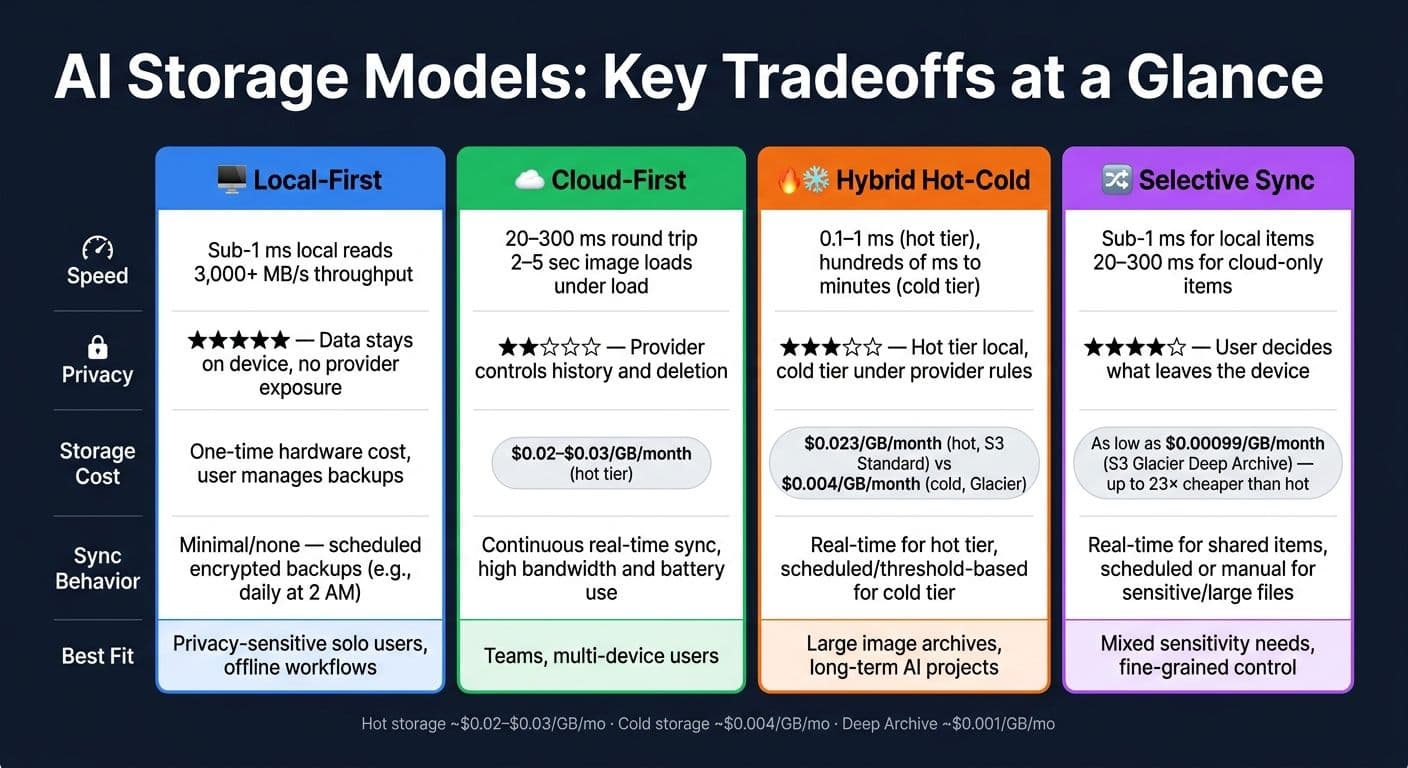
AI Storage Models Compared: Speed, Privacy, Cost & Sync
AI Stack: AI Meets Storage Comparing On Prem, Cloud and Hybrid Architectures Across the AI Lifecycle
sbb-itb-903b5f2
Quick Comparison
| Model | Best for | Main upside | Main downside |
|---|---|---|---|
| Local-first | Solo users, private work | Fastest access and strongest control | Limited by device space |
| Cloud-first | Teams, multi-device use | Easy access across devices | More latency and monthly cost |
| Hybrid hot-cold | Large histories, image archives | Fast recent access with lower archive cost | More setup complexity |
| Selective sync | Mixed privacy needs | Fine control over what syncs | History can be split across devices |
My take: if your AI history is small and private, local-first is usually the cleanest pick. If your history is large, hybrid models make more sense. And if you need every device to stay in step, cloud-first is the trade.
Below, I’d frame the choice the same way the article does: not as a storage feature, but as a scaling decision.
1. Local-first storage
In a local-first system, your device is the main place where data lives. Prompts, responses, and generated images are saved to and loaded from local storage first. Any server in the background plays a secondary role. That’s the key difference: a cache mirrors data, but local-first owns it.
Speed
This setup is fast in a way you can feel. A local NVMe SSD can deliver latency under 1 ms and throughput above 3,000 MB/s. Cloud object storage, even on a fast connection, usually lands around 20–50 ms.
For AI work, that gap shows up right away. Scrolling through thousands of old prompts feels snappy. Loading image grids doesn’t drag. Bulk exports move at disk speed instead of waiting on the network.
Privacy
Local-first avoids provider-side copies by default. That cuts down exposure, but it doesn’t mean your data is safe by magic. Device security still matters.
Local storage still needs encryption and access controls. OS-level tools like BitLocker on Windows or FileVault on macOS are a practical place to start. If someone gets physical access to the device, they may be able to reach the data. At scale, local-first also helps avoid problems like mixing data between users or using your content for training without permission.
Storage cost
Local storage is mostly a one-time hardware expense, not a recurring per-GB cloud bill. That can be a big shift in how costs add up over time.
The catch is simple: backup and recovery become the user’s job. Backups add their own cost, but they can still be cheaper than paying recurring per-GB cloud fees month after month.
Sync frequency
By default, local-first systems sync rarely or not at all. A common setup is encrypted backups on a fixed schedule - for example, every 24 hours at 2:00 AM. That gives you redundancy without giving up local control.
When local capacity becomes the limit, cloud-first changes the tradeoff. You lean less on hardware space and more on network latency and recurring cost.
2. Cloud-first storage
In a cloud-first system, the server holds the authoritative copy of everything: prompts, chat logs, and generated images. Your devices don’t own the main version. They pull it from the network when needed.
Speed
Prompt-history retrieval usually takes tens to hundreds of milliseconds, depending on your connection and how close you are to the data center. When the network is good, that can feel almost instant.
But this setup starts to drag on slow connections. It can also struggle with large, high-resolution batches, where more data has to move back and forth.
Privacy
When all data lives on provider infrastructure, privacy comes down to the provider’s retention, logging, and deletion policies. That’s the tradeoff: convenience in exchange for control.
A few safeguards matter most here:
- Encryption at rest and in transit
- Clear opt-outs from training data usage
- Easy bulk-deletion tools
Don’t assume cloud-stored means private. It doesn’t, at least not by default.
Storage cost
Cloud-first swaps a one-time device cost for recurring monthly storage fees. For AI image archives that keep growing month after month, those fees add up.
Providers usually handle this with lifecycle policies that move older data into cheaper cold storage tiers. That helps on price, but there’s a catch: pulling data back from cold storage can add latency and extra fees.
Sync frequency
Sync runs continuously while you’re online. Every interaction writes to the server, and any other device you open can reflect that state almost right away.
The downside is offline access. Most cloud-first clients cache only recent sessions on the device, while deeper history needs a live connection. Simultaneous edits can also create conflicts. If retention matters more than instant access, hybrid hot-cold storage often becomes the middle ground.
3. Hybrid hot-cold storage
Hybrid hot-cold storage sits in the middle of two extremes: always-local speed and always-cloud capacity.
The idea is simple. Keep active AI data in a fast hot tier, and move older data into a lower-cost cold tier. Recent prompts, active chats, and current image projects stay in the hot tier - usually NVMe SSD or in-memory storage - where retrieval latency is about 0.1 to 1 ms. Older sessions, archived generations, and inactive projects go to the cold tier, which costs less but takes longer to access.
Speed
For day-to-day work, hot-cold storage feels fast because the data you’re using right now stays close at hand.
The tradeoff shows up when you need older files. Cold-tier retrieval can take hundreds of milliseconds to minutes, depending on how deep the archive is. A smart setup keeps thumbnails and metadata in the hot tier, then stores full-resolution images in the cold tier. That way, browsing stays snappy, and the original file loads only when needed.
Privacy
Privacy comes down to where each tier lives.
If the hot tier is local, current prompts stay on-device. If the cold tier is in the cloud, older content falls under the provider’s retention and deletion rules. That can change how much control you have over archived data. Encrypting both tiers helps, and so does being picky about what gets pushed to cold storage in the first place.
Storage cost
Tiering can cut storage spend in a pretty direct way.
For example, S3 Standard costs about $0.023 per GB per month, while Glacier Instant Retrieval drops to about $0.004 per GB per month. One common approach is to keep the last 30 days in the hot tier and archive anything older. That keeps access fast for current work and makes monthly costs easier to plan for.
Sync frequency
The hot tier should sync right away so active sessions stay current.
The cold tier works better with scheduled promotion. Daily jobs or inactivity thresholds can move older data without piling on extra overhead. Sync the cold tier too often, and you lose much of the cost advantage. Sync the hot tier too rarely, and you risk stale context or lost data. Delayed sync is a good fit for full-resolution images and older attachments.
When users need finer per-project control, selective sync hybrid storage goes one step further.
4. Selective sync hybrid storage
Selective sync builds on hot-cold storage by giving users more control over what stays on their machine and what goes to the cloud. Instead of treating all files the same, users can decide what syncs based on project, file type, sensitivity, age, or size. That means a confidential prompt thread can stay on-device, while a finalized image set syncs to the cloud for access across devices and team work.
Speed
Speed stays high because the files people use most often remain local. Recent prompts, active assets, and current context sit on a local SSD or NVMe drive, so they open fast. Older items can wait in the cloud until someone needs them.
For large image libraries, a smart setup is to keep thumbnails and metadata on the device and pull full-resolution originals only when opened. You still get a smooth browsing experience without filling local storage with huge files.
Privacy
This is where selective sync stands out. Local-only rules can keep sensitive threads off provider systems entirely. NanoGPT already stores data locally by default, and selective sync still leaves room for encrypted cloud backup or sharing when a project isn’t sensitive.
Storage cost
Selective sync can cut cloud costs because you only sync finalized or shared work. Older archives can move to cheaper cold tiers instead of sitting in hot storage and running up the bill every month.
The price gap can be huge. Infrequently accessed archives can drop to as low as $0.00099 per GB per month with S3 Glacier Deep Archive, compared with about $0.023 per GB per month for S3 Standard. That works out to a roughly 23× difference.
Sync frequency
Different kinds of work need different sync timing:
- Use real-time sync for shared work
- Use scheduled sync for large batches or older logs
- Use manual sync for highly sensitive projects
It also helps to show clear labels for local-only, synced, and pending items, so users can see at a glance where their data lives.
That level of user control makes the tradeoffs in the next comparison easier to measure.
Speed, privacy, cost, and sync: a direct comparison
The comparison below zeroes in on the tradeoffs that matter most at scale.
Speed
Local-first is the fastest option for reads. Local SSD access is almost instant, while cloud round trips usually land in the 20–60 ms range on home broadband and 100–300 ms on congested mobile networks. For time to first response, hybrid hot-cold storage can get close to local-first for recent prompts because active context stays cached on-device. Large image folders also open almost instantly on local or hot-tier storage. With cloud-first, loading can stretch to 2–5 seconds when the system is under load.
| Criterion | Local-first | Cloud-first | Hybrid hot-cold | Selective sync |
|---|---|---|---|---|
| Local read latency | Sub-millisecond to millisecond-scale | Must load from the cloud | Sub-millisecond for hot data | Sub-millisecond for local items |
| Remote fetch latency | None | 20–300 ms | 20–300 ms for cold data | 20–300 ms for non-synced items |
| Time to first response | Fastest | Slowest on poor networks | Near-local for recent data | Near-local for selected data |
| Image loading (large sets) | Very fast from local disk | Slowest when bandwidth is constrained | Fast for hot items, slower for cold items | Fast for synced items, slower for cloud-only items |
That speed edge matters even more when the same data also needs to stay private.
Privacy
Local-first keeps exposure low because conversations, embeddings, and image histories stay on-device by default. Cloud-first puts history in one place, which helps cross-device continuity, but it also increases exposure and gives users less direct control over deletion. Hybrid hot-cold sits in the middle: recent data stays local, while older archives fall under provider retention rules. Selective sync gives the most control out of the sync-enabled setups because only the items a user picks ever leave the device.
| Privacy criterion | Local-first | Cloud-first | Hybrid hot-cold | Selective sync |
|---|---|---|---|---|
| Data stays local | High (primary storage) | Low (temporary cache) | High for hot data | User-defined |
| Provider-controlled history | None | Yes | Partial (cold tier) | Only for synced items |
| Exposure risk | Single device | Provider + all devices | Device plus cold storage | Limited to synced devices |
| Deletion control | Strong on-device | Provider-dependent | Requires deletion in both tiers | Granular per item |
The next tradeoff is simple: does that privacy come from local device capacity, or from keeping data in cloud retention systems?
Storage cost
Local-first moves cost away from recurring cloud fees and onto device storage pressure. Cloud storage usually costs $0.02–$0.03 per GB per month for hot tiers and $0.004–$0.01 per GB per month for cold tiers. Hybrid hot-cold uses that price gap by keeping active projects in faster storage and moving older archives to cheaper tiers. Selective sync cuts duplication overhead even more by uploading only marked items instead of every draft or experiment.
Hot tiers cost more. Cold tiers cost less, but retrieval takes longer.
Another part of the bill comes from movement. If data shifts between hot and cold tiers often, costs can climb even if the base storage rate looks low at first glance.
Sync behavior
Continuous sync keeps devices aligned in near real time, but that comes with more network use and more battery drain, especially on cellular connections. Scheduled sync batches updates, which trims bandwidth and battery use, but accepts a gap where devices are temporarily out of sync. Selective sync reduces bandwidth even further by limiting what syncs at all.
| Sync type | Bandwidth use | Battery impact | State alignment | Conflict handling |
|---|---|---|---|---|
| Continuous | High | High | Strong (near real time) | Server-side merge required |
| Scheduled | Moderate | Low to moderate | Eventual | Batch resolution |
| Selective | Low | Low | Mixed by item | Minimal for local-only items |
| Manual/none | Minimal | Minimal | Device-bound | None |
These differences set up the best-fit guidance that follows.
Pros, cons, and best-fit guidance for each storage model
As prompt and image histories get bigger, the right storage model comes down to a simple tradeoff: speed, privacy, cost, and access.
| Storage model | Key pros | Key cons | Best fit |
|---|---|---|---|
| Local-first | Fastest reads; strongest privacy; no recurring cloud fees; works offline | No built-in multi-device sync; user manages backups; capacity capped by device | Privacy-sensitive solo users; single-device workflows |
| Cloud-first | Seamless multi-device continuity; elastic capacity; managed backups | Lower privacy; latency on large image loads; ongoing per-GB costs | Teams; users who switch devices frequently |
| Hybrid hot-cold | Fast access to recent data; cost-efficient long-term retention; scales to large archives | Added system complexity; cold-tier retrieval can be slow | Long-term AI projects; image-heavy workflows with deep history |
| Selective sync | Fine-grained privacy control; lower bandwidth use; user decides what leaves the device | Split history across devices; more configuration overhead | Users with mixed sensitivity needs across different threads |
Use the table for a quick scan. The notes below show where each model tends to work best in day-to-day use.
Start simple. Local-first is usually the best match for privacy-sensitive solo use. Your data stays on the device unless you choose to export it or make a backup. That cuts down third-party exposure and keeps access fast, which matters when you want your history right away.
Once the library gets bigger, the tradeoff shifts. Hybrid hot-cold works well for large histories because it keeps recent data easy to reach while moving older data into cheaper cold storage. Think of it like keeping current files on your desk and older boxes in storage: the stuff you use all the time stays close, and the rest costs less to keep around.
Cloud-first makes sense for teams and for people who bounce between devices. Multi-device continuity is smooth, capacity can grow as needed, and managed backups take local storage work off your plate. The flip side is less privacy, slower loads for large images, and ongoing per-GB charges.
Selective sync is a good pick when some threads are sensitive and others aren't. You decide what leaves the device, which gives you tighter control over privacy and bandwidth use. The catch is that history can end up uneven across devices, so you need to manage it on purpose to avoid gaps in context.
FAQs
Which storage model fits my AI workflow?
The right storage model depends on how you work: how much data you handle, how often you need it, and how private it needs to stay.
Local storage makes the most sense for sensitive data and steady, high-volume use. Your data stays on your device, and once you've paid for the hardware, you avoid recurring cloud fees.
For bursty or less predictable workloads, cloud storage gives you more flexibility. In many cases, a hybrid model is the best fit: keep active or sensitive data local, and use cloud storage for backups, archives, or compute-heavy tasks.
When does hybrid hot-cold storage save money?
Hybrid storage cuts costs when you match data access patterns to the right tier. Keep hot data - like active sessions, prompts, and interaction logs - on local device storage. That lowers recurring cloud retention costs and helps you avoid egress fees on data you need again and again.
Send cold data, such as training archives and finalized artifacts, to cloud tiers. This setup tends to make the most sense for steady, high-volume workloads, where the upfront cost of local hardware for hot data often pays for itself within 12 to 18 months.
How should I protect local AI history?
Use NanoGPT’s privacy-first setup to keep prompts, chat history, and responses stored on your device instead of on outside servers.
For extra protection:
- Turn on Incognito mode for chats you don’t want saved
- Use passkey protection for sensitive conversations
- Leave sync off if you want data to stay only on your main device
For enterprise or API workloads, set retention_days to 0 or use the DELETE endpoint.